

Are you the author? Sign in to claim
model context protocol for Autodesk Revit
RevitMCP is a pyRevit extension plus a Python server that lets AI clients work against a live Revit session.
It supports two ways to use it:
http://127.0.0.1:8000Repository layout note: this repository root is the pyRevit extension root. If you install from source manually, the checkout directory itself should be named RevitMCP.extension.
RevitMCP exposes 46 tools:
| Tool | Description |
|---|---|
get_revit_project_info | Get active project metadata, document path, and Revit version details |
get_active_view_info | Read the current view's name, type, scale, and related metadata |
get_active_view_elements | Capture a bounded snapshot of elements visible in the active view |
export_active_view_image | Export the active Revit view to a local image artifact for model vision inspection |
export_element_snapshot | Export a focused snapshot from explicit IDs or the active selection by activating a target view, temporarily isolating elements, tightening a section box when exporting 3D views, exporting, and restoring the view |
isolate_elements_in_view | Temporarily isolate explicit elements or the active selection in a view and optionally focus the camera for inspection |
clear_temporary_isolate | Clear temporary hide/isolate in the active or target view |
activate_view | Switch the active Revit view by view ID or view name |
duplicate_view | Duplicate a view, optionally with detailing/as dependent, template assignment, and activation |
get_active_selection | Read the current Revit selection as a reusable result set |
get_revit_diagnostics | Return live pyRevit route, document, active view, selection, and write-context diagnostics |
list_family_types | List loaded family types with category, family, type, and symbol IDs |
get_revit_schema_context | Load canonical Revit schema context including levels, categories, families, types, and common parameters |
resolve_revit_targets | Resolve user terms to exact Revit category, level, family, type, and parameter names |
get_revit_memory_context | Load persistent local user/project notes for recurring Revit conventions and workflow hints |
save_revit_memory_note | Save a persistent local user/project note for future chats and tool runs |
analyze_model_statistics | Summarize model composition including category, family/type, view, sheet, level, and room counts |
get_elements_by_category | Retrieve all elements for a category and store the result for follow-on actions |
select_elements_by_id | Select elements by explicit IDs or a stored result handle |
select_stored_elements | Select a previously stored search or filter result inside Revit |
list_stored_elements | List stored element result sets and their counts currently available on the server |
filter_elements | Find elements by category, level, and parameter-based conditions |
filter_stored_elements_by_parameter | Refine a stored result set with batched server-side parameter filtering using one or many target values |
get_element_properties | Read parameter values for specific elements or an existing result handle |
get_element_relationships | Read host, parent, child, dependent, and adaptive point relationships for model elements |
get_element_locations | Read model-space element locations using location points, curve midpoints, bounding-box centers, and host fallbacks |
get_related_element_properties | Read selected parameters from elements and their host/super-component chains |
update_element_parameters | Update one or many element parameters with typed value handling |
sync_element_parameter_values | Copy first populated source parameter values into a target parameter with missing-only or overwrite-all policy and dry-run preview |
override_element_graphics | Apply or reset active-view graphic overrides for explicit IDs or stored result sets |
delete_elements | Delete elements with dry-run, confirmation, max-count, unpin, and batch/individual safeguards |
place_view_on_sheet | Create a new sheet, auto-number it, and place a matched view on it |
list_views | List views that can be placed on sheets, including type and placement status |
analyze_view_naming_patterns | Cluster view names by type and flag likely naming outliers |
suggest_view_name_corrections | Generate rename suggestions from a prior view naming analysis |
list_schedules | List Revit schedules with IDs, categories, field counts, filters, sorting, and sheet placement status |
get_schedule_info | Read a schedule definition including fields, hidden state, filters, sorting/grouping, and settings |
list_schedule_available_fields | List fields/parameters that can be added to a schedule, including stable available field indexes |
get_schedule_rows | Read visible schedule table rows and column metadata |
compare_schedules | Compare schedule rows across overall/release schedules by key fields and quantity fields |
duplicate_schedule | Duplicate a schedule and optionally rename it |
delete_schedule | Delete a schedule with dry-run and confirmation safeguards |
create_schedule | Create a schedule or material takeoff with fields, calculated percentage fields, filters, sorting, and settings |
update_schedule | Update schedule fields, calculated percentage fields, filters, sorting/grouping, settings, or name |
audit_schedule_capabilities | Run a rollback-only probe for schedule creation, fields, filters, sorting, settings, and row reads |
plan_and_execute_workflow | Execute a multi-step Revit workflow from a structured tool plan |
Schedule calculated field support currently maps to the public Revit 2024 API. Percentage fields can be added and wired to schedule fields through calculated_fields / add_calculated_fields. Revit exposes ScheduleFieldType.Formula, but does not expose a public formula-string setter in this API version, so formula text is rejected with an explicit unsupported error instead of silently creating a broken field.
python if you want to run the external server directly or through a local MCP client. Python 3.13 or older is recommended because some current AI-provider dependencies warn under Python 3.14+.RevitMCP has two server surfaces:
web: browser UI at http://127.0.0.1:8000mcp: stdio server for local MCP clients such as Claude Desktop, Claude Code, and CodexOne server.py process runs one surface at a time.
To switch manually:
python lib\RevitMCP_ExternalServer\server.py --surface web
python lib\RevitMCP_ExternalServer\server.py --surface mcp
If you use the pyRevit launcher, it reads the preferred surface from:
%USERPROFILE%\Documents\RevitMCP\user_data\revitmcp_settings.json
{
  "preferences": {
    "server_surface": "web"
  }
}
If you want both the Web UI and an MCP client at the same time, they need to run as separate processes.
%APPDATA%\pyRevit\Extensions%PROGRAMDATA%\pyRevit\ExtensionsRevitMCP.extension under that root:git clone https://github.com/oakplank/RevitMCP.git "%APPDATA%\pyRevit\Extensions\RevitMCP.extension"
RevitMCP.extension under the same extension root.The folder name matters: pyRevit discovers extensions by folders that end with .extension.
Keep track of the exact RevitMCP.extension folder you install here. Local MCP clients must point to the server.py file inside this same folder. Do not point your client at the pyRevit install folder unless that is actually where this extension is installed.
pyRevit -> Settings.The default Revit Routes port is usually 48884.
RevitMCP -> Server -> Launch RevitMCP.http://127.0.0.1:8000.Get Revit project infoBy default, the Web UI listens on 127.0.0.1. That only works on the same computer, so a coworker on another machine cannot connect to http://127.0.0.1:8000.
To allow another computer on the same trusted network:
%USERPROFILE%\Documents\RevitMCP\user_data\revitmcp_settings.json
servers, set:{
"servers": {
"external_server_host": "0.0.0.0",
"external_server_port": 8000
}
}
Keep the rest of the settings file intact.
ipconfig
Use the IPv4 Address for the active Wi-Fi or Ethernet adapter.
http://<REVIT_COMPUTER_IPV4>:8000
If the page still does not load, allow python.exe through Windows Defender Firewall on private networks, or add an inbound TCP rule for port 8000.
Do not expose this server on public networks or the open internet. The Web UI is intended for trusted local use.
Claude Desktop local MCP is local to one machine. Use this on the same computer that has Revit open, pyRevit installed, and the RevitMCP.extension files available. If a coworker on another computer needs access to your live Revit session, use Share the Web UI on Your LAN instead.
https://claude.ai/downloadSettings -> Developer -> Local MCP Servers -> Edit Config.server.py path inside the same RevitMCP.extension folder that pyRevit loads.If you installed under your user extension root:
$server = "$env:APPDATA\pyRevit\Extensions\RevitMCP.extension\lib\RevitMCP_ExternalServer\server.py"
Test-Path $server
$server
If you installed under the machine-wide extension root:
$server = "$env:PROGRAMDATA\pyRevit\Extensions\RevitMCP.extension\lib\RevitMCP_ExternalServer\server.py"
Test-Path $server
$server
Test-Path must return True. Use the printed absolute path in the Claude config. Do not paste %APPDATA% or %PROGRAMDATA% literally into JSON; use the expanded path such as C:\Users\YourName\AppData\Roaming\....
revitmcp to your Claude config.If your Claude config already exists, keep your current preferences and other MCP servers. Only add revitmcp under mcpServers.
If you copy the full example below, update the preferences values to match your own Claude Desktop setup.
{
  "mcpServers": {
    "revitmcp": {
      "command": "python",
      "args": [
        "C:\\Users\\YourName\\AppData\\Roaming\\pyRevit\\Extensions\\RevitMCP.extension\\lib\\RevitMCP_ExternalServer\\server.py",
        "--surface",
        "mcp"
      ]
    }
  },
  "preferences": {
    "chromeExtensionEnabled": true,
    "coworkScheduledTasksEnabled": true,
    "ccdScheduledTasksEnabled": true,
    "sidebarMode": "chat",
    "coworkWebSearchEnabled": true
  }
}
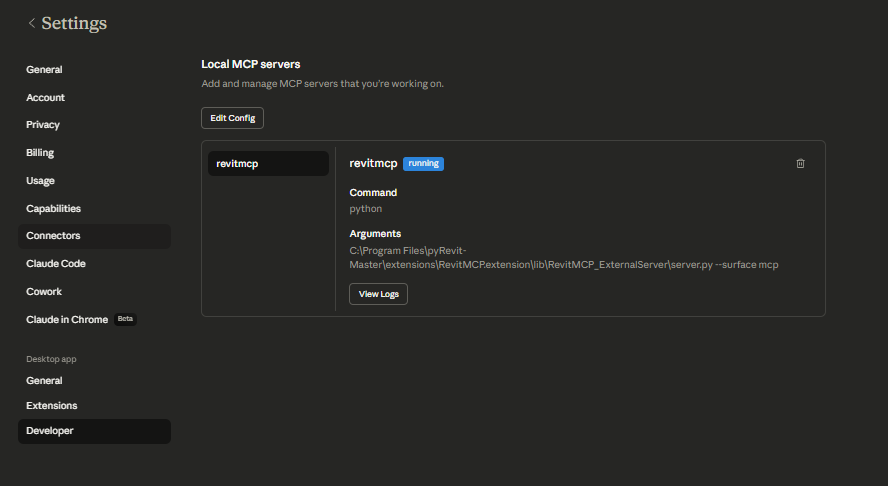
server.py path with the actual path from step 3.python does not work, replace it with the full path to python.exe.Settings -> Developer -> Local MCP Servers and confirm revitmcp shows running.Get Revit project infoExpected Claude Desktop screen after revitmcp is configured:
Codex local MCP is local to one machine. Use this on the same computer that has Revit open, pyRevit installed, and the RevitMCP.extension files available. Existing Codex sessions may not hot-load new MCP servers, so restart Codex after adding the server.
server.py path inside the same RevitMCP.extension folder that pyRevit loads.If you installed under your user extension root:
$server = "$env:APPDATA\pyRevit\Extensions\RevitMCP.extension\lib\RevitMCP_ExternalServer\server.py"
Test-Path $server
$server
If you installed under the machine-wide extension root:
$server = "$env:PROGRAMDATA\pyRevit\Extensions\RevitMCP.extension\lib\RevitMCP_ExternalServer\server.py"
Test-Path $server
$server
Test-Path must return True.
revitmcp to Codex:codex mcp add revitmcp -- python $server --surface mcp
If python does not work, replace it with the full path to python.exe.
The command writes a Codex MCP entry equivalent to:
[mcp_servers.revitmcp]
command = "python"
args = ['C:\Users\YourName\AppData\Roaming\pyRevit\Extensions\RevitMCP.extension\lib\RevitMCP_ExternalServer\server.py', "--surface", "mcp"]
Get Revit project inforevitmcp does not show in Claude Desktopserver.py path is absolute and exists.python is not found, use the full path to python.exe.%APPDATA%\Claude\logs.If the log says can't open file ... RevitMCP.extension\lib\RevitMCP_ExternalServer\server.py, Claude is pointing at a path that does not exist. On the same machine as Claude Desktop, run:
Test-Path "$env:APPDATA\pyRevit\Extensions\RevitMCP.extension\lib\RevitMCP_ExternalServer\server.py"
Test-Path "$env:PROGRAMDATA\pyRevit\Extensions\RevitMCP.extension\lib\RevitMCP_ExternalServer\server.py"
Get-ChildItem "$env:APPDATA\pyRevit\Extensions" -Directory
Get-ChildItem "$env:PROGRAMDATA\pyRevit\Extensions" -Directory
If both Test-Path commands return False, either install/copy the extension to one of those RevitMCP.extension folders or update the Claude config to the real absolute path of server.py in the extension folder pyRevit is actually loading.
revitmcp does not show in Codexcodex mcp list and confirm revitmcp is listed.server.py path is absolute and exists.python is not found, use the full path to python.exe.If the server was added with the wrong path, remove and re-add it:
codex mcp remove revitmcp
codex mcp add revitmcp -- python C:\Users\YourName\AppData\Roaming\pyRevit\Extensions\RevitMCP.extension\lib\RevitMCP_ExternalServer\server.py --surface mcp
revitmcp but tools do not workView Logs for revitmcp in Claude Desktop, or check the Codex MCP startup output.%USERPROFILE%\Documents\RevitMCP\server_logsserver_startup_error.logserver_app.logRunning on http://127.0.0.1:8000, it is only listening locally. Follow Share the Web UI on Your LAN above.http://<Revit computer IPv4>:8000, not http://127.0.0.1:8000.Running on ..., install Python 3.13 or older and configure RevitMCP to use that interpreter.RevitMCP is licensed under the MIT License. See LICENSE.md.
See CONTRIBUTING.md before submitting patches or pull requests.
Run Claude Code as an MCP server so any agent can delegate coding tasks to it
 @microsoft✓ Official
Browser automation using accessibility snapshots instead of screenshots
 @googleapis✓ Official
Google's universal MCP server supporting PostgreSQL, MySQL, MongoDB, Redis, and 10+ databases
 @github✓ Official
Official GitHub integration for repos, issues, PRs, and CI/CD workflows