

Are you the author? Sign in to claim
Open-source CLI and MCP server for Google Sheets enrichment — waterfalls, conditions, HTTP API integrations

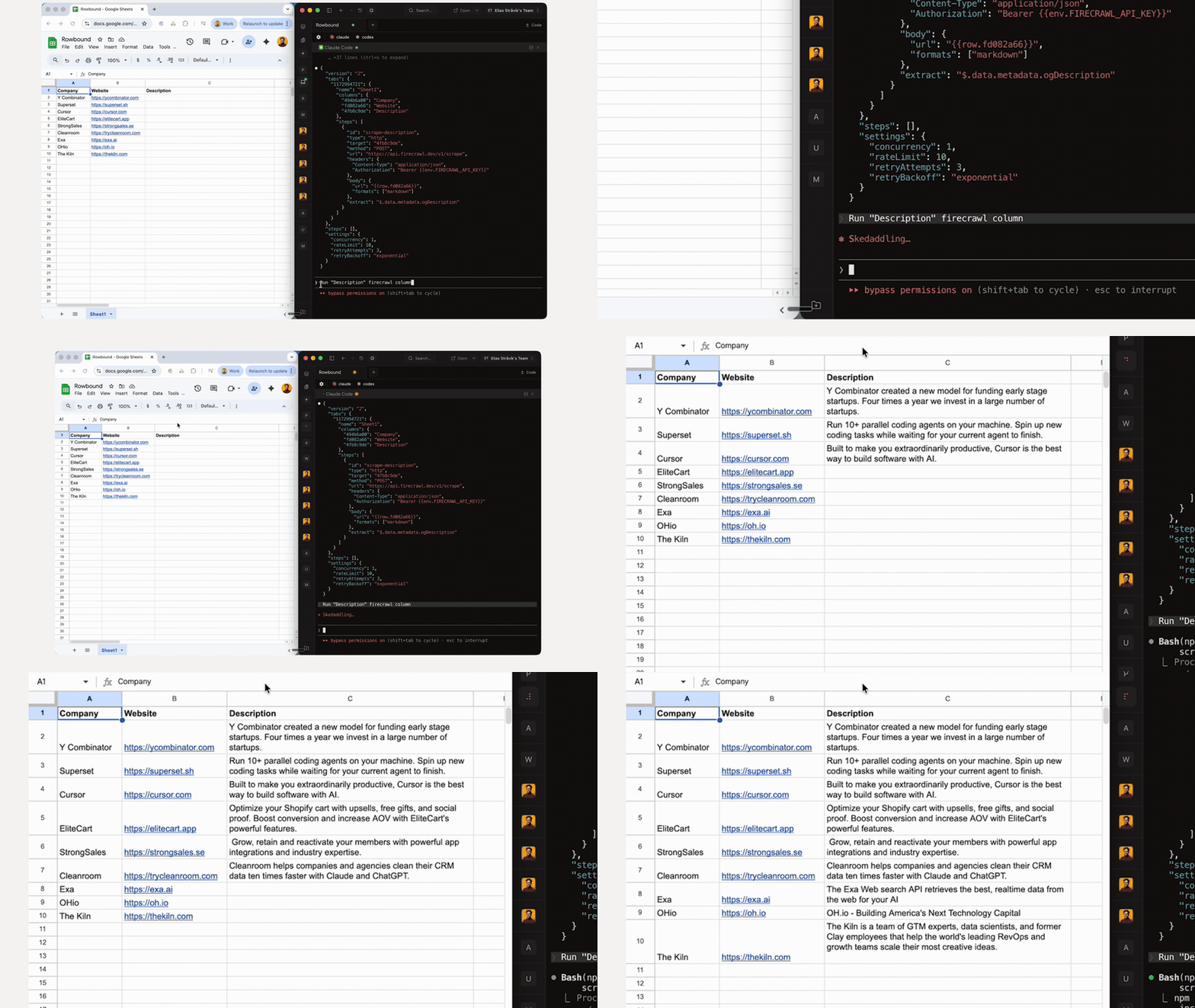
A CLI for GTM Engineering in Google Sheets with Claude Code.


node --version must be >= 22.0.0npm install -g @googleworkspace/cli
gws auth setup # first time: creates Cloud project, enables APIs, logs in
gws auth login # subsequent logins
npm install -g github:eliasstravik/rowbound
git clone https://github.com/eliasstravik/rowbound.git
cd rowbound
npm install
npm run dev -- <command>
# 1. Initialize a sheet
rowbound init <spreadsheet-id>

# 2. Add an action
rowbound config add-action <spreadsheet-id> --json '{
  "id": "enrich_company",
  "type": "http",
  "target": "company_info",
  "method": "GET",
  "url": "https://api.example.com/company?domain={{row.domain}}",
  "headers": { "Authorization": "Bearer {{env.API_KEY}}" },
  "extract": "$.name"
}'

# 3. Store API keys and run
rowbound env set API_KEY=your_key_here
rowbound run <spreadsheet-id>
rowbound run <spreadsheet-id> --dry-run   # preview first
Column names are automatically resolved to stable IDs when you run rowbound sync.
ifEmpty fallback when extract returns nothing{{Column Name}} referencesbare mode for faster startupexpandPathPLAYWRIGHT_HEADLESS=true)when expressions--columns flag — target specific columns by letter (e.g., --columns A-C,E,AP)--rows flag — flexible row specs (e.g., --rows 2-5,8,10-12)onError config maps status codes to actions (skip, write fallback)| Command | Description |
|---|---|
rowbound init <sheetId> | Initialize a sheet with a default pipeline config |
rowbound run <sheetId> | Run the enrichment pipeline (--dry-run, --rows, --columns) |
rowbound status <sheetId> | Show pipeline status and enrichment rates |
rowbound watch <sheetId> | Watch for changes and run continuously (--interval, --port) |
rowbound sync <sheetId> | Reconcile columns, validate config, fix issues |
rowbound config show <sheetId> | Display the pipeline config as JSON |
rowbound config add-action <sheetId> | Add an action to the pipeline |
rowbound config remove-action <sheetId> | Remove an action by ID |
rowbound config update-action <sheetId> | Update an action (merge partial JSON) |
rowbound config list-actions <sheetId> | List configured actions (--json) |
rowbound config add-source <sheetId> | Add a source to the pipeline |
rowbound config remove-source <sheetId> | Remove a source by ID |
rowbound config update-source <sheetId> | Update a source (merge partial JSON) |
rowbound config set <sheetId> | Update pipeline settings (--enabled, --disabled, --concurrency, --rate-limit, etc.) |
rowbound config add-script <sheetId> | Add a script to the pipeline config |
rowbound config remove-script <sheetId> | Remove a script by name |
rowbound config update-script <sheetId> | Update a script (merge partial JSON) |
rowbound config validate <sheetId> | Validate the pipeline config |
rowbound runs [runId] | List recent runs or view a specific run |
rowbound runs clear | Delete all run history |
rowbound source run <sheetId> | Run a source to create rows (--source, --dry-run) |
rowbound source list <sheetId> | List configured sources |
rowbound env set <KEY=value> | Store an API key globally |
rowbound env remove <KEY> | Remove a stored key |
rowbound env list | List stored keys (values masked) |
rowbound mcp | Start the MCP server (stdio) |
Rowbound exposes all pipeline operations as MCP tools. Add this to your Claude Desktop config:
{
  "mcpServers": {
    "rowbound": {
      "command": "rowbound",
      "args": ["mcp"]
    }
  }
}
| Tool | Description |
|---|---|
init_pipeline | Initialize a sheet with a default pipeline config |
run_pipeline | Run the enrichment pipeline |
add_action / remove_action / update_action | Manage pipeline actions |
add_source / remove_source / update_source | Manage data sources |
run_source | Execute a source to create rows |
update_settings | Update pipeline settings (concurrency, rate limit, retry) |
sync_columns | Sync the column registry with the current sheet state |
get_config / validate_config | Read or validate the pipeline config |
get_status | Return pipeline status with enrichment rates |
dry_run | Run in dry mode (no writes) |
start_watch / stop_watch | Manage watch mode |
preview_rows | Read and display rows from the sheet |
list_runs / get_run | View pipeline run history |
Sources create rows from external data. They run before actions in the pipeline — new rows are created first, then actions enrich them on the next run.
Fetch from an API and create rows from the response.
{
  "id": "search_companies",
  "type": "http",
  "method": "POST",
  "url": "https://api.blitz-api.ai/v2/search/company",
  "headers": { "x-api-key": "{{env.BLITZ_API_KEY}}" },
  "body": { "industry": "restaurants", "country_code": ["SE"] },
  "extract": "$",
  "extractPath": "$.results",
  "columns": { "Title": "$.company_name", "Website": "$.website_url", "LinkedIn": "$.linkedin_url" },
  "dedup": "Website",
  "schedule": "daily"
}
Run a shell command and parse JSON output into rows.
{
  "id": "import_leads",
  "type": "exec",
  "command": "curl -s https://api.example.com/leads",
  "extract": "$.data",
  "columns": { "Name": "$.name", "Email": "$.email" },
  "dedup": "Email",
  "updateExisting": true
}
Accept inbound POST payloads and create rows. Used with rowbound watch.
{
  "id": "form_submissions",
  "type": "webhook",
  "columns": { "Name": "$.name", "Email": "$.email", "Company": "$.company" },
  "dedup": "Email"
}
| Field | Description |
|---|---|
columns | Maps sheet column headers to JSONPath per item: { "Name": "$.name" }. Use $.nested.field for nested data, or literal strings for static values. |
extract / extractPath | JSONPath to locate the array in the response. extractPath drills into a nested object first (e.g., $.results extracts from {"results": [...]}). |
dedup | Column header to deduplicate on. Existing rows with the same value are skipped. |
updateExisting | When true and dedup is set, update matched rows instead of skipping (default: false). |
schedule | "manual" (default), "hourly", "daily", or "weekly". Watch mode checks schedules automatically. |
Run a named script (defined in the scripts config section) and parse its output into rows.
{
  "id": "import_from_script",
  "type": "script",
  "script": "fetch_leads",
  "args": ["--format", "json"],
  "extract": "$.leads",
  "columns": { "Name": "$.name", "Email": "$.email" },
  "dedup": "Email"
}
Scripts are reusable code blocks stored in your pipeline config. Define a script once, then reference it from multiple actions or sources by name. Each script has a runtime (the interpreter) and code (the script body).
Scripts are stored under the scripts key in your config (global or per-tab):
{
  "scripts": {
    "claude_json": {
      "runtime": "bash",
      "code": "#!/bin/bash\ncurl -s https://api.anthropic.com/v1/messages \\\n  -H \"x-api-key: $ANTHROPIC_API_KEY\" \\\n  -H \"content-type: application/json\" \\\n  -d \"$1\""
    },
    "parse_csv": {
      "runtime": "python3",
      "code": "import csv, json, sys\nwith open(sys.argv[1]) as f:\n    print(json.dumps(list(csv.DictReader(f))))"
    }
  }
}
Supported runtimes: bash, python3, node.
Use "type": "script" in an action to run a named script per row. The script receives row data via template-expanded arguments and its stdout is captured as the result.
{
  "id": "enrich_with_claude",
  "type": "script",
  "target": "ai_summary",
  "script": "claude_json",
  "args": ["{\"model\":\"claude-sonnet-4-20250514\",\"max_tokens\":256,\"messages\":[{\"role\":\"user\",\"content\":\"Summarize: {{row.company}}\"}]}"],
  "extract": "$.content[0].text",
  "timeout": 60000
}
Use "type": "script" in a source to run a named script and create rows from its output.
{
  "id": "load_leads",
  "type": "script",
  "script": "parse_csv",
  "args": ["/tmp/leads.csv"],
  "columns": { "Name": "$.name", "Email": "$.email" },
  "dedup": "Email"
}
| Command | Description |
|---|---|
rowbound config add-script <sheetId> | Add a script to the config |
rowbound config remove-script <sheetId> | Remove a script by name |
rowbound config update-script <sheetId> | Update a script (merge partial JSON) |
Templates use {{row.column}} for row data and {{env.KEY}} for environment variables. Actions support conditional execution with when expressions and structured error handling with onError.
Call a REST API and extract a value with JSONPath.
{
  "id": "get_company",
  "type": "http",
  "target": "company_name",
  "when": "row.domain !== ''",
  "method": "GET",
  "url": "https://api.clearbit.com/v2/companies/find?domain={{row.domain}}",
  "headers": { "Authorization": "Bearer {{env.CLEARBIT_API_KEY}}" },
  "extract": "$.name",
  "ifEmpty": "❌",
  "onError": { "404": "skip", "429": "skip", "default": { "write": "ERROR" } }
}
Try multiple providers in order. First non-empty result wins.
{
  "id": "find_email",
  "type": "waterfall",
  "target": "email",
  "providers": [
    {
      "name": "hunter",
      "method": "GET",
      "url": "https://api.hunter.io/v2/email-finder?domain={{row.domain}}&first_name={{row.first_name}}&last_name={{row.last_name}}&api_key={{env.HUNTER_API_KEY}}",
      "extract": "$.data.email"
    },
    {
      "name": "apollo",
      "method": "POST",
      "url": "https://api.apollo.io/api/v1/people/match",
      "headers": { "Content-Type": "application/json", "X-Api-Key": "{{env.APOLLO_API_KEY}}" },
      "body": { "email": "{{row.personal_email}}", "domain": "{{row.domain}}" },
      "extract": "$.person.email"
    }
  ]
}
Compute a value with a sandboxed JavaScript expression.
{
  "id": "full_name",
  "type": "formula",
  "target": "full_name",
  "expression": "`${row.first_name} ${row.last_name}`"
}
Run a shell command and capture stdout. Template values are shell-escaped.
{
  "id": "whois_lookup",
  "type": "exec",
  "target": "registrar",
  "command": "whois {{row.domain}} | grep 'Registrar:' | head -1 | cut -d: -f2",
  "timeout": 10000,
  "onError": { "default": "skip" }
}
Pull data from another tab by matching a column value. Source tab data is cached per pipeline run for performance.
{
  "id": "get_company_info",
  "type": "lookup",
  "target": "company_name",
  "sourceTab": "Companies",
  "matchColumn": "Domain",
  "matchValue": "{{row.domain}}",
  "matchOperator": "equals",
  "returnColumn": "Name",
  "matchMode": "first"
}
Use "matchMode": "all" to return all matches as a JSON array. Use "matchOperator": "contains" for substring matching.
Push data to another tab with column mapping. Supports append, upsert, and array expansion.
{
  "id": "export_contacts",
  "type": "write",
  "target": "export_status",
  "destTab": "Contacts",
  "columns": {
    "Company": "{{row.company}}",
    "Name": "{{item.name}}",
    "Title": "{{item.title}}",
    "Email": "{{item.email}}"
  },
  "expand": "{{row.contacts_json}}",
  "expandPath": "$.contacts"
}
upsertMatch column matches, otherwise append{{item.field}} in column templates to access element dataRun a named script and capture its output. Scripts are defined in the scripts config section and referenced by name.
{
  "id": "ai_summary",
  "type": "script",
  "target": "summary",
  "script": "claude_json",
  "args": ["{\"prompt\":\"Summarize {{row.company}}\"}"],
  "extract": "$.content[0].text",
  "timeout": 60000
}
Actions can define onError to map HTTP status codes (or exit codes for exec) to behaviors:
| Action | Effect |
|---|---|
"skip" | Skip this action for the current row |
"stop_provider" | Stop the current waterfall provider, try the next |
{"write": "value"} | Write a fallback value to the target cell |
Rowbound includes an Apps Script sidebar that lets you configure actions directly in Google Sheets — no CLI needed. Click a column, edit the action config in a sidebar UI, and save. The sidebar reads and writes the same Developer Metadata config as the CLI, so both stay in sync.
Code.gs with apps-script/Code.gsSidebar → paste apps-script/Sidebar.htmlSheets → click AddAll action types are configurable through the sidebar: HTTP, Waterfall, Formula, Exec, Lookup, Write, and Script. All source types are also supported: HTTP, Exec, Webhook, and Script — including column mapping, dedup, schedule, and update-existing settings.
Note: The sidebar is a config editor only — it doesn't execute the pipeline. Use
rowbound runvia the CLI to execute. Theexecaction type can be configured in the sidebar but only executes via the CLI (no shell access in Apps Script).
To use the sidebar across multiple sheets, repeat the setup steps for each sheet. Alternatively, you can set up a test deployment:
npm install
npm run dev -- <command>
| Command | Description |
|---|---|
npm run dev -- <command> | Run a CLI command in development mode |
npm run build | Type-check and build for production |
npm test | Run tests |
npm run lint | Lint with Biome |
when conditions and formula expressions run in Node.js vm.runInContext with keyword blocking; convenience sandbox, not a security boundaryROWBOUND_ALLOW_HTTP=true for local devROWBOUND_WEBHOOK_TOKEN to require bearer token authentication; server binds to localhost by default~/.config/rowbound/.env with 600 permissions; .gitignore excludes .envROWBOUND_*, NODE_ENV, PATH, and explicitly referenced vars are exposed to actionsgws CLI session permissionsRun analytics queries on ClickHouse — explore schemas, execute SQL, fetch results
Run Claude Code as an MCP server so any agent can delegate coding tasks to it
 @microsoft✓ Official
Browser automation using accessibility snapshots instead of screenshots
 @googleapis✓ Official
Google's universal MCP server supporting PostgreSQL, MySQL, MongoDB, Redis, and 10+ databases