

Are you the author? Sign in to claim
If using CLINE/RooCode/Cursor/Windsurf Setup these rules. Usable for newbies riding AI wave and experienced folks both .

The separation and independence of the rules from (a) Cursor, (b) CLINE, (c) RooCode, and (d) etc, is very precise.
a. One file only defined, and then symbolic links created to reuse it.
b. .cursor/rules/ directory for Cursor, has the original files. .roo/ and .clinerules/ are symbolic links to these original files.
Custom modes in (a) RooCode and (b) Cursor to save tokens. Extensively curated system prompts for these overriding the defaults.
Updated to conform to latest custom prompt syntax in Roo Code and CLINE.
To have a comprehensive and optimal Custom User Prompt (Rules) for AI coding. These kind of rules are very much required as the Quality of Outputs is a function $[response , Quality = f(prompt, LLM , model)]$. Thus, for best performance we need very detailed instructions while also giving the LLM the freedom to explore and learn. I came up with this after first reading many many existing rules, experimenting with mine and finalized these as tested against real use-cases. Applications: Tested for building Agentic products, plus writing research papers in AI.
Both people exploring AI without prior knowledge but tasting the AI/LLM/Agents landscape. And experieced folks adapting to and integrating AI in their workflow. As better prompts may lead to better outputs.
.cursor/rules/ directory for Cursor and ditched the deprecated .cursorrules file.For RooCode, we have used .roo/ directory and sub directories within and not the .clinerules file. With CLINE we have used the the .clinerules/ directory with sub-directories not deprecated .clinerules file ..mdc files in .cursor/rules/ directory, and configured the files so as to be added only when required. For RooCode, we have separated the rules into the mode specific rule files .roo/rules-{mode}/ and not everything in .clinerules file. This, will only load the required rules for corresponding modes. For CLINE we did some workaround! But not much support there to save tokens for custom prompts.This template provides a starting point for AI pair-coding projects. To get started quickly:
.cursor/rules/ directory in your project root..roo/ directory in your project root..clinerules/ directory in your project root.Note: All these can be stacked on top of each other, simultaneously.
.git file from this repo. Cautiously AVOID that.We will create Custom Modes in Cursor and Roo-Code. CLINE still not supports it. So only CLINE users can skip it.
But I advise to check Roo Code (if you are using CLINE, its almost same).
Step 1: Go to Prompts.
 Click on the 2nd icon looking like a book, hover the cursor and it will say "Prompts".
Step 2:
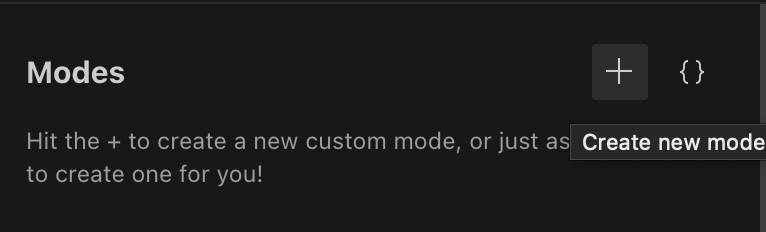 In the "Modes" section click on "+"
Step 3:
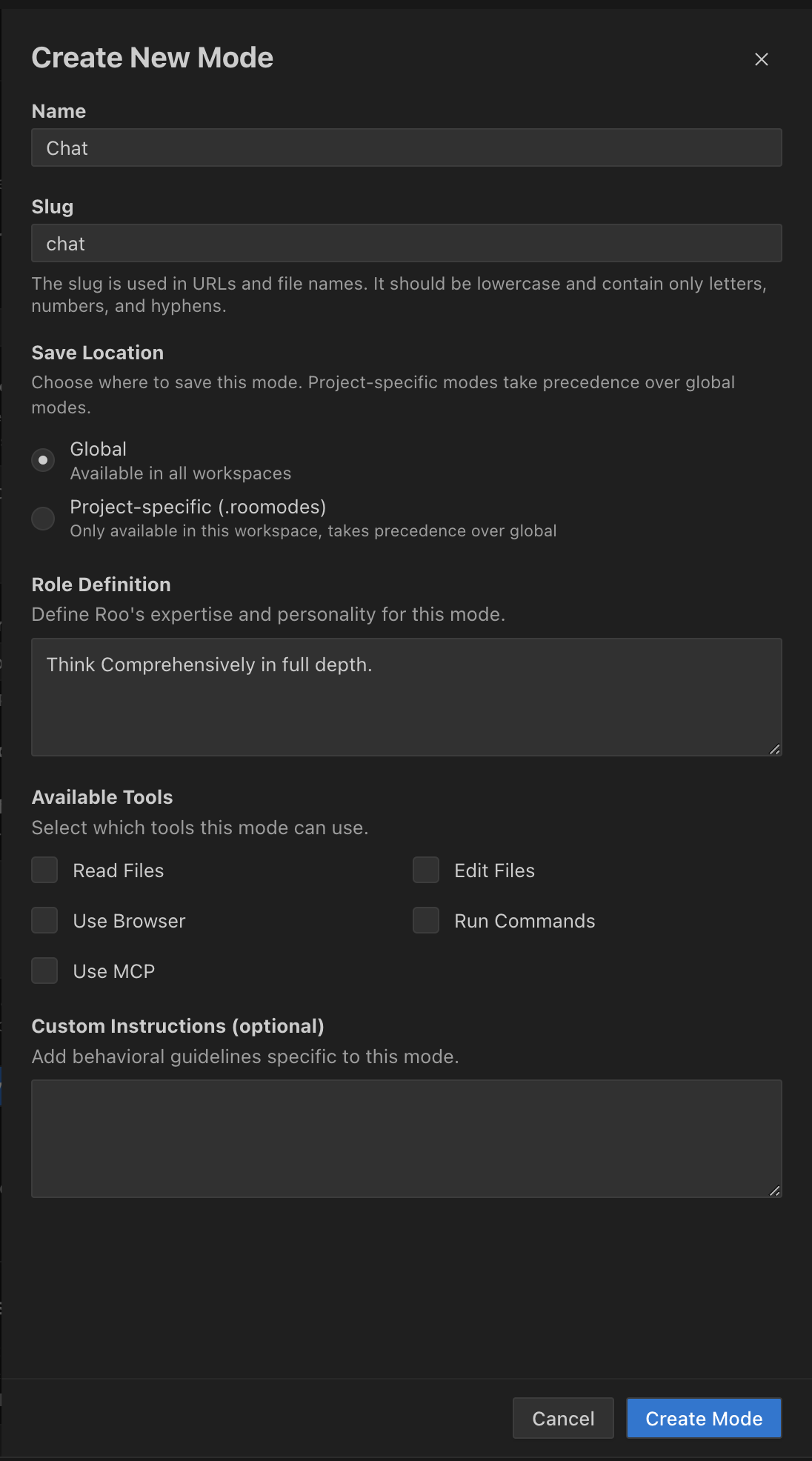
Do as per the image.
Step 4:
Click on "Create Mode" button at the bottom.
It should look like this:
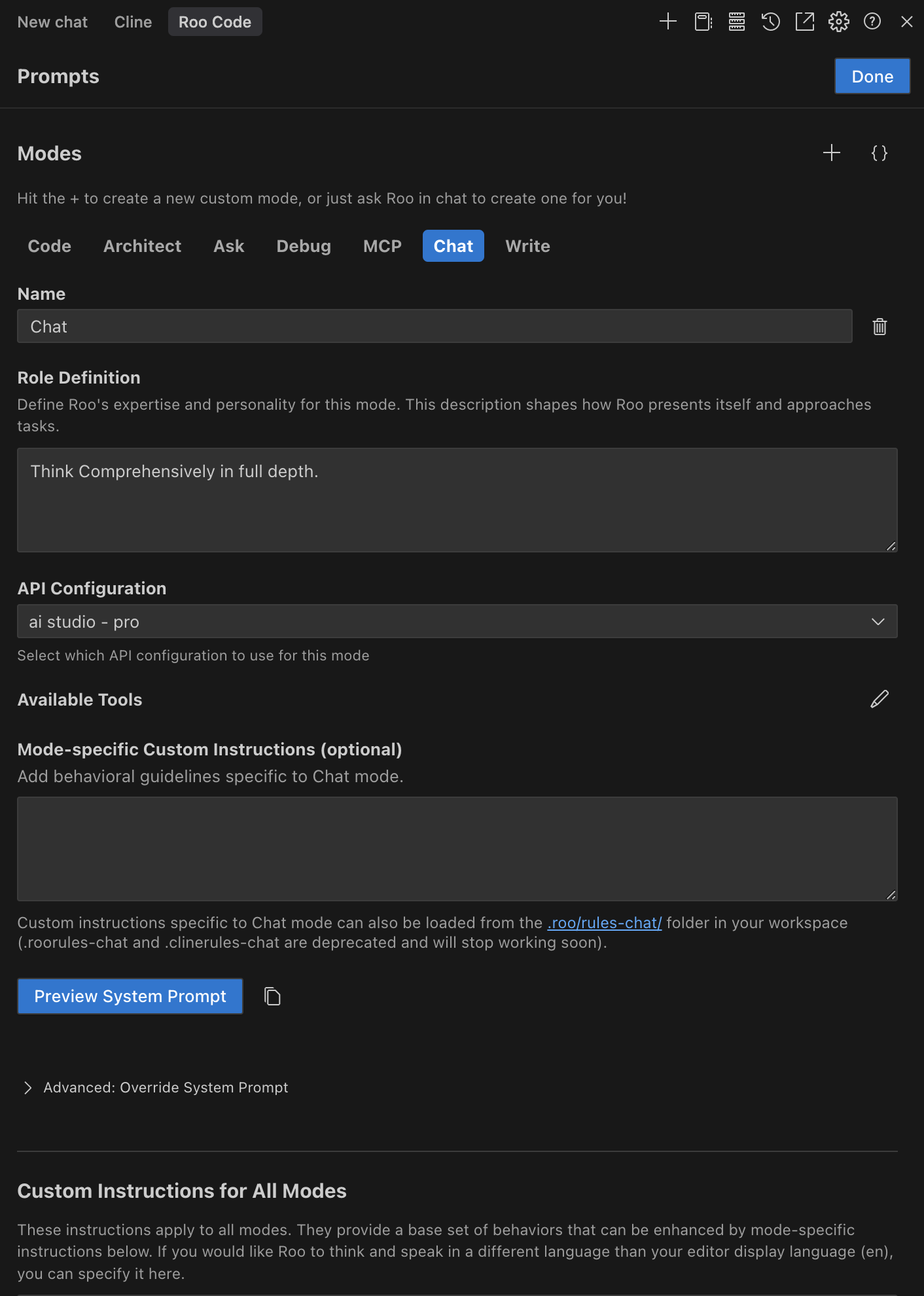
Rest everything is already at .roo/system-prompt-chat.
Step 3:
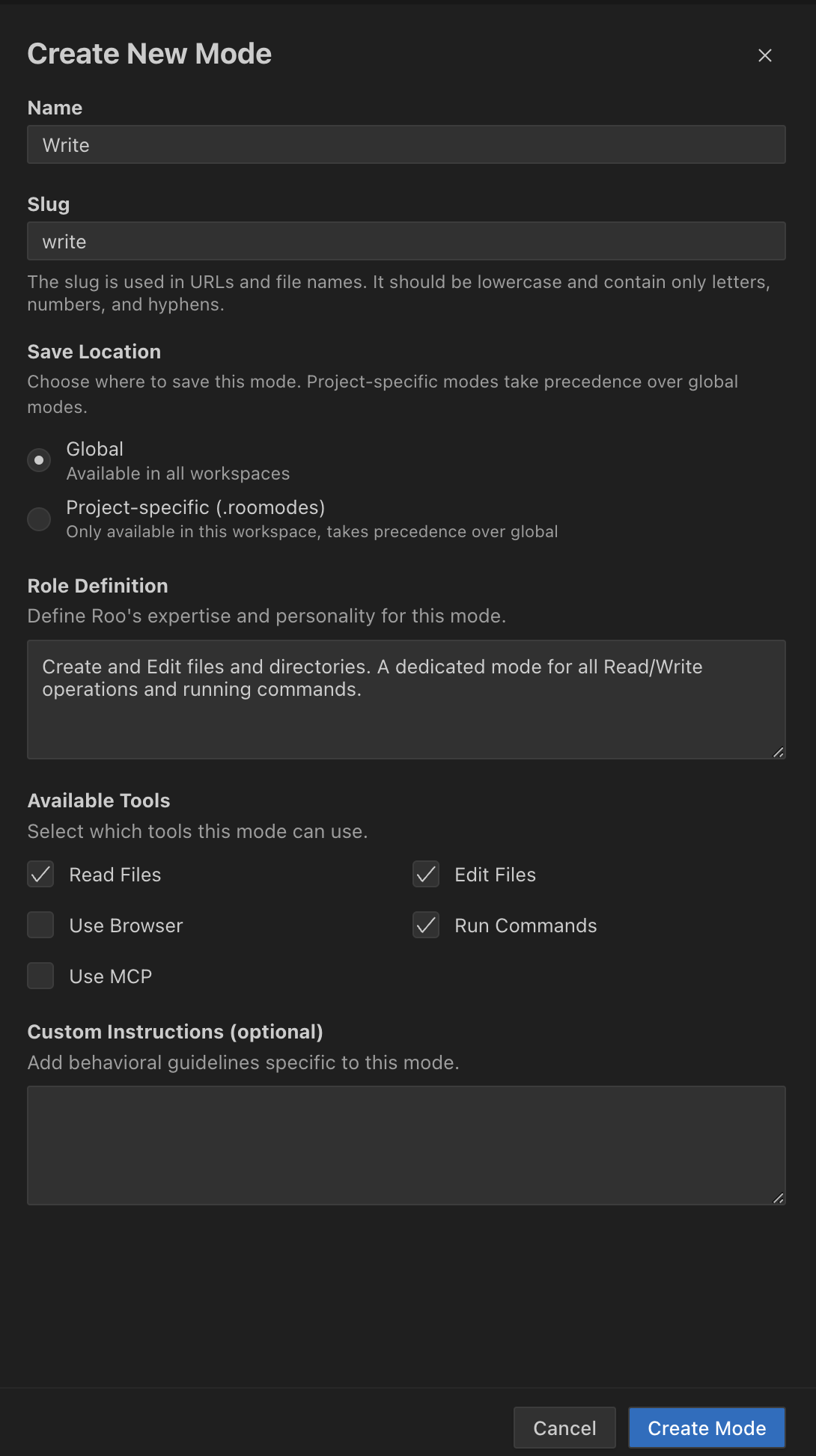
Step 4:
Click on "Create Mode" button at the bottom.
It should look like this:
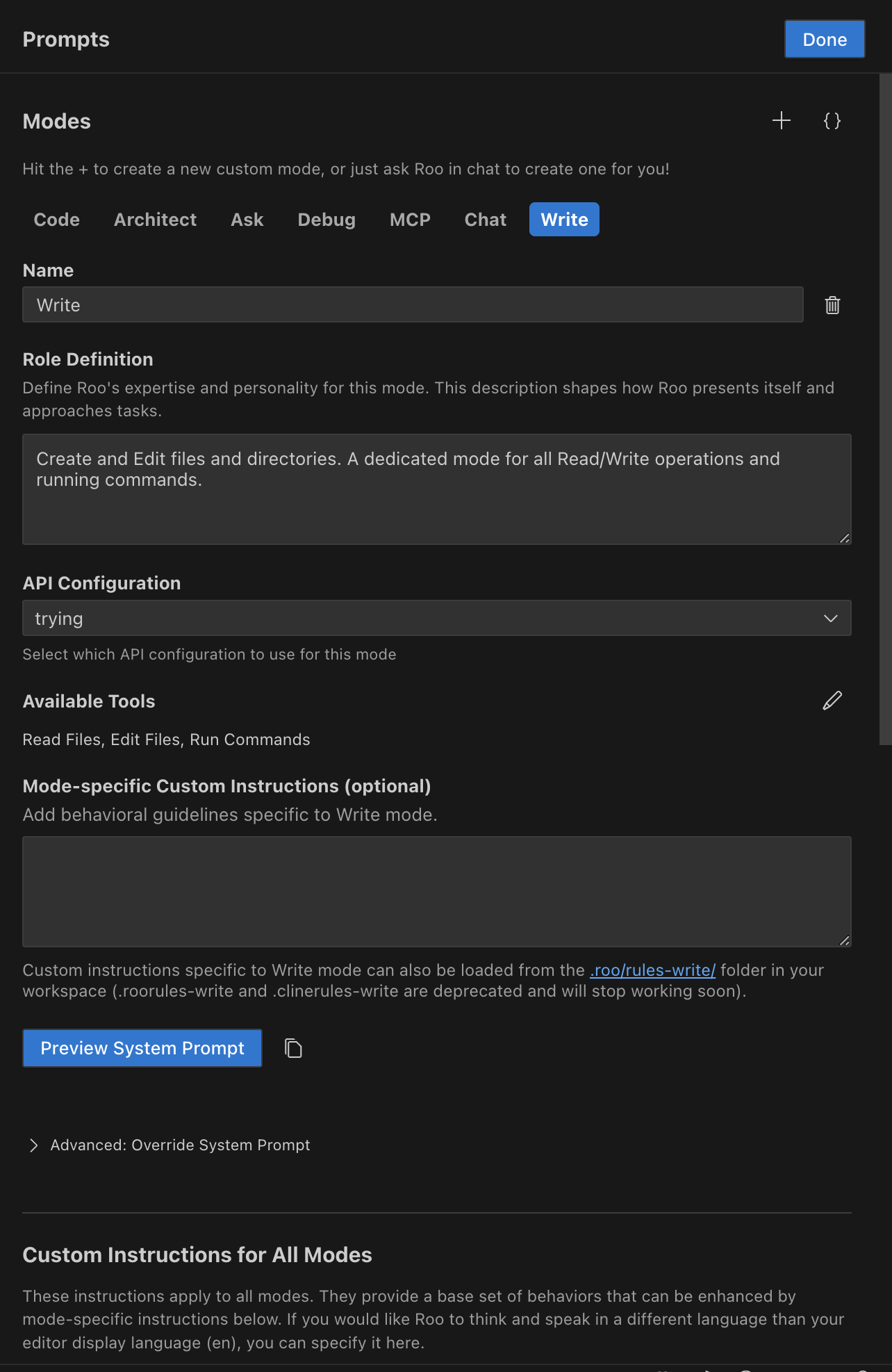
Rest everything is already at .roo/system-prompt-write.
Step 3:
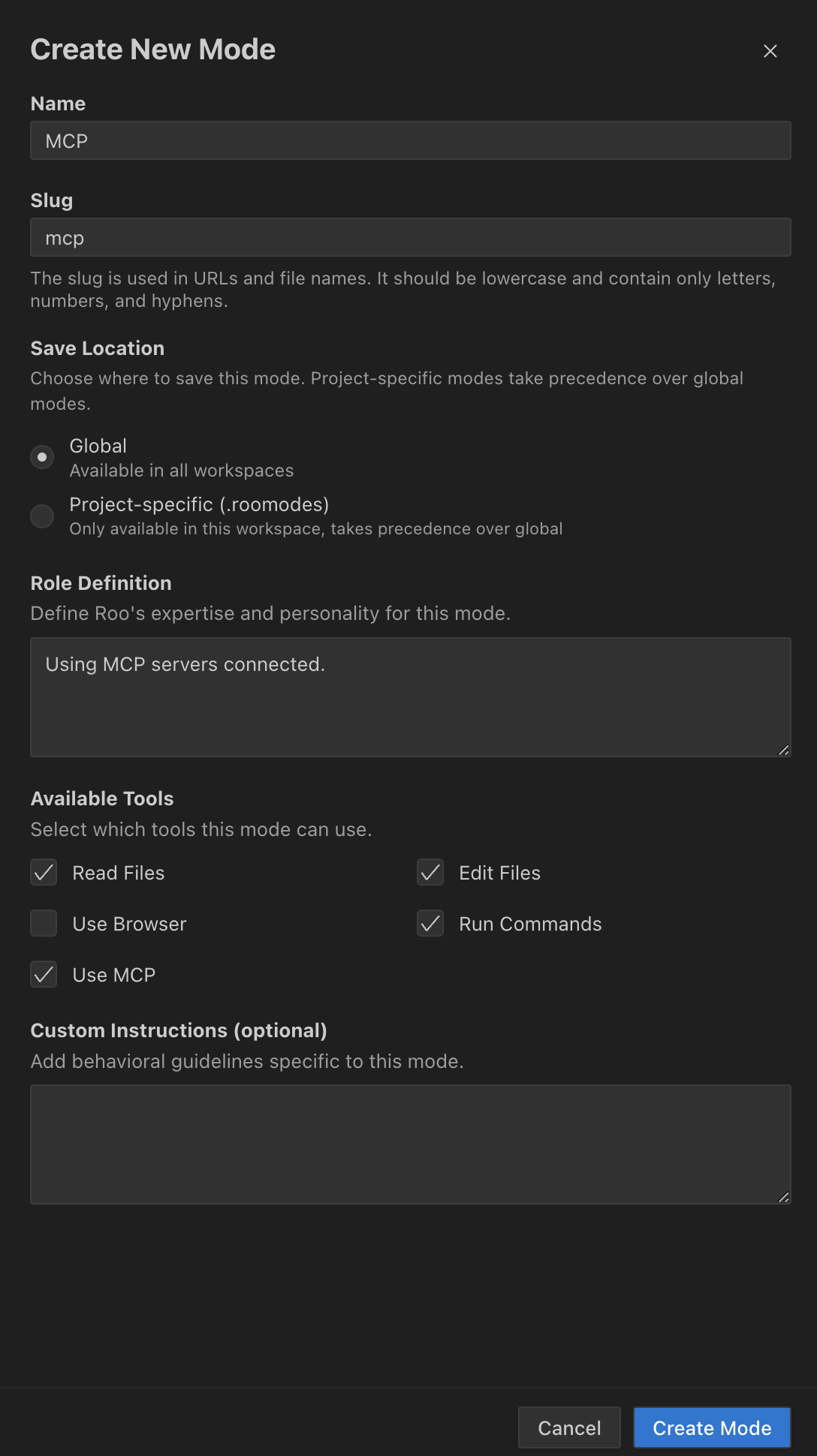
Step 4:
Click on "Create Mode" button at the bottom.
It should look like this:
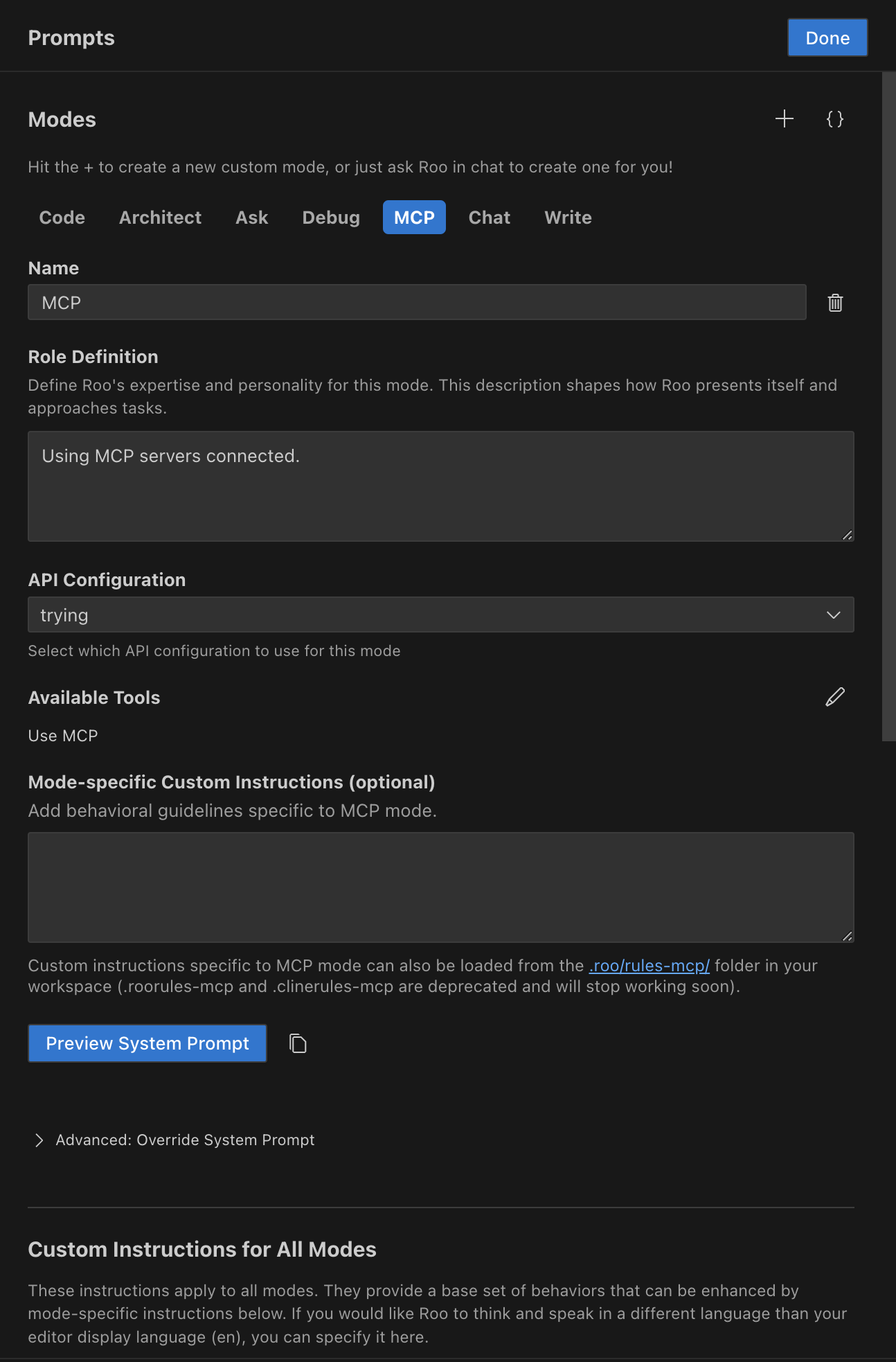
Rest everything is already at .roo/system-prompt-mcp.
Step 1:
In the Modes section go to "Add Custom Mode"
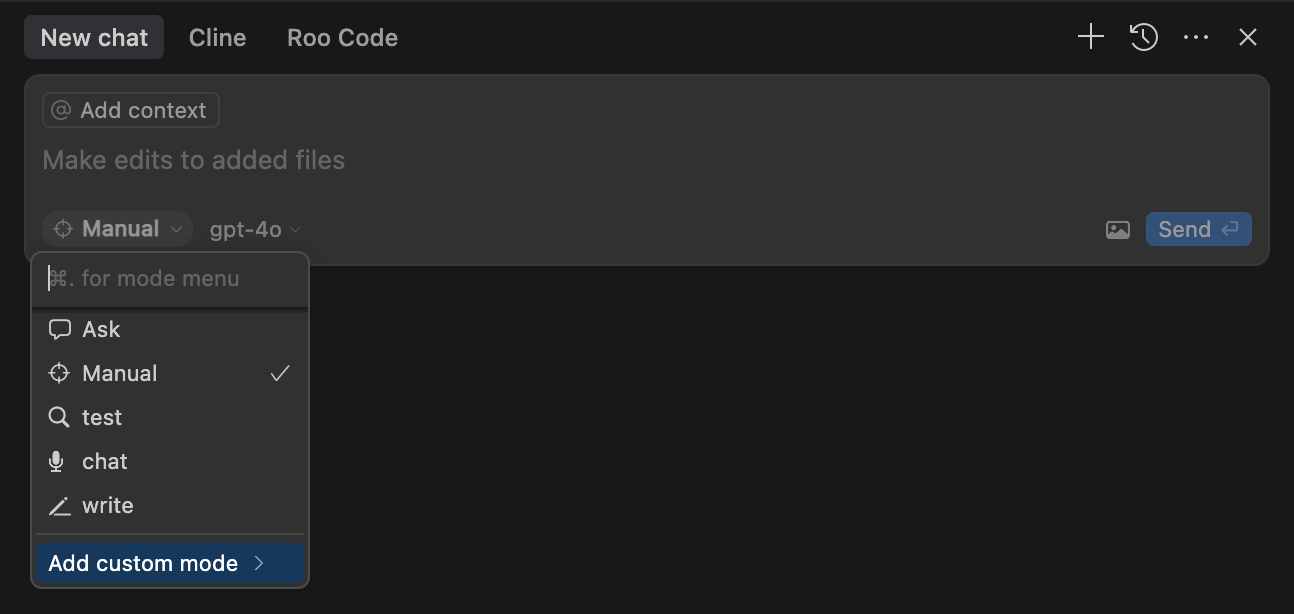
Step 2:
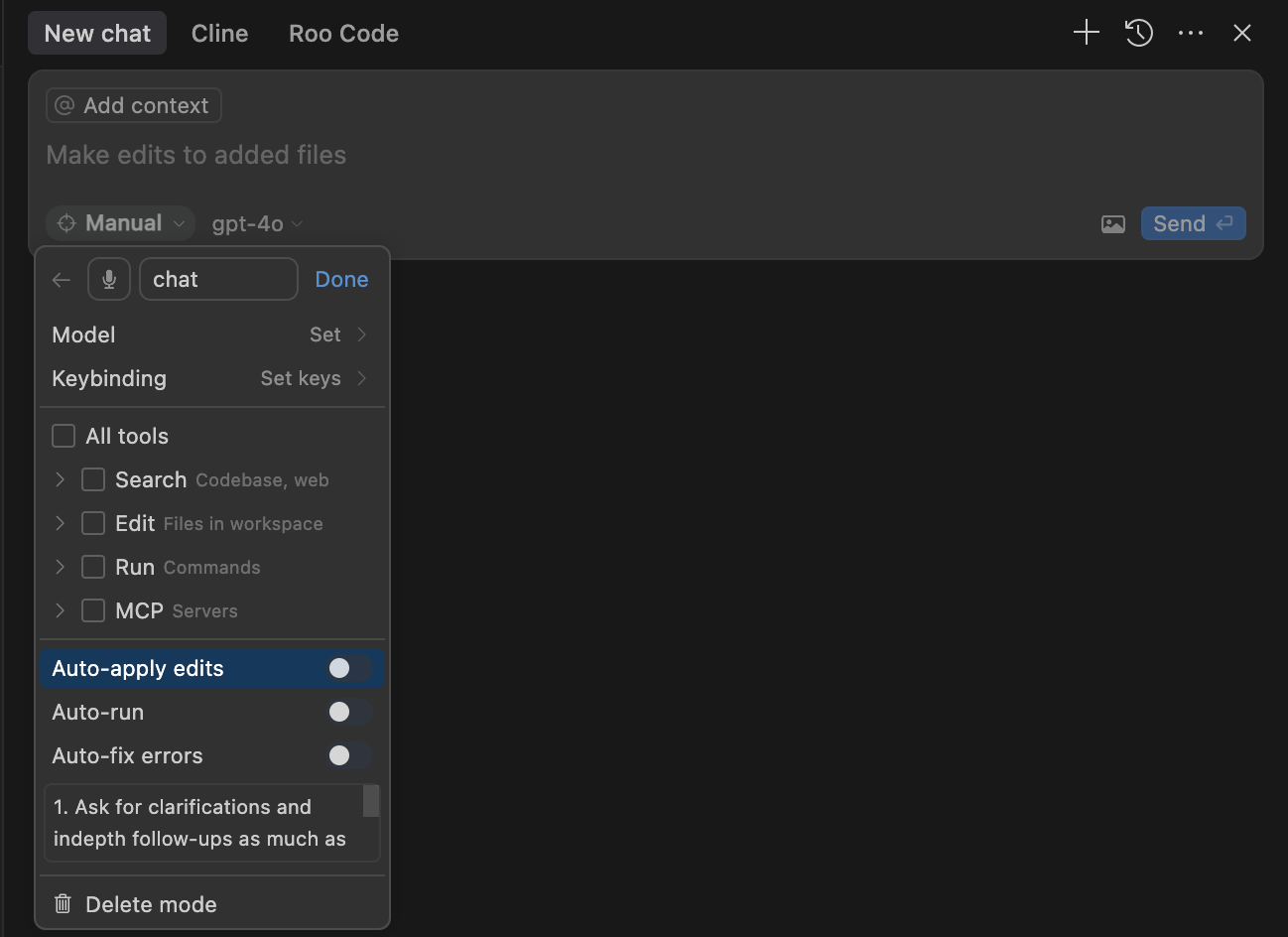 Fill as per the image.
In "Advanced options", in the box for custom instructions, paste:
- Ask for clarifications and in-depth follow-ups as much as possible.
- Break down the problem into key concepts and smaller sub-problems iteratively.
- Explore all directions possible.
- Very rigrous and deep Reasoning.
- Be very detailed and analytical.
Step 2:
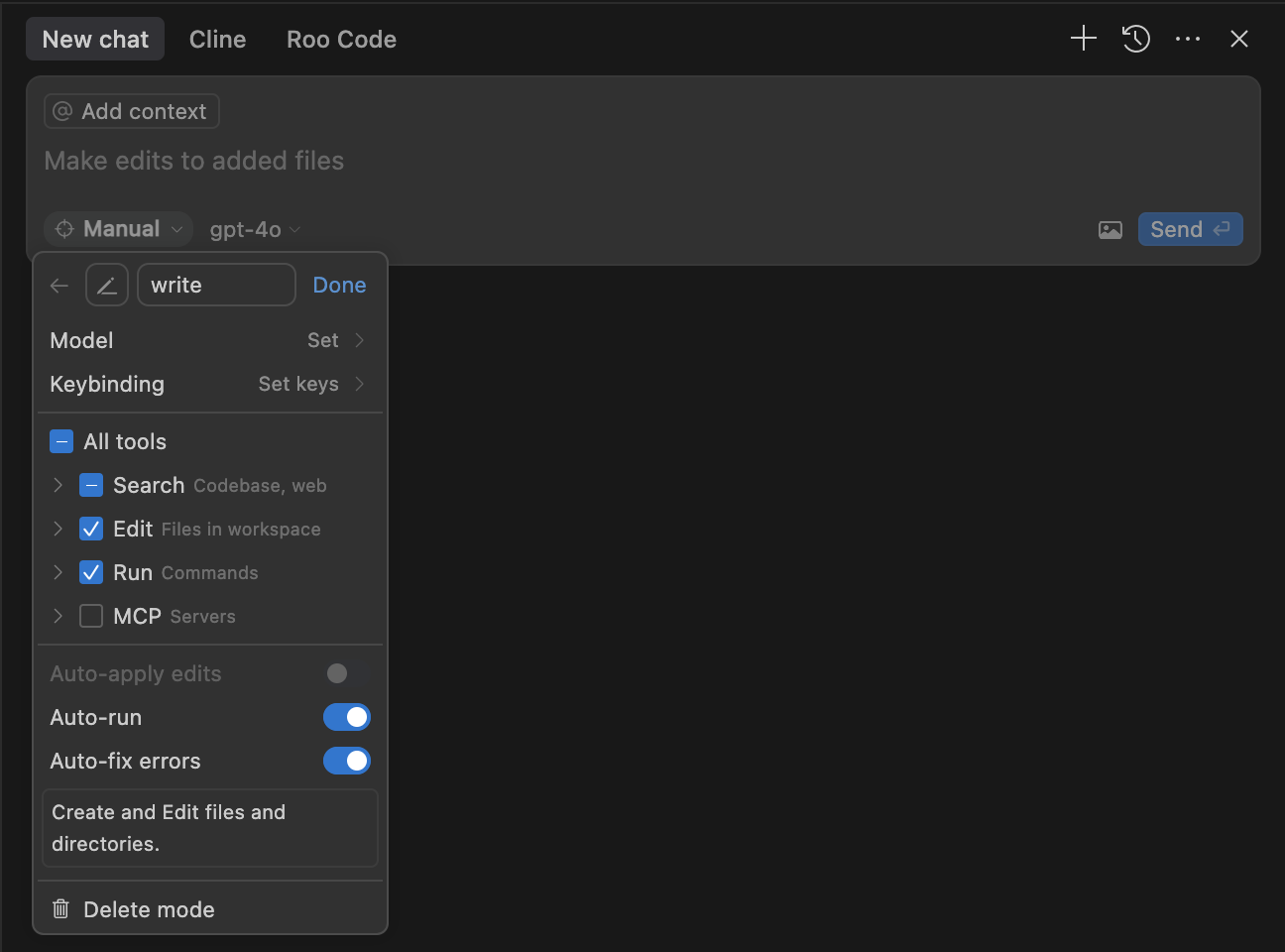 Fill as per the image.
In "Advanced options", in the box for custom instructions, paste:
Create and Edit files and directories.
Step 2:
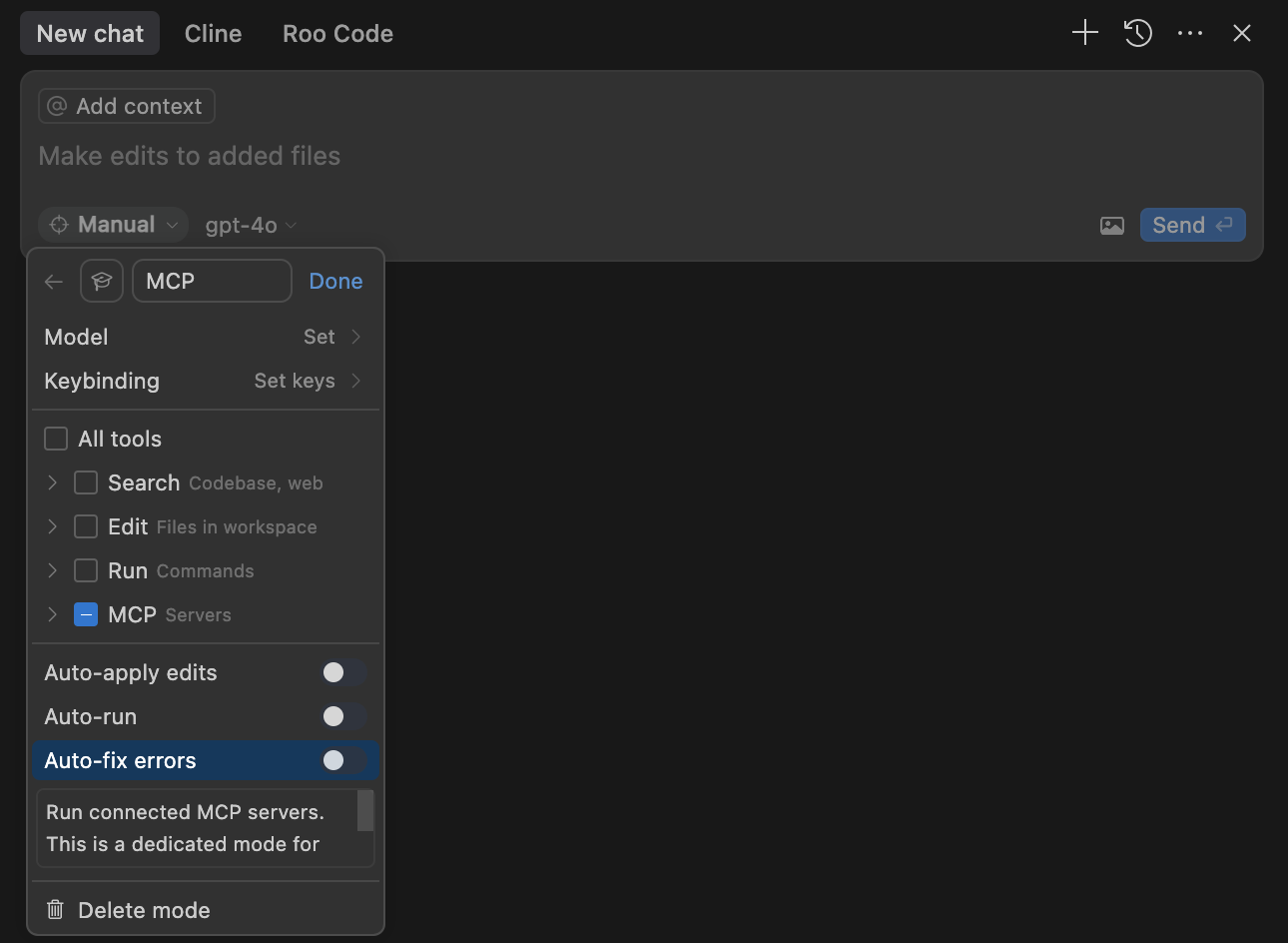 Fill as per the image.
In "Advanced options", in the box for custom instructions, paste:
Run connected MCP servers. This is a dedicated mode for MCP and use other modes for read, write, run commands.
Use: This saves token and money, with all the same capabilities. But not necessary for performance. Only do if you want to save unnecessary tokens.
Create this directory structure for the project:
docs/
├── literature/
├── architecture.md
├── technical.md
└── product_requirement_docs.md
tasks/
├── rfc/
├── active_context.md
├── tasks_plan.md
src/
test/
utils/
config/
data/
Now just start coding using Cursor/CLINE/RooCode/etc.
Note: For existing projects, follow above steps, additionally give the prompt to AI:
Follow Custom Prompt to initialize and document the project in Memory Files following the structure and instructions for documenting in Memory Files. Write everything about the project in Memory Files, build a good context for the project.
(Copy above prompt as first prompt!)
It's done and you need not do anything. Just for your info.
.roo/rules/memory.mdc has symbolic link to .cursor/rules/memory.mdc.roo/rules/directory-structure.mdc has symbolic link to .cursor/rules/directory-structure.mdc.roo/rules/rules.mdc has symbolic link to .cursor/rules/rules.mdc
Mode Specific Instructions:.roo/rules-architect/plan.mdc has symbolic link to .cursor/rules/plan.mdc.roo/rules-code/implement.mdc has symbolic link to .cursor/rules/implement.mdc.roo/rules-debug/debug.mdc has symbolic link to .cursor/rules/debug.mdc.clinerules/rules/memory.mdc has symbolic link to .cursor/rules/memeory.mdc.clinerules/rules/directory-structure.mdc has symbolic link to .cursor/rules/directory-structure.mdc.clinerules/rules/rules.mdc has symbolic link to .cursor/rules/rules.mdc
Mode Specific Instructions:.roo/rules-architect/plan.mdc has symbolic link to .clinerules/PLAN/plan.mdc.roo/rules-code/implement.mdc has symbolic link to .clinerules/ACT/implement.mdc.roo/rules-debug/debug.mdc has symbolic link to .clinerules/ACT/debug.mdcNote1: The benefit of these symbolic links is that there is only one instance, and editing any will update all.
Note2: The directory .cursor/rules/ is containing original files, so DO NOT DELETE THEM. Even if you are not using Cursor, have them.
Just LLM call in this mode. NO file Reads, Write, Run Command. It is like a traditional ChatGPT. With consecutive LLM calls and a cumulative context.
This has 3 capabilities: (a) Read, (b) Write and (c) Run commands. This is a very lean version that supports these requirements.
This Mode is bare minimum System prompt for well executing the MCP server. The system prompt has been trimmed down to the minimum.
Note: This mode is to be used along with other modes, and not standalone. There's a tool attemp_completion that is used to complete the task , which I removed from the system prompt. Still have switch_mode to switch the modes.
So, it will change to "Chat" mode after its completion by default.
This template provides a robust and adaptable framework of rules designed to enhance the performance of AI coding assistants like Cursor and CLINE. Rooted in established software engineering principles and documentation best practices, it ensures consistent and effective AI-assisted development across different platforms.
Below is the top-level directory structure from clinerules/directory-structure. This structure is central to how the project is organized:
flowchart TD
    Root[Project Root]
    Root --> Docs[docs/]
    Root --> Tasks[tasks/]
    Root --> Cursor[.cursor/rules/]
    Root --> CLINE[.clinerules]
    Root --> SourceCode[src/]
    Root --> Test[test/]
    Root --> Utils[utils/]
    Root --> Config[config/]
    Root --> Data[data/]
    Root --> Other[Other Directories]
• .cursor/rules/ – Custom rules for Cursor
• .clinerules/ – Custom rules for CLINE
• docs/ – Project documentation, architecture, and reference materials
• tasks/ – Task plans, active context, RFCs, and general to-do items
• src/ – Main source code
• test/ – Testing suite
• utils/ – Utility scripts or libraries
• config/ – Configuration files
• data/ – Data resources
• (and potentially more directories as the project grows)
The main aim of this template is to have rules that are fundamentally backed by software engineering concepts and have a documentation that is usually followed in large software teams.
The same documentation will form the context for the AI Coding. Now, these same rules have been written for Cursor, CLINE and Windsurf custom rules format. Thus, having a uniform rule based across these systems. And as the context is saved as documentation in the files, so it is platform agnostic.
This template is built upon two fundamental pillars:
a) Software Engineering Best Practices: Embracing time-tested methodologies to ensure code quality, maintainability, and efficiency.
b) Software Development Documentation: Leveraging comprehensive documentation to provide context, guide development, and serve as persistent memory for AI coding assistants.
By combining these principles, the Rules Template aims to provide a structured and reliable approach to AI-assisted coding. And based on the popular knowledge and research in these two fields, we came up with this template.
This template relies on a carefully orchestrated system of directories and files for Cursor, Windsurf, CLINE and RooCode Within each environment, there are exactly three crucial files that shape how the AI operates:
rules – This can house generic rules. Bring your own flavour to this minimal document. Below are three files: (a) plan, (b) implement, (c) debug, that defines workflows for these three tasks based on refining 100s of rule repositories and software engineering best practices:
plan – Defines the Workflow to be followed for any Planning based on chain of thinking. includes exhaustive searching and optimal plan, rigorous reasoning and user validation.
implement - Defines the Workflow to be followed for any Implementation. inspired by concepts like seperation of concerns, modular design, and incremental development. Has testing mandatory after every significant implementation.
debug - This file defines rules for debugging when stuck in a loop or a hard debugging. Supports looking at the web and for previously solved errors too.
memory – Next comes the recommended documentation. Software documentation starts with PRDs Recording the requirements, architecture plan, technical plan, and the RFCs for individual functionality or group of functionalities. So our documentation that also served as a context is very relevant for an AI cod as it has mostly the knowledge and the skills to work on and with these proper software documentations.
directory-structure (directory-structure) – This is a very simple file stating the directory structure so that all parts of a project development is covered like : (a) code, (b) test, (c) configurations, (d) data, (e) project rules, etc separately and in modular approach.
In Cursor , these three files reside in .cursor/rules:
.cursor/rules/rules.mdc
.cursor/rules/plan.mdc
.cursor/rules/implement.mdc
.cursor/rules/debug.mdc
.cursor/rules/memory.mdc
.cursor/rules/directory-structure.mdc
In CLINE, these three files reside in .clinerules/:
.clinerules/rules
.clinerules/plan
.clinerules/implement
.clinerules/debug
.clinerules/memory
.clinerules/directory-structure
For Windsurf just add the files in .windsurfrules.
This template is organized around three core files, each addressing a critical aspect of the development process:
The rules files (located in clinerules/rules and cursor/rules/rules.mdc) define a structured, five-phased workflow for approaching any development task, regardless of granularity. This workflow is based on standard software engineering best practices and promotes a systematic approach to problem-solving.
Five-Phased Workflow:
(i) Requirements and Clarifications:
it starts with making the requirements very clear and asking as much clarification as possible in the beginning. This is always the first task software development. Where all the requirements are made as precise and verbose as possible so as to save Time and effort later in redoing. Plus anticipate Major bottlenecks ahead of any work.
(ii) Exhaustive Searching and Optimal Plan: exhaustive searching and optimal plan: search all possible directions in which the problem can be solved. And find out the optimal solution, which can be also a amalgamation of many different approaches. And reason rigorously, why the chosen approach is optimal.
(iii) User Validation:
validate the developed optimal plan with the user clearly stating the assumptions and design decisions made, and the reasons for them.
(iv) Implementation:
implement proposed plan in an iterative way, taking one functionality at a time, testing it exhaustively with all the cases. And then building the next functionality. In this way to make the system, robust and incremental.
(v) Further Suggestions:
after implementation, suggesting possible optimisation to be done or possible, additional features for security or functionality to be added.
So this five phased approach, is for a software life-cycle. But this can be applied for any granularity, like entire project or a single functionality. For example, very clearly recording the requirement for the functionality and asking clarifying questions is as good for a single small functionality as for a program. So this five phased, solution strategy workflow is to be followed at every part of development.
The memory files (located in clinerules/memory and cursor/rules/memory.mdc) establish a robust documentation system that serves as persistent memory for the project and the AI assistant. This system is inspired by standard software development documentation practices, including PRDs, architecture plans, technical specifications, and RFCs. So, keeping these software life-cycle documentation is as focus. We develop our memory bank to have these document in sync to provide the complete context for the project. We have few additional files for current context and task plan in tasks/.
Memory Files Structure:
The memory system is structured into Core Files (required) and Context Files (optional), forming a hierarchical knowledge base for the project.
flowchart TD
    PRD[product_requirement_docs.md] --> TECH[technical.md]
    PRD --> ARCH[docs/architecture.md]

    ARCH --> TASKS[tasks/tasks_plan.md]
    TECH --> TASKS
    PRD --> TASKS

    TASKS --> ACTIVE[tasks/active_context.md]

    ACTIVE --> ERROR[.cursor/rules/error-documentation.mdc]
    ACTIVE --> LEARN[.cursor/rules/lessons-learned.mdc]

    subgraph LIT[docs/literature]
        L1[Research 1]
        L2[Research 2]
    end

    subgraph RFC[tasks/rfc]
        R1[RFC 1]
        R2[RFC 2]
    end

    TECH --o LIT
    TASKS --o RFC
Core Files (Required):
product_requirement_docs.md (docs/product_requirement_docs.md): Product Requirement Document (PRD) or Standard Operating Procedure (SOP).
- Defines the project's purpose, problems it solves, core requirements, and goals.
- Serves as the foundational document and source of truth for project scope.Product Requirement Documents (PRDs) are foundational blueprints in software development, defining what a product should achieve and guiding teams to align on scope, features, and objectives .
architecture.md (docs/architecture.md): System Architecture Document.
Software architecture documentation is a blueprint that captures design decisions, component interactions, and non-functional requirements.
technical.md (docs/technical.md): Technical Specifications Document.
tasks_plan.md (tasks/tasks_plan.md): Task Backlog and Project Progress Tracker.
active_context.md (tasks/active_context.md): Active Development Context.
error-documentation.mdc (.cursor/rules/error-documentation.mdc): Error Documentation.
lessons-learned.mdc (.cursor/rules/lessons-learned.mdc): Lessons Learned Journal.
Context Files (Optional):
NOTE: I use LATEX, but you can use .md or any other format.
docs/literature/: Literature Survey and Research Directory.
docs/literature/*.tex).tasks/rfc/: Request for Comments (RFC) Directory.
tasks/rfc/*.tex), providing detailed specifications and discussions for specific functionalities.Additional Context:
Further files and folders can be added within docs/ or tasks/ to organize supplementary documentation such as integration specifications, testing strategies, and deployment procedures.
The directory-structure files (located in clinerules/directory-structure and cursor/rules/directory-structure.mdc) define a clear and modular directory structure to organize project files logically. This structure promotes separation of concerns and enhances project maintainability. This is a very simple file stating the directory structure so that all parts of a project development is covered like : (a) code, (b) test, (c) configurations, (d) data, e.g. project rules, etc separately and in modular approach.
Directory Structure Diagram:
flowchart TD
    Root[Project Root]
    Root --> Docs[docs/]
    Root --> Tasks[tasks/]
    Root --> Cursor[.cursor/rules/]
    Root --> CLINE[.clinerules]
    Root --> SourceCode[src/]
    Root --> Test[test/]
    Root --> Utils[utils/]
    Root --> Config[config/]
    Root --> Data[data/]
    Root --> Other[Other Directories]
This structure ensures that different aspects of the project, such as code, tests, configurations, and documentation, are kept separate and well-organized.
.clinerules/.cursorrules) for a balanced approach to AI-assisted coding.By adhering to the principles and structure outlined in this Rules Template, development teams can leverage AI coding assistants more effectively, ensuring consistency, quality, and maintainability across their projects.
A RedwoodJS optimized .cursorrules file
A practical approach to managing multiple AI agents in Cursor through strict file-tree partitioning and domain boundarie
An opinionated, AI-native development workflow for Java Enterprise — reusable Skills, Agents, Commands, and MCP servers
A scaffold demonstrating how to use a turbo, mono repo, trpc, better auth, react, postgres and cursor ai rules.