

Are you the author? Sign in to claim
Deploy an MCP server with MCP Apps (interactive HTML widgets) on Amazon Bedrock AgentCore Runtime, connected to AI hosts
Enterprises building AI-powered experiences need a way to expose their backend services as interactive, conversational tools — without rewriting APIs or coupling to a single AI host. This project demonstrates how to do that using MCP Apps — an extension to the Model Context Protocol that lets MCP servers deliver interactive HTML user interfaces rendered directly inside AI hosts like ChatGPT, Claude, and VS Code Copilot — deployed on Amazon Bedrock AgentCore Runtime.
The sample implements Unicorn Rentals — a conversational rental service with rich interactive widgets rendered inline. Because MCP Apps are host-agnostic, the same server works across any supporting client. Customers can:
Disclaimer: This sample is provided for demonstration purposes and is not intended for production use without further security hardening, testing, and review appropriate to your environment.
This sample shows how to deploy an MCP (Model Context Protocol) server with MCP Apps on Amazon Bedrock AgentCore Runtime and connect it to AI hosts (ChatGPT, Claude, etc.) with rich interactive widget UI.
| Action | Screenshot |
|---|---|
| List Unicorns: | 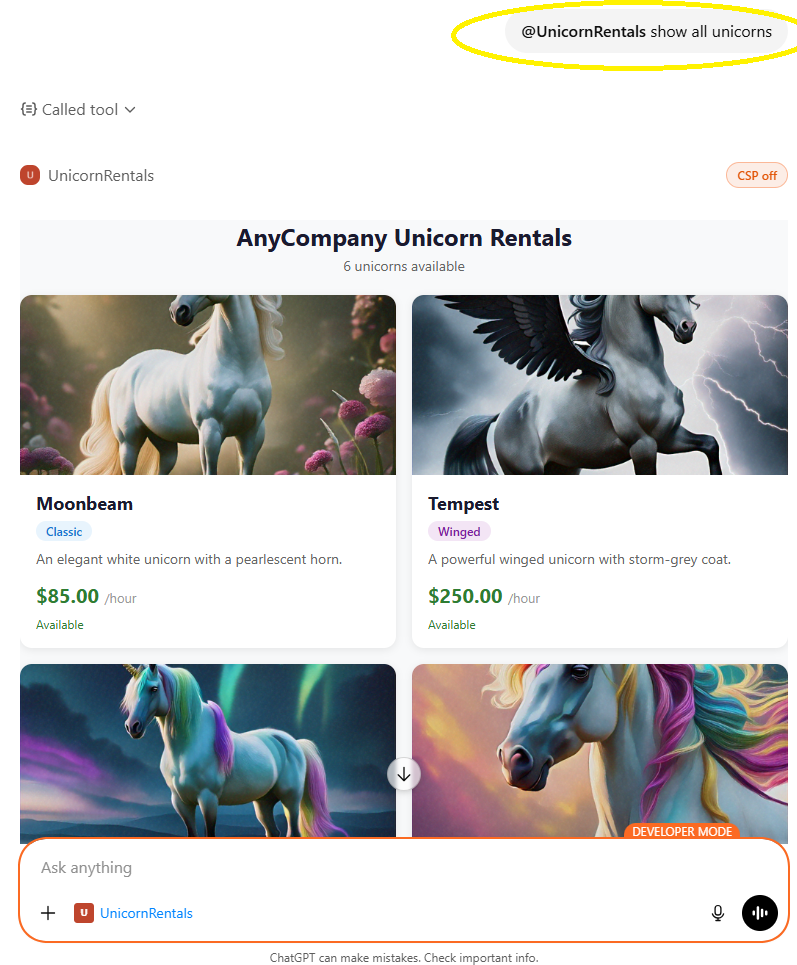 |
| Book Unicorns: | 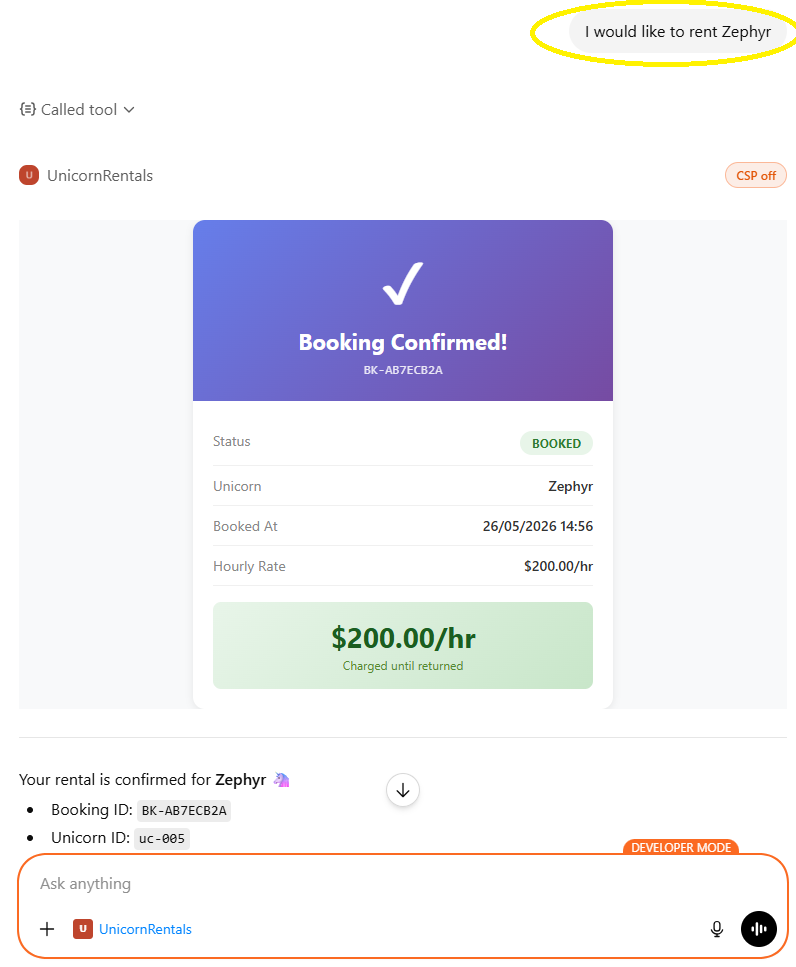 |
| Show bookings: | 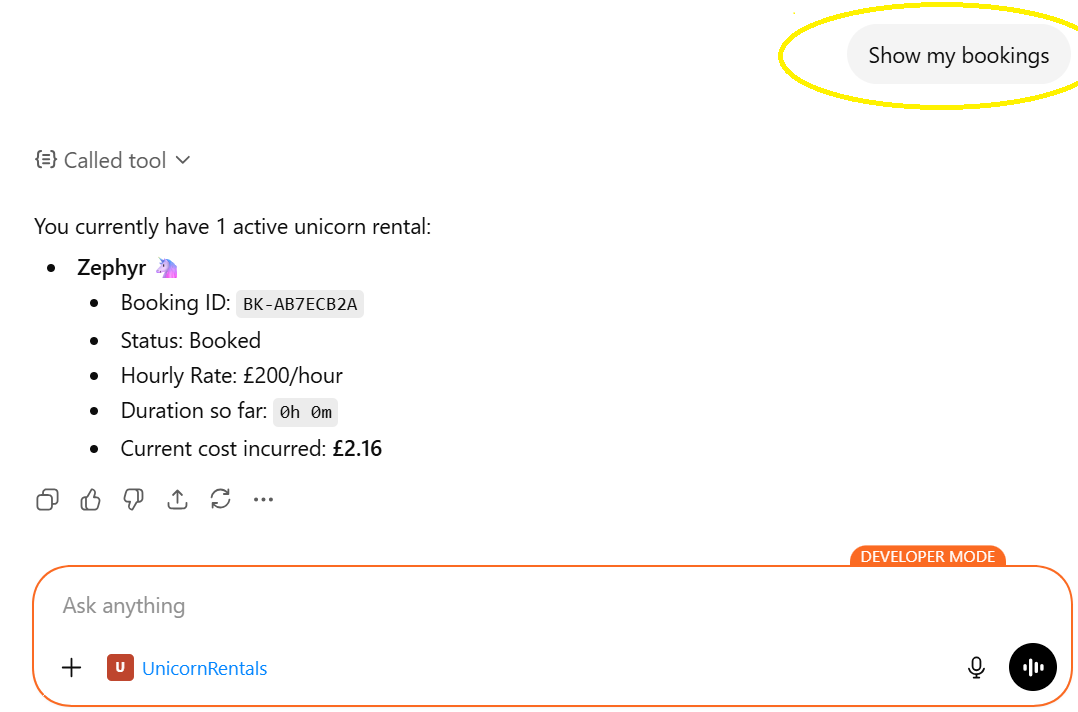 |
| Return unicorn: | 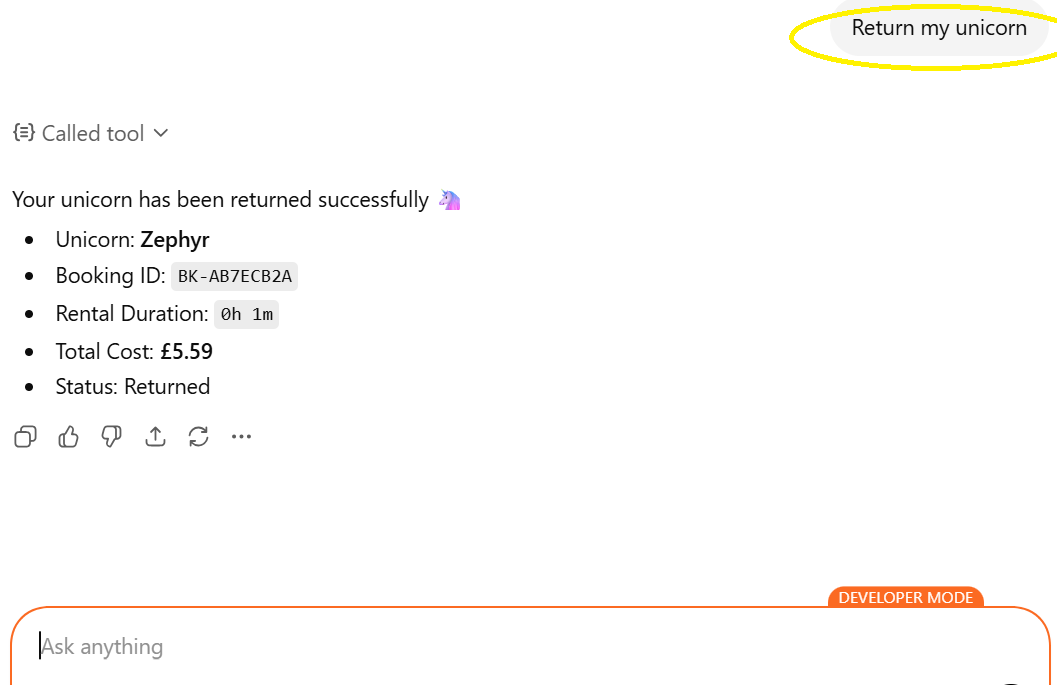 |
You will be able to interact with the app with requests like:
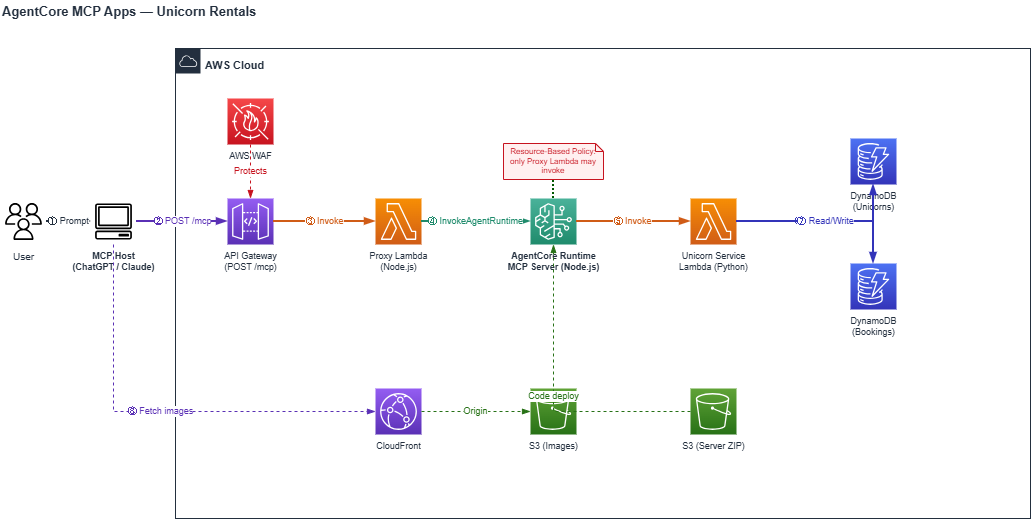
How it works:
| Component | Purpose |
|---|---|
| MCP Server (Node.js/TS) | Thin MCP protocol layer — receives JSON-RPC, resolves identity, invokes service Lambda, serves widget HTML as MCP resources |
| Unicorn Rental Service (Python) | Lambda function that implements business logic (list, book, view, return unicorns) with DynamoDB access |
| AgentCore Runtime | Managed runtime hosting the MCP server (Node.js 22) |
| API Gateway | Public HTTPS endpoint for MCP hosts to call |
| API Gateway Proxy Lambda (Node.js/TS) | Translates HTTPS from API Gateway into InvokeAgentRuntime calls |
| S3 + CloudFront | Serves unicorn images referenced by widgets |
| DynamoDB | Stores unicorn inventory and booking records |
tools/call with list_unicorns) to the API Gateway endpoint.tools/call response containing a widget resource URI (e.g., ui://widget/unicorn-list) in the tool's _meta.ui.resourceUri field.resources/read request for that URI to the API Gateway endpoint.registerAppResource) and returns it.tools/call response via the MCP Apps lifecycle.This project demonstrates a clean separation between the MCP protocol layer and the business logic layer:
aws configure)npm install -g aws-cdkA single build script handles both the API Gateway Proxy Lambda and MCP Server packaging:
chmod +x build.sh
./build.sh --clean
This script:
src/lambda/api-gateway-proxy/dist/index.mjs)--clean flag for reproducible builds)vite-plugin-singlefile (inlines the MCP Apps SDK so widgets work on any host without external CDN dependencies)main.jsbuild/mcp-server-deployment.zipThe --clean flag removes node_modules and package-lock.json before installing, ensuring a reproducible build. Omit it for faster local iteration when dependencies haven't changed.
The build output is pure JavaScript — no native modules — so it runs on ARM64 AgentCore Runtime regardless of the build host architecture.
cd infrastructure/cdk
npm install
If this is the first time deploying CDK in your AWS account/region, you need to bootstrap:
npx cdk bootstrap
Verify the stack synthesizes without errors:
npx cdk synth
You can optionally pass a custom project name via context:
npx cdk synth -c projectName=unicorn-rentals
The default project name is unicorn-mcp.
npx cdk deploy
CDK will:
Note the outputs printed after deployment — you'll need the McpEndpointUrl to connect an MCP host.
After deployment, connect the MCP endpoint to your preferred host:
Both guides cover configuration steps, demo prompts, and troubleshooting. You'll need the McpEndpointUrl from the CDK output.
This project implements multiple layers of security to protect the API endpoint and backend services:
AWS WAF is attached to the API Gateway with a default-deny policy. Only requests originating from allowlisted IP ranges are permitted through. The deployed stack includes outbound IP ranges for both ChatGPT (OpenAI outbound IPs) and Claude (Anthropic outbound IPs). To connect additional MCP hosts or for testing the MCP server directly using tools like MCP Inspector, add their outbound IP ranges to the WAF IP set.
A resource-based access policy is attached directly to the AgentCore Runtime. It explicitly allows only the API Gateway Proxy Lambda's execution role to invoke the runtime, and denies all other principals.
To destroy all deployed resources:
cd infrastructure/cdk
npx cdk destroy
Run Claude Code as an MCP server so any agent can delegate coding tasks to it
 @microsoft✓ Official
Browser automation using accessibility snapshots instead of screenshots
 @googleapis✓ Official
Google's universal MCP server supporting PostgreSQL, MySQL, MongoDB, Redis, and 10+ databases
 @github✓ Official
Official GitHub integration for repos, issues, PRs, and CI/CD workflows