

Are you the author? Sign in to claim
sample-for-bedrock-integration-with-database-mcp-server
This sample demonstrates the integration of AWS Bedrock's Conversational AI capabilities with relational databases through the Model Context Protocol (MCP) Server architecture. The sample leverages Bedrock's Converse API to enable natural language interactions with databases in query-only mode, while the MCP Server handles the complexities of database operations and security protocols.
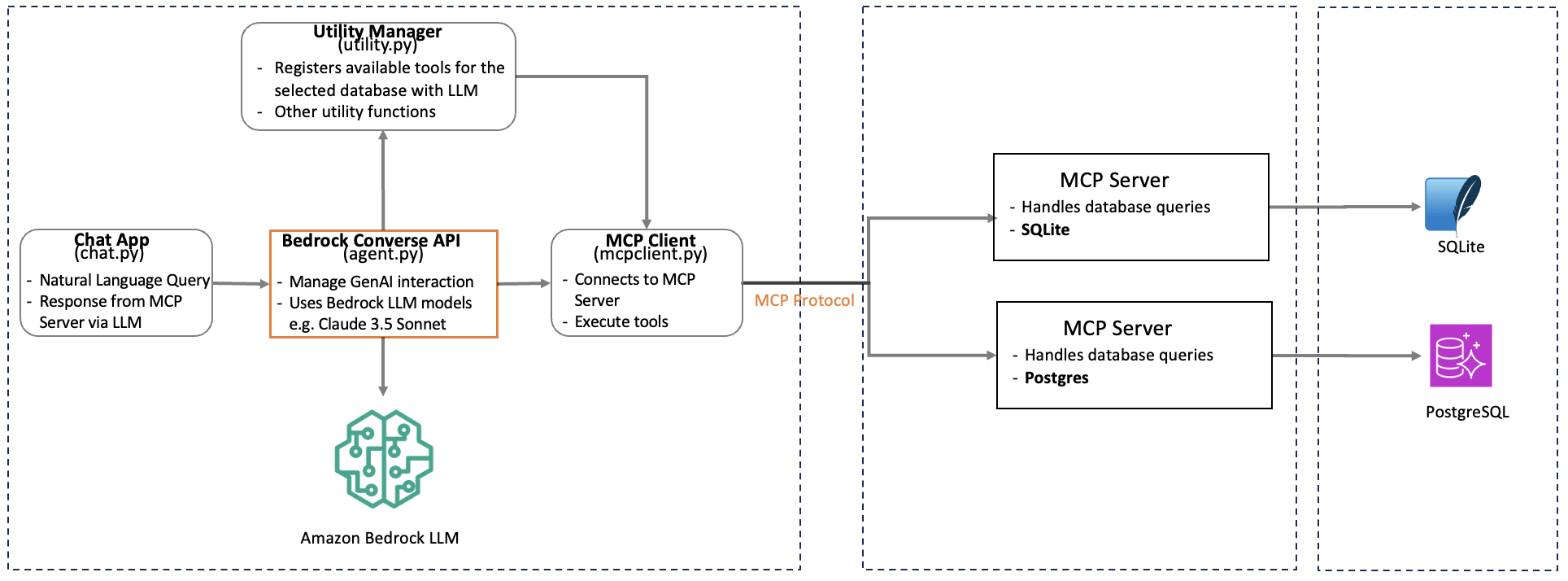
The architecture serves as a reference implementation for developers looking to incorporate Generative AI capabilities into their database applications. While the sample focuses on RDS PostgreSQL & SQLite the pattern can be readily adapted for other database systems that support MCP Server integration.
This sample demonstrates:
List of AWS resources used in this sample
git clone https://github.com/aws-samples/sample-for-bedrock-integration-with-database-mcp-server
Ensure you have Node.js installed (v10.13.0 or later)
Install AWS CDK
npm install -g aws-cdk
Configure AWS CLI with your credentials and use region where Bedrock is available
aws configure
Manually create a virtual environment on MacOS and Linux:
python3 -m venv .venv
Activate your virtual environment
source .venv/bin/activate
Once the virtual environment is activated, you can install the required dependencies.
pip install -r requirements.txt
Install the PostgreSQL MCP server using npm:
npm install -g @modelcontextprotocol/server-postgres

pip install mcp psycopg2-binary
The user must have access to Bedrock model being used for the sample. This sample isassuming the following setup
Change dbconfig.ini file with the following information
Run with appropriate database type option. If no database type provided, chat session will assume SQLite as the default database and will create a database within src/data folder with the name mymcpdb.db. You can point to your existing SQLite database by modifying this file
cd src

python3 chat.py --db-type [sqlite / postgres]
Ask questions like: (the database user has the permission to perform those actions in the database)
The following services will incur costs based on the usages and uptime. Please delete/disable access to this resources as needed at the end.
The database user configured must have enough privilege to perform those operations. As this samples works only for read-only instructions, these operations have to be excuted outside of this samples using a database tool
CREATE TABLE users ( id SERIAL PRIMARY KEY, name VARCHAR(255) NOT NULL, email VARCHAR(255) UNIQUE NOT NULL, created_at TIMESTAMP WITH TIME ZONE DEFAULT CURRENT_TIMESTAMP );
INSERT INTO users (name, email) VALUES ('John Doe', 'john.doe@example.com'), ('Jane Smith', 'jane.smith@example.com'), ('Bob Wilson', 'bob.wilson@example.com'), ('Alice Johnson', 'alice.j@example.com'), ('Tom Brown', 'tom.brown@example.com');
CREATE TABLE products ( product_id SERIAL PRIMARY KEY, name VARCHAR(255) NOT NULL, price DECIMAL(10,2) NOT NULL );
INSERT INTO products (name, price) VALUES ('Amazon Echo Dot (5th Gen)', 49.99), ('Kindle Paperwhite 8GB', 139.99), ('Fire TV Stick 4K', 49.99), ('Ring Video Doorbell', 99.99), ('Amazon Smart Plug', 24.99);
 @googleapis✓ Official
Google's universal MCP server supporting PostgreSQL, MySQL, MongoDB, Redis, and 10+ databases
Official MongoDB integration — query collections, run aggregations, inspect schemas
 @designcomputer
Secure MCP server for MySQL database interaction, queries, and schema management
Run Claude Code as an MCP server so any agent can delegate coding tasks to it