Are you the author? Sign in to claim
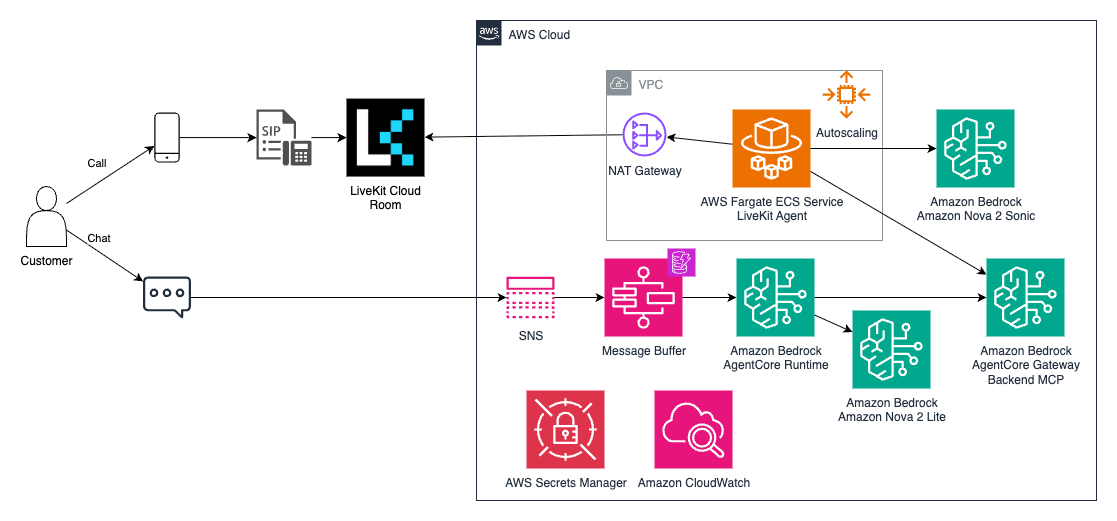
A real-time conversational AI platform built on AWS with Amazon Bedrock Nova Sonic for voice and Amazon Bedrock AgentCor
This virtual assistant platform is a comprehensive real-time speech-to-speech conversational AI system built on AWS and LiveKit with Amazon Bedrock Nova Sonic for voice and Amazon Bedrock AgentCore Runtime for chat. While designed as a hotel guest services assistant, this platform is easily adaptable to any industry by simply changing system prompts and integrating industry-specific tools. It provides natural, context-aware conversations through multiple interfaces including voice, chat, and web applications.
Key Adaptability Features:
Note: These hotel-specific capabilities demonstrate the platform's flexibility. The same architecture supports any industry by replacing the hotel PMS tools with industry-specific integrations.
You are responsible for the cost of the AWS services used while running this solution. As of December 2025, the cost for running this prototype with the default settings in the US East (N. Virginia) Region is approximately $342.01 per month for 500 voice calls and 500 chat conversations.
The costs shown represent pricing without consideration of AWS free tier benefits.
We recommend creating a budget through AWS Cost Explorer to help manage costs. Prices are subject to change. For full details, refer to the pricing webpage for each AWS service used in this solution.
The following table provides a sample cost breakdown for deploying this solution with the default parameters in the US East (N. Virginia) Region for one month:
| Component | Description | Cost [USD] |
|---|---|---|
| Backend Integration & Database | Industry-specific tools + knowledge base | $6.78 |
| Virtual Assistant Voice (LiveKit) | AI voice processing infrastructure | $292.89 |
| Virtual Assistant Chat | AI chat processing + simulated messaging | $42.34 |
| Total | $342.01 |
| AWS Service | Usage | Cost [USD] |
|---|---|---|
| Amazon Cognito | User authentication | $3.00 |
| AWS Secrets Manager | API key management | $1.70 |
| Amazon CloudWatch | Monitoring & logs | $1.00 |
| AWS Lambda | Serverless compute | $0.84 |
| Bedrock AgentCore Gateway | Tool calling gateway | $0.10 |
| S3 Standard | Object storage & vector store | $0.06 |
| Amazon Bedrock - Amazon Titan Text Embeddings V2 | Text embeddings for RAG | $0.04 |
| Amazon DynamoDB | Hotel PMS data storage (6 tables) | $0.04 |
| Total | $6.78 |
Note: Voice infrastructure is optional. If you only need chat/messaging, you can skip LiveKit configuration and save $284.63/month (including $81.30 in VPC costs).
| AWS Service | Usage | Cost [USD] |
|---|---|---|
| Amazon Bedrock - Nova Sonic 2 | AI voice processing (500 calls) | $65.80 |
| Network Address Translation (NAT) Gateway | Network address translation (VPC) | $74.00 |
| LiveKit Cloud | Real-time voice infrastructure (500 calls) | $70.00 |
| AWS Fargate | Containerized compute | $60.00 |
| Public IPv4 Address | Public IP addresses (VPC) | $7.30 |
| Amazon CloudWatch | Monitoring & logs | $5.00 |
| Data Transfer | Network data transfer | $2.00 |
| AWS Secrets Manager | API key management | $0.53 |
| Total | $284.63 |
| AWS Service | Usage | Cost [USD] |
|---|---|---|
| Amazon Bedrock - Amazon Nova 2 Lite (global inference) | AI chat processing (500 conversations) | $14.80 |
| Amazon API Gateway | Simulated messaging API | $0.02 |
| Amazon Cognito | User authentication | $2.00 |
| DynamoDB | Message storage & message buffering | $0.27 |
| Bedrock AgentCore Memory | Conversation memory storage | $2.50 |
| Amazon CloudWatch | Monitoring & logs | $1.50 |
| Bedrock AgentCore Runtime | Agent execution runtime | $0.76 |
| Bedrock AgentCore Observability | Agent performance monitoring | $0.35 |
| AWS Step Functions | Message buffering workflow orchestration | $0.71 |
| AWS Lambda | Message processing & buffering handlers | $0.02 |
| AWS Secrets Manager | API credentials | $0.40 |
| AWS WAF Web ACL | API protection | $5.00 |
| S3 Standard | Configuration storage | $0.01 |
| Total | $28.34 |
Alternative Messaging Configuration:
For production WhatsApp messaging via AWS End User Messaging Social (instead of simulated messaging backend):
| AWS Service | Usage | Cost [USD] |
|---|---|---|
| AWS End User Messaging Social | WhatsApp message delivery (5,000 msgs) | ~$50.00 |
| AWS Lambda | Message processing | $0.04 |
| Amazon CloudWatch | Monitoring & logs | $0.50 |
| Additional Cost | ~$50.54 |
Note: WhatsApp Business API pricing varies by region and message type. This estimate assumes average costs.
The actual cost will vary based on:
Important: This estimate excludes telephony and messaging integration costs. Voice telephony (Twilio/Amazon Connect) and messaging connectors (WhatsApp/SMS) require separate providers. When using the optional WhatsApp integration with AWS End User Messaging Social, additional costs apply based on message volume and WhatsApp Business API pricing.
This project is organized as an NX monorepo with pnpm workspaces, providing efficient build caching, task orchestration, and dependency management across multiple technologies:
virtual-assistant/
├── packages/
│   ├── demo/                        # React web application
│   ├── virtual-assistant/           # Python workspace with:
│   │   ├── virtual-assistant-chat/  #   - AgentCore chat agent
│   │   ├── virtual-assistant-livekit/ #   - LiveKit voice agent
│   │   ├── virtual-assistant-common/ #   - Shared utilities
│   │   └── virtual-assistant-messaging-lambda/ # - Message processing
│   ├── hotel-pms-simulation/            # Hotel PMS API & MCP server (reference)
│   ├── infra/                       # AWS CDK infrastructure
│   └── common/constructs/           # Shared CDK constructs
├── documentation/                   # Shared documentation
├── hotel_data/                      # Sample hotel data and scripts (reference)
├── .kiro/                           # Kiro IDE configuration
    ├── specs/                       # Feature specifications
    └── steering/                    # Development guidelines
The Virtual Assistant Platform is designed for easy adaptation to any industry. The hotel implementation serves as a complete reference.
What you customize:
What stays the same:
The platform uses the Model Context Protocol (MCP) to connect your existing APIs as tools. AgentCore Gateway wraps any REST API with an OpenAPI specification, eliminating the need to implement MCP protocol yourself.
For complete step-by-step instructions, see the Industry Adaptation Guide.
# Install pnpm
curl -fsSL https://get.pnpm.io/install.sh | sh -

# Install uv
curl -LsSf https://astral.sh/uv/install.sh | sh

# Install required tools and versions
pnpm  env use --global 22
uv python install 3.14

# Install global packages
npm install -g aws-cdk
This prototype uses Amazon Nova and Anthropic Claude models on Amazon Bedrock. Amazon models are enabled by default, while Anthropic models require a marketplace subscription.
Recommended approach: Subscribe to all Anthropic models to ensure compatibility with current and future model versions:
# Subscribe to all Anthropic models (recommended)
uv run scripts/bedrock_subscribe.py "Anthropic*" \
  --company-name "Your Company Name" \
  --use-cases "AI-powered virtual assistant and conversational AI"

# Subscribe to specific Anthropic model only
uv run scripts/bedrock_subscribe.py "Anthropic Claude 3.5 Haiku"
The prototype requires these models:
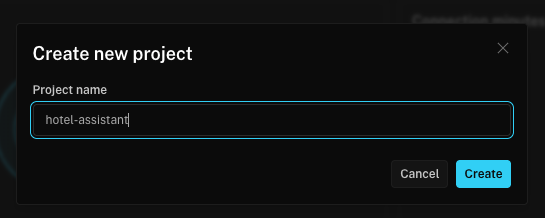
Create LiveKit Project:
Navigate to project settings:
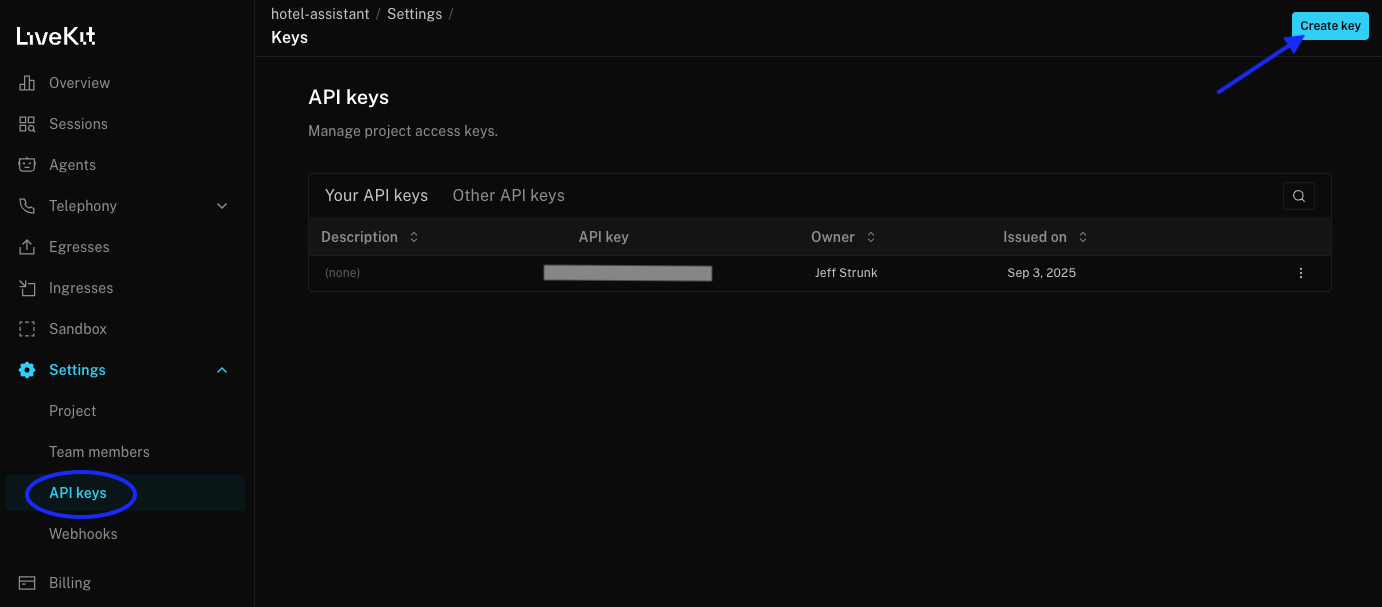
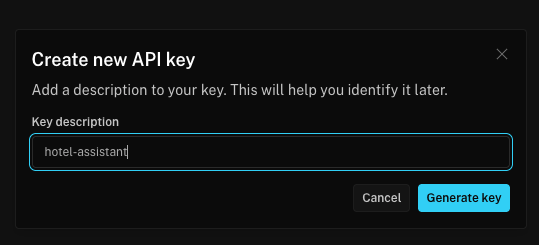
Create a new API key:
Copy the generated API key and secret:
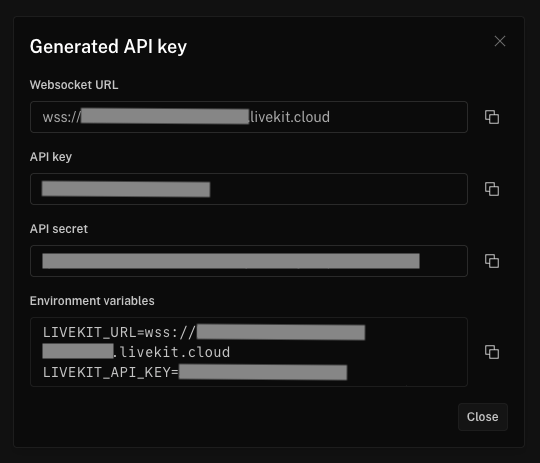
Store the LiveKit credentials in AWS Secrets Manager with the secret name
"virtual-assistant-livekit":
# Replace with your actual values from the LiveKit dashboard
aws secretsmanager create-secret \
  --name "virtual-assistant-livekit" \
  --description "LiveKit credentials for Virtual Assistant" \
  --secret-string '{
    "LIVEKIT_URL": "wss://your-project-name-xxxxxxxx.livekit.cloud",
    "LIVEKIT_API_KEY": "your-api-key-from-step-4",
    "LIVEKIT_API_SECRET": "your-api-secret-from-step-4"
  }'
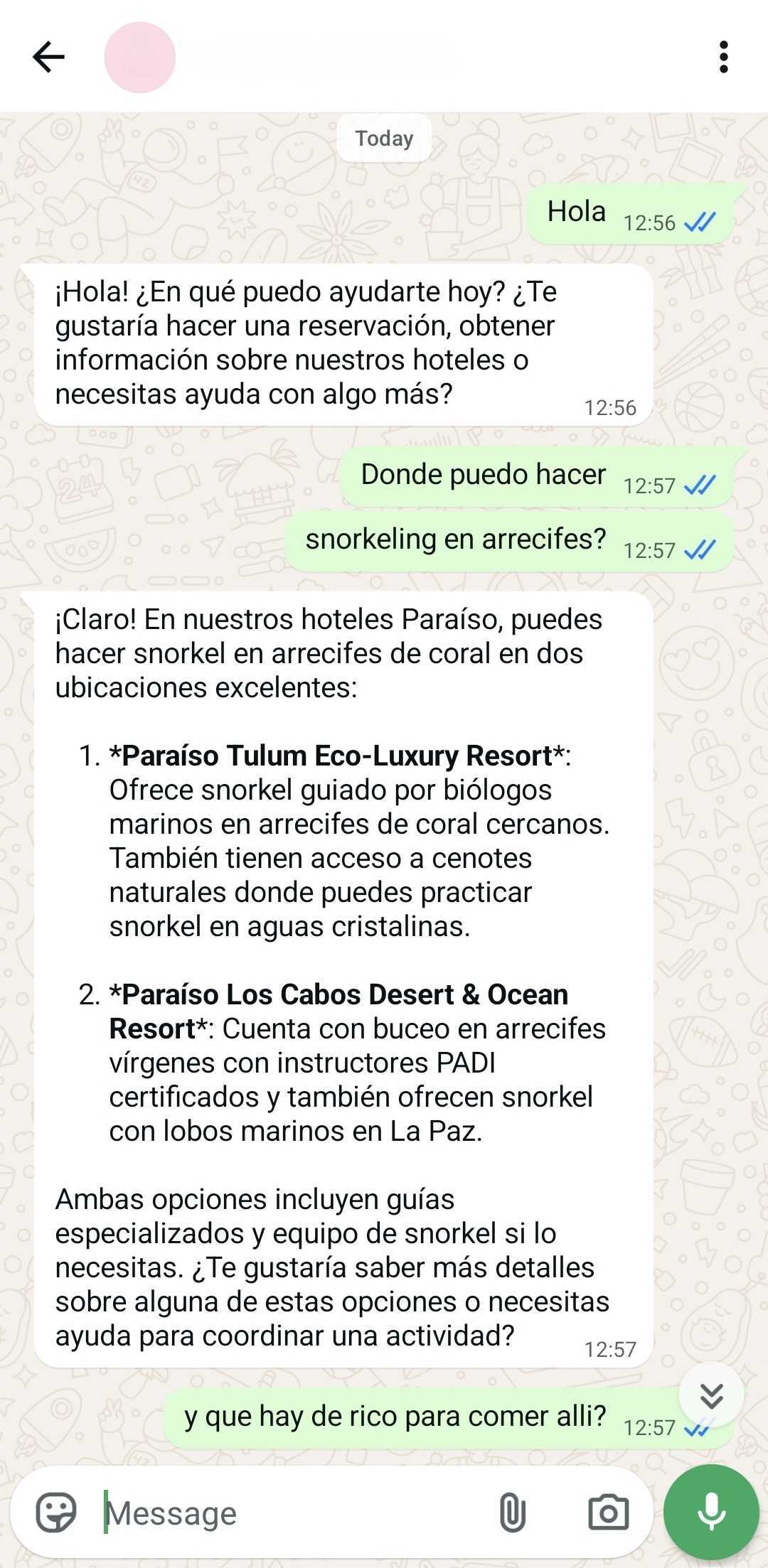
The Virtual Assistant Platform supports real WhatsApp messaging through AWS End User Messaging Social (EUM Social). This is optional - the system works with simulated messaging by default.
Create SNS Topic for WhatsApp Events:
aws sns create-topic --name whatsapp-messages --region us-east-1
Create Phone Number Allow List:
# Allow specific phone numbers (recommended for production)
aws ssm put-parameter \
  --name "/virtual-assistant/whatsapp/allow-list" \
  --value "+1234567890,+0987654321" \
  --type "String"

# OR allow all numbers (for development/testing)
aws ssm put-parameter \
  --name "/virtual-assistant/whatsapp/allow-list" \
  --value "*" \
  --type "String"
Configure CDK Context Variables: Add to your cdk.context.json or pass
via command line:
{
  "eumSocialTopicArn": "arn:aws:sns:us-east-1:YOUR-ACCOUNT:whatsapp-messages",
  "eumSocialPhoneNumberId": "your-eum-social-phone-number-id"
}
Deploy with WhatsApp Integration:
nx deploy infra --context eumSocialTopicArn=arn:aws:sns:us-east-1:123456789012:whatsapp-messages --context eumSocialPhoneNumberId=phone-number-id-01234567890123456789012345678901
For detailed WhatsApp integration setup, cross-account configuration, and
troubleshooting, see the WhatsApp Integration Guide
(documentation/whatsapp-integration.md).
The entire build and deployment can be done with just a few commands:
pnpm install
pnpm exec nx bootstrap infra     # First time only
pnpm exec nx deploy infra        # Deploy to AWS (~2.5 min)
The deploy command will automatically trigger the necessary builds and then deploy the infrastructure.
The infrastructure supports various configuration options through CDK context
variables. These can be set in packages/infra/cdk.context.json or passed via
command line.
bedrock_xacct_role (Optional): Cross-account IAM role ARN for Bedrock
access when models are in a different AWS account
arn:aws:iam::account-id:role/role-namearn:aws:iam::123456789012:role/BedrockCrossAccountRoleFor real WhatsApp messaging through AWS End User Messaging Social, configure these variables:
eumSocialTopicArn (Required for WhatsApp): SNS topic ARN that receives
WhatsApp webhook events from EUM Social
arn:aws:sns:region:account-id:topic-namearn:aws:sns:us-east-1:123456789012:whatsapp-messageseumSocialPhoneNumberId (Required for WhatsApp): EUM Social phone number
ID for sending WhatsApp messages
phone-number-id-01234567890123456789012345678901eumSocialCrossAccountRole (Optional): IAM role ARN for cross-account EUM
Social access
arn:aws:iam::account-id:role/role-namearn:aws:iam::123456789012:role/WhatsAppCrossAccountRolewhatsappAllowListParameter (Optional): SSM parameter name for phone
number allow list
/virtual-assistant/whatsapp/allow-list/virtual-assistant/whatsapp/allow-listMethod 1: Configuration File
Create packages/infra/cdk.context.json:
{
  "eumSocialTopicArn": "arn:aws:sns:us-east-1:123456789012:whatsapp-messages",
  "eumSocialPhoneNumberId": "phone-number-id-01234567890123456789012345678901",
  "eumSocialCrossAccountRole": "arn:aws:iam::123456789012:role/WhatsAppCrossAccountRole",
  "whatsappAllowListParameter": "/virtual-assistant/whatsapp/allow-list"
}
Method 2: Command Line
pnpm exec nx deploy infra \
  --context eumSocialTopicArn=arn:aws:sns:us-east-1:123456789012:whatsapp-messages \
  --context eumSocialPhoneNumberId=phone-number-id-01234567890123456789012345678901
The prototype uses a sample hotel data set. The data is loaded into Amazon S3 and ingested with Amazon Bedrock Knowledge Bases.
python ./hotel_data/scripts/generate_metadata.py
python ./hotel_data/scripts/upload_and_ingest_documents.py
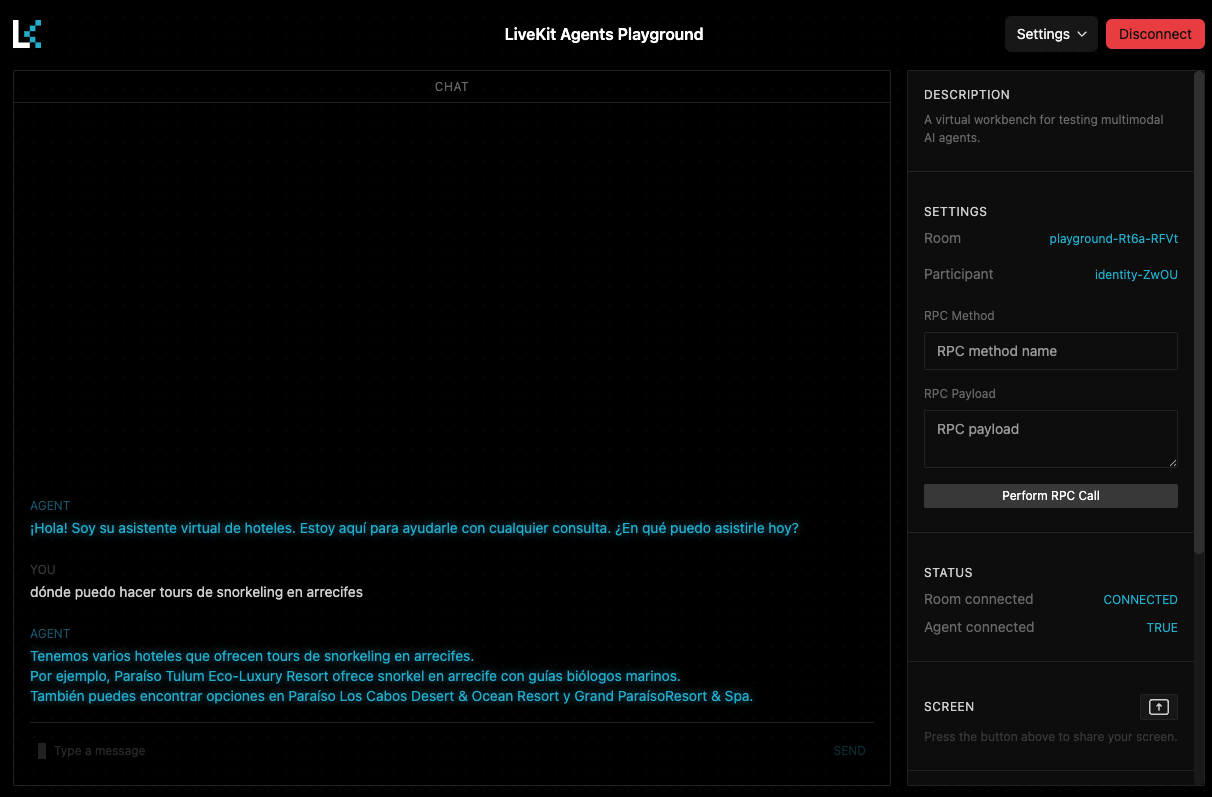
Navigate to the LiveKit Agents Playground. Enter with your LiveKit Cloud account. Select your project and connect.
You will need the VirtualAssistantStack.UserPoolId output from deployment.
For the demo, user sign up is disabled. You will need to
create your user on the Amazon Cognito console
in the VirtualAssistantStack.UserPoolId so you can log in.
VirtualAssistantStack.UserPoolId from the
stack deployment outputs.Navigate to http://localhost:5173 after running nx serve demo.
You: "¿Dónde puedo hacer meditación maya con cuencos tibetanos?" Agent: should respond with information about Paraíso Tulum You: "¿Qué hay de rico para comer allí?" Agent: should respond with information about Paraíso Tulum
You: "Quiero reservar una habitación para dos personas." Agent: should collect required details and respond with a booking confirmation.
You: "¿Puedes hacer mantenimiento en la habitación 101?"
You: "¿Puedes hacer checkout de la habitación 101?"
In the event that you decide to stop using the prototype, we recommend that you follow a tear-down procedure. Most of the services used have no cost when there is no active use with the notable exception of storage in S3 and CloudWatch Logs. AWS CloudFormation via CDK will tear down all resources except for Amazon S3 buckets and AWS CloudWatch Logs log groups with data.
nx run infra:destroy
Due to versioning, lifecycle rules are the most thorough approach for complete cleanup.
# Find virtual-assistant related bucket names
ASSISTANT_BUCKETS=$(aws s3api list-buckets --query 'Buckets[?contains(Name, `virtualassistant`) || contains(Name, `cdk-hnb659fds`)].Name' --output text)

# Apply lifecycle rules to expire all objects and versions after 1 day
for bucket in $ASSISTANT_BUCKETS; do
  echo "Setting lifecycle rule for bucket: $bucket"
  aws s3api put-bucket-lifecycle-configuration \
    --bucket "$bucket" \
    --lifecycle-configuration '{
      "Rules": [{
        "ID": "DeleteEverything",
        "Status": "Enabled",
        "Filter": {},
        "Expiration": {"Days": 1},
        "NoncurrentVersionExpiration": {"NoncurrentDays": 1},
        "AbortIncompleteMultipartUpload": {"DaysAfterInitiation": 1}
      }]
    }'
done

# After 24+ hours, delete the empty buckets
for bucket in $ASSISTANT_BUCKETS; do
  echo "Deleting bucket: $bucket"
  aws s3 rb s3://"$bucket"
done
# Delete virtual-assistant related log groups
aws logs describe-log-groups \
  --query 'logGroups[?contains(logGroupName, `VirtualAssistant`) || contains(logGroupName, `HotelPms`)].logGroupName' \
  --output text | xargs -I {} aws logs delete-log-group --log-group-name {}
Important Notes:
For common issues and debugging guidance, see the troubleshooting guide. This includes specific guidance for WhatsApp integration, voice processing, deployment issues, and performance optimization.
As part of the prototype process, we have some improvement ideas for your path to production.
Amazon Connect Integration: If your use case requires telephone support, human agent escalation, or complete contact center capabilities, we recommend using Amazon Connect. The AWS Workshop for Amazon Connect Integration provides comprehensive guidance for building virtual assistants with Amazon Connect, including integration with Amazon Bedrock Nova Sonic for natural conversations.
Please see the security guidelines.
Sample code, software libraries, command line tools, proofs of concept, templates, or other related technology are provided as AWS Content or Third-Party Content under the AWS Customer Agreement, or the relevant written agreement between you and AWS (whichever applies). You should not use this AWS Content or Third-Party Content in your production accounts, or on production or other critical data. You are responsible for testing, securing, and optimizing the AWS Content or Third-Party Content, such as sample code, as appropriate for production grade use based on your specific quality control practices and standards. Deploying AWS Content or Third-Party Content may incur AWS charges for creating or using AWS chargeable resources, such as running Amazon EC2 instances or using Amazon S3 storage.
Run Claude Code as an MCP server so any agent can delegate coding tasks to it
 @microsoft✓ Official
Browser automation using accessibility snapshots instead of screenshots
 @googleapis✓ Official
Google's universal MCP server supporting PostgreSQL, MySQL, MongoDB, Redis, and 10+ databases
 @github✓ Official
Official GitHub integration for repos, issues, PRs, and CI/CD workflows