

Are you the author? Sign in to claim
Structural RAG (Retrieval-Augmented Generation) system for large codebases





Scaffold is a specialized RAG (Retrieval-Augmented Generation) system designed to revolutionize how development teams interact with large codebases. Born from real-world frustrations with traditional documentation and AI-assisted development, Scaffold provides the structural foundation AI agents need to effectively construct, maintain, and repair complex software projects.
Modern development teams face three critical problems:
Scaffold transforms your source code into a living knowledge graph stored in a graph database. This creates an intelligent context layer that:
Like its physical namesake, Scaffold provides the temporary support structure needed to build something great - then disappears when the work is done.
There are two primary ways to run Scaffold. Choose the one that best fits your needs.
This is the fastest method to get Scaffold running. It uses the official pre-built image from the GitHub Container Registry and does not require you to clone the source code repository. You only need to create two configuration files.
Create a new folder for your project setup.
mkdir my-scaffold-server
cd my-scaffold-server
In the my-scaffold-server directory, create the following two files.
docker-compose.yaml:
services:
  scaffold-mcp:
    image: ghcr.io/beer-bears/scaffold:latest
    container_name: scaffold-mcp-prod
    env_file:
      - .env
    tty: true
    ports:
      - "8000:8080"
    depends_on:
      - neo4j
    volumes:
      - ./codebase:/app/codebase

  chromadb:
    image: chromadb/chroma:1.0.13
    container_name: scaffold-chromadb
    restart: unless-stopped
    volumes:
      - chroma_data:/data

  neo4j:
    image: neo4j:5
    container_name: scaffold-neo4j
    restart: unless-stopped
    environment:
      NEO4J_AUTH: "${NEO4J_USER:-neo4j}/${NEO4J_PASSWORD:-password}"
    volumes:
      - neo4j_data:/data
    ports:
      - "7474:7474"
      - "7687:7687"

volumes:
  chroma_data:
  neo4j_data:
.env:
# ChromaDB Settings
CHROMA_SERVER_HOST=chromadb
CHROMA_SERVER_PORT=8000
CHROMA_COLLECTION_NAME=scaffold_data

# Neo4j Credentials
NEO4J_USER=neo4j
NEO4J_PASSWORD=password
NEO4J_URI=bolt://neo4j:password@neo4j:7687

# Absolute path to your codebase
PROJECT_PATH=<ABSOLUTE_PATH_TO_YOUR_CODEBASE>
Start all services using Docker Compose.
docker-compose up -d
Scaffold will now start and begin analyzing the code of your codebase.
This method is for developers who have cloned the repository and want to build the Docker image locally. This is ideal for contributing to Scaffold or making custom modifications, or just run all containers at once in self-hosting mode.
First, clone the repository and navigate into the project directory.
git clone https://github.com/Beer-Bears/scaffold.git
cd scaffold
Next, create your environment file from the example provided.
cp .env.example .env
Place the Python project you want to analyze into the codebase directory.
# Create the directory if it doesn't exist
mkdir -p codebase

# Copy your project files into it
cp -r /path/to/your/python/project/* ./codebase/
Alternatively, you can edit the .env file and set the PROJECT_PATH variable to the absolute path of your project on your host machine.
Start the entire application stack using Docker Compose. The --build flag will compile your local source code into a new Docker image.
docker-compose up --build -d
Once the containers are running (using either method), you can interact with the system.
Add the Scaffold server to your client's mcp.json file.
{
  "mcpServers": {
    "scaffold-mcp": {
      "url": "http://localhost:8000/mcp"
    }
  }
}
Access the Neo4j web UI to visually explore the graph of your codebase. Use the credentials from your .env file (default: neo4j / password).
URL: http://localhost:7474/
You can also test the MCP endpoint directly using curl.
curl -N -X POST http://localhost:8000/mcp/ \
  -H "Content-Type: application/json" \
  -H "Accept: application/json, text/event-stream" \
  -d '{
    "jsonrpc": "2.0",
    "id": "1",
    "method": "tools/call",
    "params": {
      "name": "get_code_entity_information",
      "arguments": {
        "entity_name": "MyClassName"
      }
    }
  }'
You also can check out mcp description and get docker cmd configuration
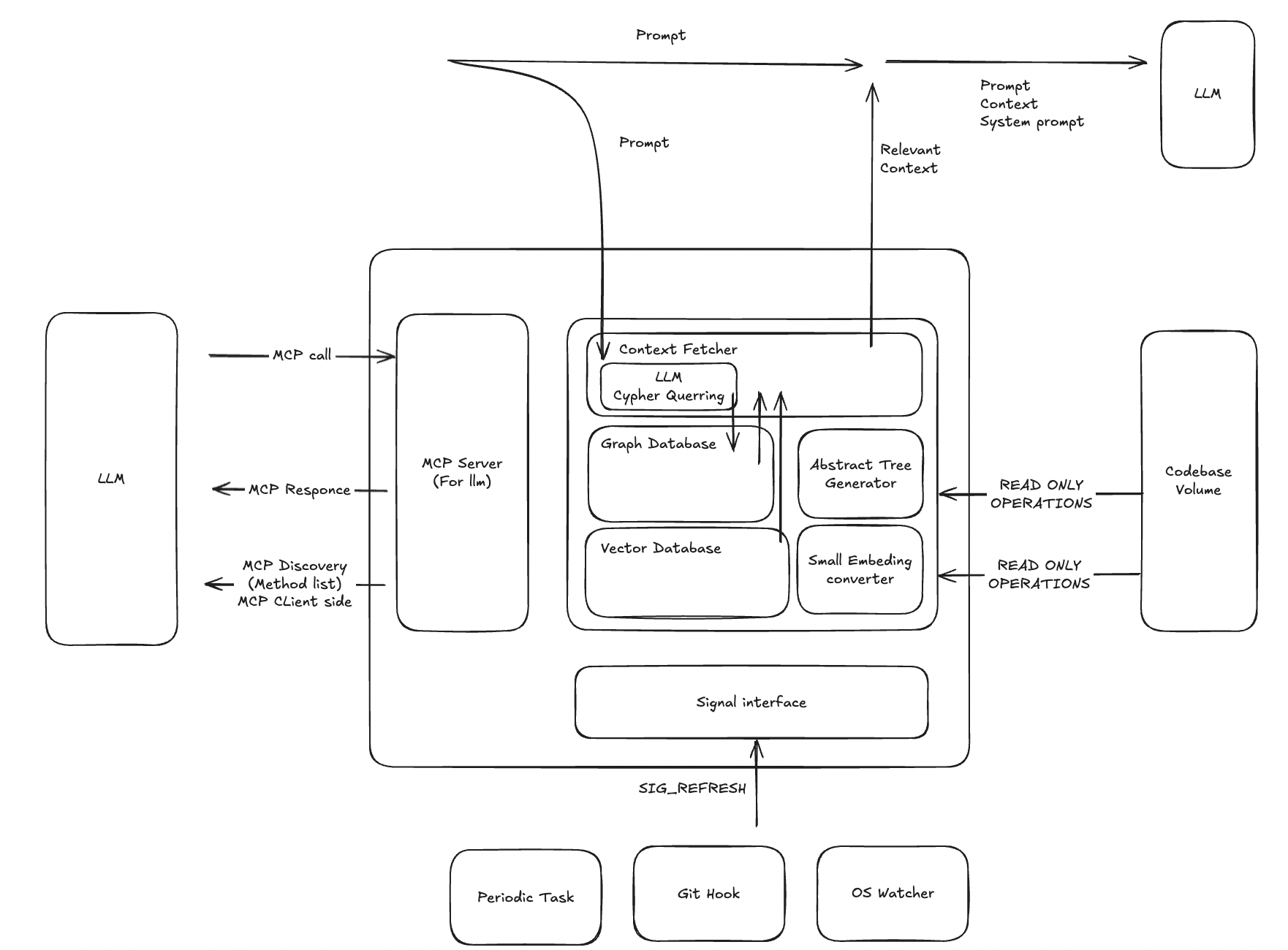
Usecase Schema
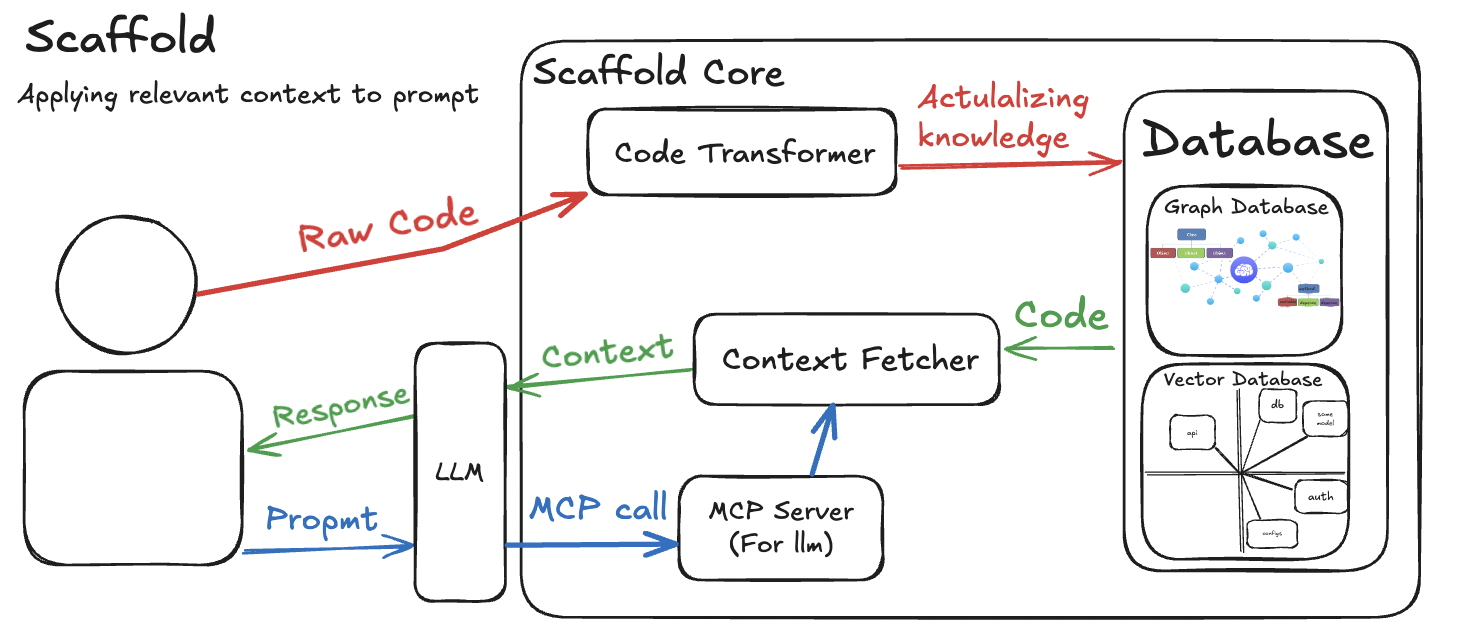
Interfaces Schema
.
├── docs
│   ├── img       # Static Images
│   └── research  # Research reports
└── src
    ├── core      # RAG Context Fetching Algorithms
    ├── database  # Graph/Vector Database Logic
    ├── generator # Abstract Tree Generator
    ├── mcp       # MCP Interface
    └── parsers   # AST Parcers
RAG (Retrieval-Augmented Generation) is a technique that enhances large language models (LLMs) by:
Unlike traditional LLMs that rely solely on their training data, RAG systems access up-to-date project-specific information and reduce hallucinations by grounding responses in actual codebase context.
Graph RAG extends traditional RAG by representing knowledge as interconnected entities in a graph database. This allows the system to understand and retrieve not just chunks of text, but also the structural relationships between them (e.g., this function calls another function, this class inherits from another class). This structural context is invaluable for complex software engineering tasks.
Scaffold is an open-source project and we welcome contributions from the community! Whether it's reporting a bug, discussing features, or submitting code, your help is valued.
To get started, please read our Contributing Guidelines for details on how to set up your development environment, run tests, and submit a pull request.
This project is licensed under the MIT License. See the LICENSE file for details.
Run Claude Code as an MCP server so any agent can delegate coding tasks to it
 @microsoft✓ Official
Browser automation using accessibility snapshots instead of screenshots
 @googleapis✓ Official
Google's universal MCP server supporting PostgreSQL, MySQL, MongoDB, Redis, and 10+ databases
 @github✓ Official
Official GitHub integration for repos, issues, PRs, and CI/CD workflows