

Are you the author? Sign in to claim
MCP server for using ScrAPI to scrape web pages.





ScrAPI MCP Server lets MCP-compatible clients scrape web pages through ScrAPI.
ScrAPI is useful when a page needs a real browser session, CAPTCHA solving, residential proxy access, cookie banner handling, JavaScript rendering, geolocation-aware fetching, or pre-scrape browser actions such as clicking and scrolling.
https:// or http:// URL through ScrAPI.npx, Docker, Smithery, or from source.scrape_url_htmlScrapes a URL and returns the result as HTML.
Use this when you need the page structure, links, tables, embedded metadata, or custom downstream parsing.
Inputs:
| Name | Type | Required | Description |
|---|---|---|---|
url | string | Yes | The absolute URL to scrape. Must be a valid URL. |
browserCommands | string | No | JSON array string of browser commands to execute before scraping. |
Returns:
text/html content from the requested page.isError: true with the ScrAPI error body when the upstream request fails.scrape_url_markdownScrapes a URL and returns the result as Markdown.
Use this when the text content matters more than the HTML structure, for example article extraction, product copy, search result summaries, or LLM-friendly page analysis.
Inputs:
| Name | Type | Required | Description |
|---|---|---|---|
url | string | Yes | The absolute URL to scrape. Must be a valid URL. |
browserCommands | string | No | JSON array string of browser commands to execute before scraping. |
Returns:
text/markdown content from the requested page.isError: true with the ScrAPI error body when the upstream request fails.Choose one of the following runtime options:
npx or local development.Set SCRAPI_API_KEY to use your ScrAPI account:
export SCRAPI_API_KEY="your-scrapi-api-key"
PowerShell:
$env:SCRAPI_API_KEY = "your-scrapi-api-key"
An API key is optional. Without one, ScrAPI currently allows limited free usage with lower concurrency and queueing priority.
The default transport is stdio, which is the transport most desktop MCP clients use when they launch a local server process.
npx -y @deventerprisesoftware/scrapi-mcp
With an API key:
SCRAPI_API_KEY="your-scrapi-api-key" npx -y @deventerprisesoftware/scrapi-mcp
PowerShell:
$env:SCRAPI_API_KEY = "your-scrapi-api-key"
npx -y @deventerprisesoftware/scrapi-mcp
The published Docker image starts in HTTP mode by default and listens on port 5000.
docker run --rm -p 5000:5000 -e SCRAPI_API_KEY="your-scrapi-api-key" deventerprisesoftware/scrapi-mcp
MCP endpoint:
http://localhost:5000/mcp
To run the container as a stdio server for a local MCP client:
docker run -i --rm -e TRANSPORT=stdio -e SCRAPI_API_KEY="your-scrapi-api-key" deventerprisesoftware/scrapi-mcp
Most local coding assistants use one of these two configuration shapes:
npx or Docker and communicates over stdin/stdout.TRANSPORT=http, then point the client at http://localhost:5000/mcp or your deployed URL.When a client has a tool timeout setting, use a value close to 300000 milliseconds or 300 seconds. ScrAPI can take several minutes for pages that require CAPTCHA solving, browser rendering, or multiple browser commands.
Add this to your claude_desktop_config.json:
{
  "mcpServers": {
    "ScrAPI": {
      "command": "npx",
      "args": ["-y", "@deventerprisesoftware/scrapi-mcp"],
      "env": {
        "SCRAPI_API_KEY": "your-scrapi-api-key"
      }
    }
  }
}
{
  "mcpServers": {
    "ScrAPI": {
      "command": "docker",
      "args": [
        "run",
        "-i",
        "--rm",
        "-e",
        "SCRAPI_API_KEY",
        "deventerprisesoftware/scrapi-mcp"
      ],
      "env": {
        "SCRAPI_API_KEY": "your-scrapi-api-key"
      }
    }
  }
}
After changing the config, restart Claude Desktop. You should see the two ScrAPI tools available in the MCP tools list.
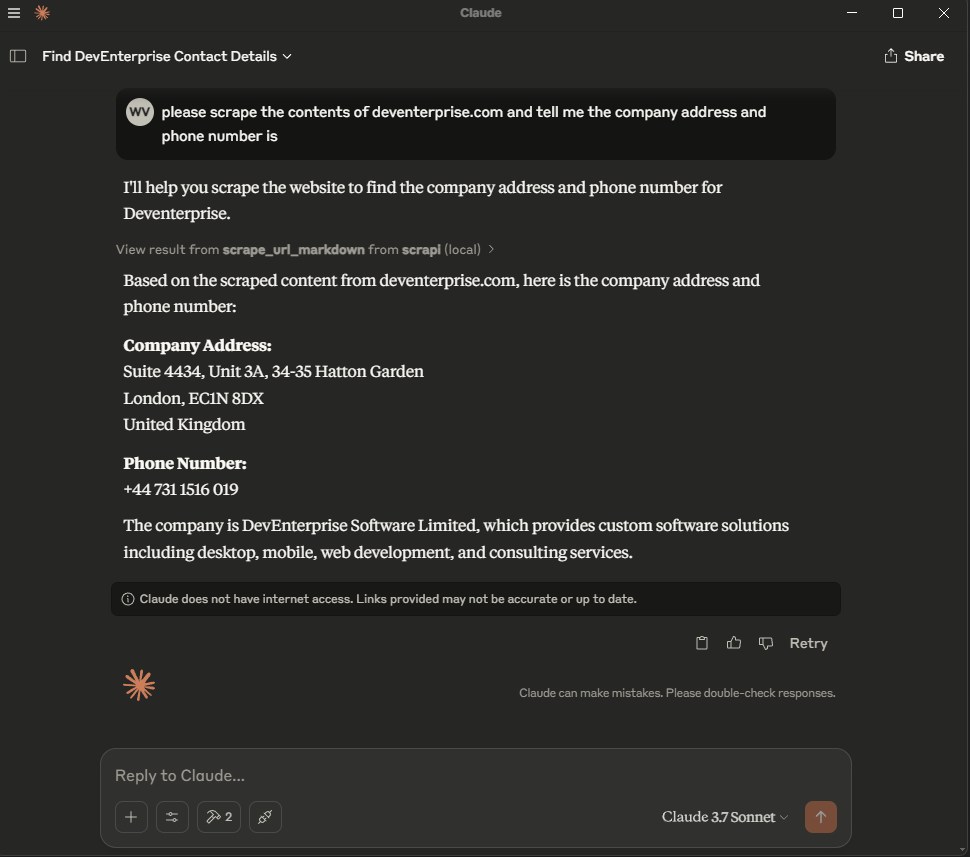
Cursor supports project configuration at .cursor/mcp.json and global configuration at ~/.cursor/mcp.json. See the Cursor MCP documentation.
Stdio configuration:
{
  "mcpServers": {
    "scrapi": {
      "command": "npx",
      "args": ["-y", "@deventerprisesoftware/scrapi-mcp"],
      "env": {
        "SCRAPI_API_KEY": "${env:SCRAPI_API_KEY}"
      }
    }
  }
}
HTTP configuration:
{
  "mcpServers": {
    "scrapi": {
      "url": "http://localhost:5000/mcp"
    }
  }
}
For HTTP, start the server first:
TRANSPORT=http PORT=5000 SCRAPI_API_KEY="your-scrapi-api-key" npx -y @deventerprisesoftware/scrapi-mcp
Windsurf Cascade stores MCP servers in ~/.codeium/windsurf/mcp_config.json. You can also add servers from Windsurf Settings > Cascade > MCP Servers. See the Windsurf MCP documentation.
Stdio configuration:
{
  "mcpServers": {
    "scrapi": {
      "command": "npx",
      "args": ["-y", "@deventerprisesoftware/scrapi-mcp"],
      "env": {
        "SCRAPI_API_KEY": "${env:SCRAPI_API_KEY}"
      }
    }
  }
}
HTTP configuration:
{
  "mcpServers": {
    "scrapi": {
      "serverUrl": "http://localhost:5000/mcp"
    }
  }
}
Windsurf supports serverUrl or url for remote HTTP MCP servers. If your team uses enterprise MCP controls, the server ID in the admin whitelist must match the key name, for example scrapi.
Kilo Code stores MCP configuration in the main Kilo config file. Use ~/.config/kilo/kilo.jsonc for global configuration, kilo.jsonc in the project root, or .kilo/kilo.jsonc for project-specific configuration. See the Kilo Code MCP documentation.
Local stdio configuration:
{
  "mcp": {
    "scrapi": {
      "type": "local",
      "command": ["npx", "-y", "@deventerprisesoftware/scrapi-mcp"],
      "environment": {
        "SCRAPI_API_KEY": "your-scrapi-api-key"
      },
      "enabled": true,
      "timeout": 300000
    }
  }
}
Remote HTTP configuration:
{
  "mcp": {
    "scrapi": {
      "type": "remote",
      "url": "http://localhost:5000/mcp",
      "enabled": true,
      "timeout": 300000
    }
  }
}
On Windows, if npx is not found from the Kilo Code UI, use cmd as the command and pass /c, npx, -y, and @deventerprisesoftware/scrapi-mcp as arguments.
Codex supports MCP servers in the CLI and IDE extension. Both use the same MCP configuration. By default, Codex stores it in ~/.codex/config.toml; trusted projects can also use .codex/config.toml. See the Codex MCP documentation.
Add a stdio server with the Codex CLI:
codex mcp add scrapi --env SCRAPI_API_KEY="your-scrapi-api-key" -- npx -y @deventerprisesoftware/scrapi-mcp
codex mcp list
Equivalent config.toml stdio configuration:
[mcp_servers.scrapi]
command = "npx"
args = ["-y", "@deventerprisesoftware/scrapi-mcp"]
startup_timeout_sec = 20
tool_timeout_sec = 300

[mcp_servers.scrapi.env]
SCRAPI_API_KEY = "your-scrapi-api-key"
HTTP configuration:
[mcp_servers.scrapi]
url = "http://localhost:5000/mcp"
tool_timeout_sec = 300
In the Codex terminal UI, run /mcp to confirm the server is connected.
VS Code stores MCP configuration in .vscode/mcp.json for a workspace or in your user profile. The top-level key is servers, not mcpServers. See the VS Code MCP configuration reference.
Stdio configuration:
{
  "inputs": [
    {
      "type": "promptString",
      "id": "scrapi-api-key",
      "description": "ScrAPI API key",
      "password": true
    }
  ],
  "servers": {
    "scrapi": {
      "type": "stdio",
      "command": "npx",
      "args": ["-y", "@deventerprisesoftware/scrapi-mcp"],
      "env": {
        "SCRAPI_API_KEY": "${input:scrapi-api-key}"
      }
    }
  }
}
HTTP configuration:
{
  "servers": {
    "scrapi": {
      "type": "http",
      "url": "http://localhost:5000/mcp"
    }
  }
}
Use the Command Palette commands MCP: Add Server, MCP: List Servers, and MCP: Reset Cached Tools to add, inspect, and refresh MCP servers.
Claude Code supports MCP servers through the claude mcp CLI and the /mcp command inside Claude Code. See the Claude Code MCP documentation.
Add a stdio server:
claude mcp add --transport stdio --env SCRAPI_API_KEY="your-scrapi-api-key" scrapi -- npx -y @deventerprisesoftware/scrapi-mcp
claude mcp list
Add an HTTP server:
claude mcp add --transport http scrapi http://localhost:5000/mcp
claude mcp list
To make the server available across all Claude Code projects, add --scope user before the server name:
claude mcp add --transport stdio --scope user --env SCRAPI_API_KEY="your-scrapi-api-key" scrapi -- npx -y @deventerprisesoftware/scrapi-mcp
Inside Claude Code, run /mcp to confirm the server is connected.
Use this shape for clients that accept a command, arguments, and environment variables:
{
  "name": "ScrAPI",
  "command": "npx",
  "args": ["-y", "@deventerprisesoftware/scrapi-mcp"],
  "env": {
    "SCRAPI_API_KEY": "your-scrapi-api-key"
  }
}
Set TRANSPORT=http to run the server over Streamable HTTP.
TRANSPORT=http PORT=5000 SCRAPI_API_KEY="your-scrapi-api-key" npx -y @deventerprisesoftware/scrapi-mcp
PowerShell:
$env:TRANSPORT = "http"
$env:PORT = "5000"
$env:SCRAPI_API_KEY = "your-scrapi-api-key"
npx -y @deventerprisesoftware/scrapi-mcp
The MCP endpoint is:
http://localhost:5000/mcp
Environment variables:
| Name | Default | Description |
|---|---|---|
SCRAPI_API_KEY | Limited default key | ScrAPI API key used when calling the ScrAPI scrape API. |
TRANSPORT | stdio | Use stdio or http. |
PORT | 5000 | Port used when TRANSPORT=http. |
Stdio mode:
npx @modelcontextprotocol/inspector npx -y @deventerprisesoftware/scrapi-mcp
HTTP mode:
TRANSPORT=http PORT=5000 npx -y @deventerprisesoftware/scrapi-mcp
Then open MCP Inspector and connect to:
http://localhost:5000/mcp
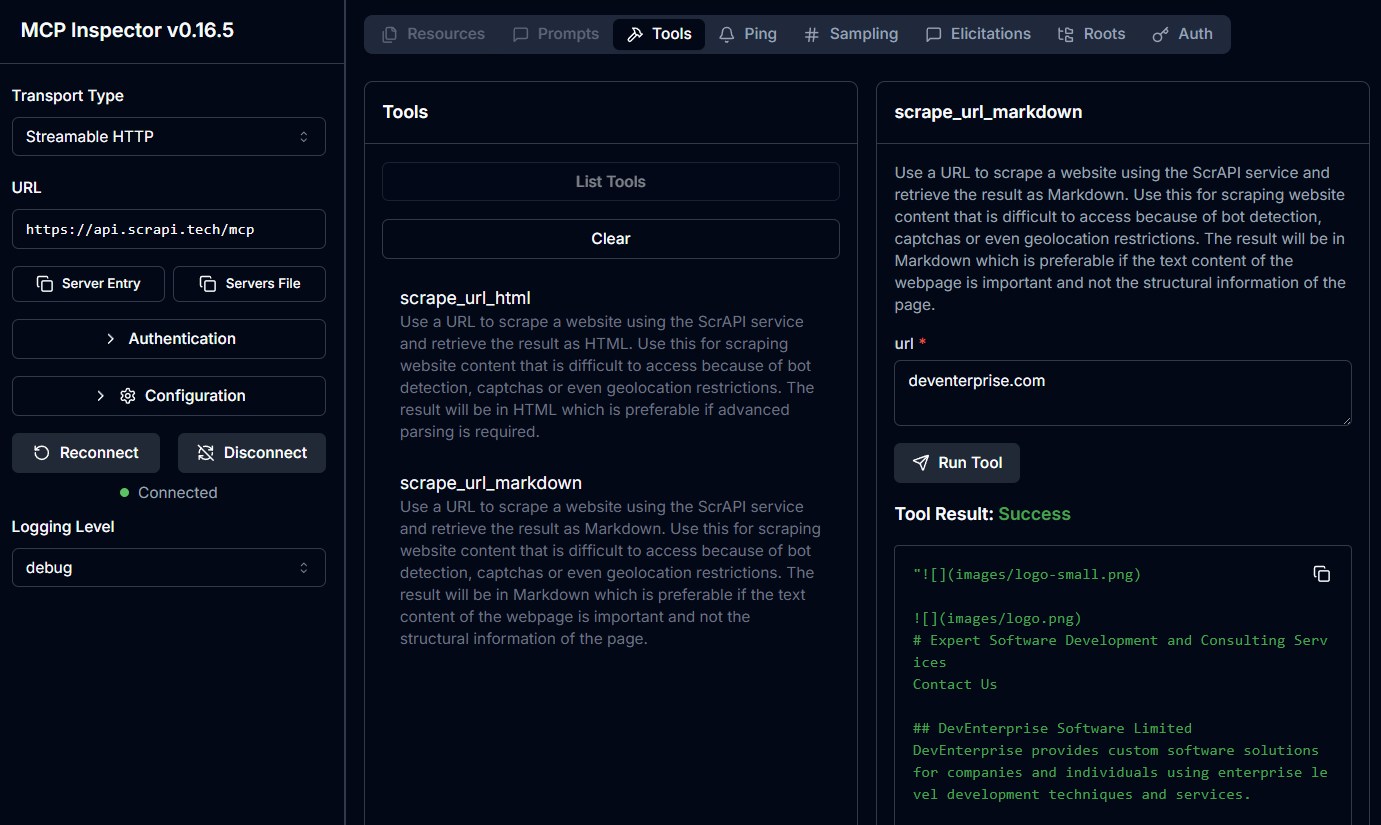
ScrAPI also provides hosted MCP endpoints:
Streamable HTTP: https://api.scrapi.tech/mcp
SSE:             https://api.scrapi.tech/mcp/sse
Cloud MCP servers are not yet supported by every MCP client. They are most useful for custom clients, MCP Inspector, or platforms that support remote MCP servers.
To authenticate with your ScrAPI API key, pass it as a query parameter or request header:
https://api.scrapi.tech/mcp?apiKey=<YOUR_API_KEY>X-API-KEY: <YOUR_API_KEY>The exact interaction depends on your MCP client. In most clients, you can either ask the model to use the ScrAPI tool or call the tool directly from a tool inspector.
Tool:
scrape_url_markdown
Arguments:
{
  "url": "https://example.com"
}
Example prompt:
Use ScrAPI to scrape https://example.com as Markdown and summarize the page.
Tool:
scrape_url_html
Arguments:
{
  "url": "https://example.com"
}
Example prompt:
Use ScrAPI to scrape https://example.com as HTML and extract every link.
The browserCommands value must be a string containing a JSON array.
{
  "url": "https://example.com",
  "browserCommands": "[{\"click\":\"#accept-cookies\"},{\"wait\":1000}]"
}
{
  "url": "https://example.com/search",
  "browserCommands": "[{\"input\":{\"input[name='q']\":\"web scraping\"}},{\"click\":\"button[type='submit']\"},{\"waitfor\":\"#results\"}]"
}
{
  "url": "https://example.com/products",
  "browserCommands": "[{\"scroll\":1200},{\"wait\":1000},{\"click\":\"button.load-more\"},{\"waitfor\":\".product-card:nth-child(25)\"}]"
}
Both tools support optional browser commands that interact with the page before ScrAPI captures the final result.
Commands are provided as a JSON array string. They are executed with human-like behavior such as random mouse movement and variable typing speed.
| Command | Format | Description |
|---|---|---|
| Click | {"click": "#buttonId"} | Click an element by CSS selector. |
| Input | {"input": {"input[name='email']": "value"}} | Fill an input field. |
| Select | {"select": {"select[name='country']": "USA"}} | Select an option by value or visible text. |
| Scroll | {"scroll": 1000} | Scroll down by pixels. Use a negative value to scroll up. |
| Wait | {"wait": 5000} | Wait for milliseconds. Maximum: 15000. |
| WaitFor | {"waitfor": "#elementId"} | Wait for an element to appear in the DOM. |
| JavaScript | {"javascript": "console.log('test')"} | Execute custom JavaScript. |
Readable command array:
[
  { "click": "#accept-cookies" },
  { "wait": 2000 },
  { "input": { "input[name='search']": "web scraping" } },
  { "click": "button[type='submit']" },
  { "waitfor": "#results" },
  { "scroll": 500 }
]
Escaped as an MCP tool argument:
{
  "url": "https://example.com",
  "browserCommands": "[{\"click\":\"#accept-cookies\"},{\"wait\":2000},{\"input\":{\"input[name='search']\":\"web scraping\"}},{\"click\":\"button[type='submit']\"},{\"waitfor\":\"#results\"},{\"scroll\":500}]"
}
Need help finding CSS selectors? Try the Rayrun browser extension to select elements and generate selectors.
For more details, see the Browser Commands documentation.
npx.SCRAPI_API_KEY is set correctly.browserCommands.browserCommands is a JSON array string, not a raw JSON array.scrape_url_html if Markdown extraction omits structure you need.The server only sends browser commands when browserCommands parses as a JSON array. This is valid:
{
  "browserCommands": "[{\"click\":\"#accept-cookies\"}]"
}
This is not valid for this MCP tool schema because it is an object array, not a string:
{
  "browserCommands": [{ "click": "#accept-cookies" }]
}
TRANSPORT=http./mcp, not /.PORT.Install dependencies:
npm install
Run tests:
npm test
Build:
npm run build
Run from source in stdio mode:
npm run build
node dist/index.js
Run from source in HTTP mode:
TRANSPORT=http PORT=5000 node dist/index.js
Build the Docker image:
docker build -t deventerprisesoftware/scrapi-mcp -f Dockerfile .
Or use the package script:
npm run docker:build
This MCP server is licensed under the MIT License. You are free to use, modify, and distribute the software subject to the terms of the MIT License. See LICENSE for details.
Run Claude Code as an MCP server so any agent can delegate coding tasks to it
 @microsoft✓ Official
Browser automation using accessibility snapshots instead of screenshots
 @googleapis✓ Official
Google's universal MCP server supporting PostgreSQL, MySQL, MongoDB, Redis, and 10+ databases
 @github✓ Official
Official GitHub integration for repos, issues, PRs, and CI/CD workflows