

Are you the author? Sign in to claim
Free, local, accurate and honest meeting transcription SKILL with speaker diarization for your AI agent or second brain
Free, local, accurate meeting transcription with speaker recognition — for your AI assistant or second brain.
Drop a file path into your AI agent's chat — or run one command in your terminal — and get a clean, speaker-labeled transcript. Works with Claude Code, Codex, Cursor, Aider & others via AGENTS.md, or as a plain CLI with no AI at all. Everything runs on your Mac: no cloud, no uploads, no subscription.







.mp4, .mov, .m4a, .mp3, .wav, .webm, you name it. The skill handles the format conversion for you.speaker-diarization-community-1 — one of the most accurate open-source diarization models (its authors report ~10–11% DER on standard benchmarks), picked so it runs on a normal Mac (M3 / 16 GB), not only a top-end M-Max. A heavier model (DiariZen-WavLM) edges it on some English benchmarks but costs a lot more compute; scriba favors the accuracy/footprint balance. Words come from OpenAI Whisper large-v3. Don't take our word for it — measure it on your own audio with scripts/benchmark_der.py.launchd/cron watcher at your Zoom or Meet recordings folder — every call becomes a searchable transcript that flows into your second brain / personal AI knowledge base (Obsidian, Notion, Cognee, mem0, whatever you use). The more conversations you capture and feed your assistant, the sharper its answers about you get. See Karpathy on personal Wikis for the broader idea.| scriba | Otter / Fireflies / Granola | Local Whisper alone | |
|---|---|---|---|
| Audio stays on your computer | ✅ | ❌ | ✅ |
| Tells you who said what | ✅ | ✅ | ❌ |
| Tells you who said what — and how sure it is | ✅ | ❌ | ❌ |
| Cost after install | $0 | $10–30/mo | $0 |
| Works offline | ✅ | ❌ | ✅ |
"…and how sure it is": every word in the JSON sidecar carries an ASR
confidence, a speaker-attribution confidence, and an overlap flag, so your AI
knows which lines to trust and which to treat as shaky. And you can put a number
on the diarization itself — benchmarks/ ships a pure-Python
DER scorer you run on your own labeled audio.
A portable <title>.transcript/ folder next to your input video, holding the Markdown plus its assets, with a 10-second voice clip per speaker embedded right in the file (click ▶ to play in Obsidian / VS Code / GitHub):
# q3-planning-sync

## Speakers — identify who's who

**Speaker 1** (80% of speaking time).
<audio controls src="data/speaker-1.wav"></audio>

Sample utterances:
> [00:00:03] «So the launch is moved to Friday — can we ship the docs by Thursday?»
> [00:00:40] «...»

**Speaker 2** (18% of speaking time).
<audio controls src="data/speaker-2.wav"></audio>
...
The assistant then asks you "who's Speaker 1?" — you answer, and it renames them everywhere in the transcript.
git clone https://github.com/AlexanderAbramovPav/scriba ~/.claude/skills/scriba
That's it. Don't pre-configure anything. The first time you transcribe, the assistant will pause and walk you through a one-time ~30-second step: creating a free HuggingFace account and pasting a token back into the chat. Three clicks in a browser, no terminal commands. You'll never see it again after that.
Why HuggingFace? It's the open-source equivalent of an app store for AI models. The speaker-recognition model is free, but its authors require accepting a usage agreement once — pretty standard for research-grade open source.
The core of scriba is a bash + Python pipeline. The "skill" layer is a thin wrapper that helps an AI agent guide you through setup and speaker naming — and there's a tool-agnostic version of those instructions in AGENTS.md, supported by most modern AI coding tools.
| Your tool | Where to point it | How to invoke |
|---|---|---|
| Claude Code | clone into ~/.claude/skills/scriba/ (default install command above) | /scriba <file> |
| OpenAI Codex CLI | clone anywhere, place AGENTS.md at ~/.codex/AGENTS.md (or project root) | "transcribe this meeting: <file>" |
| Cursor | clone anywhere, copy AGENTS.md to .cursor/rules/scriba.md | mention @scriba or natural language |
| Continue.dev | clone anywhere, register transcribe.sh as a custom slash command in ~/.continue/config.yaml | /scriba <file> |
| Aider | clone anywhere, aider --read <scriba>/AGENTS.md <file> | natural language in chat |
| Goose (Block) | clone anywhere, add as a shell-command extension | mention scriba in chat |
| ChatGPT / Claude.ai browser | open AGENTS.md, paste into a "Custom Instructions" or project-context slot | tell the chat the local file path |
| No AI at all | clone anywhere | bash <scriba>/scripts/transcribe.sh <file> |
AGENTS.md is becoming a de-facto standard for cross-tool AI agent instructions — same role as SKILL.md but vendor-neutral. The bash CLI works in any environment, with or without an AI driving it.
Easiest path is Claude Code (other agents & the plain CLI: see Use it with anything else above). Open Claude Code, type:
/scriba /path/to/your-meeting.mp4
Now you can walk away. The assistant runs the transcription in the background. While it's working:
🎙 tx 47% · ETA 01:18), updated every few seconds.--watch for a full-screen progress view.
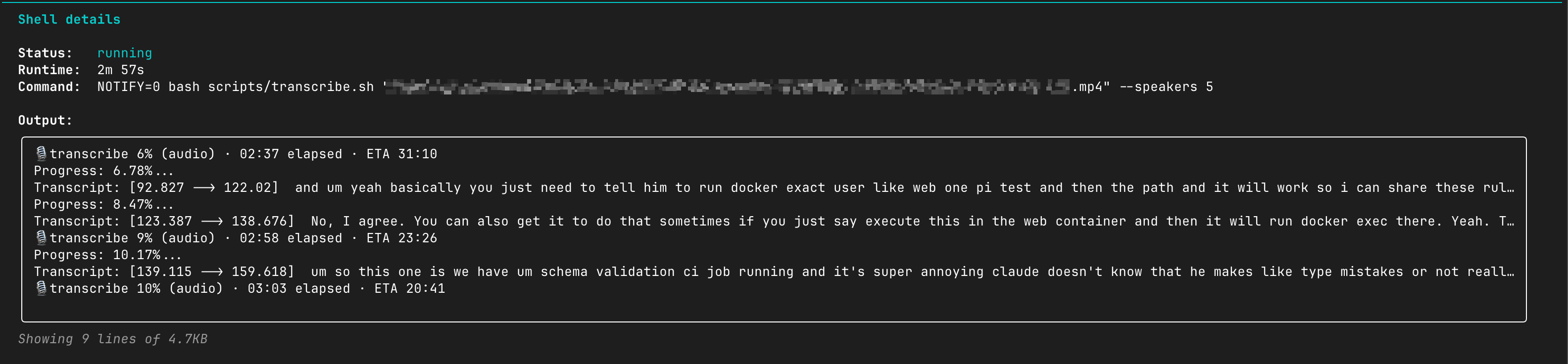
Live progress streams right into Claude Code's “Shell details” — current stage, % and ETA update as it runs (even while diarization is quiet).
When it finishes, the assistant opens the result and shows you the speakers it found. For each one you get:
<audio> is embedded right in the Markdown).The assistant asks "who is who?" — you answer (e.g. "Speaker 1 is Alice, Speaker 2 is Bob") — it renames them everywhere in the transcript. Done.
Each recording becomes a self-contained, portable folder next to your input file:
your-meeting.transcript/      ← move/zip/sync this whole folder; nothing breaks
├── your-meeting.md           ← the transcript (H1 title + frontmatter)
└── data/
    ├── transcript.json       ← rich machine-readable sidecar (per-word confidence, speakers)
    └── speaker-1.wav …       ← one ≤10 s voice clip per speaker, embedded in the MD
The MD points at data/… with relative paths, so the folder travels as a unit — open your-meeting.md in any Markdown viewer (Obsidian, VS Code, GitHub) and the embedded <audio> players just work.
The folder/file name is meaningful: it's derived from your video's name (kebab-cased). When the source name is generic (zoom_0, GMT20260605-120000, recording, …), the assistant picks a real title for you. The original filename is always preserved in the source: frontmatter field.
Alongside your recordings, a hidden .scriba/ folder holds corpus-wide state your AI uses to navigate everything: index.json (one entry per recording — read once, find any meeting), plus the glossary and persistent voiceprints. Full layout in references/file-layout.md.
The slash-command flow is the easy path. If you want every conversation captured automatically, point a small watcher at whatever folder your meeting tool dumps recordings into:
# Watch ~/Documents/Zoom/, transcribe new .m4a or .mp4 files
fswatch -0 ~/Documents/Zoom | while read -d '' f; do
  case "$f" in *.m4a|*.mp4)
    bash ~/.claude/skills/scriba/scripts/transcribe.sh "$f" ;;
  esac
done
Then point your second-brain tool (Obsidian, Cognee, mem0, Notion AI, …) at the *.transcript/*.md files and you have a personal, private, searchable corpus of everything that's been said in your meetings — feeding back into AI assistants the way Karpathy described a personal Wiki. The more conversations the assistant can reach, the more it sounds like you and the better it answers questions about your world.
Everything below is optional. The slash command flow above is what 99% of people need.
bash scripts/transcribe.sh <media-file> [--fast] [--speakers N] [--lang XX] [--model M]
| Flag | Meaning |
|---|---|
| (default) | Accuracy mode — whisperX large-v3 on CPU + pyannote diarization. Real per-step progress for diarization. |
--fast | MLX (Apple GPU) transcription. Faster but coarser speaker boundaries; no per-step diarize progress on this path. |
--speakers N | Hint the number of speakers (helps pyannote when audio is short or noisy). Default: auto. |
--lang XX | Force ISO language code (en, ru, de, …). Default: auto-detect. |
--model M | Override the whisper model. Default: large-v3. |
--bootstrap | Just create the venv, don't transcribe. |
--status <file> | Print a one-line progress summary (cheap to poll). |
--watch <file> | Full-screen TUI watcher (run in a side terminal). |
Speaker renaming after the fact:
python3 scripts/rename_speakers.py meeting.transcript/meeting.md "Alice,Bob,Carol"
# or explicit mapping:
python3 scripts/rename_speakers.py meeting.transcript/meeting.md --map "Speaker 1=Alice,Speaker 2=Bob"
Pick the channel that fits your workflow. All read the same source of truth (*.transcript.progress.json next to the input — auto-deleted on successful completion together with *.transcript.log, so you're left with only the human-facing <title>.transcript/ folder. Diagnostic files are kept only when something fails).
| Surface | What you do | What you see |
|---|---|---|
| Statusline integration | Wire scripts/statusline.sh into your Claude Code / tmux / Starship / p10k statusline once. Recipes: references/statusline-integration.md. | 🎙 tx 47%* · ETA 01:18 → 🎙 dia/embedd 50%* · 02:17 → empty. Refreshes every ~3 s in your normal status bar. Zero AI tokens. |
--watch TUI | bash scripts/transcribe.sh --watch /path/to/file.mp4 in a side terminal. | Full-screen progress bar, audio %, ETA, last log line. 2 s refresh. Ctrl-C detaches; transcription keeps running. |
--status one-liner | bash scripts/transcribe.sh --status /path/to/file.mp4 | One line: stage=transcribe · elapsed 02:30 · ETA 01:18 (observed) · audio 47% (measured) · wall 51% · … |
*.transcript.progress.json | Read the file directly. | Compact JSON (~350 B) with the canonical schema (see references/eta-factors.md). Refreshed every 5 s. |
| macOS notification | Nothing — fires automatically on done if osascript is available. | Notification Center card "scriba · · " with the Glass sound. |
*.transcript.log | tail -f /path/to/file.transcript.log | Raw whisperX + pyannote output, including each per-segment Transcript: [start --> end] text line and each diarize/<step> N% (X/Y) progress event. |
Rule of thumb: a 1-hour recording takes roughly 1 hour on an M4 Max, ~1.5 h on an M2 Max, ~2 h on an M1. First run is slower (~5 min one-time model download); after that, the skill auto-calibrates to your machine's actual speed and the next ETA is anchored to your measured rate.
The model: wall_clock ≈ audio_sec × factor + warmup, where factor is the wall-clock-per-audio-second ratio for the full pipeline (transcribe + align + diarize). Anchored to one observed M4 Max run = 1.0× (Jun 2026, batch_size=1, int8 compute_type). Other chips scaled from public CPU benchmarks — starting estimates only; the calibration cache at ~/.config/scriba/calibration.json replaces the value with the actual observed rate after the first ≥60 s run.
| Chip | factor | Rough wall-clock for 1 h of audio |
|---|---|---|
| M1 | 2.0× | ~2 h |
| M1 Pro | 1.7× | ~1.7 h |
| M1 Max | 1.5× | ~1.5 h |
| M1 Ultra | 1.3× | ~1.3 h |
| M2 | 1.7× | ~1.7 h |
| M2 Pro | 1.5× | ~1.5 h |
| M2 Max | 1.3× | ~1.3 h |
| M2 Ultra | 1.2× | ~1.2 h |
| M3 | 1.5× | ~1.5 h |
| M3 Pro | 1.3× | ~1.3 h |
| M3 Max | 1.2× | ~1.2 h |
| M4 | 1.3× | ~1.3 h |
| M4 Pro | 1.1× | ~1.1 h |
| M4 Max | 1.0× | ~1 h ← anchor |
--fast (MLX, any Apple Silicon) | ~0.5× | ~30 m |
Intel and unknown CPUs fall back to 2.0×. Linux works (degraded: no macOS notification, no native MLX) — same factor table applies, the cache corrects after the first run.
Have a chip not in this table, or a measurably different rate? See CONTRIBUTING.md — adding a row is a one-line PR.
transcribe.sh extracts the input to 16 kHz mono WAV via ffmpeg.transcribe_whisperx.py calls whisperX with verbose=True, which prints Transcript: [start --> end] text per segment as it's decoded.DiarizationPipeline and calls pyannote.audio.Pipeline directly with a custom TextProgressHook so each pyannote sub-step (segmentation, embeddings, clustering, speaker_counting, discrete_diarization) reports its real completed/total counters as plain text.*.progress.json.json_to_md.py turns the JSON into Markdown inside <title>.transcript/, ffmpeg cuts one ≤10 s WAV clip per speaker into its data/ folder for the embedded <audio> players, the JSON sidecar is copied there too, and update_index.py upserts the recording into .scriba/index.json. See references/file-layout.md.MIT — © 2026 Alexander Abramov. Source & issues: https://github.com/AlexanderAbramovPav/scriba
Runtime dependencies (whisperX, pyannote.audio, faster-whisper, CTranslate2, OpenAI Whisper, ffmpeg) are installed locally, not vendored. Their licenses are catalogued in THIRD_PARTY_LICENSES.md.
One model has an attribution clause: the default diarization pipeline pyannote/speaker-diarization-community-1 is CC-BY-4.0. If you redistribute output produced with this skill, include a short attribution:
Speaker diarization powered by pyannote/speaker-diarization-community-1 by Hervé Bredin / pyannoteAI, licensed under CC-BY-4.0.
This skill is glue around four excellent OSS projects:
And on uv (Astral) for the bootstrap, and ffmpeg for everything audio-shaped.
1000+ skills curated from Anthropic, Vercel, Stripe, and other engineering teams
Design enforcement with memory — keeps your UI consistent across a project
Detects 37 AI writing patterns and rewrites text with human rhythm across 5 voice profiles
WCAG accessibility audit — automated scanning, manual review, remediation