

Are you the author? Sign in to claim
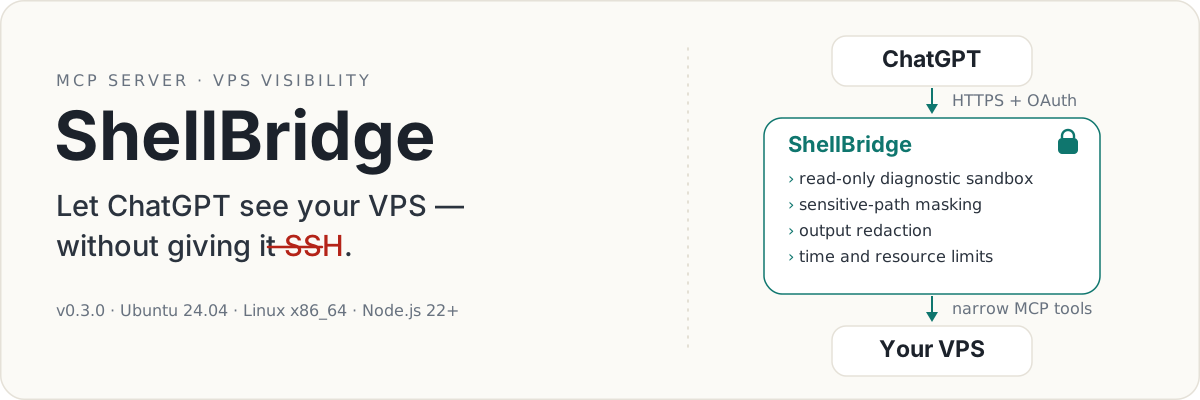
Give ChatGPT fast, safe, and auditable visibility into your VPS through MCP.
English | 简体中文



Say goodbye to “copy this command into your VPS and send me the output.”
ShellBridge connects ordinary ChatGPT conversations to your Linux VPS through MCP. It gives ChatGPT enough current, controlled, and auditable information to investigate your server, explain what is happening, and write plans grounded in the system that actually exists.
Ask ChatGPT things like:
General diagnostics run inside a read-only, network-isolated sandbox. Sensitive paths are hidden automatically. Persistent capabilities are narrow, disabled by default, and separately controlled by the server owner.
Public Preview · v0.3.0
Ubuntu 24.04 · Linux x86_64 · Node.js 22+
ChatGPT is especially useful for conversation, synthesis, explanation, and long-form writing. It can turn a complicated technical situation into an architecture review, troubleshooting guide, migration plan, implementation brief, or precise handoff for another developer.
But good plans require good context.
Without access to the VPS, ChatGPT only knows the fragments you remember to paste into the conversation. Important files, repository state, test results, logs, and configuration details are easily missed.
ShellBridge lets ChatGPT inspect the relevant evidence directly. When the information is complete, the resulting plan can be specific to your real system rather than a generic checklist.
That plan can then be reviewed by you and handed to Codex, ChatGPT Work, another coding agent, or a human developer.
Without ShellBridge, a technical conversation often becomes:
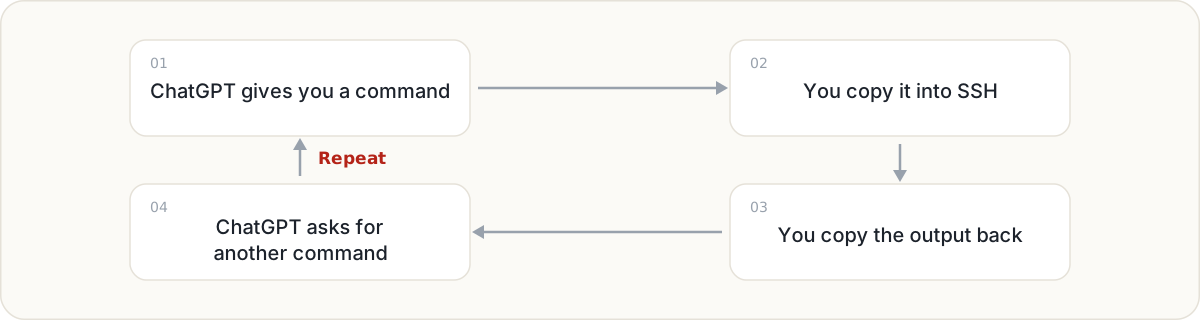
This is slow and surprisingly error-prone. Output gets truncated, commands run in the wrong directory, context is lost between messages, and the user becomes a manual transport layer between two windows.
ShellBridge removes that repetitive relay. ChatGPT can perform a read-only check, inspect the result, follow up with another diagnostic, and keep the investigation inside one conversation.
You stay in control without spending the conversation moving text around by hand.
ShellBridge does not try to replace Codex.
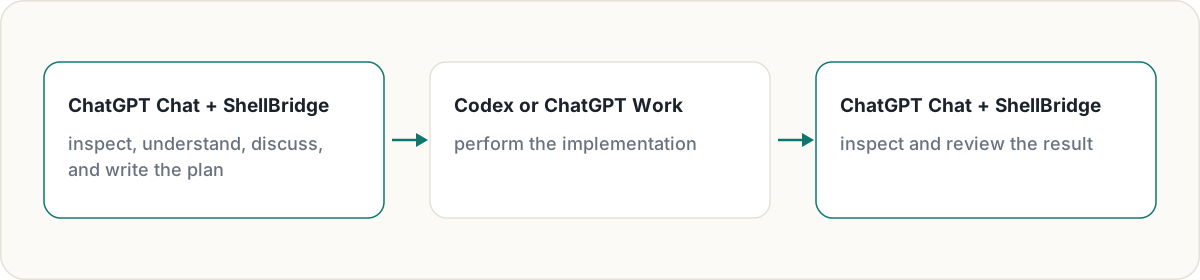
Use ChatGPT Chat with ShellBridge to:
Then use Codex or ChatGPT Work when the task genuinely needs sustained execution, broad file edits, or autonomous implementation.
OpenAI’s current documentation places Codex and ChatGPT Work in the same agentic usage pool, while Chat remains the separate conversational experience. ShellBridge lets you use ordinary Chat for investigation, explanation, and long-form planning while saving the shared Codex/Work allowance for execution-heavy tasks. Usage policies can change, so check ChatGPT Work and Codex and the current Codex usage documentation for your plan.
No — and that is not the goal.
Codex is an execution-focused coding agent. It is designed to enter a workspace, edit files, run commands, and complete implementation tasks.
ShellBridge gives ChatGPT something different: enough safe, current, and structured information to understand what is happening on your VPS.
ChatGPT remains a conversational model. ShellBridge does not grant it unrestricted workspace control, turn it into an autonomous coding agent, or provide a general-purpose remote shell.
Instead, ShellBridge connects the reasoning and planning layer to reality:
ShellBridge provides visibility, not unrestricted authority.
ChatGPT investigates and plans.
Codex or Work implements.
You remain in control.
An ordinary SSH session gives its caller broad, interactive authority. Most diagnostic questions do not need that much power.
ShellBridge exposes narrow MCP tools instead:
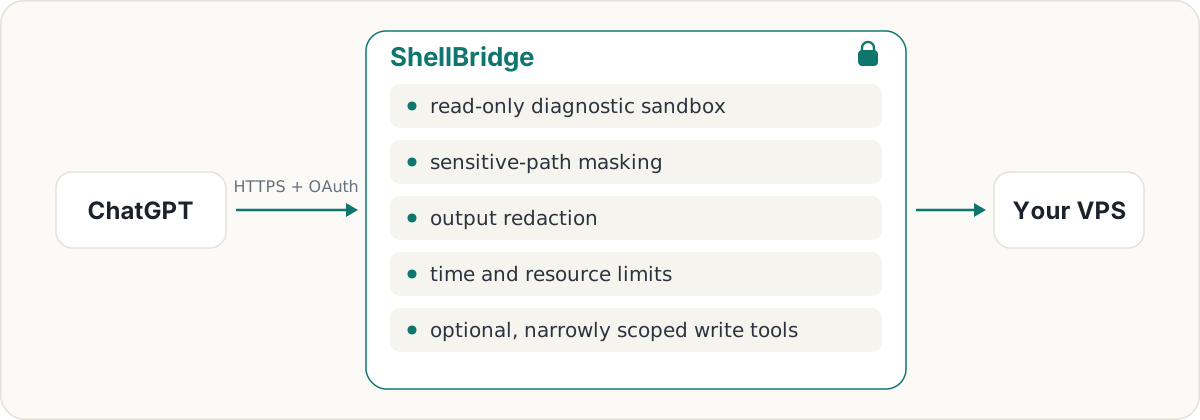
ChatGPT gets enough visibility to investigate effectively without receiving unrestricted SSH access.
The service is still security-sensitive infrastructure: a root-managed process constructs these boundaries and controls which host paths are visible. Read the threat model before deployment.
ChatGPT can use full Bash syntax inside a read-only view of the directories you choose.
Typical tasks include:
The generic diagnostic shell cannot persist changes to the host.
You can register specific JSON or environment files and explicitly allow selected fields to be inspected.
Credential values are never returned directly. Sensitive fields are reduced to states such as:
missing
empty
set / redacted
This allows ChatGPT to answer questions such as:
“Is this application configured with the required credentials?”
without exposing the credential itself.
ChatGPT can run an existing package script or project script in a disposable copy of the project.
Examples include:
npm test
npm run check
python scripts/validate.py
The temporary copy is writable so builds and test caches can work, but all changes are discarded when the task ends. The original project is not modified, and the task has no network access.
ShellBridge supports narrowly scoped local Git operations:
It does not support remote Git operations such as push, pull, or fetch.
When explicitly enabled by the server owner, ShellBridge can:
These capabilities are disabled by default. ShellBridge does not provide an arbitrary host-write shell.
ShellBridge treats model-generated commands, arguments, repository contents, and command output as untrusted input.
General diagnostics run as an unprivileged identity inside a read-only Bubblewrap filesystem view.
The diagnostic sandbox receives an isolated network namespace. Network and Unix socket creation are additionally restricted with seccomp.
Known credential, session, private-key, database, shell-history, browser-profile, cloud-client, and control-socket paths are masked from the sandbox. Administrators can block additional paths.
ShellBridge scans command output for credential-like material before returning it to ChatGPT. Registered configuration readers apply stricter field-level disclosure rules.
Diagnostic and project tasks are constrained by timeouts, output limits, process limits, file-size limits, memory limits, rlimits, and cgroup controls.
Persistent capabilities do not inherit permission from read-only shell access. They require both the global write switch and the switch for the exact capability being used.
Local Git commits and pre-existing script executions use an immutable prepare/execute flow.
Preparation records the exact repository or script identity, content state, arguments, working directory, resource limits, and relevant Git state. Execution accepts only the generated proposal ID, revalidates the frozen state, and prevents replay.
ShellBridge Public Preview currently requires:
Install the Ubuntu prerequisites:
sudo apt-get update
sudo apt-get install --yes build-essential bubblewrap
git clone https://github.com/fengyincheng/ShellBridge.git
cd ShellBridge

npm ci
npm run build
cp .env.example .env
Open .env and follow the comments for the required credentials, database path, public URL, and readable roots.
Generate the required 32-byte data key with:
openssl rand -base64 32
Load the environment and run the read-only preflight:
set -a
. ./.env
set +a

npm run doctor
Then start ShellBridge:
npm start
ShellBridge listens on loopback only. The default address is:
127.0.0.1:8765
The listen host cannot be changed to 0.0.0.0.
For remote access, put an HTTPS reverse proxy or authenticated tunnel in front of ShellBridge:
ChatGPT
   │
   │ HTTPS
   ▼
Reverse proxy or authenticated tunnel
   │
   │ loopback
   ▼
127.0.0.1:8765
Set SHELLBRIDGE_PUBLIC_BASE_URL to the deployment’s exact public HTTPS origin.
The MCP endpoint will be:
https://shellbridge.example.com/mcp
ShellBridge publishes the OAuth authorization-server and protected-resource metadata that ChatGPT needs, derived from the same public URL.
See ChatGPT connection guidance for the connection contract and expected client behavior.
Never expose port 8765 directly to the public internet.
An example root-managed unit is included under:
deploy/systemd/
The supplied unit assumes ShellBridge is installed at /opt/shellbridge.
Install the templates:
sudo install -d -o root -g root -m 0700 \
  /etc/shellbridge \
  /var/lib/shellbridge

sudo install -o root -g root -m 0600 \
  deploy/systemd/shellbridge.env.example \
  /etc/shellbridge/shellbridge.env

sudo install -o root -g root -m 0644 \
  deploy/systemd/shellbridge.service \
  /etc/systemd/system/shellbridge.service
Populate every required value in /etc/shellbridge/shellbridge.env, then:
sudo systemctl daemon-reload
sudo systemctl enable --now shellbridge
Review all paths and settings before starting the service. The included unit is an Ubuntu 24.04 example, not a universal distribution package.
All persistent capabilities are disabled by default:
SHELLBRIDGE_WRITE_ACTIONS_ENABLED=false
SHELLBRIDGE_DOCUMENT_WRITES_ENABLED=false
SHELLBRIDGE_LOCAL_GIT_WRITES_ENABLED=false
SHELLBRIDGE_EXISTING_SCRIPT_RUNS_ENABLED=false
The global switch and the relevant capability switch must both be enabled locally. Enabling one capability does not unlock unrelated write operations.
ShellBridge intentionally does not provide:
These are product boundaries, not missing shortcuts to be bypassed.
The current support matrix is intentionally narrow:
| Component | Supported |
|---|---|
| Operating system | Ubuntu 24.04 |
| Architecture | Linux x86_64 |
| Node.js | 22 or newer |
| Sandbox | Bubblewrap |
| Resource control | cgroup v2 |
| Service model | Root-managed |
| ARM64 | Not supported |
| Docker / Kubernetes | Not supported |
The native build fails clearly on unsupported operating systems and CPU architectures.
Run the ordinary tests and build:
npm run check
The ordinary suite uses controlled test doubles for generic shell execution.
Privileged native acceptance tests require a supported, disposable Ubuntu 24.04 x86_64 host with root access, Bubblewrap, and writable cgroup v2:
sudo --preserve-env=PATH npm run test:privileged
Do not run privileged acceptance tests on a host you have not prepared for their mount and cgroup fixtures.
ShellBridge is security-sensitive infrastructure.
Before deploying it:
ShellBridge does not replace operating-system hardening, account isolation, backups, or careful administration.
To report a vulnerability, follow SECURITY.md rather than opening a public issue.
ShellBridge v0.3.0 is an early public release. The security model, supported platform, configuration format, and MCP tools may change as the project receives real-world review.
Feedback, testing, documentation improvements, and carefully scoped contributions are welcome.
ShellBridge is licensed under the Apache License 2.0.
Run Claude Code as an MCP server so any agent can delegate coding tasks to it
 @microsoft✓ Official
Browser automation using accessibility snapshots instead of screenshots
 @googleapis✓ Official
Google's universal MCP server supporting PostgreSQL, MySQL, MongoDB, Redis, and 10+ databases
 @github✓ Official
Official GitHub integration for repos, issues, PRs, and CI/CD workflows