

Are you the author? Sign in to claim
An open-source Digital Worker platform for reliable execution and continuous co-evolution.

Sico: an infrastructure for symbiotic intelligence, where humans and Digital Workers co-evolve.


Overview · Quick Start · Technical Report · Agentic Evolution · Development · Contributing · Roadmap
Sico — Symbiotic Intelligence for CO-evolution — is an open-source platform for building, managing, and evolving Digital Workers: structured AI labor units that co-evolve with human operators through real production work, particularly in BPO (Business Process Outsourcing) scenarios.
The idea behind Sico emerged from large-scale operational challenges observed in Microsoft’s internal environments, especially across BPO-style workflows such as black-box testing.
Through real production workloads, Sico achieved closed-loop validation for Digital Workers operating under continuous execution, evaluation, and human supervision. Through this process, we observed that reliability emerged not from static automation alone, but from the continuous co-evolution between human operators and Digital Workers.
In Sico, four core roles define how work gets done:
At the center of this system, a Digital Worker is not just a model or an agent, but a structured, executable capability unit.
Its anatomy consists of:
This creates a practical Co-Evolution loop where humans and Digital Workers continuously improve together through real work.
For a comprehensive survey of this direction, refer to Agentic Evolution: From Self-Improving Agents to Co-Evolving Human–AI Systems
Learn more: What is Sico
Sico is primarily designed for:
Many real-world workflows, especially in BPO scenarios such as black-box testing, data processing, customer support, and content moderation, require continuous, stable execution at scale.
BPO is a natural environment for Digital Workers:
• structured evaluation signals are continuously produced
• feedback loops naturally exist
• execution and supervision responsibilities can be clearly separated
Traditional automation approaches rely on static scripts or predefined workflows. However, production environments continuously change:
As a result, automation often becomes brittle and requires repeated manual adjustment.
Digital Workers approach this problem differently. Instead of treating execution as a fixed process, Sico treats execution as an evolving capability.
As Digital Workers take on execution, human roles shift from doing tasks to guiding evolution through the Operator role.
Each completed task contributes signals that help Digital Workers adapt to real environments, enabling organizations to scale execution capacity while continuously increasing reliability.
| Pain point | Sico's approach |
|---|---|
| Agents are thin wrappers around a model and a toolbox | A structured Cortex / Action / Memory architecture with project-level knowledge |
| AI repeats the same mistakes task after task | Execution experience captured as training signals for continuous improvement |
| Full autonomy is unreliable; humans can't easily intervene | The Operator role: human-in-the-loop collaboration with clear responsibility boundaries |
| GUI automation is flaky and hard to reproduce | Sandbox execution with isolated environments, step-level traces, and replayable runs |
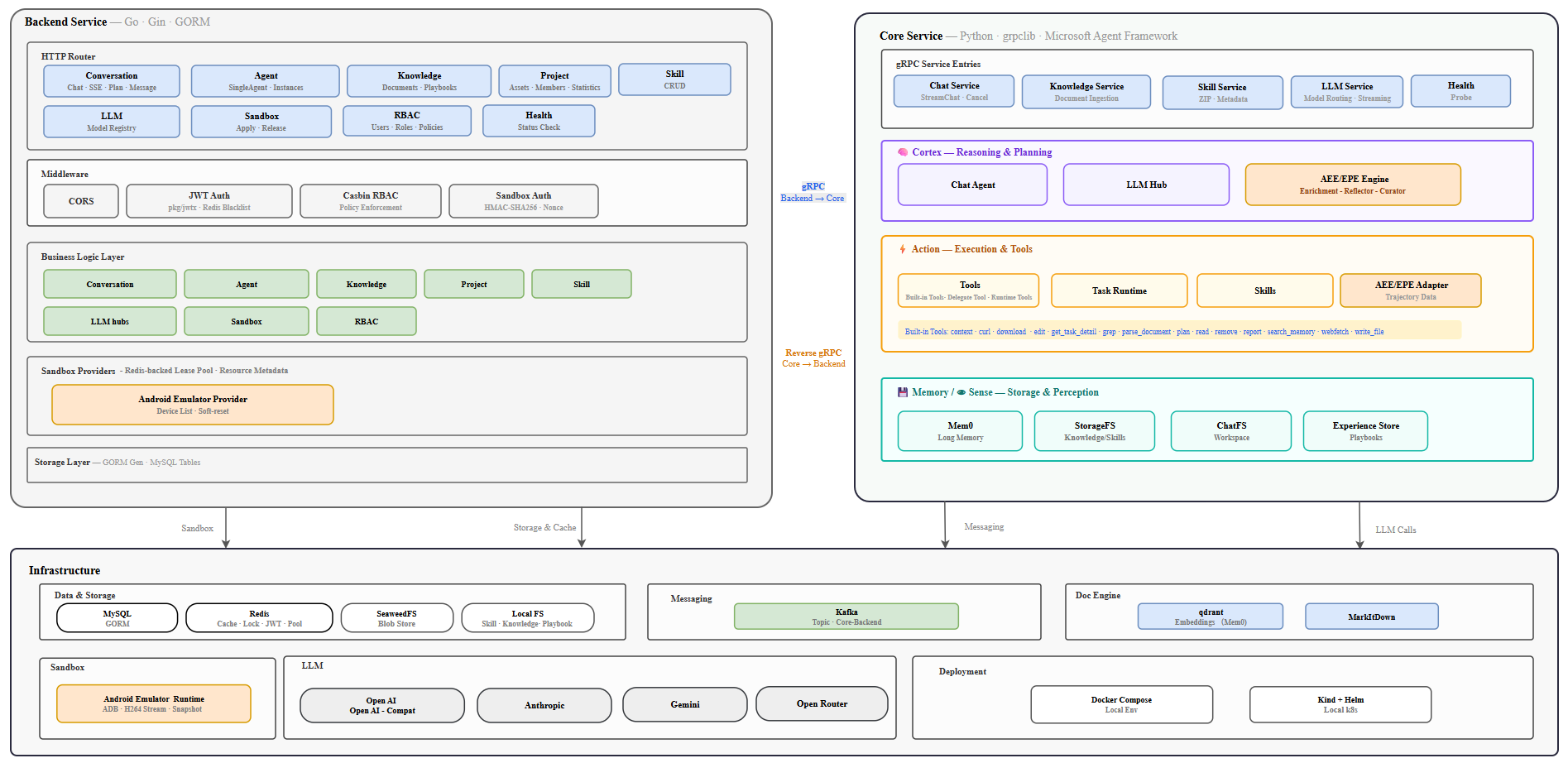
Frontend (React) ──HTTP/SSE──▶ Nginx ──▶ Backend (Go / Gin)
                                            │         ▲
                                     gRPC   │         │  reverse gRPC
                                            ▼         │
                                         Core (Python / asyncio)
On top of this runtime, Sico organizes work into three loops that together form the co-evolution cycle between Operators and Digital Workers:
Deep dive: Sico Technical Report
makegit clone https://github.com/microsoft/Sico.git
cd Sico
cp .env.example .env # edit values as needed
Before starting the stack, configure at least one LLM model. Create a YAML file under
deploy/config/llmhubs/<your-model>.yaml (use deploy/config/llmhubs/model-template.yaml
or one of the *-template.yaml files as a starting point) and make sure it contains:
default: true # mark this model as the default for the platform
Next, configure Mem0:
cp deploy/config/mem0/mem0_config_template.yaml deploy/config/mem0/mem0_config.yaml
# then edit deploy/config/mem0/mem0_config.yaml to fill in embedder / llm credentials
If you plan to collaborate with the Android Tester, you will need the Android emulator sandbox.
Install MuMu Player and set up the emulator API service before bringing up the stack:
# Install prerequisites and start the API service.
make emulator-setup

# Verify the API service is running.
make emulator-status

# Bootstrap the default emulator device.
make emulator-bootstrap
Required only for Android Tester. See sandbox/emulator/setup/README.md for detailed prerequisites.
Then pick one of the run modes below.
make compose-up # builds and starts nginx, frontend, backend, core, mysql, redis, kafka, seaweedfs, qdrant
Then verify the stack:
curl http://localhost:8080/api/sico/healthSign in with the seeded default account (local development only — rotate or remove before exposing the stack outside your machine):
operator@sico.localoperatorAlternative to Docker Compose — runs the same stack on a local Kind cluster via Helm. Prerequisites (.env, LLM config, Mem0 config, optional emulator) are identical; just replace make compose-up with make kind-up:
make kind-up                    # create Kind cluster, build images, deploy via Helm
make kind-restart SVC=core      # rebuild and roll out one app service
make kind-stop                  # stop Kind containers without deleting data
make kind-down                  # tear down and delete local cluster data
Full guide: Quick start · Hit an issue? See Troubleshooting
sico/
├── backend/              # Go HTTP + gRPC service (Gin, GORM, Wire)
├── core/                 # Python agent orchestration service (asyncio, grpclib)
├── proto/                # Protobuf definitions shared by all services
├── sandbox/              # Sandbox runtimes (Android emulator, ...)
├── skills/               # Packaged Digital Worker skills
├── examples/             # Runnable workflow examples (auth, LLM Hub, conversation, sandbox, ...)
├── deploy/
│   ├── docker/           # docker-compose stack
│   └── kind/             # Kind + Helm setup
├── docs/                 # Documentation
└── scripts/              # Dev-tool installers, lint scripts
| Topic | Link |
|---|---|
| What Sico is and why it exists | docs/overview.md |
| Quick start & deployment | docs/quickstart.md |
| System architecture, Experience Learning, and full design | docs/technical_report.md |
| Development workflow (build, test, protobuf, DI) | docs/development.md |
| Roadmap & vision | docs/roadmap.md |
| LLM Hub API & provider adapters | backend/docs/llmhub.md |
| Android emulator sandbox setup | sandbox/emulator/setup/README.md |
Contributions of all kinds are welcome: bug reports, feature ideas, documentation, and code.
make setup.Sico is licensed under the MIT License.
This project may contain trademarks or logos for projects, products, or services. Authorized use of Microsoft trademarks or logos is subject to and must follow Microsoft’s Trademark & Brand Guidelines. Use of Microsoft trademarks or logos in modified versions of this project must not cause confusion or imply Microsoft sponsorship. Any use of third-party trademarks or logos are subject to those third-party’s policies.
Sico stands on the shoulders of the open-source community: Go, Gin, GORM, Wire, Python, asyncio, grpclib, betterproto, React, Vite, and many more. Thank you to everyone who has contributed to Sico.
⚠️ Experimentelle Skill-Sammlung für deutsches Recht (Arbeits-, Gesellschafts-, Insolvenz-, Datenschutz-, Prozessrecht u
Manage multiple Claude Code agents from TUI or Web with tmux and git worktrees
Project management using GitHub Issues + Git worktrees for parallel agent execution
Core skills library for Claude Code with 20+ battle-tested skills including TDD, debugging, and brainstorming
 @codeguilds-knight