

Are you the author? Sign in to claim
Extremely fast hybrid code search for agents.



Quickstart • Agent Integration • MCP Server • CLI • Rust Library • Benchmarks
SIFS (SIFS Is Fast Search) is a local code-search engine for AI coding agents and the developers who work through them. Point it at a repository and ask questions like "where is authentication handled?", "what validates session tokens?", or "which code builds the MCP handshake?". SIFS returns ranked file paths, line ranges, and code chunks fast enough for an agent to search before reading half the tree.
It runs as a CLI, a Rust crate, or a local MCP server. BM25 mode runs offline with no model files; hybrid and semantic modes run locally once the embedding model is cached.
Across 63 repositories and 1,251 annotated tasks, SIFS builds a cold sparse index in 167 ms, answers warm queries in 2.7 ms, and scores NDCG@10 = 0.8471.
Use SIFS to:
Install SIFS with Homebrew:
brew install tristanmanchester/tap/sifs
Or install it with Cargo:
cargo install --locked sifs
Then search any local project:
cd /path/to/project
sifs search "where is authentication handled" --mode bm25 --offline --limit 5
BM25 mode runs offline with no model download. Results include the matching file, line range, score, ranking mode, and code chunk.
For semantic search, cache the local model and use the default hybrid mode:
sifs model pull
sifs search "what checks whether a session is expired" --limit 5
sifs pack "how login sessions are created and validated" --budget-tokens 6000 --json
The default search mode is hybrid (semantic + BM25). Omit --source to search
the current directory, or pass a local path or Git URL explicitly:
sifs search "parse JWT claims" --source /path/to/project --mode bm25 --offline --limit 10
sifs symbol SessionToken --source /path/to/project --offline --json
sifs outline src/auth/session.rs --source /path/to/project --offline \
  --symbols-limit 200 --chunks-limit 100 --json
sifs find-related src/auth/session.rs 42 --source /path/to/project --limit 8
sifs search "stream upload backpressure" --source https://github.com/owner/project --limit 5
Common entry points:
| Goal | Command |
|---|---|
| Search without downloads | sifs search "query" --mode bm25 --offline |
| Use semantic + lexical ranking | sifs model pull, then sifs search "query" |
| Build an offline context pack | sifs pack "query" --mode bm25 --offline --budget-tokens 6000 --json |
| Build a hybrid context pack | sifs model pull, then sifs pack "query" --budget-tokens 6000 --json |
| Inspect what was indexed | sifs status --json, sifs list-files --json, sifs symbol <name> --json, sifs outline <file> --json |
| Teach an agent to use SIFS | sifs agent install --target codex --artifact snippet --file AGENTS.md |
SIFS is most useful when agents know they can search first. Install a project instruction snippet or local skill so Codex, Claude Code, OpenClaw, Hermes, or any skill-aware agent uses SIFS before broad file reads:
sifs agent print --target codex --artifact snippet
sifs agent install --target codex --artifact snippet --file AGENTS.md --dry-run --json
sifs agent install --target codex --artifact snippet --file AGENTS.md
sifs agent doctor --target codex --json
Generated guidance is CLI-first. Agents use MCP tools when they're visible in
the current session and otherwise fall back to shell commands like sifs search, sifs pack, sifs list-files, sifs get, and sifs agent-context --json.
Full integration reference: docs/agent-integration.md.
hybrid for most queries, semantic for natural language, bm25 for symbols and identifiers. Switch per query.sifs agent.--source.sifs agent-context --json describes every command, flag, and tool.sifs feedback.diagnostics feature.# crates.io
cargo install --locked sifs
# Homebrew
brew install tristanmanchester/tap/sifs
# From source
cargo build --release
target/release/sifs search "authentication flow" --source . --mode bm25 --offline
Keep installed binaries current with:
sifs update --check
sifs update --dry-run
sifs update
sifs update delegates to Cargo or Homebrew only when the current binary is
owned by that package manager. For copied, development, or ambiguous binaries,
it prints manual next actions rather than touching an unrelated install.
The sifs-benchmark and sifs-embed diagnostic binaries require the diagnostics feature:
cargo build --release --features diagnostics --bins
Run the test suite after changing indexing, chunking, ranking, model loading, or MCP behavior:
cargo test
Install SIFS as a local stdio MCP server in two commands:
sifs daemon install-agent
sifs mcp install --client all
This registers a reusable server. Tool calls pass source to target a specific
local checkout or Git URL.
To pin the server to a single source:
sifs mcp install --client all --source /path/to/project
sifs mcp install --client codex --source /path/to/project
sifs mcp install --client claude --scope local --source /path/to/project
You can also start the server directly. Without --source, the server uses
its working directory as the default. Passing --source pins the server to
that source, so MCP clients can call search and find_related without
sending a source on every tool call.
sifs mcp
sifs mcp --source /path/to/project
The installer calls the client CLIs when they're available:
codex mcp add sifs -- /absolute/path/to/sifs mcp
claude mcp add-json sifs '{"type":"stdio","command":"/absolute/path/to/sifs","args":["mcp"],"env":{}}' --scope local
If a client CLI isn't available, sifs mcp install --dry-run prints the config to paste manually.
Codex (~/.codex/config.toml):
[mcp_servers.sifs]
command = "/absolute/path/to/sifs"
args = ["mcp"]
startup_timeout_sec = 20
tool_timeout_sec = 60
Claude Code (.mcp.json in your project):
{
  "mcpServers": {
    "sifs": {
      "type": "stdio",
      "command": "/absolute/path/to/sifs",
      "args": ["mcp"],
      "env": {}
    }
  }
}
Only commit a project-scoped .mcp.json to repositories you trust. It grants read access to whatever local paths tool calls pass in.
To run the daemon directly:
sifs daemon run --replace-existing-socket
sifs daemon ping
sifs daemon status --json
# Search the current directory
sifs search "where is authentication handled"

# Search a local project with hybrid ranking
sifs search "parse oauth callback" --source /path/to/project --mode hybrid --limit 10

# Use model-free offline BM25 search
sifs search "SessionToken" --source /path/to/project --mode bm25 --offline --limit 10

# Search a remote Git repository
sifs search "stream upload backpressure" --source https://github.com/owner/project

# Find code related to a known location
sifs find-related src/auth/session.rs 42 --source /path/to/project --limit 8
Use --json, --jsonl, or --format for structured output. Use
--language, --filter-path, and --context-lines when an agent needs
narrower results.
Use profiles for repeated agent sessions:
sifs profile save current --source /path/to/project --mode bm25 --offline --json
sifs search "mcp startup" --profile current --json
Index caches live in platform cache directories by default (~/Library/Caches/sifs on macOS, ${XDG_CACHE_HOME:-~/.cache}/sifs on Linux). Override with --cache-dir, disable with --no-cache, or opt into a repo-local .sifs/ cache with --project-cache.
Full CLI reference: docs/cli.md.
Direct CLI search, library use, and MCP stdio work on macOS and Linux. The
shared sifs daemon uses same-user Unix sockets, so daemon mode runs on Unix
only. On Windows, use direct CLI or MCP stdio. sifs doctor --json reports
daemon platform status.
use sifs::{SearchMode, SearchOptions, SifsIndex};

fn main() -> anyhow::Result<()> {
    let index = SifsIndex::from_path("/path/to/project")?;
    let results = index.search_with(
        "where is authentication handled",
        &SearchOptions::new(5).with_mode(SearchMode::Hybrid),
    )?;

    for result in results {
        println!("{} {}", result.chunk.location(), result.score);
    }

    Ok(())
}
Use SifsIndex::from_path_sparse for a BM25-only index that never touches semantic state. Use SifsIndex::from_git for remote repositories. Full API docs, model policy, filters, and chunk-level construction: docs/library.md.
SIFS walks a repo with .gitignore-aware file selection, splits files into code chunks, builds a sparse BM25 index, and loads semantic state lazily when a semantic or hybrid query needs it.
bm25 — sparse lexical search. Good for identifiers, symbols, and exact terms. No model files required.
semantic — embedding similarity using minishlab/potion-code-16M through a local Model2Vec loader. Tensors and tokenizer files load directly into the Rust process and stay on the machine.
hybrid — the default. Semantic and BM25 rankings fuse with reciprocal rank fusion, then rerank. Symbol-like queries lean on BM25; natural-language questions keep more semantic weight.
Foo::bar, getUserById) get more BM25 weight. Natural-language queries stay balanced.class, fn, def) ranks above chunks that only reference it.parse config boosts chunks containing parseConfig, ConfigParser, or config_parser.compat//legacy/ shims, example code, and .d.ts stubs are down-ranked so canonical implementations surface first.Use sifs model pull (or its alias sifs model fetch) to pre-download the default model. Use sifs doctor to confirm semantic search is ready for offline use.
Benchmarks run across 63 pinned open-source repositories, 19 languages, and 1,251 annotated search tasks.
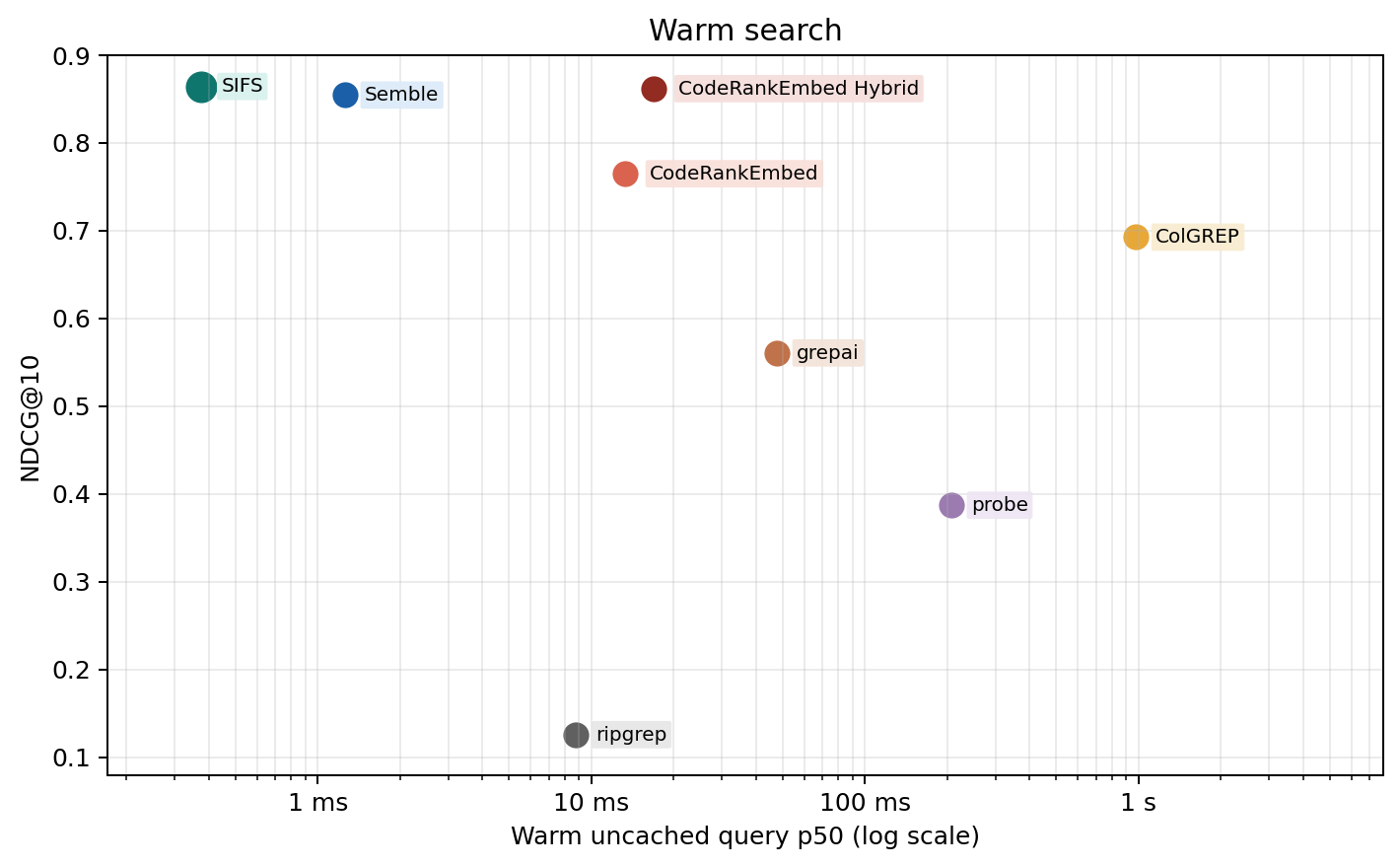
| Method | NDCG@10 | Cold index | Warm query | Cached repeat |
|---|---|---|---|---|
| CodeRankEmbed Hybrid | 0.8617 | 57.3 s | 16.9 ms | n/a |
| Semble | 0.8544 | 439.4 ms | 1.3 ms | n/a |
| SIFS | 0.8471 | 167.0 ms | 2.7 ms | 0.0049 ms |
| CodeRankEmbed | 0.7648 | 57.3 s | 13.3 ms | n/a |
| ColGREP | 0.6925 | 3.9 s | 979.3 ms | n/a |
| grepai | 0.5606 | 35.0 s | 47.7 ms | n/a |
| probe | 0.3872 | — | 207.1 ms | n/a |
| ripgrep | 0.1257 | — | 8.8 ms | n/a |
SIFS reports separate timing fields so caching effects stay legible:
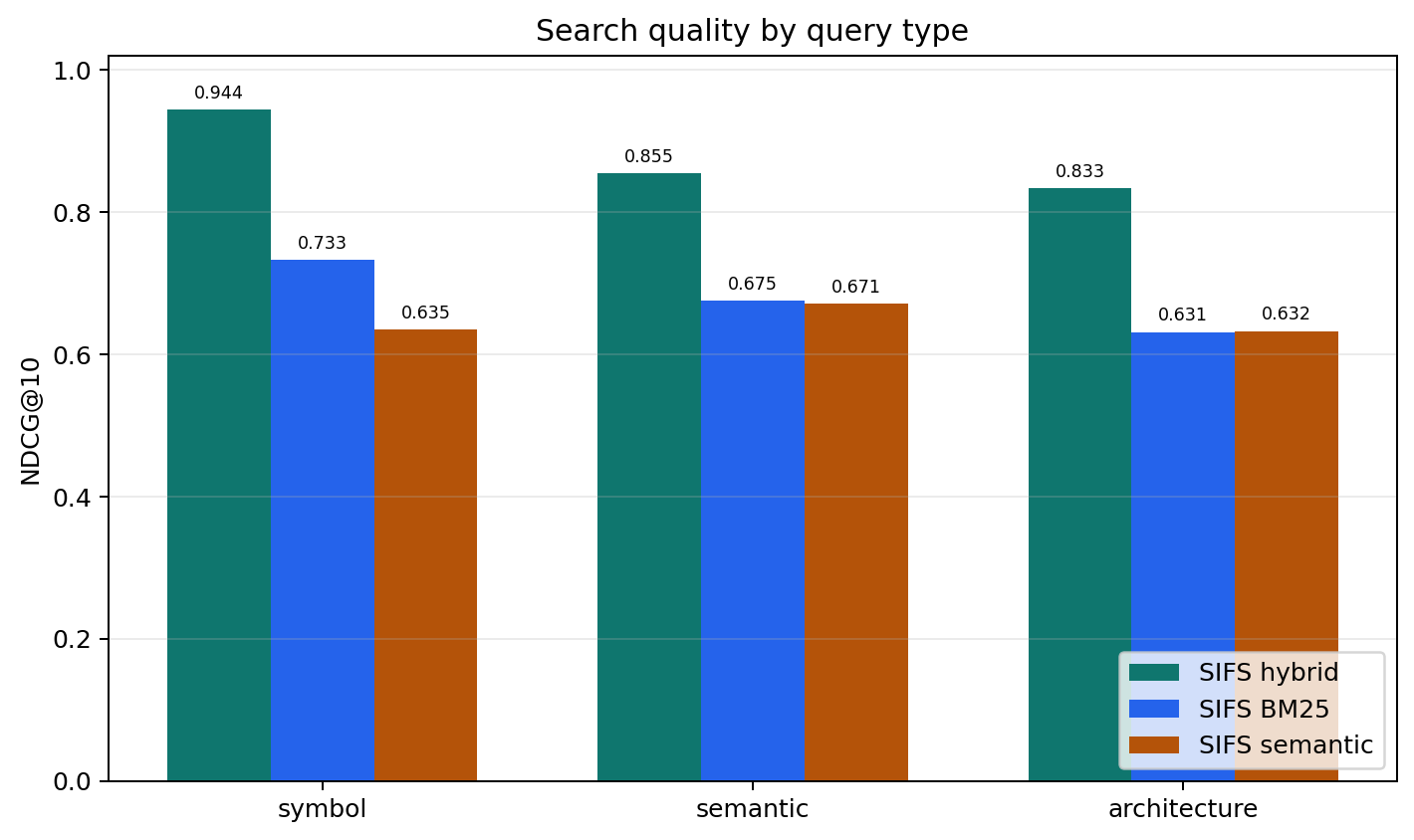
cold_index_ms — fresh sparse/chunk index, no persistent cachecold_semantic_build_or_load_ms — first semantic embedding build or loadcold_first_search_ms — first search, including semantic first-use costwarm_uncached_query_ms — normal query after the index exists (use this for comparisons)warm_cached_repeat_query_ms — repeated identical query in the same processSIFS is strongest on symbol queries but holds up well on semantic and architecture questions too.
| Query type | NDCG@10 |
|---|---|
| symbol | 0.9711 |
| semantic | 0.8412 |
| architecture | 0.7857 |
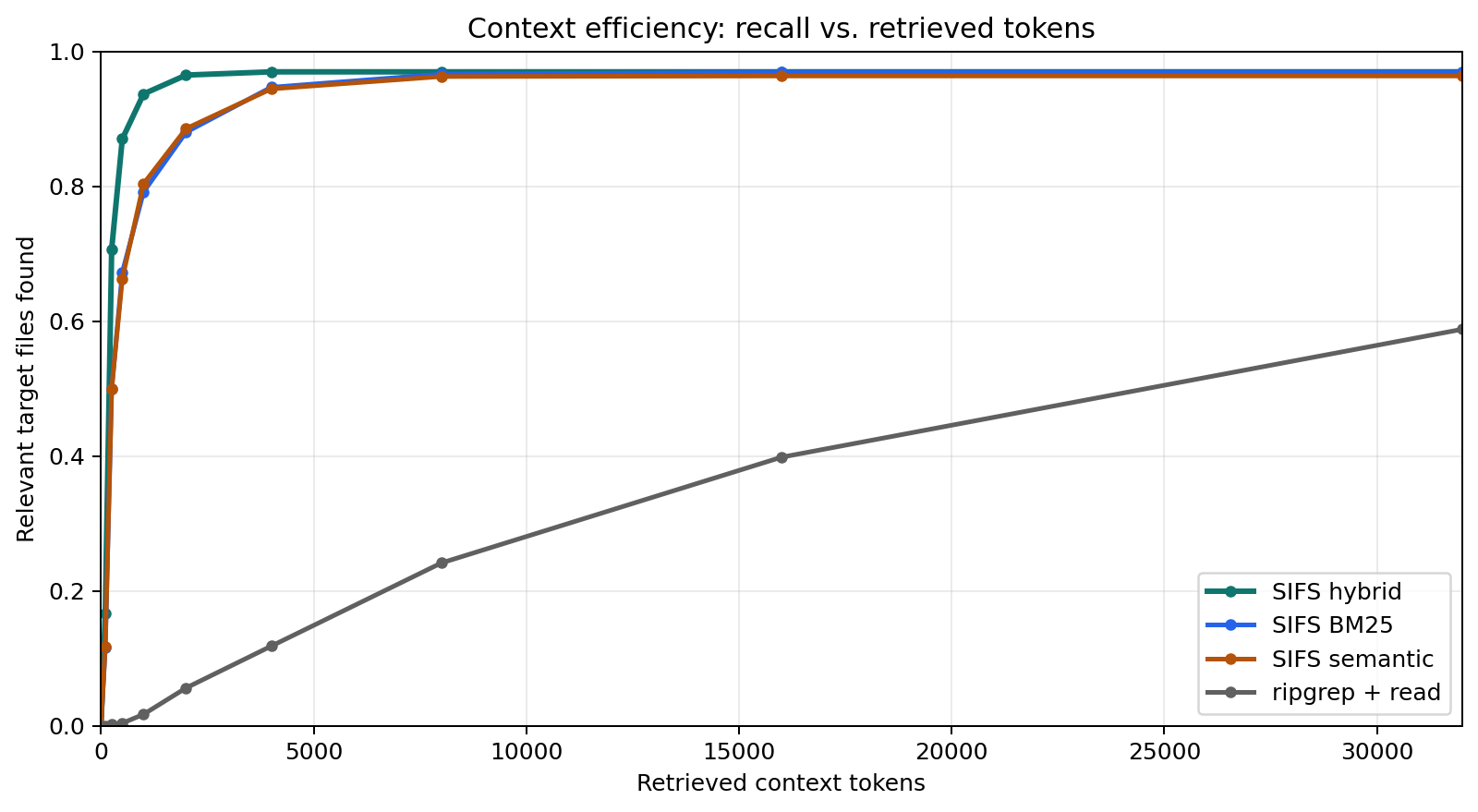
The chart below tracks how quickly annotated relevant files enter an agent's context as retrieved chunks are added to the prompt budget.
Full methodology, per-language breakdown, ablations, and benchmark artifacts: docs/benchmark-report.md.
SIFS indexes code files by default and skips generated files, dependency directories, and caches. It uses the ignore crate, so .gitignore files, Git excludes, global ignores, and hidden files behave the same as in ripgrep or fd.
Recognized extensions: Python, JavaScript, TypeScript, Go, Rust, Java, Kotlin, Ruby, PHP, C, C++, C#, Swift, Scala, Elixir, Dart, Lua, SQL, Bash, Zig, Haskell, Markdown, YAML, TOML, JSON.
Pass --include-docs to add Markdown, YAML, TOML, JSON, and plain text. Use --extension (repeatable) to add custom file types.
SifsIndex, search modes, filters, indexing optionsMIT
Run Claude Code as an MCP server so any agent can delegate coding tasks to it
 @microsoft✓ Official
Browser automation using accessibility snapshots instead of screenshots
 @googleapis✓ Official
Google's universal MCP server supporting PostgreSQL, MySQL, MongoDB, Redis, and 10+ databases
 @github✓ Official
Official GitHub integration for repos, issues, PRs, and CI/CD workflows