

A free, privacy-first tool that flags the tells of AI-generated writing, overused vocabulary, rhetorical crutches, robot





Try the live demo → — English & Spanish, runs 100% in your browser. No signup, and nothing leaves your device.
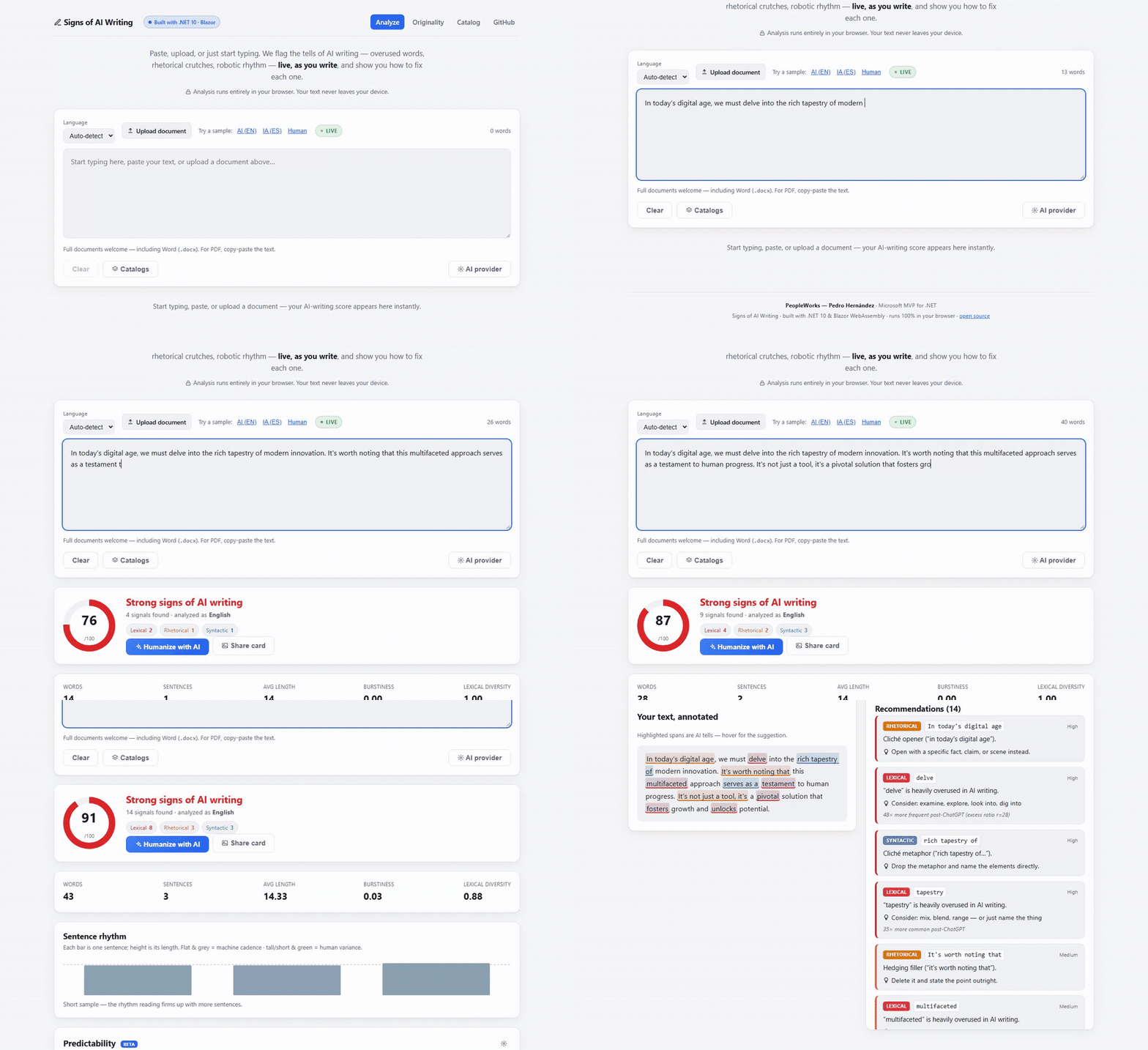
Real recording of the live demo — the score updates as you type, and every highlight comes with a suggested fix.
A free, privacy-first toolkit for academic and writing integrity. It does two things:
🔒 Almost everything runs 100% in your browser. Your documents never leave your device. The only exception is the optional paraphrase check, which is strictly opt-in and clearly disclosed.
Built with .NET 10 and Blazor WebAssembly by Pedro Hernández (PeopleWorks), Microsoft MVP for .NET — for the .NET and Microsoft developer community, por y para la comunidad educativa.
Repo: https://github.com/peopleworks/SignsofAI
Both English and Spanish are supported throughout (auto-detected or selectable). The Spanish rule-pack is an original derivation of AI-writing markers for Spanish.
Unlike black-box detectors that only spit out a score, this is an explainable, actionable, educational
linter. Paste, upload (.docx / .txt / .md), or just start typing — the 0–100 score, highlights,
statistics, and per-finding fixes update as you write.
| Category | Examples |
|---|---|
| Lexical | delve, tapestry, multifaceted, nuanced, pivotal, underscore, showcase, testament… (weighted by post-ChatGPT excess frequency) |
| Rhetorical | Negative parallelisms ("it's not just X, it's Y"), cliché openers ("in today's digital age"), hedging ("it's worth noting that"), false ranges, rule-of-three |
| Syntactic | Copula avoidance ("serves as a…", "a testament to…"), inflated constructions ("plays a crucial role") |
| Statistical | Burstiness — sentence-length uniformity. Machine text hovers at 0.0–0.2; human prose 0.6–0.8 |
claude-opus-4-8, works from the browser), OpenAI / DeepSeek, Azure OpenAI, or Ollama
(local, no key). Credentials live only in your browser and are sent directly to the provider.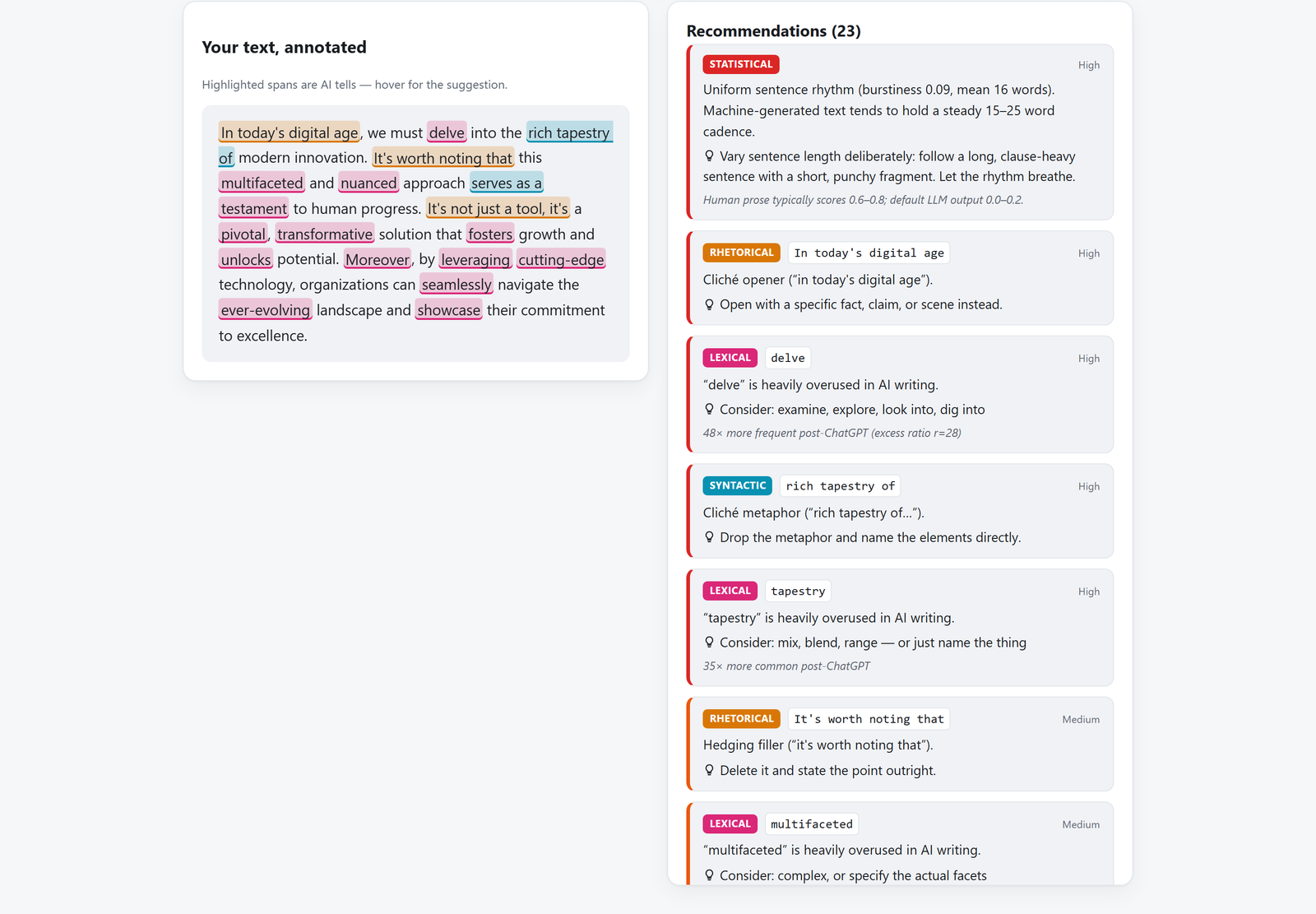
This is the difference: not "87% AI", but which words, why they were flagged, and what to write instead.
"¿Lo escribió la IA, lo copiaste, o lo parafraseaste para esconderlo?" Drop in two or more documents — a thesis and its sources, a batch of student submissions — and see exactly what they share. The guiding principle is honest: we surface the evidence and highlight it; a human judges. We never accuse. This is not a whole-internet index like Turnitin.
| Phase | What it catches | How | Where it runs |
|---|---|---|---|
| A — Literal copy | verbatim shared passages, resistant to changed capitalization/accents | accent/case-folded word k-shingles + greedy longest-match tiling, verified token-by-token | 🔒 in your browser |
| B — Paraphrase | reworded copies — same idea, different words — even across languages | sentence embeddings (Google EmbeddingGemma-300M, ONNX) + cosine similarity | 🌐 optional server (opt-in) |
| C — Cohort | who copied whom across a whole class, at a glance | batch upload + an N×N overlap heatmap; click a cell to inspect the pair | 🔒 in your browser |
| D — Web spot-check | whether a passage already exists online | extracts a document's most distinctive passages and hands you one-click exact-phrase searches (Google/Bing/DuckDuckGo) | 🔒 in your browser |
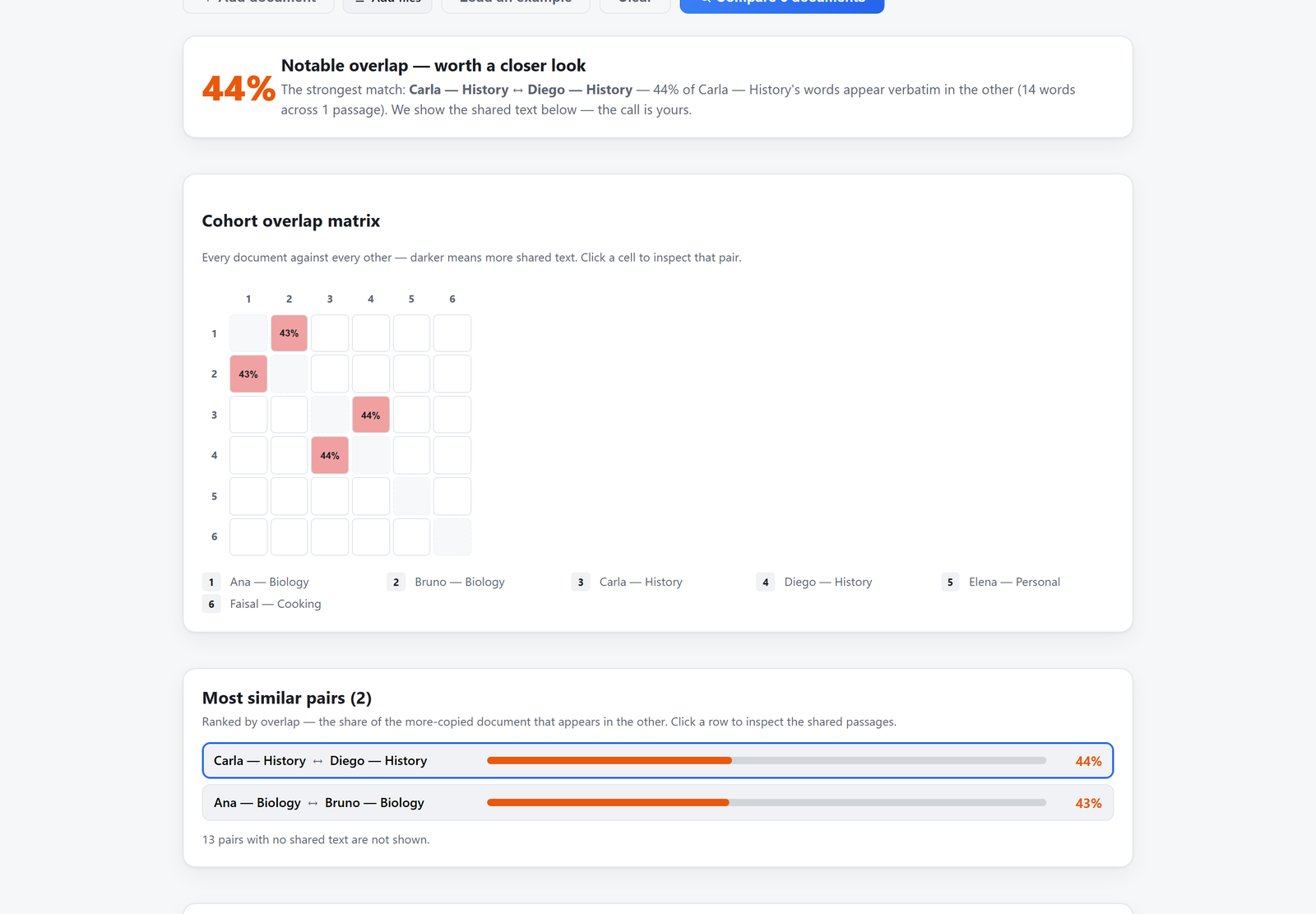
A whole class at a glance: every document against every other, then the shared passages themselves — evidence, not an accusation.
An honest reframing of perplexity. A small language model (Qwen2.5-0.5B or Microsoft Phi-4-mini, int8 ONNX) measures how predictable / generic a text's phrasing is. This is not an AI-vs-human verdict — on a labelled corpus the two overlap badly (memorized human text scores predictable too). We surface predictability honestly as one signal among many, calibrated per language. Opt-in; runs on the PeopleWorks server. The model lazily loads and idle-unloads to keep the server light.
Everything above is also available to Claude Desktop and any MCP
client through SignsOfAI.Mcp, a Model Context Protocol server (built on the official
ModelContextProtocol SDK, stdio transport). Because
the engine lives in SignsOfAI.Core — pure .NET, no browser — the server just exposes it as tools:
| Tool | What it does | Where it runs |
|---|---|---|
analyze_ai_writing | score + verdict + findings (with fixes) + statistics | 🔒 on-device |
check_originality | overlap % and shared passages across 2+ documents | 🔒 on-device |
search_catalog | search the catalog of AI-writing signs (EN/ES) | 🔒 on-device |
extract_distinctive_phrases | distinctive phrases + ready-made web-search links | 🔒 on-device |
measure_predictability | perplexity via the optional server | 🌐 server (opt-in) |
check_paraphrase | reworded/translated matches via EmbeddingGemma | 🌐 server (opt-in) |
The first four run entirely on the machine; the last two disclose that they send text to the server
(endpoint via the SIGNSOFAI_API_ENDPOINT environment variable).
It ships on NuGet as SignsOfAI.Mcp, so nothing needs
building. Point Claude Desktop at it:
// %APPDATA%\Claude\claude_desktop_config.json
{ "mcpServers": { "signs-of-ai": {
  "command": "dnx",
  "args": ["SignsOfAI.Mcp", "--yes"]
}}}
Or install it as a global tool once — dotnet tool install --global SignsOfAI.Mcp — and use
"command": "signsofai-mcp". See src/SignsOfAI.Mcp/README.md for details.
VS Code: the package ships an MCP manifest, so its
NuGet page has an MCP Server tab with the config
already generated — copy it into .vscode/mcp.json and you're done.
/signs-of-aiPrefer to work inside your editor? skill/signs-of-ai is a drop-in Claude Code / Codex / agent skill
that de-slops a draft — or judges whether text reads as AI-written — in English and Spanish. It's a
human-readable distillation of the same rules.en.json / rules.es.json taxonomy, so it edits by the
same rules the engine scores by. Install by pasting the repo link into your AI harness, or copy the
folder into ~/.claude/skills/, then:
/signs-of-ai            <your draft>          # edit mode: rewrite + change summary
/signs-of-ai is this AI slop?  <the text>     # detect mode: quoted verdict, no rewrite
The skill deliberately never fakes a numeric score — for a calibrated 0–100 verdict, burstiness,
originality, or perplexity it hands off to this engine (web app, CLI, or the MCP tools above). See
skill/README.md.
SignsOfAI.slnx
├─ src/
│  ├─ SignsOfAI.Core            # Pure C# engines (no UI/server deps)
│  │  ├─ Analyzers/             # Lexical, Pattern, Burstiness (IAnalyzer)
│  │  ├─ Originality/           # OriginalityChecker (shingles+tiling), ParaphraseFinder,
│  │  │                         #   DistinctivePhraseExtractor
│  │  ├─ Rules/Packs/           # rules.en.json, rules.es.json (embedded, community-extensible)
│  │  ├─ Text/                  # Tokenizer, sentence splitter, language detector, statistics
│  │  └─ AiWritingAnalyzer      # Public facade: Analyze(text, language)
│  ├─ SignsOfAI.Web             # Blazor WebAssembly front end (Analyze, Originality, Catalog)
│  ├─ SignsOfAI.Cli             # `dotnet tool` for CI pipelines
│  ├─ SignsOfAI.Mcp             # MCP server (stdio): the engine as tools for Claude Desktop / any client
│  └─ SignsOfAI.Perplexity.Api  # Optional ASP.NET Core server: predictability + embeddings
│     ├─ Engine/                #   OnnxPerplexityEngine, OnnxEmbeddingEngine (lazy-load + idle-unload)
│     └─ Config/                #   model profiles, calibration, embedding + web-search options
└─ tests/
   └─ SignsOfAI.Core.Tests      # xUnit (40+)
The Core engines are decoupled from the UI and server — the CLI, the Blazor app, and the API all reuse them.
dotnet run --project src/SignsOfAI.Web
# then open http://localhost:5019
dotnet test
dotnet tool)The linter ships as a global tool so you can gate prose in CI:
dotnet tool install --global SignsOfAI.Cli

signsofai check README.md                 # pretty report
signsofai check article.docx --lang en    # Word documents too
signsofai check post.md --json            # machine-readable
signsofai check post.md --max-score 40    # exit 1 if it reads too much like AI → fails CI
signsofai check post.md --rules my-style.json   # your custom catalog
The analysis engine is also a library — dotnet add package SignsOfAI.Core:
var result = new SignsOfAI.Core.AiWritingAnalyzer().Analyze(text, "auto");
Console.WriteLine($"{result.OverallScore}/100 — {result.Verdict}");
SignsOfAI.Perplexity.Api)The client works fully on its own; this server only powers the opt-in features (the predictability meter and the Phase B paraphrase check). It's ASP.NET Core (.NET 10) hosting ONNX models with lazy-load and idle-unload so it stays light. Model files are not in git — they download on first use.
The client points at a hosted instance by default; to run your own, set the endpoint in the app's server settings and configure CORS for your origin.
By default Phase D is the on-device, one-click-search experience (no key, nothing sent until you click). An operator can additionally enable an automatic web search — useful for presentations — by configuring a search provider on the server (the key never touches the browser). It stays off unless configured:
// appsettings.json (or environment variables)
"WebSearch": {
  "Enabled": true,
  "Provider": "brave",              // Brave Search API (free tier); provider-abstracted
  "ApiKey": "",                     // prefer the BRAVE_API_KEY environment variable
  "MaxPhrasesPerDoc": 8,
  "MaxResultsPerPhrase": 5
}
When enabled, the server advertises the capability and the client offers an automatic "search the web" action that reports pages containing a passage verbatim. If it's off, quota-exhausted, or errors, the UI falls back to the manual one-click searches — it never breaks.
Add entries to src/SignsOfAI.Core/Rules/Packs/rules.<lang>.json — lexical rules match single word
tokens, pattern rules are regexes for multi-word tells. Each sets a weight, severity, and suggestion.
The Blazor client is a static bundle (hosts anywhere free). Included GitHub Actions:
deploy-pages.yml) — Settings → Pages → Source: "GitHub Actions". The workflow rewrites
the base href and writes an SPA 404.html fallback.azure-static-web-apps.yml) — add the deployment token as a repo secret.The optional server is a normal ASP.NET Core app (dotnet publish the SignsOfAI.Perplexity.Api project).
Created by Pedro Hernández — PeopleWorks, Microsoft MVP for .NET. Detection markers are grounded in
linguistics research on AI stylometry — see Docs/GoogleResearch.md.
1000+ skills curated from Anthropic, Vercel, Stripe, and other engineering teams
Agent harness performance optimization with skills, instincts, memory, and security
Detects 37 AI writing patterns and rewrites text with human rhythm across 5 voice profiles
Design enforcement with memory — keeps your UI consistent across a project
 @user_d45518de
