

Are you the author? Sign in to claim
A Simulink automation suite and Claude Code plugin powered by MATLAB Engine for Python, designed for AI-assisted develop
Language: English | 简体中文


[!IMPORTANT] This project is paused (since June 2026). MathWorks has released an official, actively-maintained agentic toolkit for Simulink — for production use, please switch to the official Simulink Agentic Toolkit.
The differentiators explored here (the guarded write-safety model: dry-run / rollback / read-back verification; and post-simulation performance analysis), together with a new motor-control-focused direction, will continue in a separate, dedicated project. This repository remains available as-is for reference.
Simulink Automation Suite is a Claude Code plugin for Simulink automation workflows through MATLAB Engine for Python.
simulink-automation-suitesimulink-analyzer agent autonomously explores model topology, traces connections, audits parameters, and returns structured findings without polluting conversation context.sim-analyst agent extracts signals from sl_sim_result, evaluates dynamic performance (rise time, overshoot, settling time), and returns structured conclusions without exposing raw waveform data to the main conversation.simulink-automation skill guides safe parameter modification with dry-run preview, precondition guards, and rollback support.simulink_cli (unified CLI entrypoint)Simulink Automation Suite is built to make Simulink analysis agent-native in Claude Code:
In short: the plugin helps AI understand first, then assist.
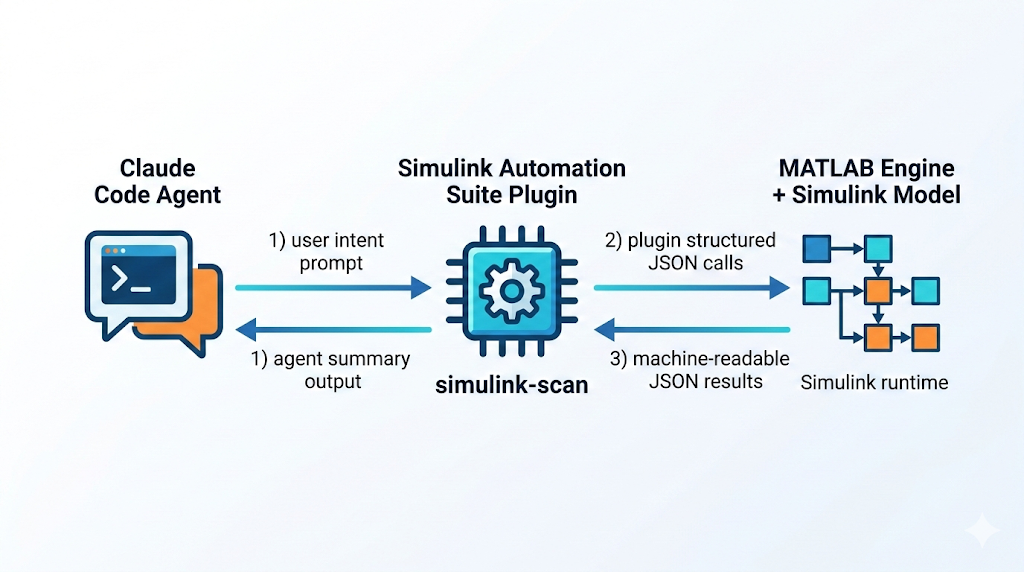
Common AI+Simulink workflows are often one of these:
This plugin provides a third path: direct, structured, runtime model analysis for agents.
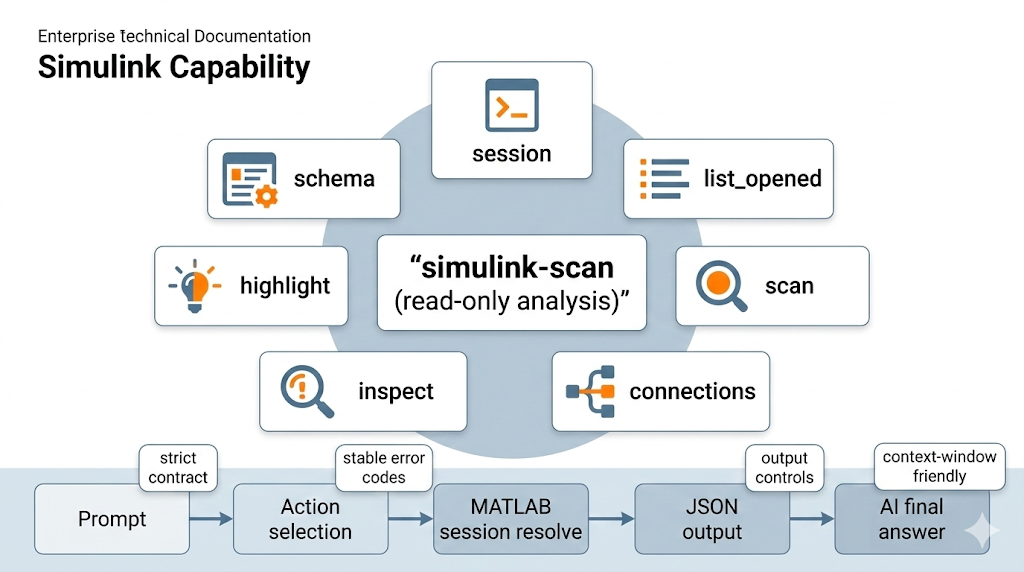
simulink-automation skill for write/meta tasks, or dispatches the simulink-analyzer agent for read analysis.session list/use/current/clear) with exact-name matching, using either an explicit --session or a previously selected active session.schema, list_opened, scan, connections, inspect, find, highlight, set_param, model_new, model_open, model_save, model_close, model_update, block_add, line_add, line_delete, block_delete, simulate, or session.stdout; warnings never spill raw text into stdout, and stderr is reserved for maintainer-facing diagnostics.set_param) use dry-run preview (default), machine-executable apply_payload, rollback payloads, guarded execute via expected_current_value, and read-back verification.Before using session-bound actions (list_opened, scan, connections, inspect, find, highlight):
matlab.engine.shareEngine
Troubleshooting:
engine_unavailable: MATLAB Engine for Python is unavailable in the active Python environment. Fix interpreter/environment installation.no_session: MATLAB Engine is available, but no shared MATLAB session is visible. Run matlab.engine.shareEngine in MATLAB, then retry./plugin marketplace add Mistakey/simulink-automation-suite
/plugin install simulink-automation-suite@simulink-automation-marketplace
/simulink-automation-suite:simulink-automation Scan gmp_pmsm_sensored_sil_mdl recursively and focus on controller subsystems.
/plugin list simulink-automation-suite@simulink-automation-marketplace
For end-to-end Claude Code prompts and screenshots (single bilingual page), see:
| Action | Purpose | Example |
|---|---|---|
schema | Return machine-readable command contract | python -m simulink_cli schema |
list_opened | List currently opened Simulink models | python -m simulink_cli list_opened |
scan | Read model/subsystem topology | python -m simulink_cli scan --model "my_model" --recursive |
connections | Read upstream/downstream key modules for a target block | python -m simulink_cli connections --target "my_model/Gain" --direction both --depth 1 --detail summary |
inspect | Read block parameters/effective values | python -m simulink_cli inspect --model "my_model" --target "my_model/Gain" --param "All" |
highlight | Highlight a block in Simulink (UI-only, no model mutation) | python -m simulink_cli highlight --target "my_model/Gain" |
find | Search blocks by name pattern and/or block type | python -m simulink_cli find --model "my_model" --name "PID" |
set_param | Set a block parameter with dry-run preview and rollback | python -m simulink_cli set_param --target "my_model/Gain1" --param "Gain" --value "2.0" |
model_new | Create a new Simulink model | python -m simulink_cli --json '{"action":"model_new","name":"my_model"}' |
model_open | Open a Simulink model from file | python -m simulink_cli --json '{"action":"model_open","path":"C:/models/my_model.slx"}' |
model_save | Save a loaded Simulink model | python -m simulink_cli --json '{"action":"model_save","model":"my_model"}' |
block_add | Add a library block to a loaded model | python -m simulink_cli --json '{"action":"block_add","source":"simulink/Math Operations/Gain","destination":"my_model/Gain1"}' |
line_add | Connect two block ports with a signal line | python -m simulink_cli --json '{"action":"line_add","model":"my_model","src_block":"Sine","src_port":1,"dst_block":"Gain","dst_port":1}' |
line_delete | Remove a point-to-point signal connection | python -m simulink_cli --json '{"action":"line_delete","model":"my_model","src_block":"Sine","src_port":1,"dst_block":"Gain","dst_port":1}' |
block_delete | Remove a block (also removes connected lines) | python -m simulink_cli --json '{"action":"block_delete","destination":"my_model/Gain1"}' |
simulate | Run a model simulation | python -m simulink_cli --json '{"action":"simulate","model":"my_model"}' |
model_close | Close a loaded model (dirty-state guard) | python -m simulink_cli --json '{"action":"model_close","model":"my_model"}' |
model_update | Compile/update a model diagram | python -m simulink_cli --json '{"action":"model_update","model":"my_model"}' |
session | Manage or select the active MATLAB shared session | python -m simulink_cli session list |
Use output clipping/projected fields when you need compact payloads:
python -m simulink_cli scan --model "my_model" --max-blocks 200 --fields "name,type"
python -m simulink_cli inspect --model "my_model" --target "my_model/Gain" --param "All" --max-params 50 --fields "target,values"
python -m simulink_cli connections --target "my_model/Gain" --detail ports --max-edges 50 --fields "target,edges,total_edges,truncated"
python -m simulink_cli find --model "my_model" --name "PID" --max-results 50 --fields "path,type"
--json is a first-class entrypoint and is mutually exclusive with flag-based action arguments.
schema returns structured metadata for each action field (type, required/default/enum, description).
JSON mode is the canonical contract surface for complex strings and newlines; use it whenever values need escaping or contain embedded line breaks.
python -m simulink_cli --json "{\"action\":\"schema\"}"
python -m simulink_cli --json "{\"action\":\"list_opened\",\"session\":\"MATLAB_12345\"}"
python -m simulink_cli --json "{\"action\":\"scan\",\"model\":\"my_model\",\"recursive\":true,\"session\":\"MATLAB_12345\"}"
python -m simulink_cli --json "{\"action\":\"inspect\",\"model\":\"my_model\",\"target\":\"my_model/Gain\",\"param\":\"Description\",\"summary\":true}"
python -m simulink_cli --json '{"action":"connections","target":"my_model/Gain","direction":"both","depth":1,"detail":"summary","max_edges":50,"fields":["target","upstream_blocks","downstream_blocks"]}'
python -m simulink_cli --json '{"action":"find","model":"my_model","name":"PID","max_results":50,"fields":["path","type"]}'
python -m simulink_cli --json '{"action":"set_param","target":"my_model/Gain1","param":"Gain","value":"2.0"}'
python -m simulink_cli --json '{"action":"model_new","name":"my_model"}'
python -m simulink_cli --json '{"action":"model_open","path":"C:/models/my_model.slx"}'
python -m simulink_cli --json '{"action":"model_save","model":"my_model"}'
python -m simulink_cli --json '{"action":"block_add","source":"simulink/Math Operations/Gain","destination":"my_model/Gain1"}'
python -m simulink_cli --json '{"action":"line_add","model":"my_model","src_block":"Sine","src_port":1,"dst_block":"Gain","dst_port":1}'
python -m simulink_cli --json '{"action":"line_delete","model":"my_model","src_block":"Sine","src_port":1,"dst_block":"Gain","dst_port":1}'
python -m simulink_cli --json '{"action":"block_delete","destination":"my_model/Gain1"}'
python -m simulink_cli --json '{"action":"simulate","model":"my_model"}'
python -m simulink_cli --json '{"action":"model_update","model":"my_model"}'
python -m simulink_cli --json '{"action":"model_close","model":"my_model"}'
dry_run defaults to true and returns both rollback and machine-executable apply_payloadapply_payload carries expected_current_value, so execute can reject stale previews instead of mutating blindlyapply_payload exactly; do not manually reconstruct the guarded execute payloadprecondition_failed without mutating the modelverification_failed and preserves rollback/write-state recovery metadatarollback payload for one-command undo, preserving an explicit session override when one was usedvalue field is always a string and may legitimately include literal percent signs, for example "%.3f"The standard single-parameter agent loop is:
inspect the current parameter state.set_param with dry_run=true.apply_payload.inspect again to confirm the new value.rollback if you need to restore the original value.Preview response excerpt:
{
  "action": "set_param",
  "dry_run": true,
  "current_value": "1.5",
  "proposed_value": "2.0",
  "apply_payload": {
    "action": "set_param",
    "target": "my_model/Gain1",
    "param": "Gain",
    "value": "2.0",
    "dry_run": false,
    "expected_current_value": "1.5"
  },
  "rollback": {
    "action": "set_param",
    "target": "my_model/Gain1",
    "param": "Gain",
    "value": "1.5",
    "dry_run": false
  }
}
If the target changes between preview and execute, replaying that saved apply_payload returns precondition_failed. If the write runs but read-back does not confirm it, the action returns verification_failed.
session use <name> or pass --session explicitly for MATLAB-bound actions.scan and find return model_not_found.unknown_parameter means the caller supplied a request field or flag that is not part of the contract.param_not_found means the target block does not expose the requested runtime parameter.invalid_json.Error envelope:
{
  "error": "<stable_code>",
  "message": "<human_readable_message>",
  "details": {},
  "suggested_fix": "<optional_next_step>"
}
Common error codes:
invalid_inputinvalid_jsonunknown_parameterjson_conflictengine_unavailableno_sessionsession_requiredsession_not_foundstate_write_failedstate_clear_failedmodel_requiredmodel_not_foundsubsystem_not_foundinvalid_subsystem_typeblock_not_foundparam_not_foundprecondition_failedset_param_failedverification_failedmodel_already_loadedmodel_save_failedsource_not_foundblock_already_existsmodel_dirtyport_not_foundline_already_existsline_not_foundupdate_failedsimulation_failedinactive_parameterruntime_errorSession management commands may return state_write_failed or state_clear_failed when the local plugin state file is not writable.
If no MATLAB shared session exists, run matlab.engine.shareEngine in MATLAB and retry.
simulink_cli/           # Unified CLI package (single entrypoint)
├── __main__.py         # python -m simulink_cli
├── core.py             # Action registry, JSON/flag parsing, schema, routing
├── errors.py           # Error envelope builder
├── json_io.py          # JSON I/O utilities
├── validation.py       # Input hardening
├── session.py          # MATLAB session management
├── model_helpers.py    # Path resolution helpers
└── actions/            # One module per action
    ├── scan.py
    ├── inspect_block.py
    ├── connections.py
    ├── find.py
    ├── highlight.py
    ├── list_opened.py
    ├── set_param.py
    ├── model_new.py
    ├── model_open.py
    ├── model_save.py
    ├── model_close.py
    ├── model_update.py
    ├── block_cmd.py
    ├── line_add.py
    ├── block_delete.py
    ├── line_delete.py
    ├── simulate_cmd.py
    └── session_cmd.py
agents/                 # Published agent definitions
├── simulink-analyzer.md  # Read-analysis agent (topology, search, connections, inspection)
└── sim-analyst.md        # Post-simulation analysis agent (signals, waveforms, performance)
skills/                 # Plugin skill definitions (docs only, no Python code)
└── simulink_automation/  # Write automation + meta-query skill
    ├── SKILL.md
    └── reference.md
tests/                  # Test suite
python -m unittest discover -s tests -p "test_*.py" -v
claude plugin validate .
⚠️ Experimentelle Skill-Sammlung für deutsches Recht (Arbeits-, Gesellschafts-, Insolvenz-, Datenschutz-, Prozessrecht u
Manage multiple Claude Code agents from TUI or Web with tmux and git worktrees
Project management using GitHub Issues + Git worktrees for parallel agent execution
Core skills library for Claude Code with 20+ battle-tested skills including TDD, debugging, and brainstorming
