

Are you the author? Sign in to claim
🤖 24/7 AI agent that maximizes Claude Code Pro usage via Slack. Auto-processes tasks, manages isolated workspaces, crea
A 24/7 AgentOS that works while you sleep



Have Claude Code Pro but not using it at night? Transform it into an AgentOS that handles your ideas and tasks while you sleep. This is a 24/7 AI assistant daemon powered by Claude Code CLI and Python Agent SDK that processes both random thoughts and serious tasks via Slack with isolated workspaces.
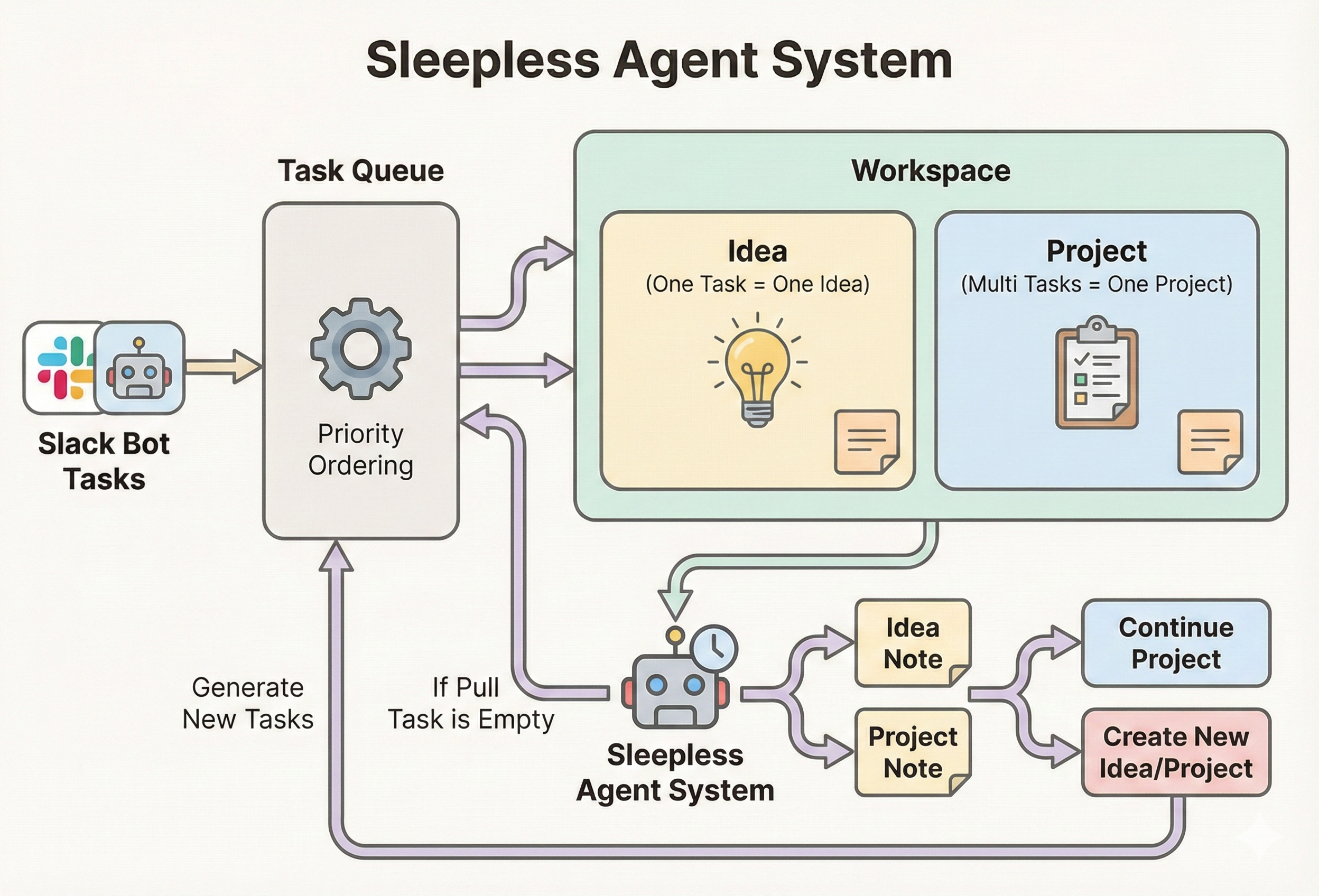
System architecture showing task flow from Slack to workspace execution
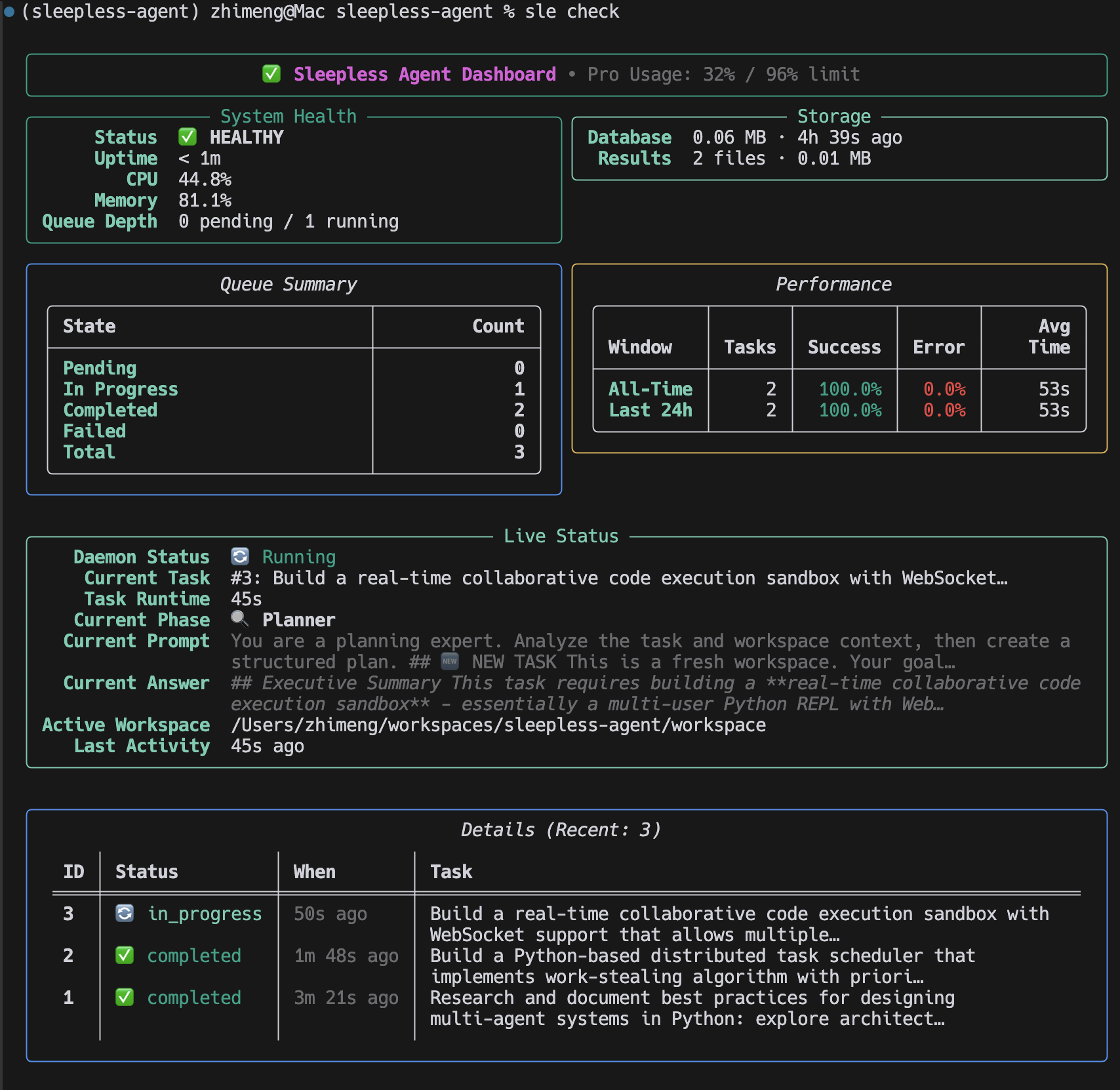
Sleepless Agent CLI in action - managing tasks, checking status, and generating reports
# Start the daemon
$ sle daemon
2025-10-26 03:30:12 | INFO | Sleepless Agent starting...
2025-10-26 03:30:12 | INFO | Slack bot connected

# Submit a task via Slack
/think Implement OAuth2 authentication -p backend

# Check status
$ sle check
╭─────────────────── System Status ───────────────────╮
│ 🟢 Daemon: Running                                  │
│ 📊 Queue: 3 pending, 1 in_progress                  │
│ 💻 Usage: 45% (Day threshold: 95%)                  │
│ 🔄 Last task: "Implement OAuth2..." (in progress)   │
╰─────────────────────────────────────────────────────╯

# View results
$ sle report 42
Task #42: ✅ Completed
Branch: feature/backend-42
PR: https://github.com/user/repo/pull/123
npm install -g @anthropic-ai/claude-code)sle CLI works without Slack)💡 Slack is optional. You can run all
sleCLI commands without configuring Slack. Slack integration adds a convenient real-time interface for submitting tasks and checking status, but every feature is also available via the CLI.
pip install sleepless-agent
Or for development:
git clone <repo>
cd sleepless-agent
python -m venv venv
source venv/bin/activate  # or venv\Scripts\activate on Windows
pip install -e .
⚠️ Windows / WSL tip: After
pip install, theslecommand might not be found if Python'sScriptsdirectory is not on yourPATH. See Troubleshooting:slenot found below.
# Install the Claude Code CLI (requires Node.js)
npm install -g @anthropic-ai/claude-code

# Log in once (opens a browser)
claude login

# Verify
claude --version
Slack integration is not required. You can use the sle CLI directly:
# Start the daemon (no Slack needed)
sle daemon

# Queue a task
sle think "Research async Python patterns"

# Check status
sle check
If you want Slack integration, continue with the setup below.
Visit https://api.slack.com/apps and create a new app:
Basic Information
Enable Socket Mode
xapp-)Create Slash Commands Settings > Slash Commands > Create New Command:
/think - Capture thought or task (use -p project-name for serious tasks)/chat - Start interactive chat mode with Claude/check - Check queue status/usage - Show Claude Code Pro plan usage/cancel - Cancel task or project/report - Show reports or task details/trash - Manage trash (list, restore, empty)OAuth Scopes Features > OAuth & Permissions > Bot Token Scopes:
chat:writecommandsapp_mentions:readchannels:history (for chat mode)groups:history (for chat mode in private channels)reactions:write (for chat mode indicators)Event Subscriptions (for Chat Mode) Features > Event Subscriptions > Enable Events > Subscribe to bot events:
message.channelsmessage.groupsInstall App
xoxb-)cp .env.example .env
nano .env # Edit with your tokens
Set:
SLACK_BOT_TOKEN - xoxb-... tokenSLACK_APP_TOKEN - xapp-... token(Claude API key no longer needed - uses Claude Code CLI)
sle daemon
You should see startup logs similar to:
2025-10-24 23:30:12 | INFO     | sleepless_agent.interfaces.bot.start:50 Slack bot started and listening for events
2025-10-24 23:30:12 | INFO     | sleepless_agent.runtime.daemon.run:178 Sleepless Agent starting...
Logs are rendered with Rich for readability; set SLEEPLESS_LOG_LEVEL=DEBUG to increase verbosity.
sle Command Not FoundIf sle is not recognised after pip install on Windows or WSL, the Python Scripts directory is likely not on your PATH.
Windows (PowerShell / CMD)
# Find where pip installed the script
python -m site --user-scripts

# Add that directory to PATH permanently (PowerShell)
$scriptsDir = python -m site --user-scripts
[Environment]::SetEnvironmentVariable("PATH", "$env:PATH;$scriptsDir", "User")

# Or run sle directly with python -m
python -m sleepless_agent.interfaces.cli --help
WSL (Ubuntu / Debian)
# Add the local bin directory to PATH
echo 'export PATH="$HOME/.local/bin:$PATH"' >> ~/.bashrc
source ~/.bashrc

# Verify
sle --version
System-wide pip install (not recommended)
If you used sudo pip install, the script will be in /usr/local/bin which is normally already in PATH. However, prefer using a virtual environment or pip install --user.
Virtual environment (recommended)
Using a virtual environment avoids PATH issues on all platforms:
python -m venv venv
# Windows:
venv\Scripts\activate
# macOS / Linux / WSL:
source venv/bin/activate

pip install sleepless-agent
sle --version  # always works inside the venv
All Slack commands align with the CLI commands for consistency:
| Command | Purpose | Example |
|---|---|---|
/think | Capture random thought | /think Explore async ideas |
/think -p <project> | Add serious task to project | /think Add OAuth2 support -p backend |
/check | Show system status | /check |
/usage | Show Claude Code Pro usage | /usage |
/cancel | Cancel task or project | /cancel 5 or /cancel my-app |
Start a real-time conversation with Claude in a dedicated Slack thread:
| Command | Purpose | Example |
|---|---|---|
/chat <project> | Start chat mode for a project | /chat my-backend |
/chat end | End current chat session | /chat end |
/chat status | Check active session status | /chat status |
/chat help | Show chat mode help | /chat help |
Chat Mode Features:
exit in thread to end session💡 Note: When you run
/chat <project>, a new thread is created. All your prompts must be sent inside this thread - Claude only responds to messages within the chat thread, not in the main channel.
| Command | Purpose | Example |
|---|---|---|
/report | Today's report, task details, date/project report, or list all | /report, /report 42, /report 2025-10-22, /report my-app, /report --list |
/trash | List, restore, or empty trash | /trash list, /trash restore my-app, /trash empty |
Install the project (or run within the repo) and use the bundled CLI:
python -m sleepless_agent.interfaces.cli think "Ship release checklist" -p my-app
# or, after installing the package:
sle check
The CLI mirrors the Slack slash commands:
| Command | Purpose | Example |
|---|---|---|
think <description> | Capture a random thought | think "Explore async patterns" |
think <description> -p <project> | Queue a serious task to project | think "Build onboarding flow" -p backend |
check | Show system health, queue, and performance metrics | check |
usage | Show Claude Code Pro plan usage | usage |
report [identifier] | Show task details, daily reports, or project summaries (--list for all reports) | report 7 |
cancel <identifier> | Move a task or project to trash | cancel 9 or cancel my-app |
trash [subcommand] [identifier] | Manage trash (list, restore, empty) | trash restore my-app |
Override storage locations when needed:
sle --db-path ./tmp/tasks.db --results-path ./tmp/results check
Slack Bot
    ↓
Slack Commands → Task Queue (SQLite)
    ↓
Agent Daemon (Event Loop)
    ↓
Claude Executor (Claude Code CLI)
    ↓
Result Manager (Storage + Git)
sleepless-agent/
├── src/sleepless_agent/
│   ├── __init__.py
│   ├── daemon.py           # Main event loop
│   ├── bot.py              # Slack interface
│   ├── task_queue.py       # Task management
│   ├── claude_code_executor.py  # Claude CLI wrapper
│   ├── scheduler.py        # Smart scheduling
│   ├── git_manager.py      # Git automation
│   ├── monitor.py          # Health & metrics
│   ├── models.py           # Database models
│   ├── results.py          # Result storage
│   └── config.yaml         # Config defaults
├── workspace/              # All persistent data and task workspaces
│   ├── data/               # Persistent storage
│   │   ├── tasks.db        # SQLite database
│   │   ├── results/        # Task output files
│   │   ├── reports/        # Daily markdown reports
│   │   ├── agent.log       # Application logs
│   │   └── metrics.jsonl   # Performance metrics
│   ├── tasks/              # Task workspaces (task_1/, task_2/, etc.)
│   ├── projects/           # Project workspaces
│   └── trash/              # Soft-deleted projects
├── .env                    # Secrets (not tracked)
├── pyproject.toml          # Python package metadata & dependencies
├── README.md              # This file
└── docs/                  # Additional documentation
Runtime settings come from environment variables loaded via .env (see .env.example). Update those values or export them in your shell to tune agent behavior.
The agent automatically monitors Claude Code usage and intelligently manages task execution based on configurable thresholds.
How it works:
claude /usage commandTime-Based Configuration (configurable in config.yaml):
claude_code.threshold_day, claude_code.threshold_nightclaude_code.night_start_hour, claude_code.night_end_hourVisibility:
sle checkconfig.yamlBehavior at threshold:
The agent integrates deeply with Git for automatic version control and collaboration:
Remote Repository Configuration (config.yaml):
git.use_remote_repo: Enable/disable remote repository integrationgit.remote_repo_url: Your remote repository URL (e.g., git@github.com:username/repo.git)git.auto_create_repo: Automatically create repository if it doesn't existGit Workflow:
thought-ideas branchfeature/<project>-<task_id>) and opens PRsImportant: Update git.remote_repo_url in config.yaml before running the agent!
The agent employs a sophisticated multi-agent architecture for complex task processing:
Agent Types (config.yaml):
Configuration:
multi_agent_workflow:
  planner:
    enabled: true
    max_turns: 3
  worker:
    enabled: true
    max_turns: 3
  evaluator:
    enabled: true
    max_turns: 3
Each agent can be independently enabled/disabled and configured with different turn limits to control execution depth.
The agent can automatically generate tasks to keep itself productive during idle time:
Generation Strategies (config.yaml):
Task Types:
workspace/tasks/<task_id>/)Workspace Constraints:
workspace/shared/workspace/data/) are protected# Required
SLACK_BOT_TOKEN=xoxb-...
SLACK_APP_TOKEN=xapp-...
Note: Most configuration is done via config.yaml. Environment variables are primarily for secrets and deployment-specific settings.
The agent intelligently processes different task types:
Random Thoughts - Auto-commits to thought-ideas branch
/think Research async patterns in Rust
/think What's the best way to implement caching?
Serious Tasks - Creates feature branch and PR, requires review (use -p flag)
/think -p backend Add authentication to user service
/think -p payments Refactor payment processing module
/check    # System status and performance stats
/report --list  # Available reports
make install-service
sudo systemctl start sleepless-agent
make install-launchd
launchctl list | grep sleepless
/think Research new Rust async libraries
/think Compare Python web frameworks
/think Ideas for improving API performance
/check
/think Fix authentication bug in login endpoint -p backend
/report <id>     # Get the PR link
# Review and merge PR
/think Security audit of user service -p backend
/think Performance analysis of payment module -p payments
thought-ideas branch regularlysle check to track performancepip install -U sleepless-agentv0.1.0 onward)For more detailed information and guides:
We are deeply grateful to the open-source community and the projects that make Sleepless Agent possible:
We welcome contributions! Sleepless Agent is designed to be a community resource for 24/7 AI development automation.
Please see our Contributing Guidelines for:
Feel free to:
If you use Sleepless Agent in your research or projects, please cite:
@software{sleepless_agent_2025,
  title = {Sleepless Agent: A 24/7 AgentOS for Continuous Development},
  author = {Zhimeng Guo, Hangfan Zhang, Siyuan Xu, Huaisheng Zhu, Teng Xiao, Minhao Cheng},
  year = {2025},
  publisher = {GitHub},
  journal = {GitHub repository},
  url = {https://github.com/context-machine-lab/sleepless-agent}
}
Released under the MIT License
Tested Sleepless Agent integration on 2025-12-15.
Project management using GitHub Issues + Git worktrees for parallel agent execution
Core skills library for Claude Code with 20+ battle-tested skills including TDD, debugging, and brainstorming
Coding agent session manager supporting Claude Code, Gemini CLI, Codex, and more
191 agents, 155 skills, and 82 plugins cross-compatible with Claude Code, Cursor, and Codex
