

Are you the author? Sign in to claim
Safe local execution layer for AI agent tools. Build, validate, and publish MCP tools with a no-pass-no-run workflow — c
Safe Local Execution Layer for AI Agent Tools
Spring AI Playground is a cross-platform desktop app for building, testing, validating, and executing MCP tools in a controlled local environment. It helps you create reusable MCP tools once and use them across macOS, Windows, and Linux through a self-contained runtime. Unlike platforms that focus primarily on generating agents or authoring tools, Spring AI Playground focuses on making the tools it manages inside the app safer and easier to inspect before reuse.
No pass, no run.
Every tool you build earns a Local Pass — a local test-run with your sample arguments. Only passing tools are added live to the built-in MCP server and become callable from Agentic Chat. A tool that has not passed is never exposed to an agent.
Safe execution does not end at publication. Every chat, tool call, vector lookup, and MCP invocation that runs in the app lands in the built-in Observability dashboards — twelve panels (Overview, Tokens & Cost, AI Models, Tool Studio, MCP Servers, MCP Inspector, Vector Database, Agentic Chat, Host, Web Application, Logs, Traces) backed by a ring buffer with dated disk persistence. Drill from a row into the trace timeline and raw spans, jump to the conversation thread, and deep-link back into Agentic Chat — so the tools you let an agent call are also the tools you can see in detail after the fact.
In Tool Studio, new or updated built-in tools are test-run before they are published to the built-in MCP server. You do not need to know Java, Spring, or JVM internals to use it. If you can install a desktop app and write a small JavaScript function, you can build tools here and connect them to hosts and clients such as Claude Desktop, Claude Code, Cursor, IDEs, and other MCP-compatible environments.
Ships with a bundled catalog of default tools across five source bundles — web fetch, datetime, math, security, encoding, crypto, filesystem, GitHub, Wikipedia, weather, finance, geo, and a Korean-domain bundle (Upbit, Bithumb, Naver, Kakao, KMA, KOFIC, KRX, data.go.kr keychain) — searchable and filterable in the Default Tools directory.
Plus a preset catalog of external MCP servers — Gmail, Notion, Slack, GitHub, Linear, Atlassian, Tavily, Firecrawl, Microsoft-Teams, Sentry, and more — grouped by category with ${ENV_VAR} placeholders so disabled servers can't be activated without setup. Browse the full list in the Default MCP Catalog.
Spring AI Playground — Demo
Connect an MCP server · compose a safe proxy · human-in-the-loop approval · full observability
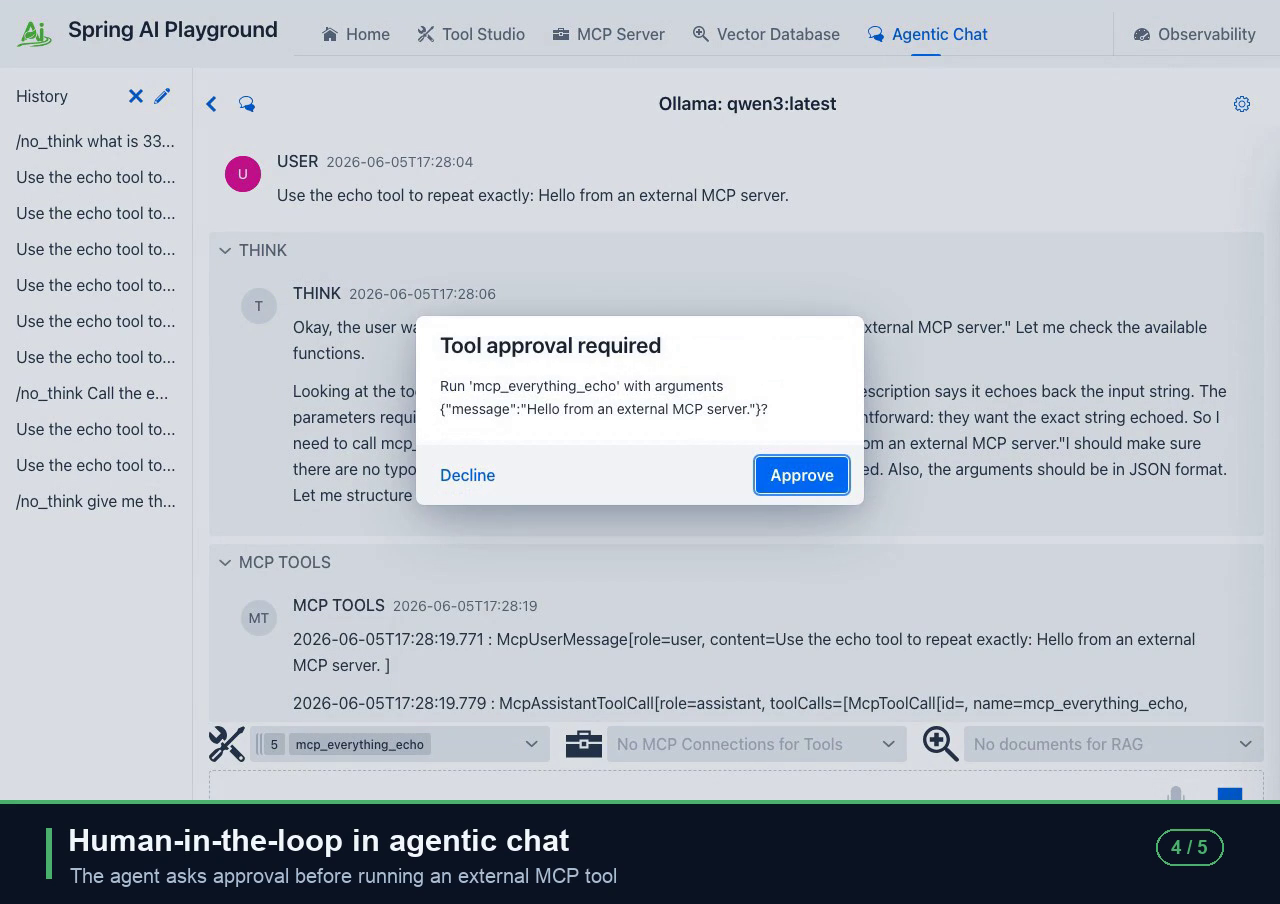
▶ Click to watch the demo — or see it autoplay on the docs site
AI agents can generate tools quickly, but generated tools are not inherently safe to execute.
Most platforms focus on creation.
Very few make verification part of the default workflow for built-in tool publication, and even fewer leave a clear trail of what each tool actually did after it ran. Spring AI Playground treats both as part of safe local execution — Local Pass at the gate, Observability dashboards on the inside.
The fastest path is the desktop app distributed through GitHub Releases.
Spring AI Playground is a standalone desktop app, so you can install it and start building MCP tools without setting up a Java project, Docker environment, or source build first.
Choose the installer for your platform from the latest release:




Each badge resolves to the latest published release automatically and opens a confirm dialog with the filename, size, and OS-specific default save path. The downloaded file keeps the version in its name (e.g. spring-ai-playground-<version>-mac-arm64.dmg). Or browse all available assets on the Releases page.
Install the app like a normal desktop application, then launch Spring AI Playground from your applications menu.
The desktop app bundles the backend runtime together with a launcher that provides provider starter templates, YAML override editing, environment-variable based secret handling, and one-click launch.
If you install the app, you can run Spring AI Playground immediately without setting up Docker or running the source manually.
macOS
Gatekeeper may block the install flow in two places:
- When you open the downloaded DMG, macOS may show a warning such as “cannot be opened because the developer cannot be verified.” If you trust the release source, go to System Settings > Privacy & Security and click Open Anyway.
- After copying the app into Applications, macOS may block the first app launch again. If that happens, open the app once, then return to System Settings > Privacy & Security and click Open Anyway.
If the app still doesn’t open because it remains quarantined, and you trust the app, one practical workaround is:
hljs language-arduinoxattr -dr com.apple.quarantine "/Applications/Spring AI Playground.app"Windows
The most common warning appears when you run the downloaded installer (
.exe).If Microsoft Defender SmartScreen shows a warning such as “Windows protected your PC” or says the app is unrecognized:
- Click More info
- Then click Run anyway
Linux
Separate Gatekeeper- or SmartScreen-style reputation warnings are uncommon. When installing the
.debor.rpmpackage, you usually only need to complete the normal package-install confirmation steps.For more detailed platform guidance, see the Getting Started guide.
Every release ships with a matching .sha256 checksum file and a Sigstore SLSA build provenance attestation. See Verify Your Download in the docs for the exact shasum, Get-FileHash, and gh attestation verify commands.
The desktop launcher handles first-run setup on one screen — provider config, Default MCP Tools curation, and JVM/environment cards — and includes an Ollama model manager to review, search, and download models. See Getting Started and Model Configuration.
Detailed installation, configuration, features, and tutorials live in the documentation site:
Alternative runtimes are still supported. The same Spring Boot fat JAR drives every channel; switching to a stdio MCP transport is opt-in via the mcp-stdio Spring profile.
For the app/web experience (default — streamable-http MCP server on port 8282, Vaadin UI front and center):
docker run -p 8282:8282 -v spring-ai-playground:/root ghcr.io/spring-ai-community/spring-ai-playground./mvnw -Pproduction spring-boot:runFor the stdio MCP server (drop-in for Claude Desktop, Claude Code, IDEs, and any other MCP-compatible client) — set SPRING_PROFILES_INCLUDE=mcp-stdio to layer the stdio transport on top of the default profile (so model config like Ollama / OpenAI is preserved):
docker run -i --rm -e SPRING_PROFILES_INCLUDE=mcp-stdio -v spring-ai-playground:/root ghcr.io/spring-ai-community/spring-ai-playground. Add -p 8282:8282 if you also want browser access to the Vaadin Inspector alongside the stdio channel.spring-ai-playground-*.jar from Releases (or ./mvnw -Pproduction package) and run SPRING_PROFILES_INCLUDE=mcp-stdio java -jar spring-ai-playground-*.jar. No Docker required, ideal for Java/Spring developers and CI integrations.Full setup details for both modes live in Getting Started: Alternative Runtimes.
${ENV_VAR} placeholders so disabled servers can't be activated without setup. One-click activation from the sidebar once the required env vars exist. Browse the full list in the Default MCP Catalog./mcp endpoint — compose multiple servers into one surface callable from Agentic Chat, the Inspector, and external MCP clients, each gated by per-tool human-in-the-loop.default-tools-preference.json — pick a preset (Starter 5, Dev Essentials, Korea Toolkit, File Toolkit, Everything) plus optional per-tool include / exclude rules to decide exactly which subset of the bundled tools the built-in MCP server exposes.fetch, rooted safety.fs, statement and wall-clock limits, with a visible per-tool Risk Level (L0–L5) computed from the declared capabilities — surface every tool's blast radius before you publish it.${ENV_VAR} placeholders that resolve at tool / MCP load time. SecretMasking redacts any resolved value (≥ 4 characters) from error logs and console output. When OS-backed secure storage is unavailable, the app clearly warns before falling back to plain-text local storage.The intended workflow is practical and composable:
Agent builders focus on generating tools and composing workflows.
Spring AI Playground focuses on validating tools and controlling execution.
It complements agent builders by providing a reliable execution layer.
Spring AI Playground doubles as a working reference implementation of the Spring AI framework — every surface in the app maps to a real Spring AI API, so you can use this repo as an end-to-end example of how those pieces fit together.
RetrievalAugmentationAdvisor for RAG, and the Tool Calling pipeline are composed through ChatClient.builder() and a custom SpringAiPlaygroundRagAdvisor.spring-ai-starter-mcp-client connects to the external MCP servers in the preset catalog and to the built-in MCP server in the same JVM, while spring-ai-starter-mcp-server-webmvc publishes every Local-Pass tool you author through the spring-ai-playground-tool-mcp connection on /mcp.ToolCallback — Tool Studio tools and external MCP tools both register through a single McpToolCallingManager, with LoggingMcpToolCallback adding correlation ids and secret masking around every call.SimpleVectorStore plus the Spring AI Tika document reader power Vector Database, exposed through the same reader / chunker / pre-retrieval / retrieval / post-retrieval stages the framework ships.ObservationRegistry is wired into ToolCallingManager and SimpleVectorStore, so spans emitted by Spring AI's semantic conventions (gen_ai.client.operation, spring.ai.chat.client) flow straight into the in-app Observability dashboards alongside chat-client spans.The version tracks the latest Spring AI release; use it as a reference when integrating these same features into your own Spring Boot app.
Spring AI Playground is a tool-first environment for building, testing, validating, and operationalizing MCP tools in a practical workflow.
It is best understood as a safe local execution layer for AI agent tools.
Note: This project is intentionally focused in its current stage.
The goal is to make MCP tool building, validation, inspection, and runtime exposure simple and reliable, so the tools you create here can be reused from MCP-compatible hosts and clients such as Claude Code, Claude Desktop, IDEs, and other agent environments.
Current focus:
It is not trying to replace the tools where agents actually run. It is designed to give you a clearer path from local tool prototype to inspectable, reusable MCP server.
Please read this section before opening issues or submitting contributions.
Pick the right channel:
docs/ (typos, errors, broken links); open a Discussion first for README changes or new sectionsWe triage issues regularly, and issues outside the current scope may be closed with guidance.
If you have a contribution that fits the current scope (bug report, doc fix, usage example), submit a PR or a targeted issue. For anything else, please open a Discussion first — but be aware we may not act on it given current capacity.
The official build sends anonymous usage data (page views, feature interaction events, device/browser info) to the maintainer's Google Tag Manager / Google Analytics account so the most-used features can be prioritized. IPs are anonymized by Google. The same opt-out switch applies to both the web app and every desktop launcher window (splash, server-splash, config editor, Ollama manager):
mvn: SPRING_AI_PLAYGROUND_TELEMETRY_ENABLED=falseSPRING_AI_PLAYGROUND_TELEMETRY_ENABLED=false before launching
the app (the launcher forwards this env var to every window and to the bundled Spring
process)-Dspring.ai.playground.telemetry.enabled=false as a JVM argIf you self-host this project for EU users, adding cookie consent on top is the operator's responsibility under GDPR.
These are the next pieces we plan to add while keeping the project focused on practical, reusable tool execution. Track day-to-day progress in the CHANGELOG [Unreleased] section.
Run Claude Code as an MCP server so any agent can delegate coding tasks to it
 @microsoft✓ Official
Browser automation using accessibility snapshots instead of screenshots
 @googleapis✓ Official
Google's universal MCP server supporting PostgreSQL, MySQL, MongoDB, Redis, and 10+ databases
 @github✓ Official
Official GitHub integration for repos, issues, PRs, and CI/CD workflows
