

Are you the author? Sign in to claim
A Claude Code skill that grounds AI-generated UI in real reference images and a persistent per-developer taste profile,
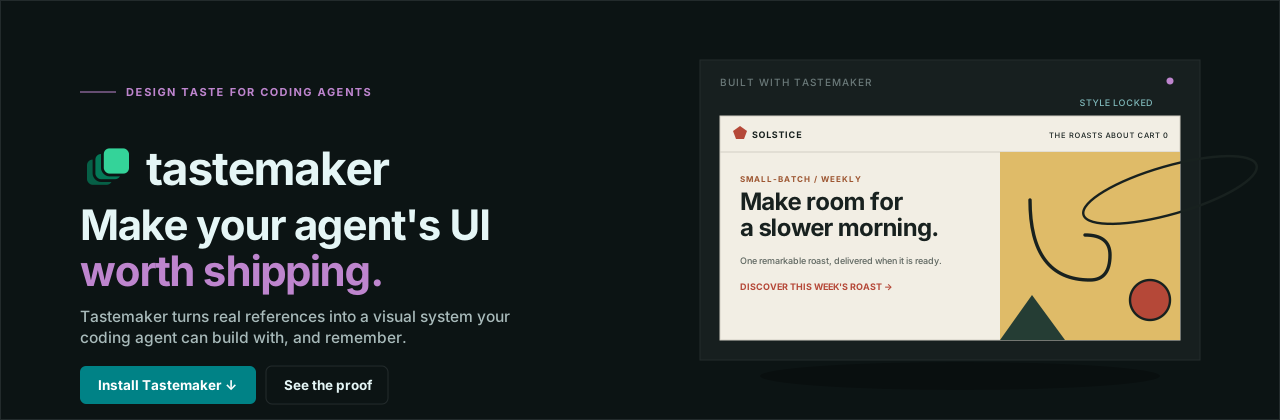




A skill that gives AI real design taste, so the UI it builds does not look AI-generated.
Before / after · Quick start · Why · Why not just prompt it? · What is verified · Features · Palette generator · Contributing
Tastemaker is a skill for coding agents (Claude Code, Cursor, Windsurf). You install it once and forget it. Whenever you ask your agent to build or style a UI, tastemaker steps in and gives it a real design system to work from, instead of the generic defaults every model reaches for.
It is plain Markdown and small Python scripts. Everything runs on your machine. There is no hosted backend, no account, and no API key.
One prompt, build a landing page for a coffee subscription, built twice: once with no skill, once with tastemaker installed. Same request, unchanged, both times.
Left is the indigo-gradient, letter-in-a-box-logo, emoji-icon default most agents reach for. Right is the same prompt with tastemaker: a palette generated fresh for the project's mood, real fetched icons, a constructed mark, and motion, in one pass. Both are real, live pages, not mockups or screenshots.
Ask any model to build a UI and you tend to get the same thing: an indigo to purple gradient, a soft shadow card, a generic hero. This is not a prompting problem. It happens because the model has to invent taste from a text description, with nothing real to ground it and no memory of what you actually like.
Tastemaker fixes this with four ideas, not a bigger catalog of canned options to pick from:
check_contrast.py --matrix computes every pairing and says which may carry text, which may carry a border, and which may carry neither. So the constraint produces variety instead of sameness, and a rule that runs is different in kind from a rule you wrote down, because it returns the same answer no matter how confident anyone felt.Yes, partly, and it is worth being straight about where the line is.
If you say "lock these decisions as a design bible and use it as our anchor," you get the decisions written down in the current context. For keeping three screens consistent inside one chat, that genuinely works, and you do not need this skill for it.
Here is what that does not give you:
.tastemaker/style-lock.md to your repo and ~/.tastemaker/profile.md to your home directory, so the decision outlives the conversation and carries into the next project.check_contrast.py --matrix is a computation. It does not care how good the palette looked to you, and it returns the same verdict every time. That is the difference between an intention and a constraint.extract_palette.py reads the actual pixel values.Short version: a conversation gives you the decision. This gives you the decision plus something that enforces it after you have stopped paying attention.
Worth separating these two clearly, because it is easy to let one stand in for the other, and this project has been guilty of that.
Verified (a computation, not taste). Contrast and readability. check_contrast.py runs real WCAG math over the palette and reports pass or fail. This is accessibility, not aesthetics. A palette that clears every ratio can still be ugly. The reason it belongs here anyway is that it catches a class of failure your eyes genuinely cannot: contrast is a calculation, and looking at a color confidently is not running it. Early hand-picked palette drafts for two moods failed that check on the first pass, and only the script caught it. That failure is the reason color is generated against the contract now instead of hand-tuned and hoped.
Judgment (heuristics and memory, not proof). Everything that is actually taste: the reference extraction, the mood-to-palette matching, the accumulated profile, and the anti-slop checklist. These are informed defaults and accumulated preference. They are not verified, and this README should not imply they are. They get better with your references and your rejections, not with more math.
Do not read the contrast script as evidence that the design is good. Read it as evidence that the design is legible, which is a smaller and more checkable claim.
Claude Code plugin (recommended):
/plugin marketplace add codeswithroh/tastemaker
/plugin install tastemaker@codeswithroh
Manual install, for Claude Code without the plugin system, or for Cursor/Windsurf: clone the repo, then copy or symlink the skills/tastemaker folder specifically (not the whole repo) into your tool's skills directory:
git clone https://github.com/codeswithroh/tastemaker /tmp/tastemaker
cp -r /tmp/tastemaker/skills/tastemaker ~/.claude/skills/tastemaker
Using Cursor or Windsurf? Same copy, into their skills directory instead.
Restart your agent, then just ask:
build a landing page for a coffee subscription
Tastemaker triggers on its own. It generates a palette, picks a matching type pairing, sources real assets, wires up motion, and builds. You do not invoke anything.
For the deterministic color extraction script you need Python 3 and Pillow (pip install Pillow). If Pillow is missing, it falls back to a vision based read instead of failing.
| Grounded in real pixels | Reference images become real color tokens through scripts/extract_palette.py, not a text guess. |
| A new palette every time, never reused | generate_palette.py builds a fresh palette per project: a base hue in the mood's range, a color-harmony rule for the accent, and per-role lightness solved so the contrast pairings clear their floors. Two similar prompts get two different, legible palettes, never the same one twice. |
| A contrast contract, not a one time check | check_contrast.py --matrix computes every pairing in the palette and reports which may carry text, which may carry a border, and which may carry neither. The generator satisfies this by construction, so a fresh palette is still a legible one. This buys readability, not taste. |
| Real illustrations | Each concept is matched to real illustrator grade art and recolored to your palette, not drawn from scratch by the model. |
| A real logo, not a letter in a box | A constructed geometric mark plus a full favicon set, readable down to 16px. |
| Motion by default | GSAP and ScrollTrigger reveals plus a sequenced hero, wired during the build and not left as a follow up. |
| Attribution free assets | Photos (Openverse), icons (Iconify), and illustrations all need no keys and no visible credit line. |
| Taste that compounds | A local profile remembers what you keep across projects, so the tool gets more accurate the more you use it. |
When you have no reference, tastemaker does not hand you a color picker, and it does not hand you a fixed color scheme to choose from either. It generates one, on the spot, for your project. A menu of five fixed options is still a menu: install the skill twice for two different products and you would get the same five outcomes. That is a smaller monoculture, not a solved one.
Instead, scripts/generate_palette.py classifies your app idea into a mood (premium, warm, technical, playful, or elegant, by keyword), then builds a genuinely new palette for it every run:
The proof is that the same mood produces different, and equally legible, output every time:
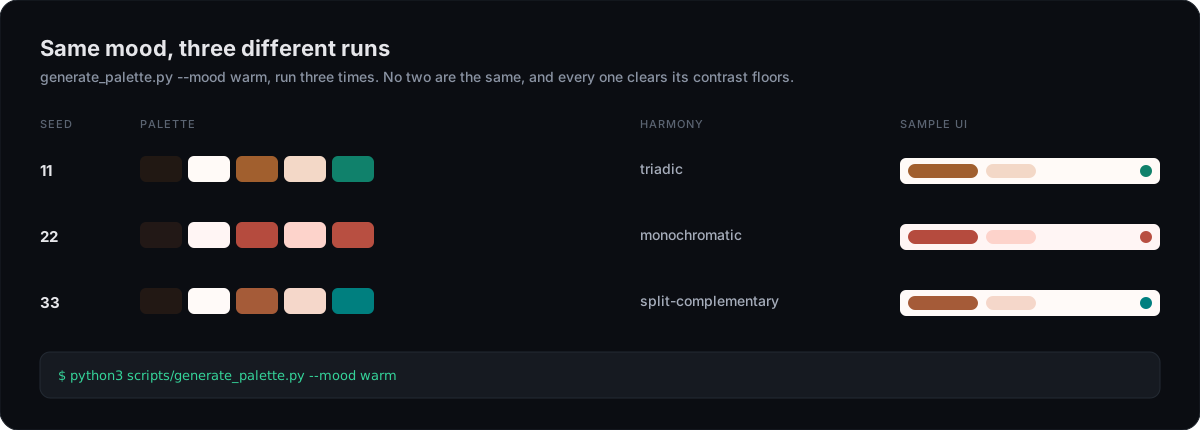
Run it yourself:
python3 scripts/generate_palette.py --mood technical
It prints the roles as hex, a live preview link, and the full contrast matrix, which pairing may carry text, which may only carry a border, and which is decorative, ready to paste straight into .tastemaker/style-lock.md. Pass --seed <n> to reproduce an exact result; omit it and every run is new. Fonts stay curated per mood (a real Google Font pairing, chosen for the mood's character, so there is no licensing question); only the color is generated.
Icons follow the same idea at a smaller scale: each mood maps to two candidate Iconify sets, not one, and fetch_icons.py picks between them per run the same way the palette generator picks a fresh hue — so two "technical" projects aren't guaranteed the same Lucide icons any more than two "premium" projects are guaranteed the same palette.
What's still fixed, honestly: font pairing (5 curated pairs, one per mood) and illustration matching (each concept maps to the closest fit in a finite local unDraw library) are not generated the way color and icons now are. Two projects in the same mood can still land on the same font pairing, and two projects needing the same abstract concept (a "team collaboration" illustration, say) can match the same source SVG — though the recolor itself differs, since it's tinted to that project's independently generated accent, not a shared default. This is a real, acknowledged limit, not a solved problem dressed up as one; widening either axis further is open work, not a claim already made good on.
1. Read the idea      references, or the app concept itself
2. Lock the style     palette and type, contrast checked, written to a lock file
3. Source assets      photos, illustrations, icons, logo, favicons, in one pass
4. Build the screens  visual first, motion wired in, checked against an anti-slop list
5. Remember taste     what you keep rolls into a profile for the next project
The full workflow lives in SKILL.md. The reference files in references/ hold the deep material and are read only when a step needs them.
I wrote up why I built this and how it works:
Every AI built site looks the same, so I built a skill that locks taste before any code is written
tastemaker/
├── .claude-plugin/              plugin + marketplace manifests (the plugin install path)
├── skills/tastemaker/           the actual skill, this is what gets installed
│   ├── SKILL.md                 the workflow, read this first
│   ├── references/              palettes, patterns, motion, asset sourcing, checklists
│   ├── scripts/                 palette generation, contrast check, extraction, asset fetch, recolor
│   ├── assets/                  GSAP motion starter and a dependency free fallback
│   └── ideagram/                vendored illustration-sourcing sub-skill
└── site/                        the marketing site and live demo
Contributions are very welcome. Bug reports, new mood ranges or harmony rules for the generator, better docs, and new layout patterns all help.
Please read CONTRIBUTING.md before you start, and see the Code of Conduct. Good first issues are labeled good first issue.
If tastemaker saved you from one more indigo gradient, a star helps other builders find it.
tastemaker is free, MIT licensed, and built in the open. If it saves you time or makes something you ship look better, sponsoring helps keep the palette generator, the asset pipeline, and the pattern library maintained.
MIT. Use it freely, including in commercial work.
Design enforcement with memory — keeps your UI consistent across a project
Create animation-rich HTML presentations using a coding agent's frontend skills
1000+ skills curated from Anthropic, Vercel, Stripe, and other engineering teams
Detects 37 AI writing patterns and rewrites text with human rhythm across 5 voice profiles