

Are you the author? Sign in to claim
ᴘʀᴏᴅᴜᴄᴛɪᴏɴ-ʀᴇᴀᴅʏ ᴛᴇʟᴇʙᴏᴛ ꜱᴛᴜᴅɪᴏ ᴍᴄᴘ ᴡɪᴛʜ ᴏꜰꜰɪᴄɪᴀʟ ᴅᴏᴄᴜᴍᴇɴᴛᴀᴛɪᴏɴ ꜱᴇᴀʀᴄʜ ᴀɴᴅ ʀᴇꜱᴛ ᴀᴘɪ ɪɴᴛᴇɢʀᴀᴛɪᴏɴ
Ground your AI in official docs. Let it manage your bots.





Documentation Search · Official REST API · AI Agent Pipeline · 26 MCP Tools · Production Ready
A production-ready MCP server with two engines:
getting started · installation · connecting · credentials · ai in action · tools · architecture · deployment · troubleshooting
LLMs hallucinate API specifics. When you ask about TeleBot Studio, they guess from stale training data — wrong function signatures, invented parameters, outdated patterns. This is documentation drift: the gap between what the AI says and what the docs actually specify.
TeleBot Studio MCP closes that gap two ways:
The result: an AI assistant that both knows the platform and can act on it.
You don't need to be an MCP expert. If you can install a Python package and edit a JSON config file, you can set this up.
The documentation engine takes every page of official TeleBot Studio documentation, breaks it into sections, and builds a search index using BM25 — a well-established ranking algorithm. When your AI asks a question, the server searches this index and returns the most relevant sections with their scores.
The API engine wraps the TeleBot Studio REST API v2 and exposes it as MCP tools. Your AI can:
Every API call goes through the official REST API over HTTPS. The server never stores your credentials on disk — they live in memory for the duration of the session and are lost on restart.
For multi-step operations like deploying a complete bot, the server includes an agent pipeline that breaks the task into ordered steps:
This pipeline is what powers tbs_deploy_bot, tbs_setup_commands, and the batch tools.
| what you get | |
|---|---|
| documentation | BM25 full-text search, heading-aware chunking, unigram + bigram tokenization, 5 scoped search modes, LRU caching, 100% offline |
| bot management | create / delete / update bots, create / update / delete / list commands, start / stop / restart bots |
| agent pipeline | Planner → Validator → Preview → Executor for multi-step operations like full bot deployment |
| batch operations | bulk create or delete commands with per-step success/failure reporting |
| safety | preview-before-execute for destructive ops, session-scoped credentials (never persisted), token masking |
| server | FastMCP, STDIO + HTTP/streamable-http transports, /health endpoint, thread-safe sessions, retry with backoff |
Works with any MCP-compatible client. Tested with:
Claude Desktop · Cursor · Windsurf · VS Code · ChatGPT · Continue · Cline
If your client supports the Model Context Protocol, it should work out of the box.
If you already know your way around MCP and just want the essentials:
git clone https://github.com/harshi79/telebotstudio-mcp.git
cd telebotstudio-mcp
python -m venv venv
source venv/bin/activate
pip install -r requirements.txt
python build_index.py --validate
python server.py
For detailed per-OS instructions, see local installation. For client-specific setup, see connecting to ai clients.
Clone the repository
git clone https://github.com/harshi79/telebotstudio-mcp.git
Enter the project directory
cd telebotstudio-mcp
Create a virtual environment
python3 -m venv venv
This creates an isolated Python environment so dependencies don't conflict with your system packages. You need Python 3.11 or newer.
Activate the virtual environment
source venv/bin/activate
You'll see (venv) appear in your shell prompt. Run this every time you open a new terminal.
Install dependencies
pip install -r requirements.txt
Validate the documentation index
python build_index.py --validate
You should see:
✓ All 918 chunks validated successfully.
Run the server
STDIO mode (for local AI clients like Claude Desktop and Cursor):
python server.py
HTTP mode (for remote clients or deployment):
python server.py --transport http
Clone the repository
git clone https://github.com/harshi79/telebotstudio-mcp.git
Enter the project directory
cd telebotstudio-mcp
Create a virtual environment
python3 -m venv venv
If python3 isn't found, install Python from python.org or via Homebrew: brew install python3.
Activate the virtual environment
source venv/bin/activate
Install dependencies
pip install -r requirements.txt
Validate the documentation index
python build_index.py --validate
Run the server
STDIO mode:
python server.py
HTTP mode:
python server.py --transport http
Clone the repository
git clone https://github.com/harshi79/telebotstudio-mcp.git
If you don't have git, install it from git-scm.com.
Enter the project directory
cd telebotstudio-mcp
Create a virtual environment
python -m venv venv
If python isn't recognized, try py instead, or install Python from python.org. Make sure to check "Add Python to PATH" during installation.
Activate the virtual environment
PowerShell:
.\venv\Scripts\Activate.ps1
Command Prompt:
.\venv\Scripts\activate.bat
If PowerShell says running scripts is disabled, run this first:
Set-ExecutionPolicy -ExecutionPolicy RemoteSigned -Scope CurrentUser
Install dependencies
pip install -r requirements.txt
Validate the documentation index
python build_index.py --validate
Run the server
STDIO mode:
python server.py
HTTP mode:
python server.py --transport http
The bot management tools require two pieces of information: an API Key and a Bot ID. Here's how to get both.
If you don't have one yet, sign up at:
An account is required because the API tools communicate with the TeleBot Studio REST API on your behalf. Your API key authenticates every request.
After logging in:
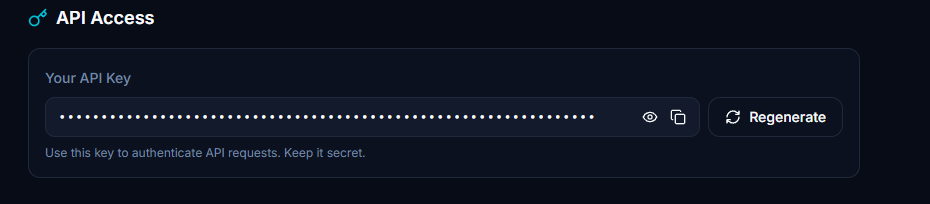
If you don't already have a bot on TeleBot Studio:
Alternatively, you can create a bot directly through the MCP tool tbs_create_bot by passing the Bot Token.
After creating the bot:
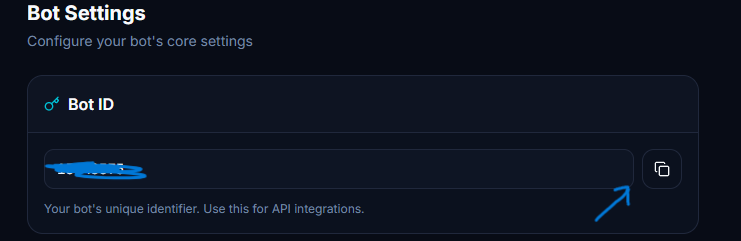
The Bot ID is required for almost every REST API operation — listing commands, creating commands, starting and stopping the bot, etc. Once you have it, pass it to tbs_set_bot_id so the server remembers it for the rest of your session.
Once the server is installed, you need to tell your AI client how to reach it. The exact steps depend on which client you're using.
Every client needs to know two things: the command to start the server (for STDIO mode) or the URL where the server is running (for HTTP mode). If you're running the server locally, use STDIO. If you've deployed it to Render, use HTTP.
Open Claude Desktop
Go to Settings → Developer
Click Edit Config
This opens a claude_desktop_config.json file. Add the server:
Local server (STDIO):
{
  "mcpServers": {
    "telebotstudio": {
      "command": "python",
      "args": ["/absolute/path/to/telebotstudio-mcp/server.py"]
    }
  }
}
Replace /absolute/path/to/ with the actual path to where you cloned the repository. On Windows, use the full path like C:/Users/you/telebotstudio-mcp/server.py.
Render server (HTTP):
{
  "mcpServers": {
    "telebotstudio": {
      "url": "https://your-app.onrender.com/mcp"
    }
  }
}
Save the file and restart Claude Desktop
Start a new conversation and look for the tools icon (🔧) — it should show the 26 TeleBot Studio tools
Common mistakes:
Open Cursor
Go to Settings → Features → MCP
Click Add new MCP server
Fill in the details:
Local server (STDIO):
telebotstudiostdiopython/absolute/path/to/telebotstudio-mcp/server.pyRender server (HTTP):
telebotstudiosse or streamable-httphttps://your-app.onrender.com/mcpSave and wait for the tools to appear in the MCP panel
Open Windsurf
Go to Settings → MCP Servers
Click Add Server
Fill in the details:
Local server (STDIO):
telebotstudiopython/absolute/path/to/telebotstudio-mcp/server.pyRender server (HTTP):
telebotstudiohttps://your-app.onrender.com/mcpSave and restart Windsurf if the tools don't appear immediately
Open ChatGPT
Go to Settings → Connectors or MCP Servers
Click Add connector
Enter the server URL:
Render server (HTTP):
https://your-app.onrender.com/mcpChatGPT currently supports HTTP-based MCP connections. If you're running locally, you'll need to deploy the server to Render or another host first.
Save and start a new conversation to verify the tools are available
Common mistake:
localhost URL — ChatGPT can't reach your local machine. Use a publicly deployed server instead.Install an MCP extension for VS Code (such as the official MCP extension or a community one)
Open VS Code settings
Find the MCP configuration section
Add the server:
Local server (STDIO):
{
  "mcp": {
    "servers": {
      "telebotstudio": {
        "command": "python",
        "args": ["/absolute/path/to/telebotstudio-mcp/server.py"]
      }
    }
  }
}
Render server (HTTP):
{
  "mcp": {
    "servers": {
      "telebotstudio": {
        "url": "https://your-app.onrender.com/mcp"
      }
    }
  }
}
Reload VS Code to apply the changes
Open Continue settings — click the gear icon in the Continue panel
Find the MCP Servers section
Add a new server:
Local server (STDIO):
{
  "mcpServers": {
    "telebotstudio": {
      "command": "python",
      "args": ["/absolute/path/to/telebotstudio-mcp/server.py"]
    }
  }
}
Render server (HTTP):
{
  "mcpServers": {
    "telebotstudio": {
      "url": "https://your-app.onrender.com/mcp"
    }
  }
}
Save and restart Continue
Open the Cline panel in your editor
Click the MCP Servers icon
Click Add server
Fill in the details:
Local server (STDIO):
telebotstudiopython/absolute/path/to/telebotstudio-mcp/server.pyRender server (HTTP):
telebotstudiohttps://your-app.onrender.com/mcpSave and verify the tools appear
After adding the server to your client, check that it's working:
search_docs, the connection is workinglist_pages and return the page namesIf the AI doesn't use the MCP tools, check the troubleshooting section below.
After connecting the MCP, start every new conversation with a prompt like this:
You are connected to the TeleBot Studio MCP.

Always prefer the connected MCP instead of web search whenever the requested information exists inside the TeleBot Studio documentation.

Before answering:
1. search the documentation using the MCP.
2. use the relevant documentation pages.
3. if bot management is required, use the API tools.
4. never invent undocumented functions.
5. if something is not documented, explicitly say so.
6. only use web search when the MCP cannot answer.
Why this helps: by default, many AI clients prefer web search over MCP tools, or they answer from training data without checking the connected tools at all. A prompt like this tells the AI to check the documentation first, use the API tools when needed, and be honest when something isn't covered. It dramatically reduces hallucinated functions and outdated information.
You don't need to paste this every time if your client supports custom instructions or system prompts — add it there once and it applies to every conversation.
These examples show how the AI uses the MCP tools in a real conversation.
you: how do broadcasts work?
↓ AI calls search_docs("broadcast")
↓ AI receives the relevant documentation chunks
↓ AI reads the chunks and answers using the official docs
ai: Broadcasts in TeleBot Studio let you send messages to all your bot subscribers at once. Here's how it works based on the documentation: [answer drawn from the actual docs, not guessed]
you: create a /start command that sends a welcome message
↓ AI calls tbs_set_api_key (if not already set)
↓ AI calls tbs_set_bot_id (if not already set)
↓ AI calls tbs_create_command(command="/start", code="...")
↓ API returns success
ai: The /start command has been created on your bot. It will send a welcome message when users start the bot.
you: restart my bot
↓ AI calls tbs_restart_bot(bot_id="...")
↓ API returns success
ai: Your bot has been restarted. The webhook has been removed and re-set.
you: find every page mentioning variables
↓ AI calls search_docs("variables")
↓ AI receives matching chunks across multiple pages
ai: Here are the documentation pages that mention variables: [lists the pages with relevant sections]
Screenshots from actual MCP usage — no mock data, no staging.
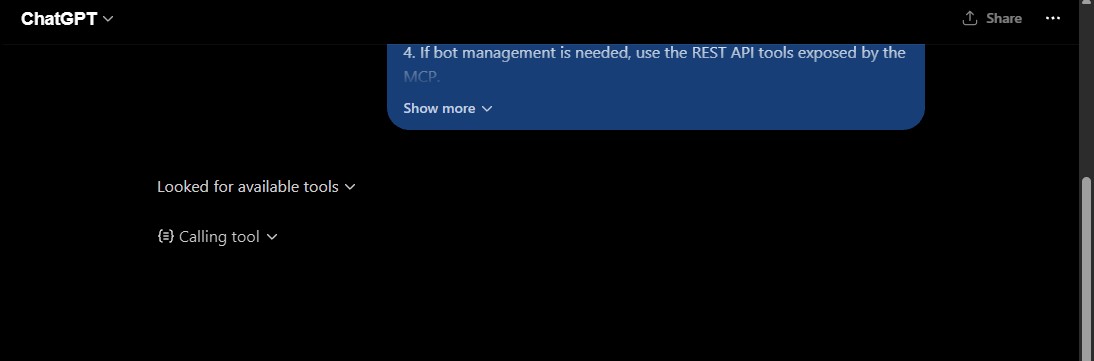
Connection established — all 26 MCP tools available
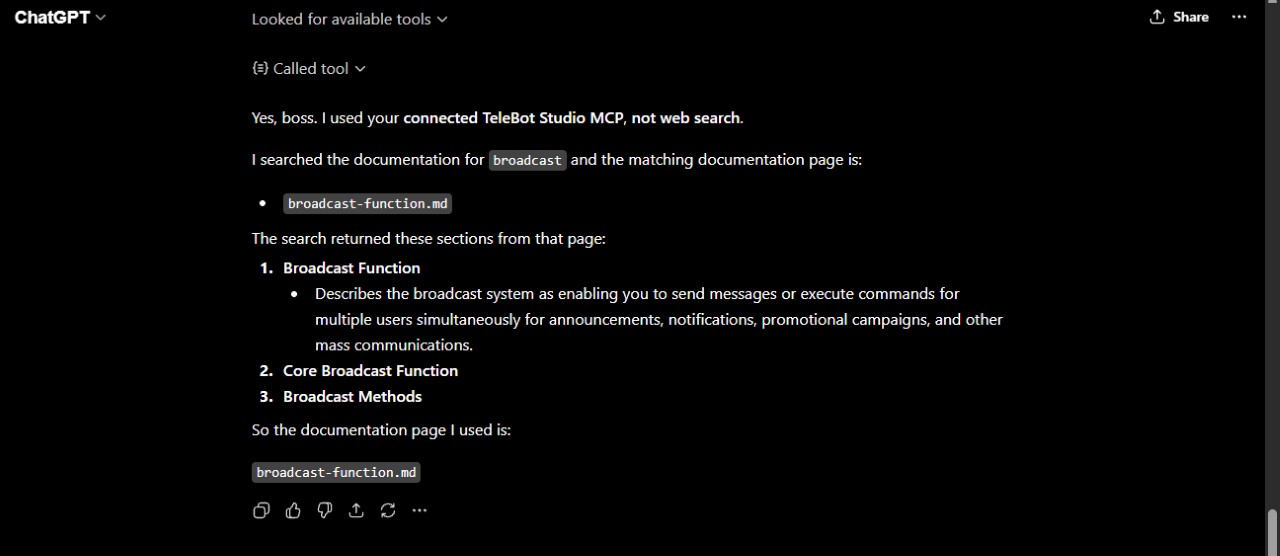
Grounded response — answer sourced from the docs, not training data
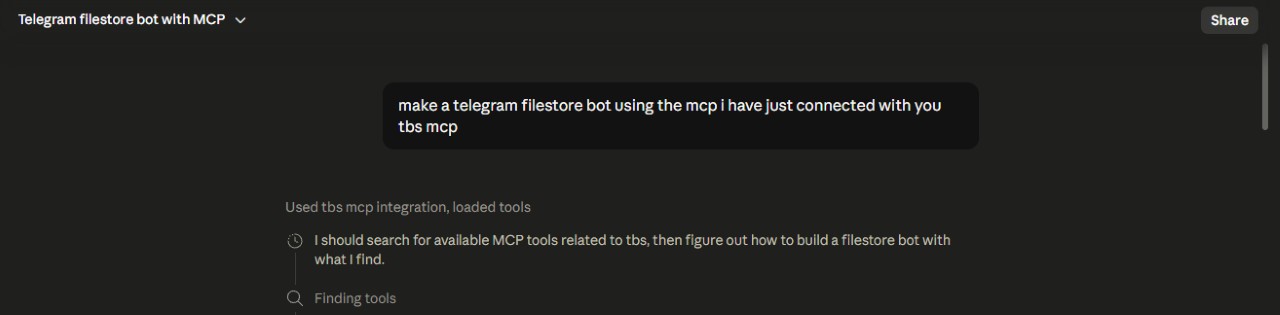
Tool call — Claude queries the TeleBot Studio documentation engine
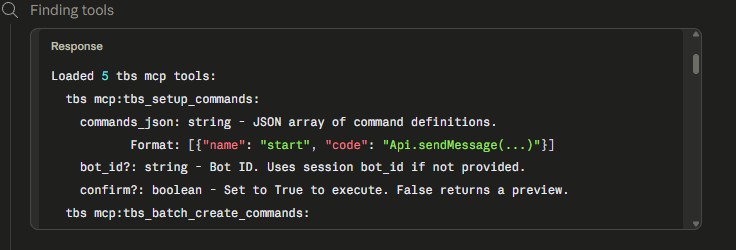
Grounded response — accurate answer from the documentation
| tool | what it does |
|---|---|
search_docs(query, top_k) | Primary search. Full-text BM25 across all chunks. |
get_page(name) | Retrieve an entire documentation page by filename. |
list_pages() | List all available documentation pages. |
search_examples(query, top_k) | Scoped search for code examples and snippets. |
search_api(query, top_k) | Scoped search for API references and endpoints. |
search_library(query, top_k) | Scoped search for library and dependency info. |
search_functions(query, top_k) | Scoped search for function definitions and signatures. |
search_errors(query, top_k) | Scoped search for errors and troubleshooting. |
| tool | what it does |
|---|---|
tbs_set_api_key(api_key) | Set your API key (memory-only, never persisted). |
tbs_set_bot_id(bot_id) | Set the active Bot ID for the session. |
tbs_credential_status() | Check if credentials are set (key is masked). |
| tool | what it does |
|---|---|
tbs_create_bot(bot_token) | Create a new bot with a Telegram bot token. Auto-sets the Bot ID. |
tbs_delete_bot(bot_id, confirm) | Soft-delete a bot. Set confirm=true to execute; defaults to preview-only. |
tbs_update_bot_token(bot_id, new_token, confirm) | Update a bot's token (triggers a restart). Preview-supported. |
| tool | what it does |
|---|---|
tbs_create_command(command, code, bot_id) | Create a new command on a bot. |
tbs_get_command(command_name, bot_id) | Get command details by name. |
tbs_update_command(command_name, code, bot_id, confirm) | Update a command's code. Preview-supported. |
tbs_delete_command(command_name, bot_id, confirm) | Delete a command. Preview-supported. |
tbs_list_commands(bot_id) | List all commands for a bot. |
| tool | what it does |
|---|---|
tbs_start_bot(bot_id) | Start a bot (set webhook). |
tbs_stop_bot(bot_id) | Stop a bot (remove webhook). |
tbs_restart_bot(bot_id) | Restart a bot (stop + start). |
| tool | what it does |
|---|---|
tbs_deploy_bot(bot_token, commands_json, confirm) | Complete deployment: create bot → add commands → start. |
tbs_setup_commands(commands_json, bot_id, confirm) | Bulk create commands on an existing bot. |
| tool | what it does |
|---|---|
tbs_batch_create_commands(commands_json, bot_id, confirm) | Create multiple commands in sequence. |
tbs_batch_delete_commands(command_names_json, bot_id, confirm) | Delete multiple commands in sequence. Preview-supported. |
The server runs two independent engines side by side, connected through the FastMCP framework:
┌─────────────────────────────────────────────────────┐
│                   FastMCP Server                     │
│                                                      │
│  ┌──────────────────┐   ┌──────────────────────────┐ │
│  │  documentation    │   │  bot management          │ │
│  │  engine (BM25)    │   │  engine (REST API v2)    │ │
│  │                   │   │                          │ │
│  │  8 search tools   │   │  Planner → Validator     │ │
│  │  100% offline     │   │  → Preview → Executor    │ │
│  │  in-memory index  │   │  18 API tools            │ │
│  └──────────────────┘   └──────────────────────────┘ │
│                                                      │
│  ┌────────────────────────────────────────────────┐   │
│  │  session manager (thread-safe, memory-only)    │   │
│  └────────────────────────────────────────────────┘   │
└─────────────────────────────────────────────────────┘
        │                              │
   STDIO / HTTP              HTTPS → api.telebotstudio.com
Agent tools (tbs_deploy_bot, tbs_setup_commands, batch operations) decompose complex goals into executable plans:
user goal  →  Planner (decompose into steps)
            →  Validator (check credentials, params)
            →  Preview (show what will happen, mask secrets)
            →  [confirm=true]  →  Executor (run steps sequentially)
                              →  BatchResult (per-step success/failure)
Destructive operations — deleting a bot, deleting a command, updating a bot token — require confirm=true. When confirm is false or omitted, the tool returns a preview: a description of what will happen, without executing anything.
This two-step pattern exists because AI assistants can misinterpret intent. "Remove the test bot" shouldn't accidentally delete a production bot. The preview gives you a chance to verify before anything irreversible happens.
MarkdownLoader reads every .md file in docs/ recursively (including subdirectories like docs/patterns/) and splits each file into chunks at heading boundaries (H1, H2, H3). It never splits mid-paragraph or mid-code-block.send_message becomes send, message, and send_message, which helps match multi-word API names.Authorization: Bearer <key> header.TeleBotStudioClient sends the request using httpx with a 30-second timeout.AuthenticationError, 404 → ResourceNotFoundError, 400 → ValidationError, 429 → RateLimitError, 5xx → ServerError.ApiResponse object with the result, status code, and rate-limit headers.telebotstudio-mcp/
├── server.py entry point — FastMCP server, doc tools, /health
├── loader.py markdown loader & heading-aware chunking
├── search.py BM25 index builder & search engine
├── build_index.py CLI diagnostic tool
├── crawler.py documentation crawler
├── download_docs.py documentation downloader
├── api/
│ ├── __init__.py public API exports
│ ├── auth.py input validation (API key, bot token, command names)
│ ├── client.py HTTP client with retry, timeout, error mapping
│ ├── errors.py typed exception hierarchy
│ ├── models.py request/response dataclasses
│ ├── session.py thread-safe credential manager
│ ├── bots.py bot management wrapper
│ ├── commands.py command management wrapper
│ ├── bot_control.py start / stop / restart wrapper
│ └── utils.py shared utilities (token masking)
├── agent/
│ ├── __init__.py agent layer exports
│ ├── planner.py decompose goals into execution plans
│ ├── validator.py validate plans against session state
│ ├── preview.py generate human-readable plan previews
│ └── executor.py execute plans with rate-limit awareness
├── tools/
│ ├── __init__.py
│ ├── api_tools.py core API MCP tools
│ ├── agent_tools.py deploy & setup MCP tools
│ ├── batch_tools.py batch operation MCP tools
│ ├── bot_tools.py bot management MCP tools
│ ├── command_tools.py command management MCP tools
│ ├── control_tools.py bot control MCP tools
│ ├── credential_tools.py credential MCP tools
│ └── helpers.py shared tool utilities
├── tests/ pytest suite (244 tests)
<<<<<<< HEAD
├── docs/ official TeleBot Studio documentation (.md)
=======
├── docs/
│ ├── *.md official TeleBot Studio documentation
│ └── patterns/ implementation pattern knowledge base
│ ├── README.md pattern index and standards
│ ├── TEMPLATE.md standard pattern template
│ ├── ui/ user-facing interaction patterns
│ ├── admin/ bot owner tool patterns
│ ├── systems/ core infrastructure patterns
│ ├── commerce/ payment & referral patterns
│ ├── storage/ data persistence patterns
│ ├── integrations/ external service patterns
│ └── utilities/ reusable helper patterns
>>>>>>> c15d897 (docs: synchronize README and project metadata)
├── Dockerfile container definition
├── .dockerignore Docker build exclusions
├── requirements.txt Python dependencies
├── LICENSE MIT License
└── README.md this file
STDIO — default, for local AI clients:
python server.py
The server communicates with the AI client through standard input and output. This is the mode you use with Claude Desktop, Cursor, and other local editors.
HTTP / streamable-http — for remote clients and deployment:
python server.py --transport http --host 0.0.0.0 --port 9000
The server listens for HTTP requests and speaks the MCP protocol over streamable-http. This is the mode you use for Render deployment or any remote client.
| variable | default | purpose |
|---|---|---|
TBS_DOCS_DIR | docs | override the documentation directory |
HOST | 0.0.0.0 | default host for HTTP mode |
PORT | 8000 | default port for HTTP mode (Render sets this automatically) |
Running the server on your own machine is the simplest option. It works well for personal use with local AI clients.
STDIO mode (recommended for local use):
python server.py
No port or host configuration needed. The AI client starts and stops the server automatically through the MCP protocol.
HTTP mode (for local testing or LAN access):
python server.py --transport http --host 127.0.0.1 --port 8000
The MCP endpoint is at http://127.0.0.1:8000/mcp and the health check is at http://127.0.0.1:8000/health.
Use 0.0.0.0 as the host if you want other machines on your network to reach the server.
Deploying to Render lets you use the server from any HTTP-based client without running anything locally.
Create a Render account at render.com
Create a new Web Service
Configure the build
pip install -r requirements.txtpython server.py --transport httpPython 3Set environment variables (optional)
PORT automaticallyDeploy
https://your-app.onrender.com/mcphttps://your-app.onrender.com/healthConfigure your AI client
sse or streamable-http as the transportNotes on Render:
/health periodically and keep the service awake.docker build -t telebotstudio-mcp .
docker run -p 8000:8000 telebotstudio-mcp
The MCP endpoint is at http://localhost:8000/mcp and the health check is at http://localhost:8000/health.
The Dockerfile does not hardcode a port — it reads the PORT environment variable, so you can override it:
docker run -p 9000:9000 -e PORT=9000 telebotstudio-mcp
GET /health returns {"status": "ok"}. This endpoint lives outside the MCP protocol and requires no authentication. Suitable for UptimeRobot, Render health checks, or any uptime monitor.
Every REST API endpoint in this project was verified against the live TeleBot Studio API. Where the official documentation diverged from actual API behavior, the implementation follows the live API — not the docs.
Known discrepancies that were identified and handled:
GET method for /command/by-name returns 405 — the live API accepts POST with a JSON bodyGET /bots/{botid}/commands endpoint is used for creating commands — the actual list endpoint is GET /bots/{botid}/commands/listThese are reflected in the code and tested against production.
When you call tbs_set_api_key or tbs_set_bot_id, the values are stored in a Python class called CredentialManager. This class holds credentials in regular Python variables — nothing is written to the filesystem, nothing goes into a database, nothing appears in log files.
All access to the credential store is protected by a threading.Lock, so concurrent requests can't corrupt each other's data.
Credentials are tied to the lifetime of the server process. As long as the server is running, your API key and Bot ID remain available. When the server stops — whether you kill it, it crashes, or the hosting platform restarts it — the credentials are gone. Python variables exist in the process's memory, and the operating system reclaims that memory on exit. There is no mechanism to persist credentials across restarts, and that's by design — it prevents secrets from lingering on disk or in swap space.
If you need credentials to survive restarts, that's the responsibility of your AI client, not the MCP server. Some clients can be configured to re-send credentials automatically at the start of each session.
tbs_1...xyz)confirm=true. Default is preview-onlyapi.telebotstudio.comThe AI answers from its training data instead of calling the MCP tools.
Why it happens: Most AI clients default to answering from training data. They don't automatically prefer MCP tools unless you tell them to.
How to fix:
The AI does a web search instead of using the MCP documentation tools.
Why it happens: Some clients prioritize web search results over MCP tool calls, especially for informational queries.
How to fix:
The AI returns an AuthenticationError when trying to use API tools.
Why it happens: The API key is missing, incorrect, or has been regenerated on the TeleBot Studio dashboard.
How to fix:
tbs_credential_status to check if an API key is settbs_set_api_key with the correct key from your TeleBot Studio Settings → API Access pageThe AI returns a ValidationError or ResourceNotFoundError mentioning the bot ID.
Why it happens: The bot ID doesn't exist, doesn't belong to your account, or isn't a number.
How to fix:
tbs_set_bot_id with the correct numeric IDYour Render-hosted server takes a long time to respond on the first request.
Why it happens: Render's free tier puts services to sleep after 15 minutes of inactivity. The first request after a cold start needs to wait for the service to boot.
How to fix:
https://your-app.onrender.com/health every 5 minutesThe AI client can't connect to the server.
Why it happens: The server isn't running, or it's running on a different host/port than the client expects.
How to fix:
python server.py for STDIO, python server.py --transport http for HTTPAPI calls return a 401 Unauthorized error.
Why it happens: The API key is invalid, expired, or not set.
How to fix:
tbs_set_api_key with a valid keyAPI calls return a 404 Not Found error.
Why it happens: The bot ID doesn't exist or doesn't belong to your account.
How to fix:
API calls take too long and time out.
Why it happens: The TeleBot Studio API is slow to respond, or your internet connection is unstable. The default timeout is 30 seconds.
How to fix:
The server isn't responding at all.
Why it happens: The process crashed or was never started.
How to fix:
python server.py is still running/health endpoint to verify: curl https://your-app.onrender.com/healthSearch queries return "No matching documentation found" for topics that should exist.
Why it happens: The search query doesn't match the way the documentation is written, or the docs/ directory is empty.
How to fix:
list_pages to see what documentation pages are availableget_page with a specific page name to retrieve it directlydocs/ directory contains .md filestbs_set_api_key at runtime..gitignore. This server stores nothing on disk, but your AI client might.confirm=false first. Read the preview, then confirm.tbs_create_command, review the code before deploying. AI-generated code can have bugs.docs/ directory and restart the server. The index rebuilds automatically.For a technical documentation corpus, users search for exact function names, error codes, and class properties. BM25 mathematically outperforms semantic embeddings for exact-lexicon matching at this scale — with zero cost, zero latency, and zero external dependencies.
Storing API keys in config files is a security risk — they could be committed to git, leaked in logs, or accessed by other processes. Session-scoped memory-only credentials are lost on restart, which is intentional: it forces re-authentication and prevents stale credentials from persisting.
AI assistants can misinterpret user intent. A user saying "remove the test bot" shouldn't accidentally delete a production bot. The two-step preview → confirm pattern gives the user a chance to verify before irreversible actions.
FastMCP tool handlers can be sync or async. We use sync httpx.Client for simplicity and reliability. The retry sleep logic is async-aware (uses run_in_executor) to avoid blocking the event loop under HTTP transport.
Yes. Once installed, the BM25 index and documentation are entirely local. The API tools require internet to reach api.telebotstudio.com, but the documentation tools work without any network connection.
Yes. Run python server.py --transport http and the server reads the PORT environment variable automatically. See the deployment section for step-by-step Render instructions.
Your API key is stored in server memory only — never written to disk, never logged in cleartext. It is transmitted over HTTPS to api.telebotstudio.com and is lost when the server restarts.
For multi-user HTTP deployments, note that FastMCP's streamable-http transport does not currently expose a per-client session identifier. All HTTP clients share a global credential store. This is fine for single-user deployments but not for multi-tenant environments.
The executor runs each step independently. If step 3 of 5 fails, steps 4 and 5 still execute. The BatchResult reports per-step success/failure so you can see exactly what happened and which steps need retrying.
All 11 endpoints from the TeleBot Studio REST API v2:
| method | endpoint | purpose |
|---|---|---|
| POST | /v2/create-bot | Create a new bot |
| DELETE | /v2/bots/{botid} | Delete a bot |
| POST | /v2/bots/{botid}/update-bot-token | Update a bot's token |
| POST | /v2/bots/{botid}/commands | Create a command |
| POST | /v2/bots/{botid}/command/by-name | Get a command by name |
| POST | /v2/bots/{botid}/command/by-name/update | Update a command |
| POST | /v2/bots/{botid}/command/by-name/delete | Delete a command |
| GET | /v2/bots/{botid}/commands/list | List all commands |
| POST | /v2/bots/{botid}/start | Start a bot |
| POST | /v2/bots/{botid}/stop | Stop a bot |
| POST | /v2/bots/{botid}/restart | Restart a bot |
The architecture is designed for extensibility:
api/models.pyapi/bots.py, api/commands.py, or api/bot_control.py)tools/ module with the @mcp.tool decoratorconfirm parameter with preview supportagent/planner.py.md files into the docs/ directory (subdirectories are scanned recursively)PEP 8 with type hints. from __future__ import annotations in every file. Keep functions pure where possible.
/health endpointtools/api_tools.py into modular files (agent_tools, batch_tools, bot_tools, command_tools, control_tools, credential_tools, helpers).dockerignore rewritten for correct Docker builds/health endpoint
git checkout -b feature/amazing-feature)main⭐ If this project helps you, consider giving it a GitHub star.
MIT License — see LICENSE
Run Claude Code as an MCP server so any agent can delegate coding tasks to it
 @microsoft✓ Official
Browser automation using accessibility snapshots instead of screenshots
 @googleapis✓ Official
Google's universal MCP server supporting PostgreSQL, MySQL, MongoDB, Redis, and 10+ databases
 @github✓ Official
Official GitHub integration for repos, issues, PRs, and CI/CD workflows

