

Are you the author? Sign in to claim
A structured 3-agent AI dev team — Architect, Builder, Reviewer. Built from production use. Token-optimized. Works with
russellenvy.github.io/three-man-team
See all releases →
AI coding tools are powerful but undisciplined. They read entire codebases when they need one function. They add features nobody asked for. They drift mid-task. They burn tokens on every session doing work that didn't need to happen.
The solution isn't a better prompt. It's a process.
Three Man Team gives you three agents with distinct jobs, clear handoffs, and rules that prevent the most expensive failure modes. The Architect plans and deploys. The Builder builds exactly what the brief says. The Reviewer doesn't pass work that isn't right.
Three is not arbitrary. Solo agents drift — there's no one to catch a wrong turn. Large teams generate coordination overhead that eats the productivity gain. Three is the minimum for meaningful review and the maximum before the team starts managing itself instead of the work.
The roles map to how real software ships:
How the team runs: Three Man Team uses one Claude Code session. Arch is your main agent. When work is ready to build, Arch spins up Bob as a subagent via Claude Code's Agent tool. When Bob is done, Arch spins up Richard the same way. You don't open three windows — everything runs inside your single session.
Choose your install type:
One project, one install. Clone directly into your project folder.
Step 1 — Navigate to your project folder and clone
git clone https://github.com/russelleNVy/three-man-team.git .claude/skills/three-man-team
Step 2 — Run setup and follow the instructions
cd .claude/skills/three-man-team && ./setup
Setup takes over from here. It will give you the exact commands to run and the prompt to paste into Claude to get started. Follow what it prints.
Install once, use in any project.
Step 1 — Clone to your global Claude skills folder
git clone https://github.com/russelleNVy/three-man-team.git ~/.claude/skills/three-man-team
cd ~/.claude/skills/three-man-team && ./setup
That's the one-time install. Setup will confirm everything is in place.
For each project you want to use Three Man Team on:
Step 2 — Copy agent files into your project, then spin up Claude
cp -r ~/.claude/skills/three-man-team/templates/project-folder/. /path/to/your/project/
cd /path/to/your/project
Open Claude Code and paste:
You are the Architect on this project. Please read new-setup.md.
Arch will handle the rest — project context file, team names, and your first session prompt.
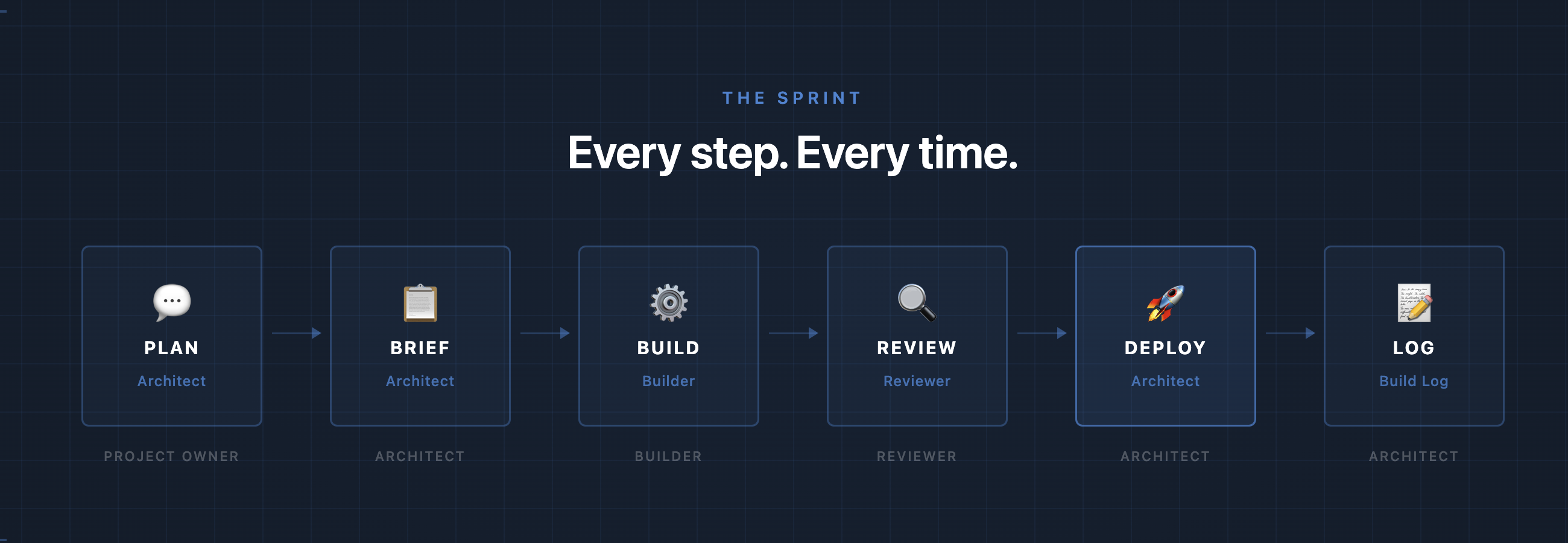
Every unit of work follows the same path. Architect plans and writes the brief. Builder reads it, shows a plan, builds, and hands off to Reviewer. Reviewer clears it or sends it back. Architect deploys with the Project Owner's go-ahead. Nothing skips a step.
See a complete example from problem to deploy → examples/sprint-walkthrough.md
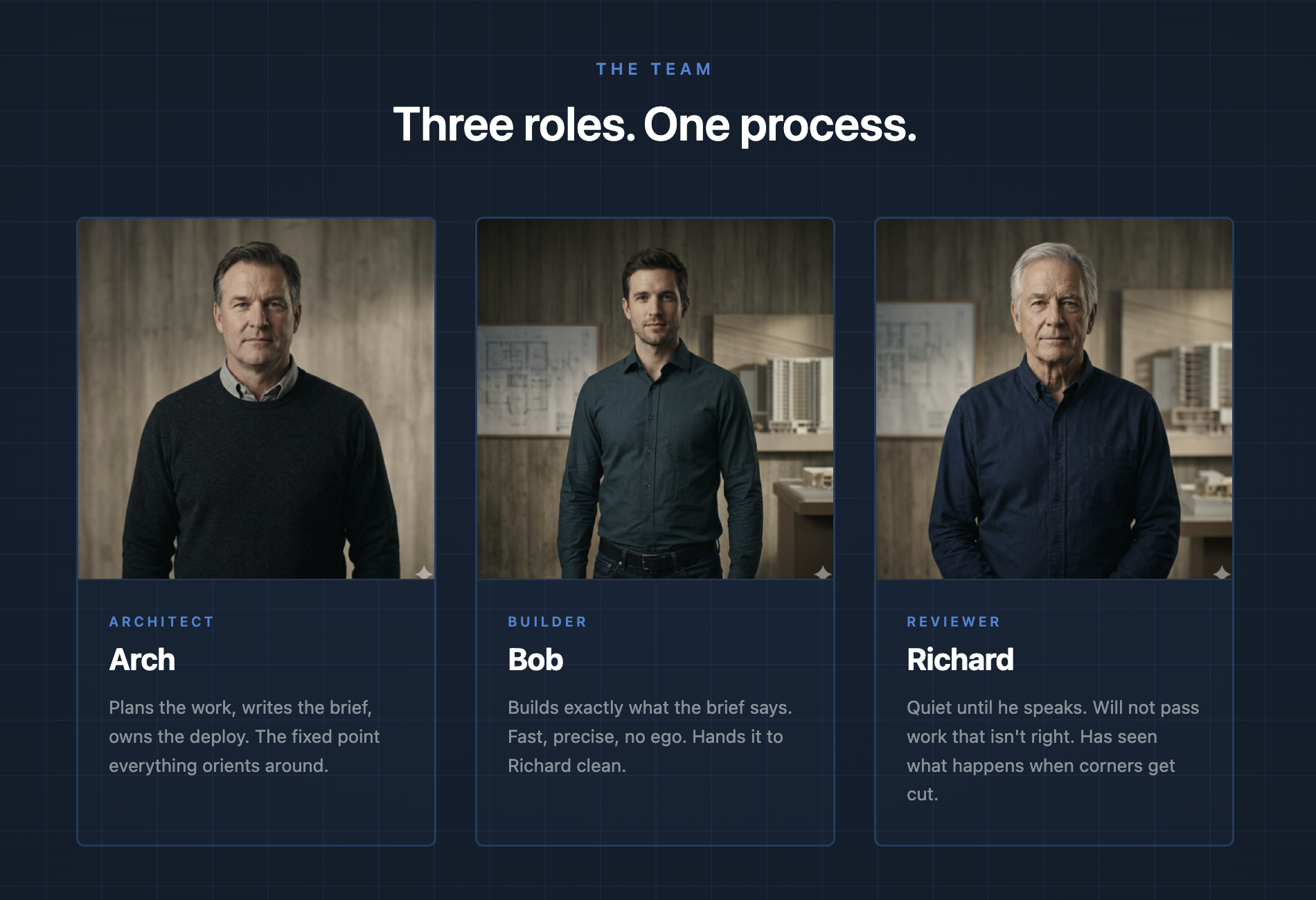
Three agents. Three distinct jobs. Built to work together.
Architect, Builder, Reviewer are the defaults. Rename them to anything — Arch will handle it during setup.
Every session starts with five rules baked into CLAUDE.md:
Is this in a skill or memory?   → Trust it. Skip the file read.
Is this speculative?            → Kill the tool call.
Can calls run in parallel?      → Parallelize them.
Output > 20 lines you won't use → Route to subagent.
About to restate what user said → Delete it.
The token-optimizer skill ships with every install and auto-loads via CLAUDE.md — no manual setup required.
For bash output compression on top of these rules, see RTK —
a separate tool that compresses find, ls, grep output before it reaches Claude's context.
Not required, but recommended for heavy Claude Code CLI users. The combination of RTK (bash layer)
See docs/token-optimization.md for the full discipline.
Arch checks the GitHub releases API at the start of every session. If a newer version is available, it tells you before doing anything else:
"Three Man Team v1.2.4 is available — you're on v1.2.3. Before we get into today's work, let me walk you through what changed."
Arch walks you through each change in plain language and guides you through any updates your project needs. You decide what to apply and when.
See releases for what's changed.
templates/project-folder/ — Start here. Named personas (Arch, Bob, Richard), fully written and ready to use. Customize the Who You Are sections and rename to fit your team.templates/generic/ — Blank slate with [CUSTOMIZE] placeholders. Use this if you want to build your own personas from scratch or install globally across all projects.Arch handles renaming during setup — just tell it the new names.
MIT. Free forever.
Russell Aaron — 20+ years building and supporting software the right way. He built this team in production shipping a real SaaS platform. It works because it was used before it was published, fine tuned, and will continue to get better over time as AI models and tools evolve.
1000+ skills curated from Anthropic, Vercel, Stripe, and other engineering teams
Design enforcement with memory — keeps your UI consistent across a project
Detects 37 AI writing patterns and rewrites text with human rhythm across 5 voice profiles
WCAG accessibility audit — automated scanning, manual review, remediation