

Are you the author? Sign in to claim
MCP server for Thunderbird - enables AI assistants to access email, contacts, and calendars





Give your AI assistant full access to Thunderbird -- search mail, compose messages, manage filters, and organize your inbox. All through the Model Context Protocol.
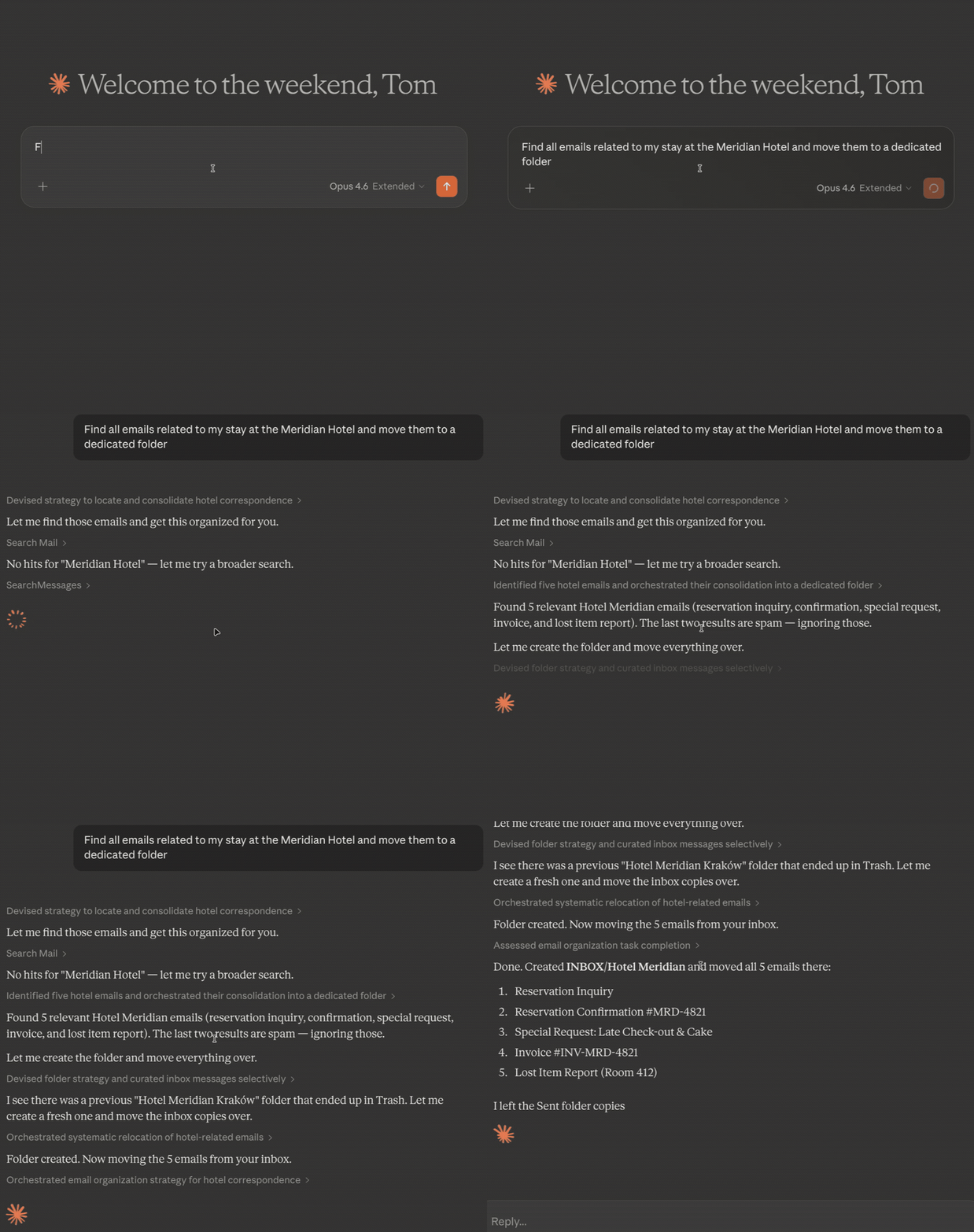
Inspired by bb1/thunderbird-mcp. Rewritten from scratch with a bundled HTTP server, proper MIME decoding, and UTF-8 handling throughout.
Thunderbird has no official API for AI tools. Your AI assistant can't read your email, can't help you draft replies, can't organize your inbox. This extension fixes that -- it exposes 36 tools over MCP so any compatible AI (Claude, GPT, local models) can work with your mail the way you'd expect.
Compose tools open a review window before sending by default. Set skipReview to send directly when you've already approved the content upstream. Nothing gets sent without your approval.
                    stdio              HTTP (localhost:8765-8774)
  MCP Client  <----------->  Bridge  <--------------------->  Thunderbird
  (Claude, etc.)           mcp-bridge.cjs                    Extension + HTTP Server
The Thunderbird extension embeds a local HTTP server with session-scoped auth tokens. The Node.js bridge translates between MCP's stdio protocol and HTTP, discovering the port and token automatically via a connection file. The bridge handles MCP lifecycle methods (initialize, ping) locally, so clients can connect even before Thunderbird is fully loaded.
| Tool | Description |
|---|---|
listAccounts | List all email accounts and their identities |
listFolders | Browse folder tree with message counts -- filter by account or subtree |
searchMessages | Search by subject, sender, recipient, body preview, date range, or tags. Multi-word queries are AND-of-tokens (every word must appear somewhere). Prefix with from:, subject:, to:, or cc: to restrict to one field. Set searchBody: true for full-text body search via Thunderbird's Gloda index. Supports includeSubfolders, countOnly, and offset-based pagination. Results include threadId and preview snippet. By default, dedupByMessageId collapses the same RFC Message-ID found in multiple folders/labels into one row and reports the other folder paths in dupLocations; set dedupByMessageId: false to return every location. |
getMessage | Read full email content -- bodyFormat: markdown (default), text, or html. Set rawSource: true for the complete RFC 2822 source (all headers + MIME parts). Optional attachment saving. Includes inline CID images. |
getMessages | Read full email content for up to the configured batch limit in one call (default 10, max 20). Uses the same bodyFormat, rawSource, and attachment options as getMessage; each item supplies messageId and folderPath. |
getRecentMessages | Get recent messages with date, unread, and tag filtering. Supports pagination. Results include threadId and preview. |
displayMessage | Open a message in Thunderbird's GUI -- 3pane (default), tab, or window mode |
updateMessage | Mark read/unread, flag/unflag, add/remove tags, move between folders, or trash -- supports bulk via messageIds |
deleteMessages | Delete messages -- drafts are safely moved to Trash |
createFolder | Create new subfolders to organize your mail |
renameFolder | Rename an existing mail folder |
deleteFolder | Delete a folder (moves to Trash, or permanently deletes if already in Trash) |
moveFolder | Move a folder to a new parent within the same account |
emptyTrash | Permanently delete all messages in Trash (including subfolders) |
emptyJunk | Permanently delete all messages in Junk/Spam (including subfolders) |
| Tool | Description |
|---|---|
sendMail | Compose a new email -- opens a review window, or set skipReview to send directly |
replyToMessage | Reply with quoted original and proper threading -- supports skipReview |
forwardMessage | Forward with all original attachments preserved -- supports skipReview |
All compose tools open a window for you to review and edit before sending by default. Set skipReview: true to send directly when you've already approved the content. Attachments can be file paths or inline base64 objects.
Compose tools validate the from identity strictly -- if the specified sender doesn't match any configured Thunderbird identity, the tool returns an error instead of silently substituting another account.
| Tool | Description |
|---|---|
listFilters | List all filter rules with human-readable conditions and actions |
createFilter | Create filters with structured conditions (from, subject, date...) and actions (move, tag, flag...) |
updateFilter | Modify a filter's name, enabled state, conditions, or actions |
deleteFilter | Remove a filter by index |
reorderFilters | Change filter execution priority |
applyFilters | Run filters on a folder on demand -- let your AI organize your inbox |
Full control over Thunderbird's message filters. Changes persist immediately. Your AI can create sorting rules, adjust priorities, and run them on existing mail.
| Tool | Description |
|---|---|
searchContacts | Search contacts across all address books by email or name. Supports maxResults. |
createContact | Create a new contact in any writable address book |
updateContact | Update an existing contact's email, name, or display name |
deleteContact | Delete a contact by UID |
| Tool | Description |
|---|---|
listCalendars | List all calendars with read-only, event, and task support flags |
createEvent | Create a calendar event -- opens a review dialog, or set skipReview to add directly. Accepts status: tentative | confirmed | cancelled (VEVENT STATUS per iCal RFC 5545). |
listEvents | Query events by date range with recurring event expansion. Returns status on each event. |
updateEvent | Modify an event's title, dates, location, description, or status |
deleteEvent | Delete a calendar event by ID |
createTask | Open a pre-filled task dialog for review |
listTasks | List tasks/to-dos from calendars -- filter by completion status, due date, or calendar |
updateTask | Update a task's title, due date, description, priority, completion status, or percent complete |
| Tool | Description |
|---|---|
getAccountAccess | View which accounts the MCP server can access |
Account and tool access are configured via the extension settings page (Tools > Add-ons > Thunderbird MCP > Options). Access control is not MCP-exposed -- only the user can change it.
The same settings page has a "Send Safety" section: toggle Block skipReview to reject sendMail / replyToMessage / forwardMessage calls that pass skipReview: true. The review-window path still works, so clients stay usable -- they just can't send silently.
git clone https://github.com/TKasperczyk/thunderbird-mcp.git
Install dist/thunderbird-mcp.xpi in Thunderbird (Tools > Add-ons > Install from File), then restart. A pre-built XPI is included in the repo -- no build step needed.
Add to your MCP client config (e.g. ~/.claude.json for Claude Code):
{
  "mcpServers": {
    "thunderbird-mail": {
      "command": "node",
      "args": ["/absolute/path/to/thunderbird-mcp/mcp-bridge.cjs"]
    }
  }
}
The bridge re-discovers connection.json on every cache miss. It tries these locations in order:
THUNDERBIRD_MCP_CONNECTION_FILE, if set<os.tmpdir()>/thunderbird-mcp/connection.json/var/folders/*/*/T/thunderbird-mcp/connection.json owned by the current userTMPDIR from /proc/<pid>/environ, plus the official snap fallback under ~/Downloads/thunderbird.tmp$XDG_RUNTIME_DIR/app/*/thunderbird-mcp/connection.jsonThis covers native installs, the official Thunderbird snap, Thunderbird Flatpak, Thunderbird Beta Flatpak, and Betterbird Flatpak without changing the extension side. If multiple sandbox candidates exist at once, the bridge tries the newest file first. Set THUNDERBIRD_MCP_CONNECTION_FILE to force a single explicit path.
Example override:
{
  "mcpServers": {
    "thunderbird-mail": {
      "command": "node",
      "args": ["/absolute/path/to/thunderbird-mcp/mcp-bridge.cjs"],
      "env": {
        "THUNDERBIRD_MCP_CONNECTION_FILE": "/absolute/path/to/connection.json"
      }
    }
  }
}
That's it. Your AI can now access Thunderbird.
<TmpD>/thunderbird-mcp/connection.json with 0600 permissions. The bridge re-discovers that file automatically across native installs, Snap, Flatpak, Betterbird Flatpak, and macOS temp directories.tools/list and blocked at dispatch.| Problem | Fix |
|---|---|
| Extension not loading | Check Tools > Add-ons and Themes. Errors: Tools > Developer Tools > Error Console |
| Connection refused | Make sure Thunderbird is running and the extension is enabled |
Bridge can't find connection.json | Set THUNDERBIRD_MCP_CONNECTION_FILE explicitly if your environment uses a non-standard temp/runtime path |
| Missing recent emails | IMAP folders can be stale. Click the folder in Thunderbird to sync, or right-click > Properties > Repair Folder |
| Tool not found after update | Reconnect MCP (/mcp in Claude Code) to pick up new tools |
searchBody returns no results | IMAP accounts need offline sync enabled for Gloda to index message bodies |
rawSource fails on IMAP | Requires local/offline message copy. Enable offline sync or click the message first to cache it. |
# Build the extension
./scripts/build.sh

# Test via the bridge (handles auth automatically)
echo '{"jsonrpc":"2.0","id":1,"method":"tools/list"}' | node mcp-bridge.cjs

# Test the HTTP API directly.
# On Snap / Flatpak / Betterbird Flatpak / macOS, point CONN_FILE at the
# real file or export THUNDERBIRD_MCP_CONNECTION_FILE first.
CONN_FILE="${THUNDERBIRD_MCP_CONNECTION_FILE:-/tmp/thunderbird-mcp/connection.json}"
TOKEN=$(jq -r .token "$CONN_FILE")
PORT=$(jq -r .port "$CONN_FILE")
curl -X POST http://127.0.0.1:$PORT \
  -H "Content-Type: application/json" \
  -H "Authorization: Bearer $TOKEN" \
  -d '{"jsonrpc":"2.0","id":1,"method":"tools/list"}'
After changing extension code: remove from Thunderbird, restart, reinstall the XPI, restart again. Thunderbird caches aggressively.
thunderbird-mcp/
├── mcp-bridge.cjs              # stdio <-> HTTP bridge (auth, port discovery)
├── extension/
│   ├── manifest.json
│   ├── background.js           # Extension entry point
│   ├── httpd.sys.mjs           # Embedded HTTP server (Mozilla)
│   ├── options.html            # Settings page UI
│   ├── options.js              # Settings page logic
│   ├── icons/                  # Extension icons
│   └── mcp_server/
│       ├── api.js              # All 36 MCP tools + auth + access control
│       └── schema.json
├── test/                       # Test suite (node:test, zero dependencies)
└── scripts/
    ├── build.sh
    └── install.sh
listFolders aftersearchBody on IMAP without offline sync only searches headers (Gloda limitation)rawSource requires offline message copy for IMAP -- online-only messages will errorMIT. The bundled httpd.sys.mjs is from Mozilla and licensed under MPL-2.0.
Run Claude Code as an MCP server so any agent can delegate coding tasks to it
 @microsoft✓ Official
Browser automation using accessibility snapshots instead of screenshots
 @googleapis✓ Official
Google's universal MCP server supporting PostgreSQL, MySQL, MongoDB, Redis, and 10+ databases
 @github✓ Official
Official GitHub integration for repos, issues, PRs, and CI/CD workflows