

Are you the author? Sign in to claim
A self-hosted AI workspace unifying chat, code execution, parallel multi-agent orchestration, and project management. Ea
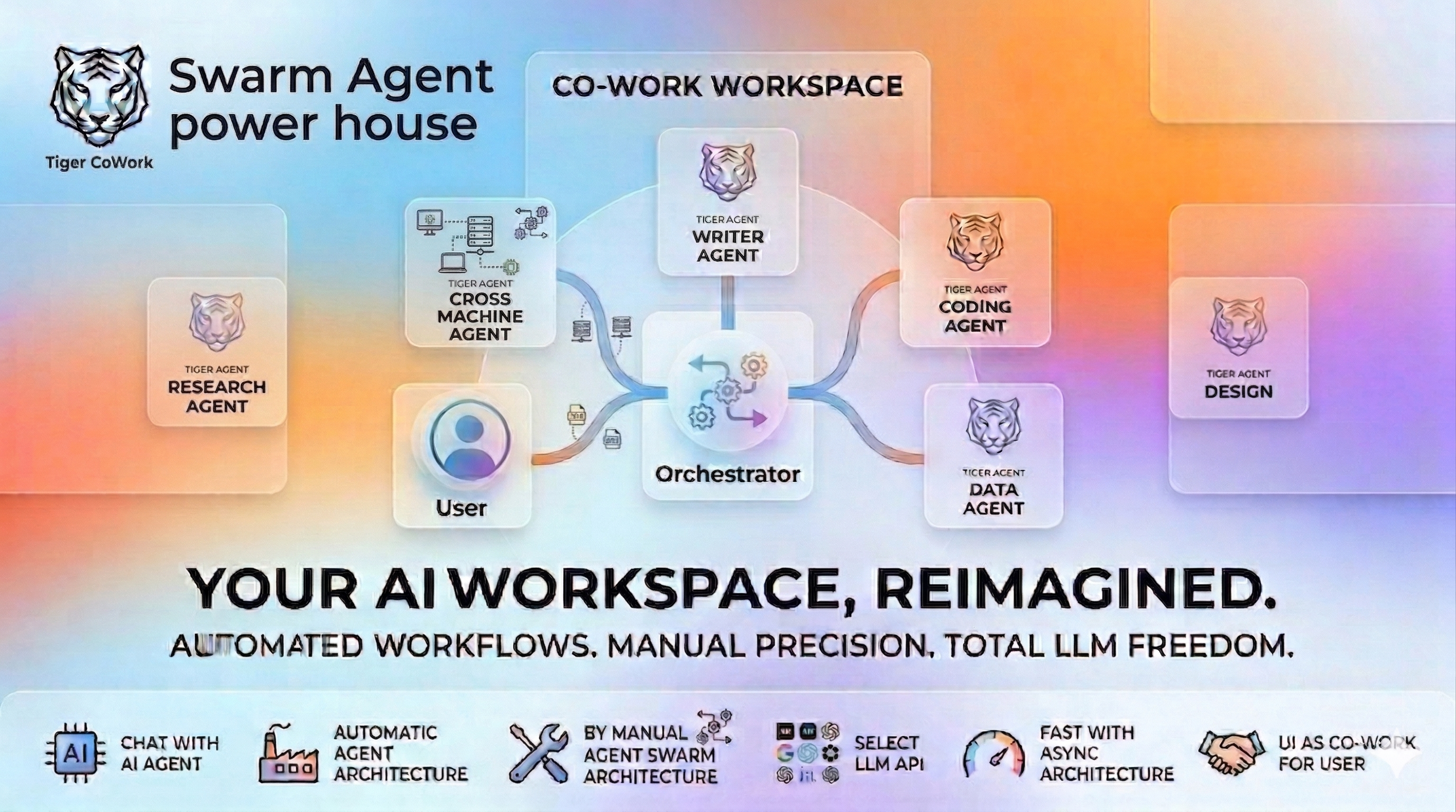
A self-hosted AI workspace with chat, code execution, parallel multi-agent orchestration, cross-machine agent connection, and a skill marketplace. Mix different AI providers in the same agent team — OpenAI-compatible APIs, Claude Code CLI, and Codex CLI. Connect agents across machines on your network so distributed teams can collaborate in real time. Connect external MCP servers to extend the AI's toolbox. Built with 16 built-in tools and designed for long-running sessions with smart context compression and checkpoint recovery.
"chat content is empty (2013)" errors that surfaced as Context overflow after 3 compression retries in long pipeline runs. Emergency retries now bypass the 60-second compaction cooldown; trimConversationContext is tool-pair aware (assistant tool_calls and their matching tool results are dropped as a unit so nothing gets orphaned); a new truncateLargestToolResult helper targets the single biggest tool message on retries 2–3 instead of halving the whole transcript; and a structural validateMessageStructure pass runs after every compression/trim to drop any orphan that slipped through.{"proposals":[]}, the run summary previously showed created=0 updated=0 skipped=0 candidates=N with no indication of why nothing happened. Empty-proposal outcomes now surface in skillAutoUpdateLastRunSummary as LLM returned no proposals for N session(s), and the LLM's actual reply head is logged to the server console for debugging.looksEmpty Heuristic — the prose-fallback that coerces a refusal-shaped reply (e.g. "no skills worth capturing") into proposals=[] now requires the whole trimmed reply to be under 200 characters. Previously a long, malformed proposal that happened to contain "no skill" inside its rationale could be silently swallowed.SKILL.md workflows. The synthesiser proposes new skills or refines existing auto-generated ones; updates land as a side-by-side SKILL.md.proposed diff for review before going live. See Automatic Skill Generation for the full algorithm and settings.SKILL.md and enables it; the next user turn in any chat picks it up automatically (the system prompt is rebuilt per turn — no restart needed).data/chat_logs/<sessionId>.log to surface a per-agent workflow trace (task, tools used, skills loaded). For multi-agent chats this fixes a previous gap where only the orchestrator's merged reply was visible to the synthesiser; remediation can now identify and rewrite the exact auto-skill a sub-agent loaded, and synthesis can capture the agent topology in the SKILL.md body — not just the outcome..txt.getSettings() returns the project-scoped configuration throughout the entire chat lifecycle.Warning: This app executes AI-generated code and shell commands. Run it inside Docker or a sandboxed environment. See Security & Docker Setup.
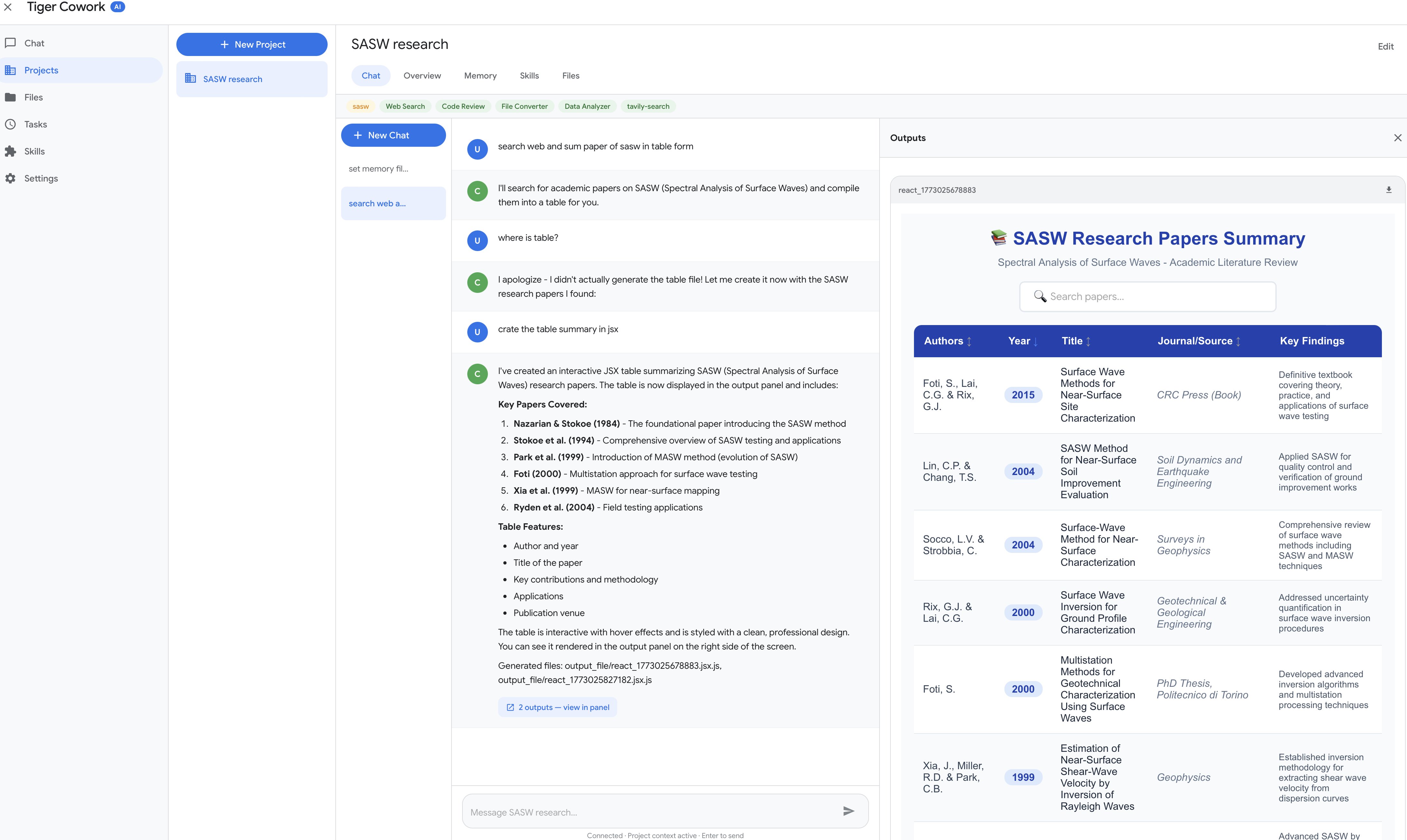
AI Chat with tool-calling — generates React/Recharts visualizations rendered in the output panel.
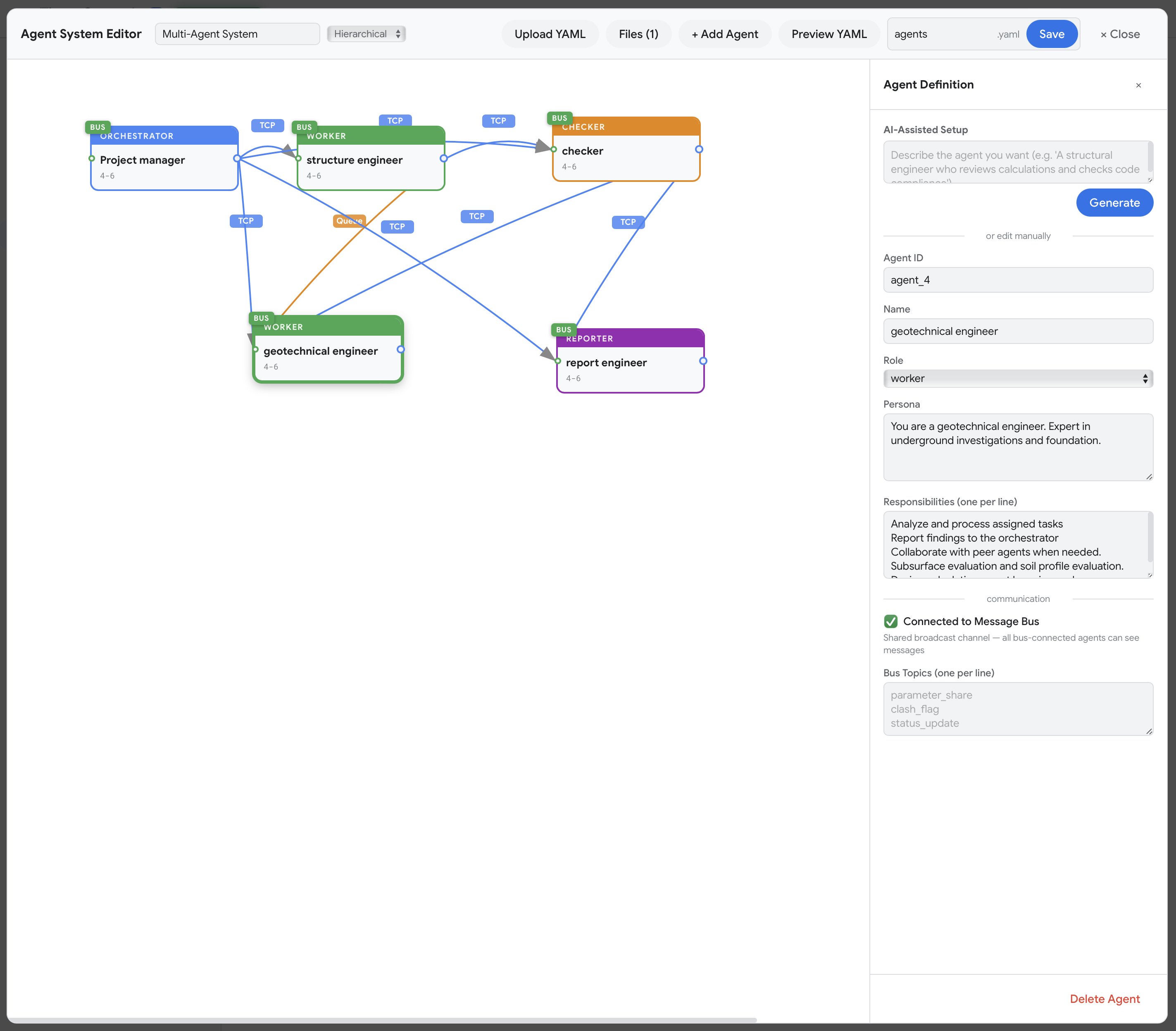
Visual Agent Editor — drag-and-drop multi-agent design with mesh networking and YAML export.

Minecraft Task Monitor — live pixel-art agents with speech bubbles, walking animations, and inter-agent interactions.
SKILL.md procedures with an LLM synthesiser, approval gate, and proposed-diff reviewMac:
TigerCoWork.zipTigerCoWork.app and select OpenWindows:
TigerCoWorkInstaller.zipTigerCoWorkInstaller.batPrerequisite: Docker Desktop must be installed and running.
| Mac | Windows | |
|---|---|---|
| Start | Double-click TigerCoWork.app | Double-click TigerCoWorkStart.bat |
| Stop | Docker Desktop → Containers → Stop | Double-click TigerCoWorkStop.bat |
Mac/Linux:
curl -fsSL https://raw.githubusercontent.com/Sompote/tiger_cowork/main/install.sh | bash
Windows (PowerShell):
irm https://raw.githubusercontent.com/Sompote/tiger_cowork/main/install.ps1 | iex
Log in to your Linux server directly or via SSH:
ssh root@<your-server-ip>
⚠️ Security Warning: AI agents can execute arbitrary code and shell commands that may modify or delete files on the host system. It is strongly recommended to run Tiger CoWork on a VPS or dedicated machine that contains no important data. Do not run it on a machine with sensitive or irreplaceable information.
Prerequisites: Node.js >= 18, npm, Python 3 (optional)
git clone https://github.com/Sompote/tiger_cowork.git
cd tiger_cowork
bash setup.sh        # installs deps, prompts for ClawHub token
npm run build && npm start   # → http://localhost:3001
Running in background (recommended): Use PM2 to keep Tiger CoWork running after you close the terminal.
hljs language-bashnpm install -g pm2 # install PM2 globally npm run build # build production bundle pm2 start npm --name "tiger-cowork" -- start # start in background pm2 save # save process list for auto-restart pm2 startup # enable auto-start on system bootUseful PM2 commands:
hljs language-bashpm2 status # check running processes pm2 logs tiger-cowork # view logs pm2 restart tiger-cowork # restart pm2 stop tiger-cowork # stop
First-time token: The default token is
your-secret-token-herein the UI. Please change it later in.envfor your security.
http://localhost:3001Tiger CoWork can automatically synthesise reusable SKILL.md workflows from your past chat sessions. After a chat finishes, an LLM-driven pipeline reviews recent conversations and either proposes a brand-new skill, refines an existing auto-generated one, or — when 👎 feedback was left — surgically rewrites the auto-skill most likely responsible. Future chats then match a stored procedure instead of re-improvising from scratch.
updatedAt is newer than the saved cursor are summarised: first 6 user prompts (≤600 chars each), the last assistant reply (≤3000 chars), any per-message 👍 / 👎 feedback with comments, and a sub-agent workflow trace parsed from data/chat_logs/<sessionId>.log (per-agent task, tools used, skills loaded via load_skill, completion/error status). The trace is necessary because in multi-agent modes only the orchestrator's merged final reply lands in session.messages — the chat log is the only place that knows which sub-agent did what. Sessions whose final reply looks like an error (rate limit, missing API key, connection error) are silently dropped, as are sessions with no user or assistant turn yet.load_skill events found → match against all auto-skills using the disliked excerpt + comment (minimum score = 2 distinct content tokens). The model is then asked to rewrite that one skill to address the complaint, or {"skip": true} if it judges the wrong target was picked. The remediation prompt also includes the parsed sub-agent workflow so the model can correct orchestration-layer failures (wrong sub-agent, wrong order, missing prerequisite). Capped at 5 remediations per run; the rest defer to the next tick. Successful remediations consume the session, so Pass 2 will not also distil from it. The run summary records which strategy picked the target (e.g. target picked via chatlog-unique) for debuggability.create — a new skill (must not collide with any existing name across all sources), orupdate — refines an existing skill only if its source: "auto". Human-curated skills (custom, clawhub, claude, openclaw) are write-protected.
The synthesiser is told to skip casual chats / one-off Q&A that don't generalise — quality > quantity. 👍 reinforces "capture this"; 👎 explicitly suppresses distillation. When subagent_workflow is non-empty, the prompt instructs the synthesiser to capture the agent topology (which roles to spawn, in what order, with which skills loaded) in the SKILL.md body — not just the outcome.[a-zA-Z0-9_-]+, ≤64 chars), valid YAML frontmatter, content under 100k chars, and source/collision checks.skills/<slug>/SKILL.md and a registry row in data/skills.json with source: "auto".skills/<slug>/SKILL.md.proposed next to the live file, leaving the live SKILL.md untouched until you approve.skillAutoUpdateRequireApproval is true (the default), proposals land with enabled: false, reviewStatus: "pending" until you approve them from the Skills page. Approval renames .proposed → SKILL.md and flips enabled: true. Set it to false to auto-enable everything.When skillAutoUpdateHumanFeedbackEnabled is on, every assistant message in chat picks up a 👍 / 👎 control plus an optional comment box. Submitting feedback bumps the session's updatedAt, so the auto-skill loop will re-consider that session on its next pass.
| Signal | Effect on Pass 1 (Remediation) | Effect on Pass 2 (Synthesis) |
|---|---|---|
| 👍 | none | Strong "capture this procedure" hint to the synthesiser |
| 👎 + comment | Picks the auto-skill that the chat actually loaded (parsed from the chat log); falls back to token-overlap if none was loaded. Asks the model to rewrite it, including the sub-agent workflow as context | Skipped (already consumed) |
| 👎 (no comment) | none | Synthesiser is told not to distil a skill from this chat |
| no rating | none | Synthesiser decides on its own — casual / one-off chats are skipped |
data/settings.json)| Key | Default | Purpose |
|---|---|---|
skillAutoUpdateEnabled | false | Master on/off switch (must be enabled in Settings to start the cron) |
skillAutoUpdateIntervalMinutes | 60 | Cron interval (clamped to [5, 1440]) |
skillAutoUpdateMaxCandidates | 30 | Cap on sessions summarised per run (newest N kept) |
skillAutoUpdateRequireApproval | true | Gate new/updated skills behind manual approval |
skillAutoUpdateHumanFeedbackEnabled | false | Show 👍 / 👎 + comment per assistant message and feed it into the pipeline |
skillAutoUpdateCursor | epoch | High-water mark of newest processed session |
skillAutoUpdateLastRunAt / LastRunSummary | — | Telemetry surfaced in the Skills UI |
Toggling any of these from the Settings page reconciles the cron job immediately — no restart needed.
POST /api/skills/auto/run-now — trigger the pipeline immediately (ignores cursor)POST /api/skills/:id/approve — accept a pending create or updatePOST /api/skills/:id/reject — drop a pending proposal (deletes the folder for a create, deletes only .proposed for an update)GET /api/skills/:id/proposed-diff — return current vs. proposed SKILL.md for reviewGET /api/skills/:id/content — read the live SKILL.md plus its supporting-file listGET /api/skills/:id/download — download a single SKILL.md or a zipped folder of the whole skillPOST /api/chat/sessions/:id/messages/:index/feedback — set/clear 👍/👎 + comment on one assistant message ({rating?: "up"|"down", comment?: string, clear?: true})Skills are advertised to every agent in the topology — orchestrator, spawn_subagent workers, and realtime/auto-swarm/auto-create agents — by buildEnabledSkillsBlock, which re-scans the skills directory and registry on every prompt build. Once a skill flips to enabled: true (i.e. after approval), the next user turn in any chat sees it, including any sub-agents the orchestrator spawns. No server restart needed.
A skill cannot be applied within the same chat that produced it: synthesis only runs after a session settles, and that session is the pipeline's input, not its consumer. The earliest a skill distilled from chat A can be invoked is the next user turn that follows the next cron tick (and approval click, if required).
| Document | Description |
|---|---|
| Technical Documentation | Architecture, agent system, communication protocols, orchestration topologies, MCP setup, CLI agents, API endpoints, configuration |
| Changelog | Full version history and release notes |
This project is licensed under the MIT License.
⚠️ Experimentelle Skill-Sammlung für deutsches Recht (Arbeits-, Gesellschafts-, Insolvenz-, Datenschutz-, Prozessrecht u
Manage multiple Claude Code agents from TUI or Web with tmux and git worktrees
Project management using GitHub Issues + Git worktrees for parallel agent execution
Core skills library for Claude Code with 20+ battle-tested skills including TDD, debugging, and brainstorming