

Are you the author? Sign in to claim
Auto-resume Claude Code, Codex CLI, Grok, Qwen Code, Kimi CLI, OpenCode & Antigravity when the 5-hour/weekly usage limit


unsnooze.combustortech.in — docs · changelog · feedback
Claude Code · Codex CLI · Grok · Qwen · Kimi · OpenCode · Antigravity — when they hit the 5-hour or weekly usage limit
("You've hit your usage limit"), your session just… stops.
unsnooze auto-resumes them: it tracks every limit-stopped session across all
your projects and wakes each one up in tmux or Zellij the moment the usage limit resets.
npm install -g unsnooze && unsnooze setup
Overnight and long-running agent work dies at the 5-hour / weekly limit, and every existing tool solves only a slice of it:
| unsnooze | claude-auto-retry | autoclaude | hydra | |
|---|---|---|---|---|
| Multi-CLI (Claude · Codex · Grok · Qwen · Kimi · OpenCode · Antigravity) | ✅ | ❌ Claude only | ❌ Claude only | partial |
| GUI sessions (VS Code ext, desktop apps) | ✅ watcher daemon | ❌ | ❌ | ❌ |
| Waits for reset & resumes the same session | ✅ | ✅ | ✅ | ❌ switches provider |
| All sessions at once (shared ledger + one daemon) | ✅ | ❌ one pane | ✅ | ✅ |
| Revives sessions whose pane/process is gone | ✅ --resume <id> | ❌ | ❌ | ❌ |
| Survives laptop sleep & weekly-scale waits | ✅ epoch polling | partial | partial | n/a |
| Settings + first-run wizard | ✅ | ❌ | ❌ | ❌ |
unsnooze is a scheduler that presses your keys — not an auto-approver. It waits for your usage limit to reset, then resumes the same session. It never changes how your agent handles permissions.
@unsnooze_owner stamp, else a lease = process id + birth
time — a mismatch vetoes, because pane ids get recycled) and liveness (your
agent is still running there). Pane closes require proven identity (idle
threshold too for resumed panes). Ownership unprovable → it reopens a fresh
session instead of typing.unsnooze preview. A true dry-run — it prints exactly
what would be typed, where, and why (or what's holding it back), and sends
nothing. Preview shares its decision code with the real dispatcher, so it cannot
drift from what dispatch actually does.menuAutoAnswer.--dangerously-skip-permissions, no auto-trust, no auto-approve. unsnooze
never passes bypass flags, never presses "Yes, I trust this folder," and never
touches MCP config. Whatever your agent does after resuming is governed by
its own permission model — the same as if you'd typed the message yourself.registry.npmjs.org (nothing identifying; updateCheck=false turns it off), and
push notifications only if you configure an ntfy topic. State stays local under
~/.unsnooze.*.unsnooze-orig pristine + *.unsnooze-bak rolling); unsnooze uninstall removes every change. Releases are published with npm provenance.~/.ssh/config, keys, agent);
unsnooze never sets StrictHostKeyChecking=no and fails fast on unknown
hosts instead of auto-trusting them.command="unsnooze _remote",restrict ssh-ed25519 AAAA… unsnooze-fleet
in the remote authorized_keys confines that key to the fleet
entrypoint — it can never open a shell.Honest limits: unsnooze does inject keystrokes into your live terminal on your behalf, and it does not sandbox your agent or defend against prompt injection / malicious repos — that's your agent's job. Full threat model, residual risks, and vulnerability reporting: SECURITY.md.
StopFailure hook (authoritative,
carries session_id) plus multiplexer pane scraping for banners and the interactive
limit menu (always answered with "Stop and wait for limit to reset", never a
blind Enter). Dead sessions revive via claude --resume <id>.■ You've hit your usage limit … banner strings from the Codex
source, parses try again at 3:51 PM / Feb 23rd, 2026 9:01 PM /
in 4 days 20 hours 9 minutes. Dead sessions revive via
codex resume <id> "<message>" — the prompt travels in argv.StopFailure); the limit banner text is
not publicly documented, so detection uses generic patterns with a safe
fallback. Hit a banner unsnooze missed? Run unsnooze report and paste the
capture into an issue — that's how this adapter gets good.StopFailure
hook installed into ~/.qwen/settings.json (fires with error: rate_limit)
plus scraping for the verbatim quota renders (Qwen OAuth quota exceeded,
Coding Plan Allocated quota exceeded, and OpenRouter Rate limit exceeded: limit_… passthroughs). Qwen never shows a reset time, so waits use the
5-hour fallback and self-correct on verify. Dead sessions revive via
qwen --resume <id> (session ids come from the *.runtime.json sidecars
qwen writes for exactly this purpose).LLM provider error: Error code: 429 … rate_limit_reached_error line — that's the detection anchor.
The 429 body carries no reset time (5h fallback + verify). Dead sessions
revive via kimi -r <id> -p "<message>" — with a guard: kimi silently starts
a new session for unknown ids, so the id is verified on disk first
(--continue otherwise). Membership expired (402) is notify-only.retry-after (it will sleep hours
until the reset, showing Rate Limited [retrying in 2h5m attempt #4]). So
unsnooze records the stop but never touches a live self-retrying pane; its
job is reviving sessions whose process died mid-wait (laptop slept, tmux
gone) via opencode -s <ses_id>, with the reset time parsed straight from
the banner countdown. Zen plan banners (5 hour/weekly/monthly usage limit reached…) and OpenRouter passthroughs are detected too; insufficient credits (402) is notify-only.agy) — ⚠️ experimental. The Gemini-CLI
successor. Scrapes the forum-reported quota strings (Model quota limit exceeded, Refreshes in 6 days and 18 hours — parsed, multi-day refresh =
the weekly cap) and treats 503 MODEL_CAPACITY_EXHAUSTED as a transient
overload, not a limit. Dead sessions revive via agy --conversation=<id>
(ids from ~/.gemini/antigravity-cli/history.jsonl). Like Grok: closed
source, so unsnooze report captures make this adapter better.OpenRouter (the API gateway) isn't a separate agent: its 429 bodies
(Rate limit exceeded: limit_rpd/…, free-models-per-day) are detected inside
the CLIs that use it (OpenCode, Qwen Code), and credit exhaustion (402) is
surfaced as a notification — there's no reset to wait for, only a top-up.
Terminal sessions are watched through the shell wrapper + tmux or Zellij. Sessions in
Claude Code's VS Code extension / desktop app and Codex's IDE
extension / desktop app have no pane to scrape — so unsnooze daemon tails
the session files those surfaces already write:
~/.claude/projects/**.jsonl transcript (session id, cwd, reset time) —
shared by the CLI and the VS Code extension.rate_limits snapshot (usage %, exact epoch reset
time) into every rollout under ~/.codex/sessions/ — shared by the CLI,
IDE extension, and the unified ChatGPT desktop app (July 2026: the Codex
app became the ChatGPT app; its bundled codex app-server writes the same
rollouts to the same store — verified against a real install). On machines
where Codex lives only inside ChatGPT.app (no codex on PATH), unsnooze
automatically resumes through the app-bundled binary
(/Applications/ChatGPT.app/Contents/Resources/codex).~/Library/Application Support/Claude; unsnooze watches
those too and revives with the session's isolated CLAUDE_CONFIG_DIR
(plus the keychain-scope override that keeps auth working — verified
against a real desktop session).When the limit resets, the session is revived in a multiplexer pane with
claude --resume <id> / codex resume <id> — it's the same session file, so
the continued conversation stays visible in the GUI's own history. (Resuming
inside the GUI panel isn't possible today: no extension/app exposes an
IPC/URI that can send a prompt.)
Enable it in unsnooze setup (installs a launchd agent / systemd user unit),
or run unsnooze install --daemon / unsnooze daemon yourself. Turn it off
anytime with unsnooze config set guiWatch off.
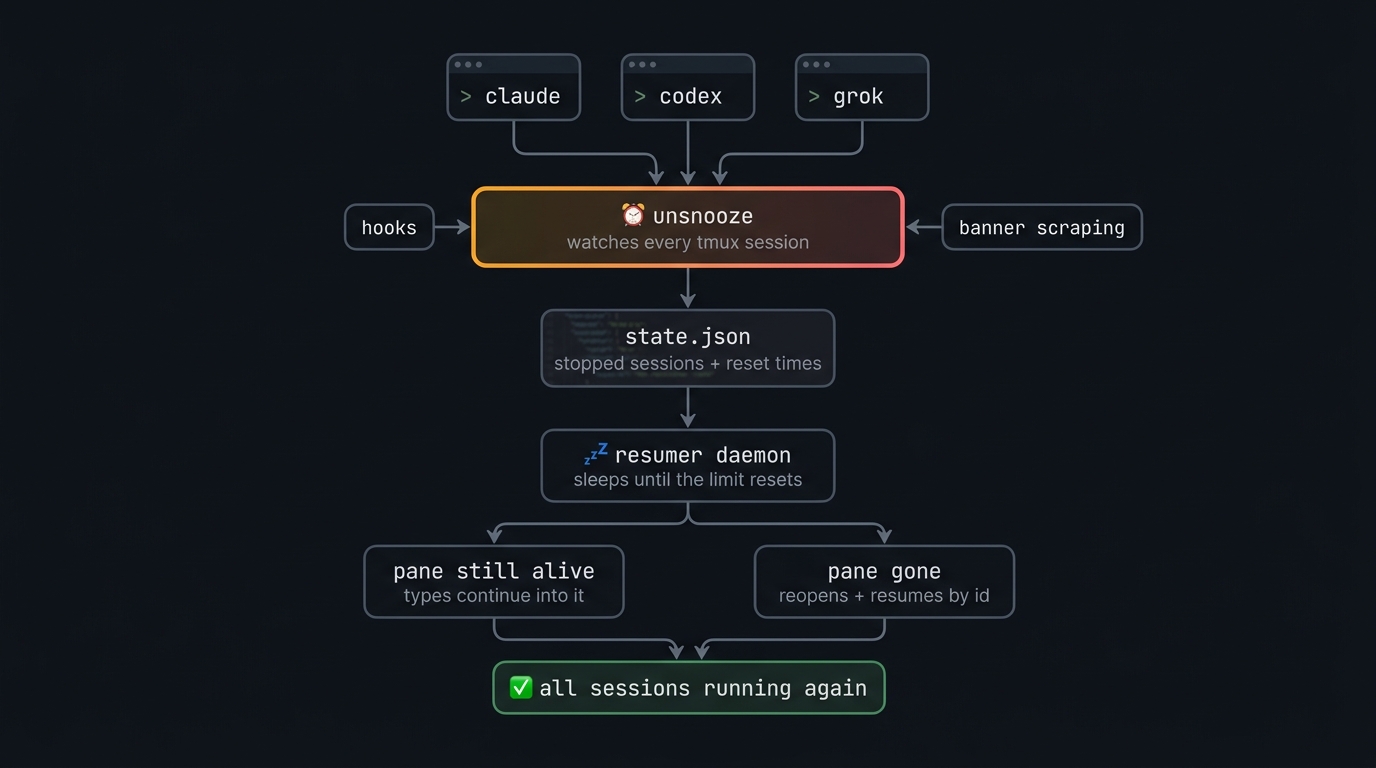
claude / codex / grok (shell wrapper) ──► unsnooze _run <agent> ──► CLI in mux pane
                                              │
                                              ├─ per-pane monitor (scrapes for limit
                                              │  banners, drives Claude's limit menu,
                                              │  seconds-scale retry on 5xx/overload)
                                              │
StopFailure hook (claude, grok) ──────────────┤
                                              ▼
                                ~/.unsnooze/state.json
                                { agent, sessionId, cwd, pane, resetAt, status }
                                              │
                                              ▼
                                resumer daemon (singleton, epoch-polling —
                                survives laptop sleep and weekly-scale waits)
                                              │
                          ┌───────────────────┴────────────────────┐
                 pane still alive?                          pane gone?
                 send resume message into it                new multiplexer pane,
                 (only if the CLI is foreground             `unsnooze _run <agent>
                 and not mid-stream)                        --resume <id>`, verify
Limit events are never persisted by the CLIs themselves; the reset time is parsed from the banner text, DST-safe. Unparseable banners are never guessed at — unsnooze probes the pane on a backoff schedule until a real reset time appears. Every resume is verified afterwards (banner came back → reschedule from the fresh banner, capped at 5 attempts).
Recovery (auto-resume) is only half the job. Prevention is knowing when the
wall is coming — so you can /compact, pause, or switch models before a stop.
unsnooze usage                         # burn rate, % used, time-to-limit
unsnooze usage --json                  # stable machine shape (exit 2 past warn %)
unsnooze usage --install-statusline    # opt-in: exact Claude % via statusline
unsnooze usage --uninstall-statusline  # remove the shim, restore your statusLine
$ unsnooze usage
unsnooze usage — account burn & time-to-limit  (daemon: running · warnings at 80,95%)

  claude  5h      [█████████████░░░░░░░]  ~64%  (calibrated from 4 stops)
          burn    ~31k weighted tok/min over last 42 active min
          wall    ~1h 10m at this pace · window resets 8:00 pm (absolute)

  codex   5h      [███░░░░░░░░░░░░░░░░░]  5% used  (exact)
          monthly [██░░░░░░░░░░░░░░░░░░]  5% used  (exact) · resets Aug 11
          burn    idle — no active burn

  Estimates are a lower bound: Claude quotas are account-pooled with claude.ai/Desktop.
  Exact Claude percentages available via: unsnooze usage --install-statusline
| What you get | How |
|---|---|
| Honest labels | Every figure is tagged (exact), (calibrated from N stops), or (estimated — calibrating…). Never a bare %. |
| Account-wide burn | Sums all active sessions and subagents (the limit is per-account, not per-pane). Idle gaps >5 min are excluded so a quiet hour doesn't hide a fast burn. |
| Time-to-wall | ETA as a band (not a false-precision minute), cross-checked against known reset times. Weekly shown info-only — no unstable weekly ETA. |
| Pre-wall warnings | Daemon notifies at % bands (usageWarnAt, default 80,95) and time tiers (30 / 10 min). Deduped once per window. |
/compact nudge only | Warnings may suggest /compact so the eventual wake is cheap. unsnooze never auto-types it (same security rule as resume: types only your configured message). |
Provenance ladder (why this isn't another guessed-quota dashboard):
(exact) — Codex always (local used_percent + epoch reset). Claude only with the opt-in statusline shim (server-authoritative rate_limits from Claude Code's statusline JSON).(calibrated from N stops) — Claude token burn vs a ceiling learned from your limit-stop ledger (the same stops unsnooze already records for resume). Not plan presets, not circular P90-of-history.(estimated) — used tokens + burn shown; ceiling unknown until the first observed stop.Honest limits: Claude transcript sums are a lower bound — subscription quotas are account-pooled with claude.ai and the Desktop app. Without the statusline shim, Claude tops out at calibrated/estimated. Exact Claude % needs Pro/Max after the first API response of a session (absent after /clear and on API auth).
On an interactive TTY, status / usage / sessions open a live dashboard
(unsnooze dashboard) with the brand logo (❯ + rising zzz), tabs, live
refresh until you press q — and mouse support: click tabs and rows,
wheel to scroll (toggle with m; hold Shift — Option in iTerm2 — to select text). Pipes, NO_COLOR, CI, and --json stay plain.
claude / codex / grok                  # normal usage — wrapped automatically
unsnooze status                        # tracked sessions + reset countdowns
unsnooze dashboard [tab]               # live TUI (status|usage|sessions|doctor|logs|fleet|prompts)
unsnooze usage [--json]                # account burn & time-to-limit forecast
unsnooze usage --install-statusline    # opt-in exact Claude % (chains your statusLine)
unsnooze resume-now [id|--all]         # don't wait for the reset time
unsnooze cancel [id|--all]             # stop tracking a session
unsnooze message <id> "text"           # per-session wake message (--clear to reset)
unsnooze preview [id]                  # dry-run: what WOULD happen right now, and why —
                                       # nothing is typed or opened
unsnooze sessions                      # list unsnooze-owned mux sessions + panes
unsnooze reap [--dry-run|--yes]        # close finished panes / empty sessions (default dry-run)
unsnooze doctor [--fix]                # install health check + retire old csg leftovers
unsnooze prompt add [--agent id] [--project path] [--at time|--now] "text"
                                       # queue a prompt for a NEW session (see Queued prompts)
unsnooze prompt list [--json]          # list queued prompts
unsnooze prompt remove <id>            # cancel a queued prompt
unsnooze prompt clear                  # cancel all pending queued prompts
unsnooze config list                   # settings (see below)
unsnooze config set <k> <v>            # e.g. autoResume off
unsnooze logs [-f]                     # what unsnooze has been doing
unsnooze update                        # update unsnooze itself
unsnooze daemon                        # persistent GUI-session watcher (usually run
                                       # by launchd/systemd via `install --daemon`)
unsnooze report [agent]                # capture a pane to report an undetected banner
unsnooze uninstall [--purge]           # remove wrappers + hooks (+ state with --purge)
unsnooze help                          # full command list (also -h / --help)
Queue a prompt now; unsnooze types it into a brand-new agent session — a fresh window in a project directory — once a usage limit clears (or at a time you choose). It's one-shot: each entry is delivered at most once.
unsnooze prompt add "run the full test suite and fix any failures"
# → interactive agent picker on a TTY; queued for next-reset in the cwd

unsnooze prompt add --agent codex --project ~/code/api --now "ship the release"
unsnooze prompt add --at "+2h30m" "rebase onto main"   # relative duration
unsnooze prompt add --at "9pm" "nightly cleanup pass"  # next occurrence of a clock time
unsnooze prompt add --at 1755000000 "..."              # epoch (seconds or ms), or an ISO-8601 timestamp

unsnooze prompt list [--json]   # id, agent, due, status, cwd, prompt preview
unsnooze prompt remove <id>     # cancel one pending/launching entry
unsnooze prompt clear           # cancel every pending/launching entry
Modes:
prompt add prints a notice to that effect right away. Use --at if you
want a specific time instead.--now — deliver on the next daemon tick, no reset wait at all.--at <time> — deliver at a specific time: epoch (seconds or
milliseconds), an ISO-8601 timestamp, a +2h30m-style relative duration,
or a bare clock time (9pm, 2:05pm, 14:30) rolled to its next local
occurrence.If a delivery attempt lands on a pane that's still limited — the reset
hadn't actually cleared, or a fresh --now/--at session hits the wall
immediately — the entry goes back to pending behind a backoff floor before
it's retried. That floor applies to every mode, so a failing --now/--at
entry can't burn through every retry in the first few seconds the way an
unthrottled retry loop would. Verified delivery (capped at 5 attempts,
same as resume) marks it failed and sends a notification.
autoResume does not gate prompt delivery — the queue runs independently
of session tracking, even with autoResume off.
A far-future --at entry is expected to keep a transient resumer process
alive (checking in each tick) until its delivery time arrives, however long
that is — this is intended, not a leak.
Fleet: --host <name> queues on a registered host instead of locally.
--project (an absolute remote path) and --agent are both required — there's
no local cwd to default to and no interactive picker over an ssh round-trip.
The remote host re-validates everything server-side. Delivery feedback comes
from unsnooze fleet / the dashboard's Fleet tab (per-host queued count) and
that host's own notifications (ntfy reaches your phone from any host, not
just the one you're sitting at). A host can refuse all queue traffic with
remoteQueue: false (unsnooze config set remoteQueue off, env
UNSNOOZE_REMOTE_QUEUE=0, set on the host being controlled) — the queue
verbs then answer a typed "disabled" instead of silently dropping; a remote
that predates this feature reports a clear "too old" error instead of
failing silently.
unsnooze prompt add --host gpu-box --project /home/me/repo --agent claude --now "..."
unsnooze prompt list --host gpu-box
Dashboard: the Prompts tab (7) lists queued entries; a opens an
add form (path → agent → when — with a time prompt if you pick "at" — → a
host step if you have hosts registered → prompt text), d/x removes the
selected entry. The Status tab shows a <n> prompt(s) queued — tab 7 hint
whenever entries are pending or launching.
See and act on unsnooze sessions on other machines from one terminal — over your own SSH, no new service to run.
unsnooze hosts add work you@work-box.local   # register an ssh destination
unsnooze hosts list                          # registered hosts
unsnooze hosts rm work                       # forget a host
unsnooze fleet [--json]                      # every host's sessions, fanned out over ssh
unsnooze dashboard fleet                     # live Fleet tab — R resumes a selected stopped session (C cancels)
A registered host needs unsnooze installed and ssh key auth (no
passwords) — nothing new to open or configure; fleet rides your existing
~/.ssh/config, keys, and agent. Before adding a host, connect to it the
normal way once (ssh <host>) so OpenSSH pins the host key itself —
unsnooze never weakens host-key checking to skip that step, so an unknown or
changed host fails fast instead of being silently trusted.
Fleet is see and mark, not type remotely: unsnooze fleet and the
dashboard's Fleet tab list every reachable host's tracked sessions
(state, reset countdown, attach hint). Selecting a stopped remote session and
pressing R (uppercase — lowercase r refreshes) only marks it due — the
remote's own daemon does the actual keystrokes, under the same
ownership/liveness/menu gates as a local session.
Resumed and stopped sessions print an attach hint
(ssh -t <host> 'tmux new -A -s <session>' / zellij attach <session>) so
you can hop over and watch. An unreachable or out-of-date host shows
unreachable/skew rather than blocking the rest of the fleet, and falls
back to its last-known state (marked stale) for up to 24h.
Every host picks its own auth, per host — unsnooze imposes no policy:
key (default, unchanged) — the BatchMode-hardened path above. Nothing
about a key host changes.password, interactive (--source prompt, the default source when you
pass --auth password with nothing else) — typed at run time, no-echo, on
whichever terminal is running unsnooze fleet/hosts test. Nothing is
stored. There's no terminal under the background daemon, so a prompt
host is naturally interactive-only — it shows needs-auth when the daemon
or a piped/non-TTY caller tries it.password, stored (--source env|keychain|command) — resolved
automatically, so the daemon and unsnooze fleet can reach it unattended.unsnooze hosts add <name> <dest>
[--auth key|password] # default: key
[--source prompt|env|keychain|command] # default: prompt, once --auth password is set
[--env <VARNAME>] # env source: var to read (default UNSNOOZE_PW_<NAME>)
[--service <s> --account <a>] # keychain source (macOS only)
[--cmd '<command>'] # command source: program whose stdout is the password
unsnooze hosts test <name> # pre-flight: resolves the source (never prints the
# secret) then a real ssh reachability probe
Examples:
unsnooze hosts add laptop me@laptop.local --auth password
# → prompts for a password every time it's used from a real terminal

unsnooze hosts add gpu ubuntu@gpu.example.com --auth password --source env --env UNSNOOZE_PW_GPU
# → export UNSNOOZE_PW_GPU=... in your shell/session first

unsnooze hosts add mac me@mac-mini.local --auth password --source keychain --service unsnooze-mac --account me
# → macOS only; reads via `security find-generic-password`

unsnooze hosts add ci ci@build.example.com --auth password --source command --cmd 'op read op://vault/ci/password'
# → any OS; runs your own secret manager and reads its stdout

unsnooze hosts test gpu   # resolves the credential + probes reachability; prints "auth ok" or a hint, never the secret
command is the portable, first-class source — plug in whatever secret
manager you already run. Per-OS one-liners for --cmd:
| OS | Example --cmd |
|---|---|
| macOS | security find-generic-password -s <service> -a <account> -w |
| Linux | pass show <path> or secret-tool lookup <attr> <value> ... |
| Windows | powershell -Command "..." (e.g. wrapping Get-StoredCredential) or op read op://vault/item/password |
| any OS | op read op://vault/item/password (1Password CLI), or any other manager's read command |
keychain is a convenience built-in for macOS only (security find-generic-password) — there's no dependable dependency-free store to
shell out to on Windows or Linux, so those use --source command with the
recipes above instead.
Security posture: the password reaches ssh through OpenSSH's own
SSH_ASKPASS hook — it never appears on argv, in ps, or in unsnooze's
own environment; it flows helper-stdout → ssh, in-process, for that one ssh
child only. unsnooze itself stores no plaintext: keychain/command
delegate entirely to the OS store or your own manager, and env is
user-managed (readable by your own shell already — positioned as a
low-friction/CI convenience, not secret-manager-grade). Keys remain the
default and their BatchMode-hardened path is untouched by any of this.
Windows note: native ssh.exe (Windows' built-in OpenSSH client) prompts
fine out of the box for an interactive prompt-source host — no shim
needed, it's the zero-friction path. Stored sources (env/keychain/
command) need a non-interactive askpass helper, and native ssh.exe
requires that to be a real launchable .exe — it won't reliably run a .js
or npm's .cmd shim. Until unsnooze ships that native launcher, use a
Git-for-Windows or WSL ssh (both accept the script-based helper the
same way macOS/Linux do — common on dev machines already) for stored
password hosts on Windows; a plain ssh <host> prompt works with native
ssh.exe regardless.
unsnooze setup writes ~/.unsnooze/config.json; change anything later with
unsnooze config set:
| key | default | meaning |
|---|---|---|
multiplexer | auto | Backend to use: auto, tmux, or zellij. auto prefers the current multiplexer, then the only installed backend, with tmux as the tie-breaker. |
autoResume | true | Master switch. Off = stops are still tracked, but nothing is resumed until you run unsnooze resume-now or turn it back on. |
menuAutoAnswer | true | May unsnooze answer Claude's limit menu (send keys in your pane)? Off = watch-only. |
notifications | true | Master switch for all notifications (limit detected / session resumed / gave up). Off = silence every channel. |
notifyChannel | auto | How to deliver: auto, native, osc, or bell (see Notification channels). Env: UNSNOOZE_NOTIFY_CHANNEL. |
guiWatch | true | May the daemon watch session files for GUI-surface stops (VS Code extension, desktop apps)? Needs the daemon running (unsnooze install --daemon). |
resumeMessage | "Continue where you left off…" | The message sent to wake a session. Override it for a single session with unsnooze message <id> "…" — visible in unsnooze status. |
resumeMessages.claude / .codex / .grok / .qwen / .kimi / .opencode / .agy | "" | Per-agent override of resumeMessage. Empty = use the global message; clear one with unsnooze config set resumeMessages.claude "". |
agents.claude / agents.codex | true | Which CLIs are guarded. |
agents.grok / agents.qwen / agents.kimi / agents.opencode / agents.agy | false | Experimental adapters — off by default; enable in unsnooze setup or unsnooze config set agents.qwen on. |
workspaceGuard | inform | Repo changed while a session slept? inform wakes it with a heads-up in the message; pause holds it (desktop notification, diff shown on resume-now); off disables. |
contextGuard | inform | Big cold context at wake? Waking a session re-reads its entire context at full uncached price (why). inform resumes and notifies you of the size; pause holds sessions above the threshold for unsnooze resume-now; off disables. Claude Code only for now. |
contextGuardTokens | 100000 | Context-size threshold (tokens) at which contextGuard notifies or holds. |
usageWarn | notify | Pre-wall usage warnings from the daemon (unsnooze usage): notify or off. Needs notifications on and the daemon running. Env: UNSNOOZE_USAGE_WARN. |
usageWarnAt | 80,95 | Percent thresholds for usage warnings (comma-separated). Non-numeric values fall back to the default — never silently disable. Time tiers (30 / 10 min) are constants, not config keys. Env: UNSNOOZE_USAGE_WARN_AT. |
mouse | true | Mouse support in unsnooze dashboard: click tabs and session rows, wheel-scroll lists/logs, clickable footer hints. Toggle live with m. Hold Shift (Option in iTerm2) to select text while it's on. Env: UNSNOOZE_MOUSE. |
reapResumed | false | Opt-in: auto-close resumed panes idle longer than reapIdleAfter. Off by default — use unsnooze reap --yes for explicit cleanup. |
reapIdleAfter | 604800000 (7d) | Idle age (ms) before an opt-in auto-reap closes a resumed pane. |
updateCheck | true | Daily new-version check (a plain GET to the npm registry, nothing identifying is sent). Notices after commands + one desktop toast per version. |
ntfyTopic | "" | ntfy push notifications — off until set. Fires alongside the local channel on limit-hit / resumed / gave-up. ⚠️ ntfy.sh topics are public — the name is the password. Use an unguessable one, e.g. unsnooze-$(openssl rand -hex 8), a token, or a self-hosted server. |
ntfyServer | https://ntfy.sh | ntfy server base URL (self-hosted servers welcome). |
ntfyToken | "" | Optional tk_… access token (Authorization: Bearer) for reserved topics / authed servers. |
ntfyPrivacy | full | terse keeps directory paths out of pushed bodies (titles only) — recommended on public ntfy.sh topics. |
remoteQueue | true | Set on the host being controlled: may other hosts queue prompts on this one (unsnooze prompt add --host <this>)? Off = the queue verbs answer a typed disabled instead of silently dropping. Env: UNSNOOZE_REMOTE_QUEUE. |
Every setting also has a UNSNOOZE_* env override (see src/settings.js), and
all timings/paths are tunable via UNSNOOZE_* env vars (see src/config.js).
Interactive launches own the base session name (default unsnooze); a second
concurrent terminal takes unsnooze-2, etc. The resumer daemon may join a
live session but only ever creates unsnooze-resumed, so a revived agent
never steals the interactive name.
| env | default | meaning |
|---|---|---|
UNSNOOZE_SESSION_NAME | unsnooze | Interactive base session name (also accepts legacy UNSNOOZE_TMUX_SESSION). |
UNSNOOZE_RESUME_SESSION | <base>-resumed | Session the daemon creates when the pane's original session is gone. |
Find revived agents with unsnooze status (prints an attach hint when the
session is live), unsnooze sessions, or e.g. tmux attach -t unsnooze-resumed.
When a limit is hit, a session resumes, or unsnooze gives up, it can alert you
via an OS toast, a terminal OSC sequence, a BEL, or a mix — controlled by
notifyChannel (default auto). notifications=false (or
UNSNOOZE_NOTIFICATIONS=off) turns every channel off.
| channel | what it does |
|---|---|
auto | OSC (when the terminal supports it) plus BEL on the pane tty; falls back to native only if OSC delivered nothing (avoids double banners). No pane / non-tmux mux → native. |
native | OS toast (macOS osascript, Linux notify-send, WSL/Windows PowerShell toast); tmux display-message as a last-resort statusline fallback on other platforms. |
osc | Force OSC to attached client ttys; native if zero deliveries. |
bell | BEL to the pane tty; native if undeliverable. |
Terminal support (OSC) — detection uses TERM_PROGRAM / termname / known
env markers:
| terminals | sequence |
|---|---|
| iTerm2, kitty, WezTerm, Ghostty, Warp | OSC 9 (\x1b]9;title: body\x07) |
| rxvt / urxvt | OSC 777 (\x1b]777;notify;title;body\x07) |
| Apple Terminal, VS Code, Alacritty, Zed | denylisted — OSC skipped (prefer native; force osc does not unlock these) |
| unknown | skipped in auto; OSC 9 when notifyChannel=osc |
tmux only for OSC/BEL. Those paths write to the client's tty (OSC) or the pane's tty (BEL), which requires tmux's client/pane tty APIs. Zellij has no equivalent, so OSC/BEL are not attempted under Zellij — notifications fall back to native (and Zellij has no statusline-inject equivalent either). GUI watcher stops (no pane context) always use native.
workspaceGuard=pause, the session is held and unsnooze resume-now
shows the diff first.ctx ~152k tok in unsnooze status) and, per contextGuard,
notifies you or holds the session instead of spending it silently.~/.zshrc / ~/.bashrc)tmux and Zellij are Unix tools, so on Windows unsnooze runs inside WSL — which is where the agent CLIs live on Windows anyway:
# inside your WSL distro (Ubuntu etc.)
sudo apt install tmux             # or install Zellij: https://zellij.dev/documentation/installation
npm install -g unsnooze && unsnooze setup
On macOS, install either backend with brew install tmux or
brew install zellij. In auto mode unsnooze uses the multiplexer you are
currently inside; choose one explicitly with
unsnooze config set multiplexer tmux or zellij.
Everything works as on Linux, including desktop notifications: inside WSL,
unsnooze raises native Windows toasts through powershell.exe (no
notify-send or X server needed). Native Windows (PowerShell/cmd, no WSL) is
not supported — without tmux or Zellij there is no terminal pane to watch; unsnooze will tell you
so and run your CLI unwatched instead of breaking it.
Claude subscription plans meter usage in a rolling 5-hour window plus a weekly
cap. When either runs out, Claude Code stops mid-task and shows the banner with
a reset time ("resets 3pm"). Nothing is lost — the session can be resumed with
claude --resume <id> once the limit resets. unsnooze does exactly that,
automatically, for every stopped session.
Same idea: ChatGPT-plan Codex has 5-hour and weekly windows. The Codex TUI
stays open at the composer after the banner, so unsnooze either types into the
live pane or reopens the session with codex resume <id> at the reset time it
parsed from the banner.
No. unsnooze waits for the reset exactly like you would, resumes once, and verifies the limit actually lifted. It replaces the 4am alarm, not the limit.
unsnooze update (or npm i -g unsnooze). unsnooze checks the npm registry at most once a day and
tells you when a newer version exists (a line after CLI commands, plus one
desktop notification per version); after updating, the next command shows a
short "what's new" from the changelog. It's a plain registry GET with nothing
identifying — turn it off with unsnooze config set updateCheck off.
unsnooze fingerprints the workspace (HEAD + uncommitted state) at stop time
and re-checks at wake. By default the session still resumes, but the wake
message includes what changed ("HEAD abc1234 → def5678 — re-read before
continuing"). Set workspaceGuard to pause to hold such sessions for a
manual unsnooze resume-now (which prints the diff stat), or off to
disable the check.
Because of prompt-cache expiry, not because of unsnooze. Providers cache your session's context so each turn only pays full price for what's new — but that cache lives ~5 minutes. After hours stopped at a limit, the cache is long gone, so the first wake message (unsnooze's, or a hand-typed "continue" — identical cost either way; the wake message itself is ~30 tokens) makes the API re-read the entire conversation at full uncached price. A ~150k-token session on a top-tier model can cost a meaningful slice of a fresh 5-hour window the moment it wakes, before any new work happens.
What actually helps: /compact (or starting a fresh session with a handoff
summary) before you hit the limit, and keeping overnight sessions lean.
What unsnooze does: the contextGuard setting estimates the context size
from the session transcript before waking. inform (default) resumes and
notifies you of the price; pause holds sessions above contextGuardTokens
(default 100k) until you decide with unsnooze resume-now; the estimate is
also visible per-session in unsnooze status (ctx ~152k tok).
Yes — reset times are stored as absolute timestamps and checked every 30 seconds, so a laptop that slept through the reset resumes on the next tick, and dead panes are reopened by session id in a fresh multiplexer pane.
npm test                     # unit tests (node:test)
./scripts/e2e-simulate.sh    # full detect → wait → re-open cycle in a
                             # scratch tmux session (no real limits needed)
bash -n scripts/e2e-zellij.sh # syntax-check the reserved-session Zellij smoke test
vhs demo/demo.tape           # regenerate assets/demo.gif (brew install vhs)
Releases are tagged (git tag v<version> && git push origin v<version>) and
published to npm by CI with provenance
via trusted publishing — see .github/workflows/release.yml.
⚠️ Experimentelle Skill-Sammlung für deutsches Recht (Arbeits-, Gesellschafts-, Insolvenz-, Datenschutz-, Prozessrecht u
Manage multiple Claude Code agents from TUI or Web with tmux and git worktrees
Project management using GitHub Issues + Git worktrees for parallel agent execution
Core skills library for Claude Code with 20+ battle-tested skills including TDD, debugging, and brainstorming
