Are you the author? Sign in to claim
AI tool for automating Upwork job applications using AI agents to find and qualify jobs, write personalized cover letter
UpworkScribe AI is not just a tool; it's your partner in navigating the competitive world of freelancing, helping you secure more projects and grow your freelance career. 🚀
The freelance marketplace has undergone a dramatic transformation in the digital age. While platforms like Upwork have opened up a world of opportunities, they have also intensified competition. Freelancers often find themselves spending countless hours searching for suitable projects, tailoring proposals, and crafting unique cover letters. This process can be not only time-consuming but also mentally exhausting, leading to missed opportunities and proposal fatigue.
UpworkScribe AI simplifies the freelancing process by acting as your personal assistant. It offers:
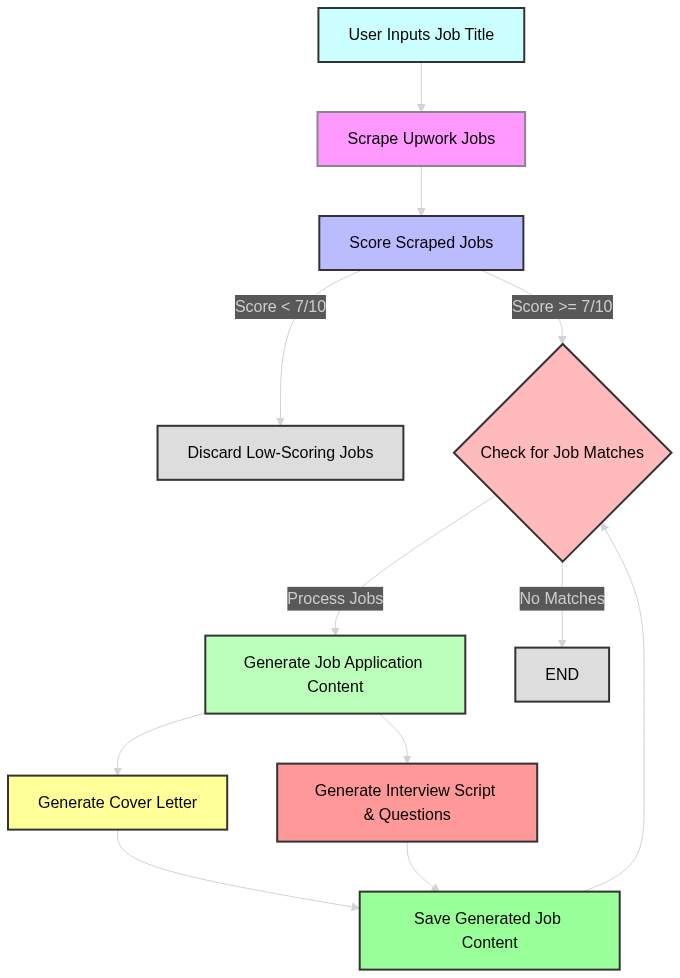
This is the detailed flow of the system:
Clone the repository:
git clone https://github.com/kaymen99/Upwork-AI-jobs-applier.git
cd Upwork-AI-jobs-applier
Set up environment variables:
Create a .env file in the root directory of the project and add your API keys, see .env.example to know all the parameters you will need.
requirements.txt)Create and activate a virtual environment:
python -m venv venv
source venv/bin/activate  # On Windows use `venv\Scripts\activate`
Install the required packages:
pip install -r requirements.txt
playwright install firefox
Start the workflow:
python main.py
The application will start scraping job listings, classifying them, generating cover letters, and saving the results. By default, all the generated cover letters will be saved in the data/cover_letter.txt file alongside a csv file including all the jobs details.
Test the Upwork jobs scraping tool by running:
python scrape_upwork_jobs.py
Build and run the Docker container:
docker build -t upwork-auto-jobs-applier-using-ai .
docker run -e OPENAI_API_KEY=YOUR_API_KEY_HERE -v ./data:/usr/src/app/data upwork-auto-jobs-applier-using-ai
The application will start scraping job listings, classifying them, generating cover letters, and saving the results. By default, all the generated cover letters will be saved in the data/cover_letters.txt file.
Test the Upwork jobs scraping tool in Docker by running:
docker run -e OPENAI_API_KEY=YOUR_API_KEY_HERE -v ./data:/usr/src/app/data upwork-auto-jobs-applier-using-ai python scrape_upwork_jobs.py
To use this automation for your own profile, just add your profile into files/profile.md and remove the example profile.
You can customize the behavior of each AI agent by modifying the corresponding agent prompt in the prompts script.
Contributions are welcome! Please open an issue or submit a pull request for any changes.
If you have any questions or suggestions, feel free to contact me at aymenMir1001@gmail.com.
⚠️ Experimentelle Skill-Sammlung für deutsches Recht (Arbeits-, Gesellschafts-, Insolvenz-, Datenschutz-, Prozessrecht u
Manage multiple Claude Code agents from TUI or Web with tmux and git worktrees
Project management using GitHub Issues + Git worktrees for parallel agent execution
Core skills library for Claude Code with 20+ battle-tested skills including TDD, debugging, and brainstorming