

Are you the author? Sign in to claim
Run Claude Code, Codex, Kimi and OpenCode agents in parallel on one macOS canvas — isolated git worktree per agent, live

-lightgrey?style=flat)

Run Claude Code, Codex, Kimi and OpenCode side by side — each in its own git worktree, in live terminals you can watch, steer, and merge.
Quickstart · What it is · Getting started
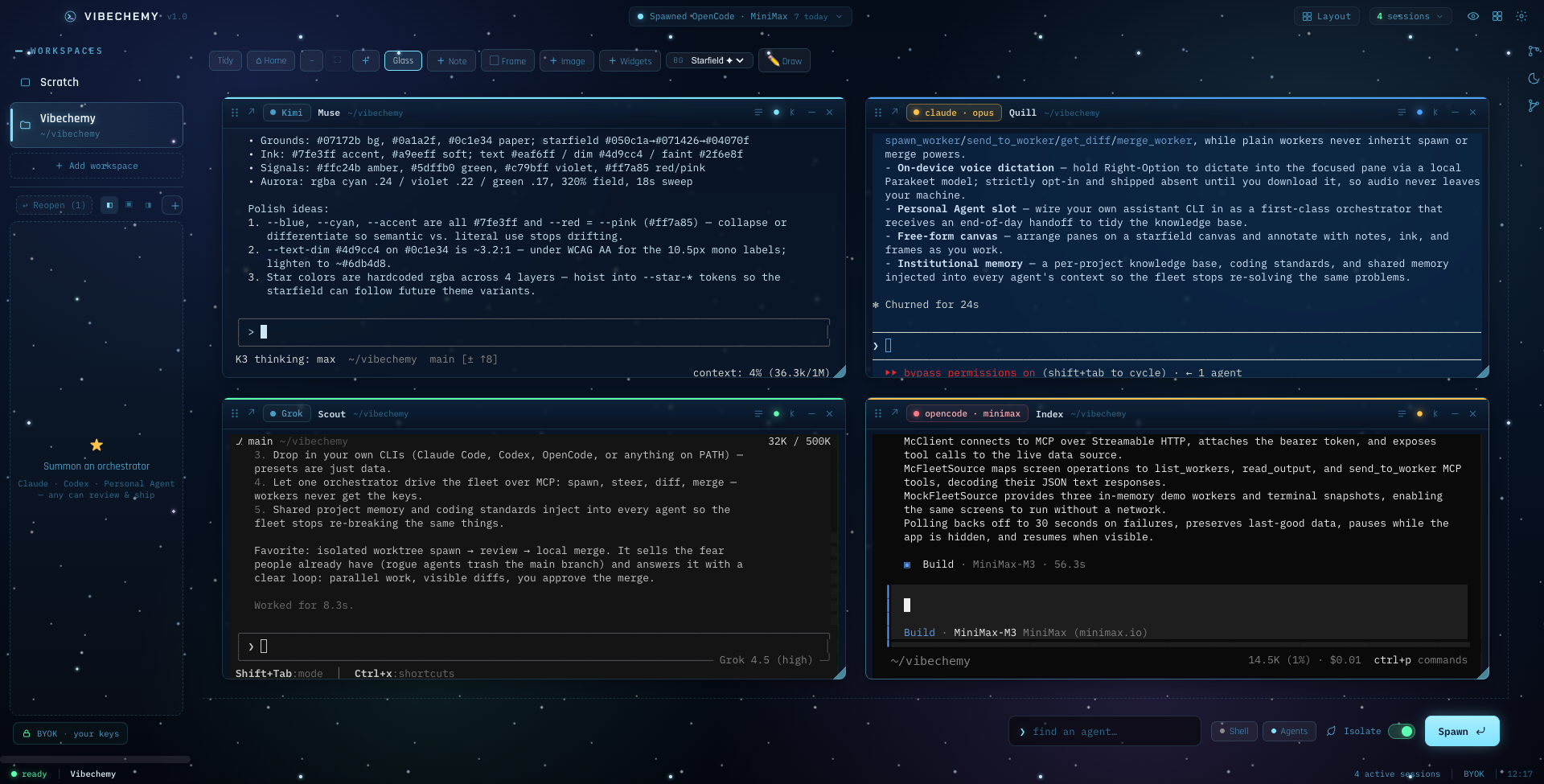
Four agents, four vendors, one workspace. Each in an isolated git worktree, all visible at once.
If you've ever had three AI CLIs open in three terminals and lost track of who's doing what — this is the cockpit for that.
main.tmux-backed terminals on a freeform canvas: watch, type
into, scroll, rearrange. No hidden background processes — if an agent is working, you see it working.spawn_worker, send_to_worker, get_diff, merge_worker. Plain workers never inherit
those tools, so nothing spawns or merges behind your back.BYOK, always — Vibechemy drives your own CLI subscriptions. It detects that you're signed in and never proxies, stores, or sees a token.
I'm not a career software engineer. I run a real business in a physical, regulated industry and I needed to ship and operate my own software without a dev team. So I built the machine that lets one operator command many coding agents at once — watch them work in real terminals, review their diffs, and merge the good ones. Vibechemy is the open-source core of that machine: the orchestration shell, with the business-specific and proprietary parts removed.
Who made this: Built by DiamondAlchemy. The full private rig runs my actual company; Vibechemy is the reusable core.
A desktop app (Electron + React + TypeScript) that turns a wall of terminals into a controllable fleet:
tmux-backed terminal you can watch, type into, and
scroll. No hidden background processes; if an agent is working, you see it working.spawn_worker, send_to_worker, get_diff, merge_worker, …).Vibechemy is the core, not a whole rig. Deliberately left out (they're business-specific or still private): media/image generation, an always-on assistant brain, remote-rig control, and usage/billing adapters. Features may flow out to this public repo over time, or they may not. No roadmap promises.
macOS-first (built and run on Apple Silicon). Not tested on Windows/Linux yet.
git clone https://github.com/DiamondAlchemy/vibechemy.git
cd vibechemy
npm install
npm run dev        # launches the app in dev
Full walkthrough: GETTING-STARTED.md.
Then:
Requirements: macOS, Node 20.19+ / 22.12+, tmux, and at least one agent CLI on your PATH.
npm install compiles native modules (better-sqlite3, node-pty) from source, so you also need the
Xcode Command Line Tools (xcode-select --install) and python3.
There is no MCP setup step. Vibechemy is the MCP server: on first launch it generates an auth
token (stored owner-only in its app data as mcp-token) and starts an authenticated control plane on
127.0.0.1:4880 (4881 in dev). When you summon an orchestrator from the dock, the app writes
that CLI's own client config for it — Claude Code gets a generated --mcp-config, Codex gets inline
-c mcp_servers.vibechemy.* overrides, and so on — so the pane opens already holding the fleet tools
(spawn_worker, send_to_worker, get_diff, merge_worker, …) plus an operating briefing that
teaches it the protocol. The Personal Agent slot is wired the same way.
Two deliberate boundaries:
Power-user path: any external MCP client can drive the same control plane directly — point it at
http://127.0.0.1:4880/mcp with Authorization: Bearer <contents of mcp-token>.
Every pane behaves the same, whichever CLI is inside it:
| Gesture | What it does |
|---|---|
| Click an unfocused pane | Focus it — start typing immediately |
| Scroll wheel | Scroll that pane's own transcript / scrollback |
| Option-drag | Select text (auto-copies to clipboard) |
| Right-click | Copy / Paste menu |
| ⌘C / ⌘V | Standard copy / paste |
The whole point: you never have to remember a different command per agent.
Point the "Personal Agent" setting at your own assistant CLI (command + args + a display name). It becomes a first-class orchestrator you can summon, and it receives an end-of-day handoff — a single prompt telling it to pull the day's activity and tidy the knowledge base. It's the seam where your own agent plugs into the cockpit; the app ships with the slot empty for you to fill.
src/main/ is the Electron main process (all the real logic — sessions, tmux, git, the MCP server,
the stores). src/preload/ is the typed IPC bridge. src/renderer/ is the React UI. src/shared/ is
pure, Node-free domain logic that carries the unit tests. Every subsystem has a shared/ half so its
logic is testable without touching live services. Start at src/main/index.ts.
MIT — see LICENSE. Use it, fork it, build your own cockpit.
Run Claude Code as an MCP server so any agent can delegate coding tasks to it
 @microsoft✓ Official
Browser automation using accessibility snapshots instead of screenshots
 @googleapis✓ Official
Google's universal MCP server supporting PostgreSQL, MySQL, MongoDB, Redis, and 10+ databases
 @github✓ Official
Official GitHub integration for repos, issues, PRs, and CI/CD workflows
