

Are you the author? Sign in to claim
📺 AI视频学习助手: 自动生成 B站/YouTube/抖音/本地视频思维导图、笔记与总结。支持播客分析与视频索引,开源平替。AI Video Learning Assistant: Auto-generate Mind Maps, No
AI-powered Video Analysis Assistant for efficient learning and knowledge retrieval
English | 中文
Features • Architecture • Getting Started • Contribution
If you like this project, please give it a Star ⭐!
Video Helper is an AI-powered Video Learning Assistant and Study Tool designed to significantly improve the efficiency of video analysis, knowledge retrieval, and note-taking.
This project adopts a full-stack Monorepo architecture and integrates advanced LLM analysis pipelines. Users simply provide a video link (e.g., Bilibili, YouTube, TikTok) or upload a local video, and the system automatically extracts core content, generating structured Mind Maps and Key Summaries.
The core highlight lies in its outstanding interactive linkage: clicking on a mind map node precisely navigates to the corresponding key content module, and clicking on a content module can jump to the corresponding video segment. Additionally, the built-in AI assistant supports multi-turn Q&A and can generate practice questions based on video knowledge points to form a complete learning loop.
https://github.com/user-attachments/assets/1d3824b2-feec-40da-9dee-0b6c689e2a8a
| Features | Traditional Learning | Video Helper |
|---|---|---|
| Structuring | Manual notes, time-consuming | Auto-generated Mind Maps & Key Notes |
| Navigation | Constant scrubbing | One-click Precise Jump |
| Consolidation | Weak feedback loop | AI-Generated Quizzes |
| Understanding | No immediate help | 24/7 AI Q&A Assistant |
This project uses Monorepo architecture to manage frontend and backend, ensuring efficient code maintenance and scalability.
apps/web
services/core
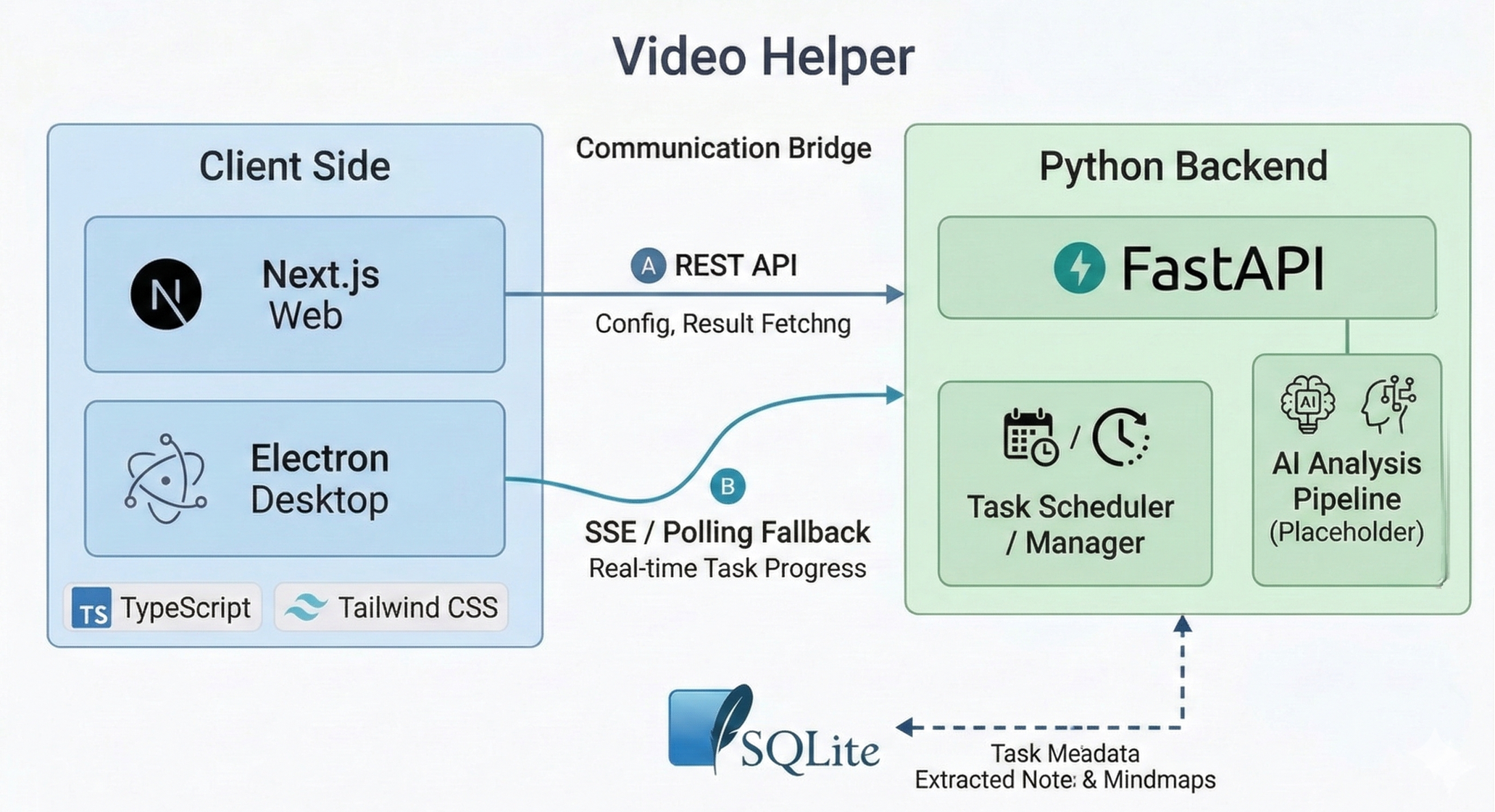
Figure: System architecture overview.
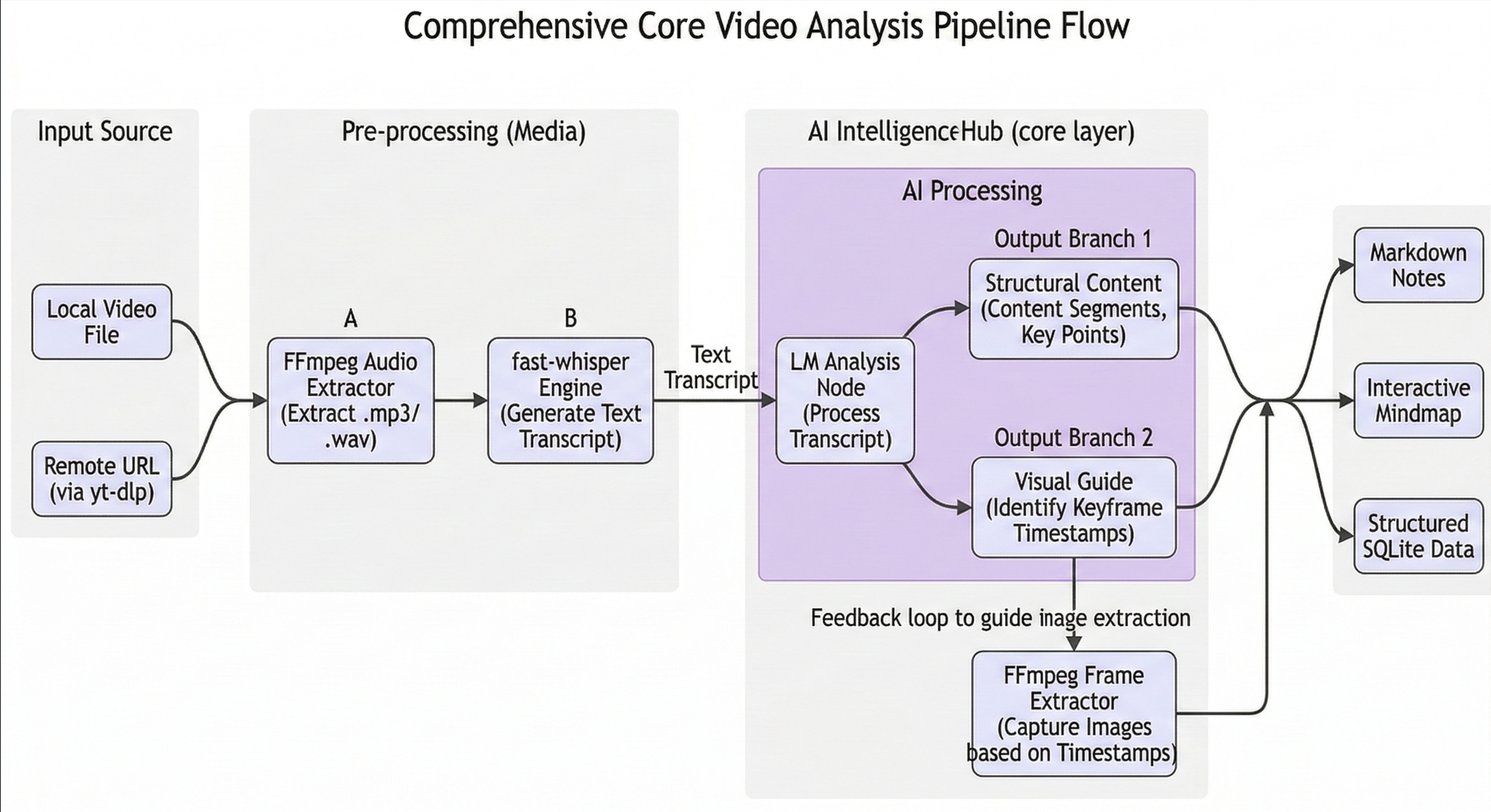
Figure: Core video analysis flow.
Choose one of three options based on your use case:
No environment setup required. Download the pre-built installer for your platform and run it directly:
Ideal for deploying on a server or anyone who wants a running instance without a local dev environment.
1. Clone the repository
git clone https://github.com/LDJ-creat/video-helper.git
cd video-helper
2. Start services
docker compose up -d
3. Open
Data is persisted to the
./datafolder in the project root.
Port conflicts (if 8000 or 3000 is already in use)
To resolve port conflicts, switch to different ports:
# Linux / macOS
CORE_HOST_PORT=8001 WEB_HOST_PORT=3001 docker compose up -d
# Windows (PowerShell)
$env:CORE_HOST_PORT="8001"; $env:WEB_HOST_PORT="3001"; docker compose up -d
For contributors, developers who want to modify the code, or those running the full stack locally.
Prerequisites
pip install uv)git clone https://github.com/LDJ-creat/video-helper.git
cd video-helper
cd services/core

# Create config file from template
cp .env.example .env          # Linux/macOS
Copy-Item .env.example .env   # Windows (PowerShell)

# First run automatically creates a virtualenv and installs deps
# Start API service (port 8000)
uv run python main.py
Common command: uv run pytest -q (run tests)
cd apps/web
pnpm install

cp .env.example .env.local          # Linux/macOS
Copy-Item .env.example .env.local   # Windows (PowerShell)

pnpm run dev
Open your browser at http://localhost:3000.
Development mode (run from project root — auto-launches backend, frontend, and Electron):
node apps/desktop/scripts/dev.js
Local packaging test:
cd apps/desktop
pnpm run pack
Build full release installer (Windows only):
# Run from project root in PowerShell
powershell -ExecutionPolicy Bypass -File apps\desktop\scripts\build-all.ps1
To build Docker images locally (developer override):
hljs language-bashdocker compose -f docker-compose.yml -f docker-compose.dev.yml up -d --build
You can also use the backend service of this project as a skill within AI editors like Claude Code, Antigravity, or GitHub Copilot. In this mode, you don't need to configure LLMs in the backend project itself; instead, the AI editor's LLM handles the analysis.
To use it:
video-helper/
├── apps/
│   ├── web/                # Next.js Frontend App
│   └── desktop/            # Electron Desktop App
├── services/
│   └── core/               # Python FastAPI Backend
├── docs/                   # Documentation
├── scripts/                # Automation Scripts (e.g., Smoke Tests)
├── _bmad-output/           # Architecture & Planning Artifacts
├── docker-compose.yml      # (Optional) Docker setup
└── README.md               # Project Documentation
This project is licensed under the MIT License – see the LICENSE file for details.
Issues and Pull Requests are welcome! Before submitting code, please ensure it passes the project's Smoke Tests and adheres to code standards.
Q: Which platforms are supported?
A: Powered by yt-dlp, we support Bilibili, YouTube, and many other platforms. You can also upload local MP4/MKV videos.
Q: Do I need to pay for the LLM? A: You can integrate your own API keys (OpenAI, Claude, etc.). If using as an AI Skill, you can use the model provided by your AI editor.
Q: How does it handle long videos? Is it slow? A: For long videos, we use a MapReduce strategy: the video content is split and analyzed concurrently by multiple LLM calls, then aligned and aggregated by a master LLM. A 1-hour video typically takes 15-20 minutes to process.
Created with ❤️ by the Open Source Community
⚠️ Experimentelle Skill-Sammlung für deutsches Recht (Arbeits-, Gesellschafts-, Insolvenz-, Datenschutz-, Prozessrecht u
Manage multiple Claude Code agents from TUI or Web with tmux and git worktrees
Project management using GitHub Issues + Git worktrees for parallel agent execution
Core skills library for Claude Code with 20+ battle-tested skills including TDD, debugging, and brainstorming


