

Are you the author? Sign in to claim
WorkflowAI is an open-source platform where product and engineering teams collaborate to build and iterate on AI featur
WorkflowAI will be shut down on January 31, 2026.
We want to thank everyone for putting your trust in our team and our product; and we loved seeing everything WorkflowAI helped build.

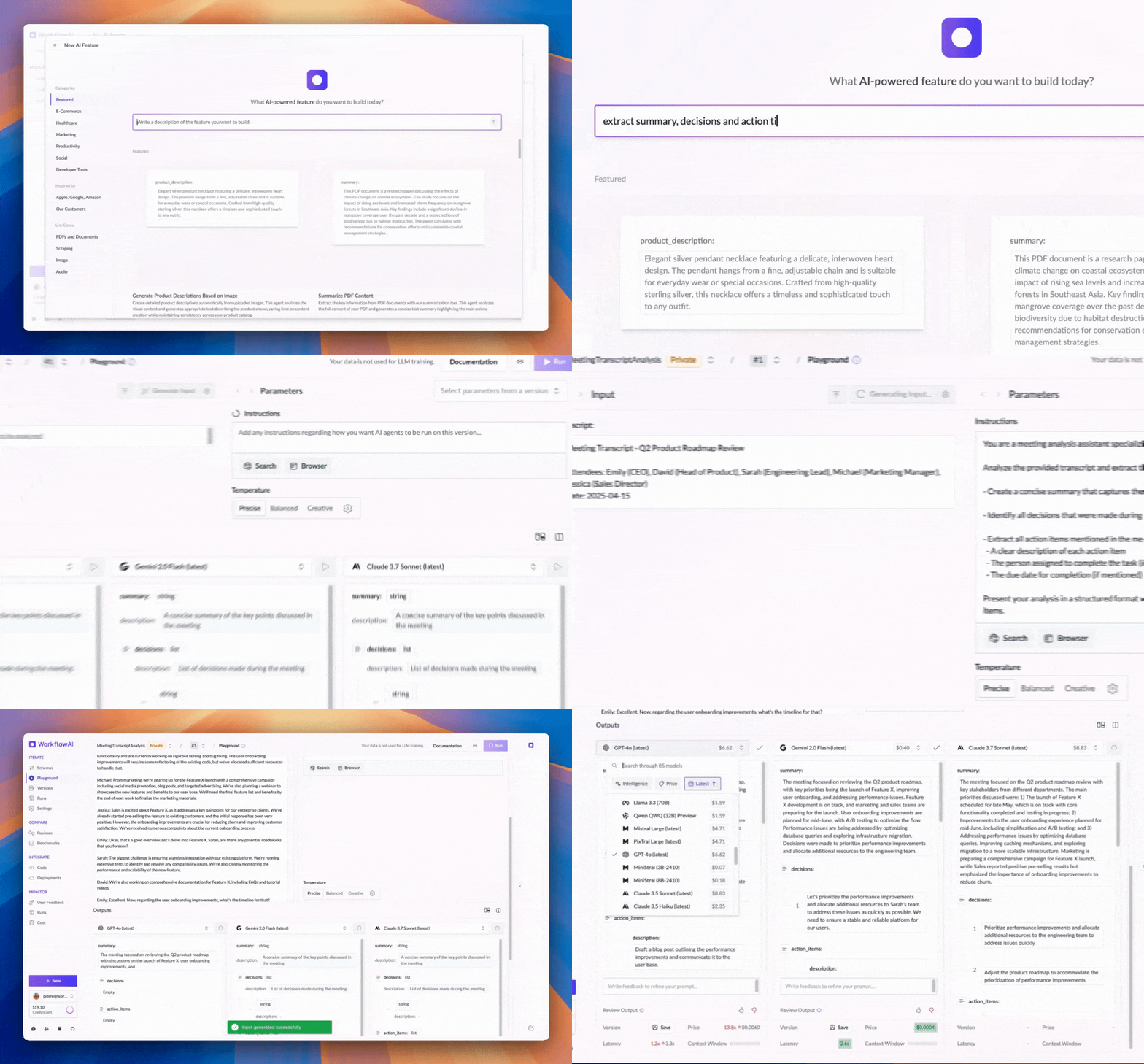

Faster Time to Market: Build production-ready AI features in minutes through a web-app – no coding required.
Interactive Playground: Test and compare 80+ leading AI models side-by-side in our visual playground. See the difference in responses, costs, and latency. Try it now.
https://github.com/user-attachments/assets/febf1047-ed85-4af0-b796-5242aef051b4
Open-source and flexible deployment: WorkflowAI is fully open-source with flexible deployment options. Run it self-hosted on your own infrastructure for maximum data control, or use the managed WorkflowAI Cloud service for hassle-free updates and automatic scaling.
Observability integrated: Built-in monitoring and logging capabilities that provide insights into your AI workflows, making debugging and optimization straightforward. Learn more about observability features.
https://github.com/user-attachments/assets/ae260da3-06ed-4ba0-824b-a9cab4fadb6f
https://github.com/user-attachments/assets/261c3a5a-16ac-4c29-bc30-5ec725a0619d
https://github.com/user-attachments/assets/0c81d596-ec70-43bc-80a8-ceddcd26b9d9
https://github.com/user-attachments/assets/4cf6e65a-a7b4-4b93-a30c-7d28b22e1553
https://github.com/user-attachments/assets/9329af26-1222-4d5d-a68d-2bb4675261e2
https://github.com/user-attachments/assets/0cd54e38-6e6d-42f2-aa7d-365970151375
import workflowai
from pydantic import BaseModel
from workflowai import Model

class MeetingInput(BaseModel):
    meeting_transcript: str

class MeetingOutput(BaseModel):
    summary: str
    key_items: list[str]
    action_items: list[str]

@workflowai.agent()
async def extract_meeting_info(meeting_input: MeetingInput) -> MeetingOutput:
    ...

Fully managed solution with zero infrastructure setup required. Pay exactly what you'd pay the model providers — billed per token, with no minimums and no per-seat fees. No markups. We make our margin from provider discounts, not by charging you extra. Enterprise-ready with SOC2 compliance and high-availability infrastructure. We maintain strict data privacy - your data is never used for training.
The Docker Compose file is provided as a quick way to spin up a local instance of WorkflowAI. It is configured to be self contained viable from the start.
# Create a base environment file that will be used by the docker compose
# You should likely update the .env file to include some provider keys, see Configuring Provider keys below
cp .env.sample .env
# Build the client and api docker image
# By default the docker compose builds development images, see the `target` keys
docker-compose build
# [Optional] Start the dependencies in the background, this way we can shut down the app while
# keeping the dependencies running
docker-compose up -d clickhouse minio redis mongo
# Start the docker images
docker-compose up
# The WorkflowAI api is also a WorkflowAI user
# Since all the agents the api uses are hosted in WorkflowAI
# So you'll need to create a Workflow AI api key
# Open http://localhost:3000/organization/settings/api-keys and create an api key
# Then update the WORKFLOWAI_API_KEY in your .env file
open http://localhost:3000/organization/settings/api-keys
# The kill the containers (ctrl c) and restart them
docker-compose up
Although it is configured for local development via hot reloads and volumes, Docker introduces significant latencies for development. Detailed setup for both the client and api are provided in their respective READMEs.
WorkflowAI connects to a variety of providers (see the Provider enum). There are two ways to configure providers:
Globally, using environment variables. The provider environment sample provides information on requirements for each provider.
Per tenant, through the UI, by navigating to ../organization/settings/providers
Several features of the website rely on providers being configured either globally or for the tenant that is used internally. For example, at the time of writing, the agent that allows building agents with natural language uses Claude 3.7 so either Anthropic or Bedrock should be configured. All the agents that WorkflowAI uses are located in the agents directory
For now, we rely on public read access to the storage in the frontend. The URLs are not discoverable though so it should be ok until we implement temporary leases for files. On minio that's possible with the following commands
# Run sh inside the running minio container
docker-compose exec minio sh
# Create an alias for the bucket
mc anonymous set download myminio/workflowai-task-runs
# Set download permissions
mc alias set myminio http://minio:9000 minio miniosecret
The api provides is the Python backend for WorkflowAI. It is structured as a FastAPI server and a TaskIQ based worker.
The client is a NextJS app that serves as a frontend
WORKFLOWAI_STORAGE_CONNECTION_STRING env variable. A variable starting with
s3:// will result in the S3 storage being used.WorkflowAI supports a variety of LLM providers (OpenAI, Anthropic, Amazon Bedrock, Azure OpenAI, Grok, Gemini, FireworksAI, ...). View all supported providers here.
Each provider has a different set of credentials and configuration. Providers that have the required environment variables are loaded by default (see the sample env for the available variables). Providers can also be configured per tenant through the UI.
To find answers to your questions, please refer to the Documentation, ask a question in the Q&A section of our GitHub Discussions or join our Discord.
WorkflowAI is licensed under the Apache 2.0 License.
⚠️ Experimentelle Skill-Sammlung für deutsches Recht (Arbeits-, Gesellschafts-, Insolvenz-, Datenschutz-, Prozessrecht u
Manage multiple Claude Code agents from TUI or Web with tmux and git worktrees
Project management using GitHub Issues + Git worktrees for parallel agent execution
Core skills library for Claude Code with 20+ battle-tested skills including TDD, debugging, and brainstorming