

Are you the author? Sign in to claim
Switch between Claude Code accounts from your macOS menu bar or terminal, fast. Mac app + CLI · yoink.codes
Switch between Claude Code accounts from your macOS menu bar or terminal, fast.
Snapshot each login into a named profile, swap them in a single keystroke from the menu bar app or the CLI, and run OpenRouter, Ollama, or any Anthropic-compatible model through the same Claude Code harness. No browser, no re-login.




Website · Download · Docs · npm
Download the notarized Yoink app for Apple Silicon or Intel from the download page, then drag it to Applications. It lives in the menu bar, so switching accounts is one click with no terminal.
macOS / Linux:
curl -fsSL https://yoink.codes/install.sh | bash
Windows (PowerShell):
powershell -c "irm https://yoink.codes/install.ps1 | iex"
Or on any OS with Node:
npm install -g yoink-cli
Each drops a single self-contained binary onto your PATH. Confirm it answers:
yoink version
Register your accounts once, then hop between them instantly:
yoink add        # sign in as account A, name it "work"
                 # "Add another?" > yes > sign in as account B, name it "personal"

yoink personal   # switch to personal
yoink work       # switch back
Restart Claude Code after a switch so it picks up the new login.
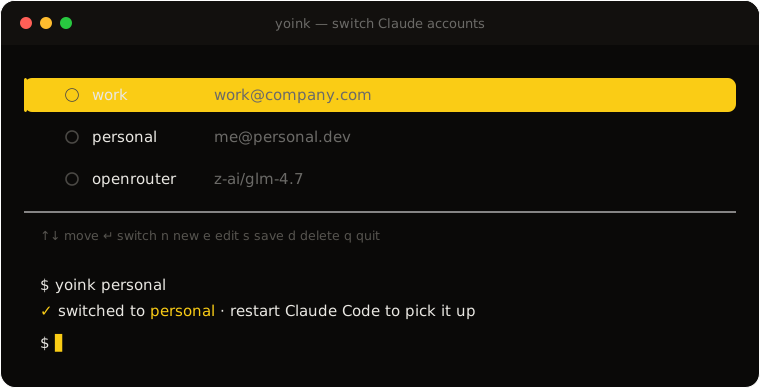
Run yoink with no arguments for a keyboard-driven list of your accounts:
 yoink  switch Claude accounts

 ● work        work@company.com
 ○ personal    me@personal.dev
 ○ openrouter  z-ai/glm-4.7

 ↑↓ move  ↵ switch  n new  e edit  s save  d delete  q quit
| Key | Action |
|---|---|
↑ ↓ / j k | Move between accounts |
↵ | Switch to the highlighted account |
n | Add a new account (Claude sign-in or external provider) |
e | Edit the highlighted profile |
s | Save your current login as a profile |
d | Delete the highlighted profile (after a confirm) |
q / Esc / Ctrl-C | Quit |
Actions loop back to the list, so you can switch, add, and prune in one sitting, then leave with q.
~/.claude/.credentials.json on Linux/Windows) plus the oauthAccount identity, so a swap is a keystroke, not a browser round-trip../.claude/settings.local.json, which yoink adds to your .gitignore before writing.ANTHROPIC_* / CLAUDE_CODE_SUBAGENT_MODEL keys, warns before writing a token into a git-tracked file, and writes every file atomically.bun build --compile bakes the CLI, its deps, and the runtime into a single file. No Node, no runtime to install.| Command | Aliases | What it does |
|---|---|---|
yoink | Open the interactive account menu | |
yoink <name> | Switch straight to a saved profile | |
yoink add | login | Add an account: Claude sign-in or an external provider |
yoink edit <name> | Edit a profile (name, or provider / URL / key / model) | |
yoink save <name> | Snapshot the current login as a profile | |
yoink use <name> | switch | Switch to a saved profile |
yoink list | ls | List all saved profiles |
yoink current | who | Show the active profile |
yoink rename <a> <b> | Rename a profile | |
yoink remove <name> | rm | Delete a profile |
yoink version | -v | Print the version |
yoink help | -h | Print help |
yoink add also registers any Anthropic-compatible provider. Pick External provider and give it a name, a base URL (e.g. https://openrouter.ai/api), and an API key. yoink validates the key against ${baseURL}/v1/models, then shows a searchable picker; the model you choose fills every Claude Code model tier. Switching to a Claude account strips the provider env block again so your subscription takes back over.
See external providers for the full flow.
Claude Code keeps your login in the macOS Keychain under the service Claude Code-credentials on macOS, and in ~/.claude/.credentials.json on Linux and Windows. A profile pairs that credential blob with the oauthAccount identity from ~/.claude.json. A switch:
.credentials.json elsewhere).~/.claude.json.Profiles live in ~/.config/yoink/profiles.json on every OS (chmod 600 on POSIX). Full details in how it works.
macOS (Apple Silicon and Intel), Linux (x64 and arm64, both glibc and musl/Alpine), and Windows (x64 and arm64). On macOS, credentials are swapped through the login Keychain via the security CLI; on Linux and Windows, through ~/.claude/.credentials.json, written atomically with the same protections Claude Code itself applies. The installers and npm package ship prebuilt binaries for every platform, so nothing else is needed. On bare Alpine, run apk add libstdc++ libgcc once (the same runtime libraries Node needs there).
Full guides live at yoink.codes and in docs/:
bun install
bun run dev        # web dev server + CLI test watcher (mprocs)
bun run build      # build every app (turbo)
bun run test       # run every app's tests
Build the CLI from source and link it:
cd apps/cli && bun run build
ln -sf "$PWD/dist/yoink" ~/.local/bin/yoink
See docs/development.md for the monorepo layout, release flow, and architecture.
MIT © Majid Raimi
Manage multiple Claude Code instances in separate git worktrees simultaneously
⚠️ Experimentelle Skill-Sammlung für deutsches Recht (Arbeits-, Gesellschafts-, Insolvenz-, Datenschutz-, Prozessrecht u
Manage multiple Claude Code agents from TUI or Web with tmux and git worktrees
Project management using GitHub Issues + Git worktrees for parallel agent execution