

Are you the author? Sign in to claim
Real-time secret-leak guardrails for AI coding agents (Claude Code, Codex), Git hooks, and CI.




Stop your AI coding agent from leaking secrets — in real time, before the tool call runs.
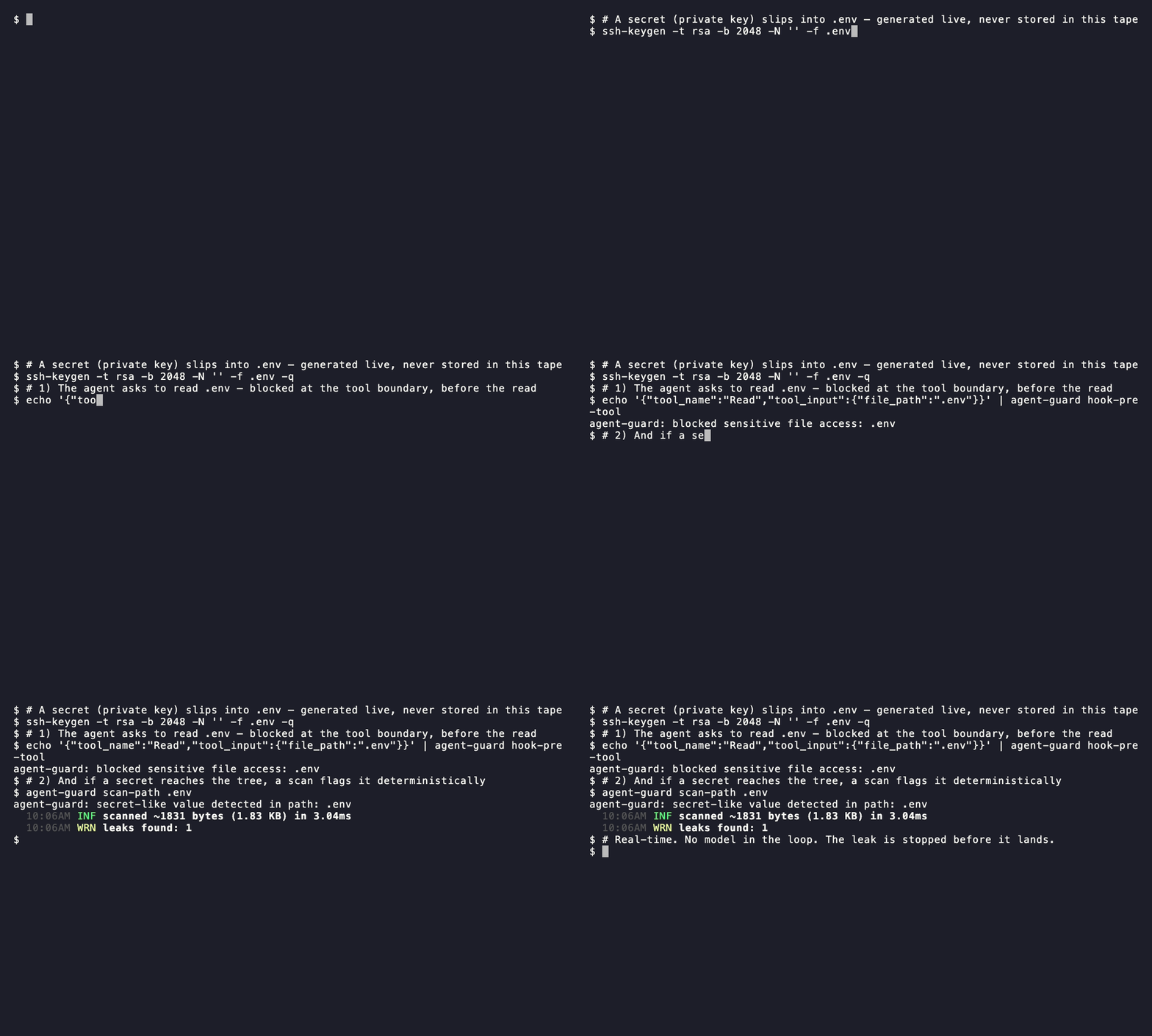
Agent Guard is a deterministic guardrail for AI coding agents (Claude Code, Codex) and the Git hooks, CI, and CLI around them. It blocks common ways an agent accidentally exposes secrets: reading .env, writing secret-like values, running shell commands that dump credentials, or leaving secrets in the working tree after a tool call. It uses gitleaks for detection and plain shell scripts for integration.
Unlike commit- or CI-time scanners that catch a leak after it lands, Agent Guard also runs at the agent's tool boundary — the .env read or secret write is blocked before it happens. Pair it with commit/CI scanning for defense in depth.
It is not a vault, credential rotator, or replacement for GitHub Secret Scanning / Push Protection.
Install from the marketplace:
/plugin marketplace add JeongJaeSoon/agent-guard
/plugin install agent-guard@agent-guard
/reload-plugins
/agent-guard:setup-shell
The last command installs the default-on Claude command wrapping into your shell rc. Restart the shell and Claude Code after it succeeds. Plugin hooks are active after reload; shell wrapping for user-typed ! commands requires this explicit rc update because plugins cannot edit it during installation.
Verify it's live — ask the agent to read your .env:
Please read .env
It should refuse:
agent-guard: blocked sensitive file access: .env
Add the marketplace:
codex plugin marketplace add JeongJaeSoon/agent-guard
Open /plugins in Codex and install Agent Guard. Then open Settings > Hooks, trust the SessionStart, PreToolUse, PostToolUse, and Stop hooks, and restart Codex.
Run the guided setup skill:
$setup-agent-guard
Treat setup as complete only when the plugin-local dependency check, smoke test, and both live host probes pass. The probes confirm that the current Codex tool route actually dispatches to Agent Guard's hooks.
To install or refresh the optional Agent Guard shell integration, choose
Set Up Agent Guard Shell from the / menu or invoke:
$setup-shell
The skill resolves the current plugin-local binary and requests approval before updating the shell rc, so the versioned plugin-cache path does not need to be copied into the prompt. After the rc update, start a new shell and restart any agent sessions launched from that shell before relying on the integration.
Both plugins need jq and gitleaks on your machine (brew install jq gitleaks; see Requirements). Using the CLI, Git hooks, or CI instead? Pick your path below.
| Use case | Install path | Best first check |
|---|---|---|
| Claude Code agent guardrails | Claude Code quick start | Ask the agent to read .env; it should be blocked. |
| Codex plugin guardrails | Codex quick start | Run $setup-agent-guard and require both live hook probes to pass. |
| Codex CLI + Git backstop | Direct CLI + Native Git hook | Run agent-guard smoke-test; commit a staged fixture secret, and it should fail. |
| Centrally managed machines | Managed deployment | Merge the managed settings example, have each developer run the setup commands, then ask the agent to read .env. |
| Local commits | Native Git hook | Commit a staged fixture secret; commit should fail. |
| CI / PRs | GitHub Actions | Push a test PR with a gitleaks-detectable fixture; workflow should fail. |
| Manual scans | Direct CLI | Run agent-guard smoke-test. |
Agent Guard runs on macOS and Linux and expects:
shawkgitjqgitleaks 8.30 or newer recommendedInstall paths that download release archives also use curl, tar, shasum, and ln.
PII endpoint providers also use curl.
With a direct CLI install:
agent-guard setup   # prints dependency status and install hints
agent-guard check   # strict pass/fail dependency check
agent-guard smoke-test
From a clone of this repo:
plugins/agent-guard/bin/agent-guard setup
make check
make smoke-test
The Claude Code and Codex plugin installs do not put agent-guard on your shell PATH. In Codex, invoke $setup-agent-guard: it uses the plugin-local binary even when a different standalone version is on PATH, presents the exact host-appropriate install plan, requests approval, runs check plus smoke-test, verifies hook trust, and runs live host probes. It never installs software merely because a session started. The same skill is available in Claude Code as agent-guard:setup-agent-guard; Claude Code users can also run the equivalent manual commands below.
Manual macOS equivalent:
brew install jq gitleaks
On Debian / Ubuntu or Fedora, install jq with the system package manager and download gitleaks from its release page.
When the plugin is enabled, its PreToolUse and PostToolUse hooks run for every
matched tool call in the session. They inspect supported tool inputs and outputs
in memory, and mutation/stop backstops scan changed files in the current Git work
tree. Default hook processing is local: Agent Guard has no telemetry, developer
service, account, or analytics endpoint, and it does not retain inspected data.
PII hook handling is off by default. The built-in regex provider stays local.
If you explicitly select the pleno or http provider, text passed to
pii-filter—and supported tool-input text in PII block mode—is sent to the
exact endpoint in AGENT_GUARD_PII_REDACT_URL. Review that endpoint's privacy
and retention terms before enabling it.
Dependency downloads never happen from a lifecycle hook. The guided setup asks before installing anything and requires a published SHA-256 for the gitleaks archive. See Privacy and data handling, Security, Support, and Third-party notices.
Install and verify in the Claude Code quick start. Useful slash commands once installed:
/agent-guard:verify
/agent-guard:checksum [VERSION]
/agent-guard:setup-shell
For guided dependency diagnosis and installation, use the
agent-guard:setup-agent-guard skill — the same skill Codex invokes as
$setup-agent-guard. SessionStart recommends it when it reports degraded
protection, but never invokes it: it only emits the warning. The skill selects
the active host's plugin-verification path and runs live probes through that
host's normal command surface. /agent-guard:verify remains a separate
working-tree scan and does not prove live hook dispatch.
Start with the Codex quick start. Re-check Settings > Hooks after plugin updates: a changed hook is marked Modified and remains inactive until you review and trust it again. SessionStart reports degraded protection when a dependency is unavailable and points Codex to $setup-agent-guard; installation remains approval-gated. An untrusted SessionStart hook cannot display that guidance.
The setup skill requires all three layers to pass: plugin-local check, plugin-local smoke-test, and the live host probes. For the pre-tool probe, ask Codex to run this harmless sentinel command:
printf '%s\n' 'AGENT_GUARD_LIVE_PRE_TOOL_PROBE'
Expected result: Agent Guard blocks the command before the sentinel is printed. For the post-tool probe, run the paired harmless sentinel and confirm that the raw marker is masked or replaced before it reaches the model:
printf '%s\n' 'AGENT_GUARD_LIVE_POST_TOOL_PROBE'
These sentinels test only whether the host dispatched PreToolUse and PostToolUse. The plugin-local smoke-test separately exercises the real deny-list and secret-redaction rules without placing sensitive-looking instructions in the setup skill.
Codex may expose shell execution through a wrapping or orchestration tool such as functions.exec. Agent Guard cannot replace or wrap Codex's host executor; it protects only nested operations that the current Codex release dispatches to plugin hooks. Test the exact route used in the current task. If the pre-tool marker or raw fake token appears, protection is not active on that route even when the binary smoke test passes. Use a native Git hook or CI as the backstop and do not treat the plugin setup as complete for that host route.
Codex loads the plugin's skills/ directory but does not use the Claude
commands/ directory. Use $setup-agent-guard for dependency and hook setup,
and $setup-shell to install or refresh the optional shell integration. Ask
Codex to run the binary directly for other workflows:
${PLUGIN_ROOT}/bin/agent-guard scan-working-tree
${PLUGIN_ROOT}/bin/agent-guard checksum
Install the latest release without cloning:
curl -fsSL https://github.com/JeongJaeSoon/agent-guard/releases/latest/download/bootstrap.sh | sh
The installer verifies the release archive checksum, extracts to ~/.agent-guard, links agent-guard into ~/.local/bin, runs agent-guard setup, and installs the default-on shell integration. Set AGENT_GUARD_COMMAND_WRAPPING=off on the bootstrap command for a persistent command-wrapping opt-out.
Common commands:
agent-guard scan-path .
agent-guard scan-working-tree
agent-guard scan-staged
agent-guard pii-filter
agent-guard setup
agent-guard smoke-test
agent-guard checksum
Scan commands exit 0 when nothing was found, 1 when a secret was detected, and 3 when the scan could not run at all — for example scan-staged outside a git work tree. 3 exists so that "I looked and it was clean" is never confused with "I never got to look"; both non-zero results mean the change is not cleared. Any other non-zero status is a scanner error.
Override install defaults with AGENT_GUARD_VERSION, AGENT_GUARD_HOME, AGENT_GUARD_BIN_DIR, or AGENT_GUARD_COMMAND_WRAPPING.
Rolling Agent Guard out to an organization takes two steps:
deployment/claude-managed-settings.example.json
into the organization's Claude Code managed settings. It registers the
Agent Guard marketplace pinned to a release tag and force-enables the
plugin for every developer.agent-guard setup --install ... for the jq/gitleaks dependencies
(/agent-guard:checksum prints the paste-ready command),
/agent-guard:setup-shell for the shell integration, then
agent-guard smoke-test to verify.Developers who have not finished setup are reminded automatically: the
plugin's SessionStart hook detects missing dependencies or a missing shell
integration and suggests the exact setup command at session start.
See Managed deployment for Claude Code for the managed settings locations, per-command details, and the automatic reminder behavior.
agent-guard pii-filter reads text from stdin, masks detected PII, and writes the masked text to stdout. The default provider is regex, a built-in shell/awk adapter with no Python runtime dependency:
printf '%s\n' 'Email jane@example.com from 203.0.113.42' | agent-guard pii-filter
# Email [PII:EMAIL] from [PII:IP_ADDRESS]
The built-in regex provider masks common deterministic formats: email addresses, phone numbers, credit cards, US SSNs, and IP addresses. Clean text is passed through unchanged.
Choose a provider with AGENT_GUARD_PII_PROVIDER:
AGENT_GUARD_PII_PROVIDER=regex agent-guard pii-filter --check
Endpoint-backed providers are available for external redaction services:
AGENT_GUARD_PII_PROVIDER=pleno \
AGENT_GUARD_PII_REDACT_URL=http://127.0.0.1:8080/api/redact \
agent-guard pii-filter --check

printf '%s\n' 'Customer jane@example.com' \
  | AGENT_GUARD_PII_PROVIDER=pleno \
    AGENT_GUARD_PII_REDACT_URL=http://127.0.0.1:8080/api/redact \
    agent-guard pii-filter
pleno and http use the same HTTP adapter: POST JSON as {"text":"..."} and read a redacted string from redacted_text, anonymized_text, text, or data.redacted_text. They require curl, jq, and AGENT_GUARD_PII_REDACT_URL; missing tools, missing URL, HTTP errors, invalid JSON, or unexpected response shapes fail closed.
Agent Guard does not install, import, run, or manage pleno-anonymize, Docker, Python, or any hosted service. If you use pleno, run pleno-anonymize separately or point AGENT_GUARD_PII_REDACT_URL at a hosted compatible endpoint.
PII handling in hooks is off by default. Two opt-in modes:
AGENT_GUARD_PII_HOOK_MODE=block   # block tool INPUTS that contain any PII
# or
AGENT_GUARD_PII_HOOK_MODE=mask    # mask PII in tool OUTPUTS; hard-block Tier-2 inputs
In block mode, proposed Write, Edit, MultiEdit, NotebookEdit, apply_patch, Bash, WebFetch, WebSearch, and MCP inputs are blocked when any PII is detected, with guidance to run agent-guard pii-filter first.
In mask mode, PII is masked in a tool's output (PostToolUse, the same path as secret redaction) so the model never sees it. On the input side, mask mode hard-blocks only Tier-2 PII — credit card, US SSN, and Korean resident registration number, which must never reach a tool — and lets Tier-1 PII (email, phone, IPv4) through to be masked on the way out. Hooks cannot rewrite a pending input payload, so Tier-1 input is allowed rather than masked in place; use agent-guard pii-filter for input-side masking.
The regex provider recognizes email, phone (including Korean mobile), IPv4, credit card, US SSN, and Korean resident registration number.
Install from a clone or direct CLI install:
cd <your-project>
~/.agent-guard/install.sh git-hooks
From a clone of this repo:
./install.sh git-hooks
This sets core.hooksPath=githooks only when it will not overwrite an existing hook setup.
Add a workflow step:
- uses: JeongJaeSoon/agent-guard@v3
  with:
    paths: "."
    gitleaks-checksum: "<sha256 of the gitleaks release archive>"
Use @v3 for compatible 3.x updates. The @v2 and @v1 moving tags remain on the 2.x and 1.x lines; pin one of them, a full tag, or a commit SHA when you intentionally stay on an older line.
Get the checksum with:
agent-guard checksum
CI runners are usually linux/x64, so use the linux/x64 value printed by the checksum command. require-checksum defaults to true; set it to false only for local experimentation.
This repository also includes .github/workflows/codex-review.yml, which runs openai/codex-action on non-draft pull requests and posts Codex feedback as a PR comment.
To enable it, add an Actions secret named OPENAI_API_KEY in the GitHub repository settings. The workflow intentionally runs on pull_request, checks out the PR merge commit without persisted Git credentials, and runs Codex in a read-only sandbox with drop-sudo.
Read, NotebookRead, Grep, and Glob access to deny-listed paths; Write, Edit, MultiEdit, and NotebookEdit secret-like content; and sensitive web/MCP inputsBash, apply_patch, and MCP tools). Current Codex hooks do not intercept arbitrary Read/Grep/WebSearch calls, so Agent Guard does not claim coverage for them.printenv, op read, vault kv get, aws secretsmanager get-secret-value, cat .env, and git commit --no-verifyAGENT_GUARD_PII_HOOK_MODE=block, or only Tier-2 PII (credit card, US SSN, Korean resident registration number) when AGENT_GUARD_PII_HOOK_MODE=maskPatch and diff scans inspect added lines only. Removing an existing leaked value is allowed.
Beyond blocking, Agent Guard masks secret-like values in a matched tool's output before the model sees them. Claude uses the native updatedToolOutput rewrite and preserves the result shape. Codex does not expose that Claude field, so Agent Guard blocks the original sensitive result and supplies a sanitized replacement through additionalContext. Detection combines gitleaks with a KEY=value env-assignment heuristic. It is on by default; disable with AGENT_GUARD_OUTPUT_REDACT=off.
With AGENT_GUARD_PII_HOOK_MODE=mask, the same PostToolUse redactor also masks PII in tool output — email, phone (including Korean mobile), IPv4, credit card, US SSN, and Korean resident registration number become [PII:TYPE] placeholders in place. Secret redaction and PII masking compose into a single rewrite, so a result containing both is fully sanitized at once.
! shell-escape output)The PostToolUse redactor only ever sees the results of the agent's tool calls. When you type a !-prefixed command at the Claude Code prompt, it runs in the session shell and its output is captured into the transcript and sent to the model — but it is not a tool call, so no Agent Guard hook fires (a documented blind spot). If that output carries a credential, the model sees it unmasked.
agent-guard exec closes that gap. Before running anything, it verifies that the configured masking dependencies are usable; if they are not, the explicit wrapper fails closed and does not run the command. Once ready, it runs the command to completion, propagates its exit code, captures combined stdout+stderr, and prints only masked text. Capture is buffered, so this is for non-interactive info commands, not TUIs or streaming programs. AGENT_GUARD_OUTPUT_REDACT=off explicitly disables secret masking.
agent-guard exec -- printenv # runs it, but the transcript gets [REDACTED] in place of secrets
To make this ergonomic, add the shell integration to your ~/.bashrc / ~/.zshrc:
eval "$(agent-guard shell-init)"
Or let setup-shell write (and later update) that line for you — idempotently, and by absolute path when agent-guard isn't on your $PATH yet:
agent-guard setup-shell
This defines agx (a thin wrapper for agent-guard exec --) so you can run agx <cmd> — in Claude Code, !agx <cmd> — and have the output masked before the model sees it. It also installs a warn-only, non-blocking nudge (a zsh preexec / bash DEBUG trap) that reminds you to use agx when you run a known secret-loading idiom without it. The nudge never blocks or modifies your command; pass --bash or --zsh to force a target shell.
The nudge above relies on a preexec / DEBUG hook — but Claude Code runs ! commands from a shell snapshot that strips those hooks (and unalias -as), so the nudge never fires for !. The snapshot does keep shell functions, so Agent Guard installs function overrides for the common dump commands by default.
The default shell-init output overrides cat, head, and printenv so that — only inside Claude Code (gated on $CLAUDECODE) — they route through agent-guard exec, masking their output before the transcript captures it. So !cat config.txt gets its secrets redacted automatically, without you remembering to type agx. In a normal terminal ($CLAUDECODE unset) the overrides stay inert and fall back to plain cat / head / printenv behavior.
Turn automatic wrapping off for one process or shell by exporting AGENT_GUARD_COMMAND_WRAPPING=off. For a persistent opt-out, rewrite the managed block without the automatic overrides:
export AGENT_GUARD_COMMAND_WRAPPING=off  # runtime opt-out
agent-guard setup-shell --no-command-wrapping  # persistent opt-out
The binary is resolved at call time in this order: an explicit $AGENT_GUARD_BIN, then agent-guard on your $PATH, then the absolute path baked into the snippet at shell-init time. Transparent command wrapping preflights dependencies too. If the binary cannot resolve or protection is degraded, it fails open because the user typed an ordinary cat/head/printenv: it runs the command but prints a loud output is NOT masked warning. agx, being an explicit mask request, instead fails closed.
Because the plugin (auto-updated by claude plugin update) and the binary the integration actually resolves update independently, updating only one side can silently leave agx / !-command masking on older rules. To catch that, the shell-init snippet exports AGENT_GUARD_SHELL_INIT_VERSION — the version of the binary it resolved at rc-eval time (whichever of the three paths above won) — and a Claude Code SessionStart hook compares that marker against the plugin's own version, showing a non-blocking warning on mismatch. Because the marker records what the integration resolved at shell start (not a re-derivation the hook would have to guess), it stays silent unless the integration is genuinely loaded and drifting: a user who has agent-guard on $PATH but never ran setup-shell gets no warning, and a plugin-only install pinned to a stale baked binary is still covered. It is a start-up snapshot, so if you upgrade the resolved binary in place inside a long-lived shell and then launch Claude Code from it without opening a new shell, the warning reflects the version from when that shell started until you re-source your rc.
Works without the CLI on
$PATH— but a plugin can't edit your rc. Direct CLI bootstrap installs the default-on shell integration automatically. For a plugin-only install, run the plugin-localagent-guard setup-shellonce — invoke it by absolute path ifagent-guardisn't on your$PATH; it bakes that same absolute path into the line it writes — then restart your shell and any Claude Code session. See Migrating from 1.x to 2.x for old managed blocks and opt-out behavior.
/agent-guard:setup-shell invokes that binary through Claude's Bash tool so a
sandboxed session can request approval before writing the shell rc. If the host
cannot grant that approval, run the displayed plugin-local command directly in
your terminal; ! command interpolation cannot request the required write
permission.
This is best-effort, not a security control. It covers only those command names and is trivially bypassed by an absolute path (/bin/cat), source / ., python -c 'open(...)', or a redirection (< file). Because agent-guard exec buffers the whole output before masking it, streaming / follow commands would hang — so tail is deliberately not wrapped, and you should not agx a tail -f, a pager, or any long-running program (wrap only terminating dump commands). Output is captured via shell substitution, so wrapping is text-only — a binary or NUL-containing read loses embedded NULs and its trailing newline, so use command cat / \cat for faithful binary output. Each wrapped call also pays a gitleaks scan. Treat it as a convenience nudge for the common cases, not a boundary — the only channel-agnostic fix remains an egress redaction proxy or an upstream !-command hook.
Agent Guard is a deterministic, thin guardrail — not a DLP system, EDR, or vault. It scans tracked diffs, staged changes, and untracked files with gitleaks, and blocks a fixed list of sensitive paths and shell idioms. It deliberately does not inspect arbitrary file contents that a command reads, and it has these blind spots by design:
git ls-files --others --exclude-standard and git diff, both of which skip .gitignored paths. A secret written to a gitignored file (e.g. secrets/ or *.local) is not caught by the backstop. Keep real secrets out of the repo entirely.agent-guard scan-path <dir> to scan an arbitrary tree on demand.deny-read-paths.txt; shell blocking matches the idioms in deny-bash-patterns.txt. A secret in an unlisted path, or read by an unlisted tool or flag, is not blocked. Extend the lists with AGENT_GUARD_DENY_READ_PATHS / AGENT_GUARD_DENY_BASH_PATTERNS.Bash stdout/stderr, file reads) are masked in place by the PostToolUse redactor (AGENT_GUARD_OUTPUT_REDACT, on by default), but detection is heuristic — gitleaks plus a KEY=value env-assignment rule. Detection is also entropy-gated: a realistic high-entropy credential is masked regardless of context, but a low-entropy value is only caught when its key name looks secret-bearing (*_TOKEN=, PASSWORD:, …) or its shape carries a distinctive vendor prefix (GitHub ghp_/github_pat_, AWS AKIA…, Anthropic/OpenAI sk-ant-/sk-proj-, npm npm_, GCP AIza…, Slack xox?-, GitLab glpat-, DigitalOcean dop_v1_ — matched by shape alone, with no entropy filter). A low-entropy secret under a generic variable name with no recognizable prefix passes through unmasked, non-secret-but-sensitive data (internal hostnames, base URLs, private config) is never a match at all, and other unusual or custom secret formats can still slip through. The redactor also only sees results of the agent's tool calls. PII masking (AGENT_GUARD_PII_HOOK_MODE=mask) is likewise regex-based: it can over-match (a version string read as an IPv4) or miss locale formats it has no rule for. Both the secret redactor and the PII masker walk JSON string values only — a secret or PII string that appears as an object key is left unmasked, because rewriting keys could collapse two distinct keys onto one placeholder and drop an entry. Treat output masking as defense in depth and keep real secrets and personal data out of agent sessions entirely.PreToolUse / PostToolUse) and git hooks. A command the user runs directly through the host's interactive shell escape — for example a !-prefixed command typed at the agent prompt — never becomes a tool call, so no Agent Guard hook fires: neither the input block nor the output redactor. A secret that such a command prints (e.g. an env- or vault-reading CLI whose output is not redirected to /dev/null) lands in the session transcript unmasked. The recommended mitigation is to run such commands via agx <cmd> / agent-guard exec -- <cmd> (see Shell integration) so their output is masked before it reaches the model, or use the default-on Claude command wrapping for the common dump commands. Alternatively, run secret-loading commands through the agent's tools so the hooks apply, or redirect their output away from the transcript — both streams, since many CLIs print credentials or secret-bearing diagnostics to stderr (>/dev/null 2>&1).For defense in depth, pair Agent Guard with GitHub Secret Scanning / Push Protection and a secrets manager so credentials never reach the working tree.
make bench runs a deterministic, per-channel leak-prevention benchmark against the real gitleaks engine, classifying each case as blocked / masked / leaked (plus false-positive for benign controls) across the read-tool, bash-read, bash-cmd, bash-output, read-output, mcp-output, and ! bang channels. It honestly records the raw ! channel as structurally uncovered by hooks; default command wrapping and explicit agx are reported as best-effort shell mitigations, not counted as hook coverage. See docs/benchmark.md for the channel model, latest results, and findings.
Override bundled policies with environment variables:
AGENT_GUARD_GITLEAKS_CONFIG=/path/to/gitleaks.toml
AGENT_GUARD_GITLEAKS_BIN=/absolute/path/to/gitleaks
AGENT_GUARD_GITLEAKS_BIN_DIR=$HOME/.agent-guard/bin
AGENT_GUARD_DENY_READ_PATHS=/path/to/deny-read-paths.txt
AGENT_GUARD_DENY_BASH_PATTERNS=/path/to/deny-bash-patterns.txt
AGENT_GUARD_PII_PROVIDER=regex
AGENT_GUARD_PII_REDACT_URL=http://127.0.0.1:8080/api/redact
AGENT_GUARD_PII_HOOK_MODE=off
AGENT_GUARD_OUTPUT_REDACT=mask
Set AGENT_GUARD_OUTPUT_REDACT=off to disable masking secret-like values in tool output (default mask). Set AGENT_GUARD_PII_HOOK_MODE to block (block PII in tool inputs), mask (mask PII in tool outputs + hard-block Tier-2 PII inputs), or off (default).
Project-local .gitleaks.toml files are not automatically trusted.
Gitleaks resolution is deterministic: AGENT_GUARD_GITLEAKS_BIN, then PATH, then AGENT_GUARD_GITLEAKS_BIN_DIR/gitleaks (default ~/.agent-guard/bin/gitleaks). This makes the private setup --install destination immediately usable without editing PATH.
agent-guard setup --install can install gitleaks, but only with an explicit checksum:
agent-guard checksum
agent-guard setup --install \
  --gitleaks-version 8.30.1 \
  --gitleaks-checksum <sha256-for-this-os-and-arch>
The checksum helper prints all supported OS / arch values and paste-ready snippets for CLI setup and GitHub Actions. $setup-agent-guard automates the diagnosis and checksum-selection workflow, but still asks before the download or a package-manager change.
Agent Guard shares its scanner implementation across Claude Code and Codex, but keeps host wiring explicit:
plugins/agent-guard/bin/agent-guard, config/, and scripts/ are shared..claude-plugin/plugin.json, commands/, and hooks/hooks.json..codex-plugin/plugin.json, which explicitly declares hooks.json and skills/; hook commands set AGENT_GUARD_HOOK_HOST=codex so output follows the Codex contract.$setup-agent-guard for guided dependency setup and $setup-shell
for the optional shell integration. Claude commands/ remain Claude-specific;
other Codex workflows use the binary directly.make help
make test
make smoke-test
make scan
make scan-staged
make checksum
make smoke-test uses real git, jq, and gitleaks in temporary projects. make test is the faster deterministic routing suite and uses a mock scanner for some cases.
Hooking implementations and supporting tools for various coding agents (Claude, Cursor, Gemini, etc)
Hook-based token compressor for 5 AI CLI hosts (Claude Code, Copilot CLI, OpenCode, Gemini CLI, Codex CLI). Up to 95% ba
Blocks dangerous git and shell commands from being executed by AI coding agents
One command to install 6 essential safety hooks in 10 seconds — zero dependencies