Are you the author? Sign in to claim
A menu-bar and floating traffic light for Claude Code sessions - red/yellow/green at a glance, driven by hooks. macOS, z



An ambient status light for Claude Code. A menu-bar dot and an optional floating glass panel show, at a glance, whether each session is 🔴 waiting for you, 🟡 running, or 🟢 done — driven automatically by Claude Code hooks, with desktop notifications on the transitions that matter.
No network, no telemetry. Everything is local files under ~/.claude/.
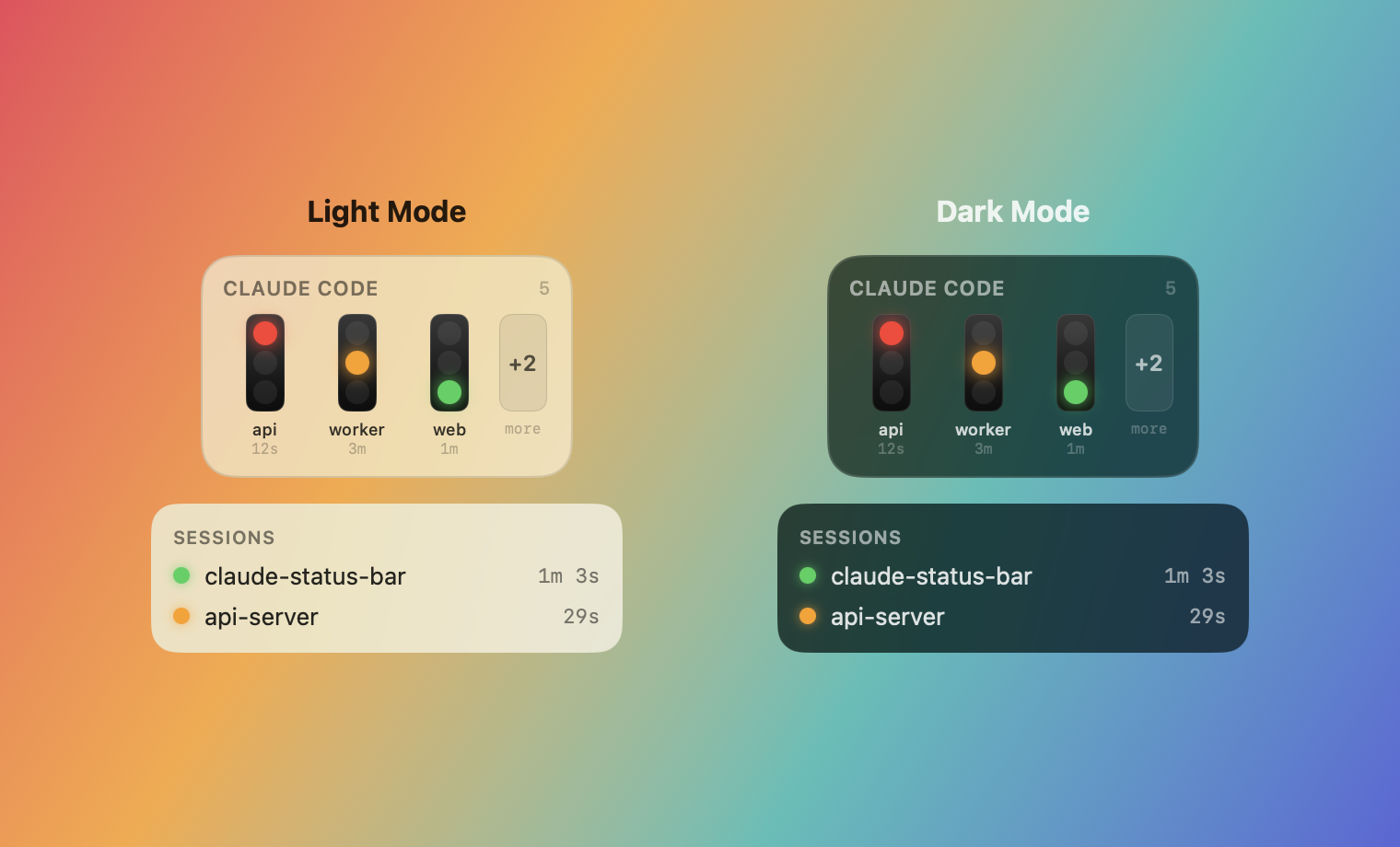
xcode-select --install)Everything installs from the terminal — no Xcode project, no App Store.
git clone https://github.com/AdilHoumadi/claude-status-bar.git
cd claude-status-bar
./scripts/install.sh
./scripts/install.sh does the whole thing:
swift build -c release),ClaudeStatusBar.app (ad-hoc signed),~/Applications (its permanent home),~/.claude/settings.json — your existing hooks are preserved and
a .bak is written,Re-running is safe: hooks merge idempotently (no duplicates), and reinstalling to the same path preserves your notification permission.
Open a new Claude Code session afterwards — a session loads its hooks at startup, so sessions already running won't light up until they restart.
Keep one copy. The app lives in
~/Applicationsand Start at login registers it from there. Don't also copy it to/Applications— a second copy with the same bundle id shadows updates (the old one keeps launching) and is a pain to untangle. Pick one location.
git pull
./scripts/install.sh   # rebuilds, replaces ~/Applications, re-wires hooks
If an old instance is still running, quit it from the menu (or killall ClaudeStatusBarApp)
before relaunching so the new build takes over.
./scripts/dmg.sh builds dist/ClaudeStatusBar.dmg (drag-to-Applications). It's ad-hoc
signed (not notarized), so on first launch right-click the app → Open, or run:
xattr -dr com.apple.quarantine /Applications/ClaudeStatusBar.app
Then click the menu-bar dot → Install hooks (or run
~/.claude/statusbar/bin/claude-statusbar-hook --install) to wire it into Claude Code.
Everything lives in the menu-bar dropdown — click the dot to open it.
+N overflow chip). The width adapts to how many are shown. Drag it
anywhere; the position is remembered.+N chip.claude -p runs).CLI, IDE extensions, and Claude Desktop's Code / Cowork sessions are all covered — they run the Claude Code engine and fire the same hooks.
The floating panel (and the dropdown menu) can show colourful usage loaders — a 5-hour bar and, when available, a weekly bar (green → yellow → red as you approach each limit, with a reset countdown). Enable the floating bars in Options → 5h usage bar; the dropdown shows them automatically whenever usage data exists.
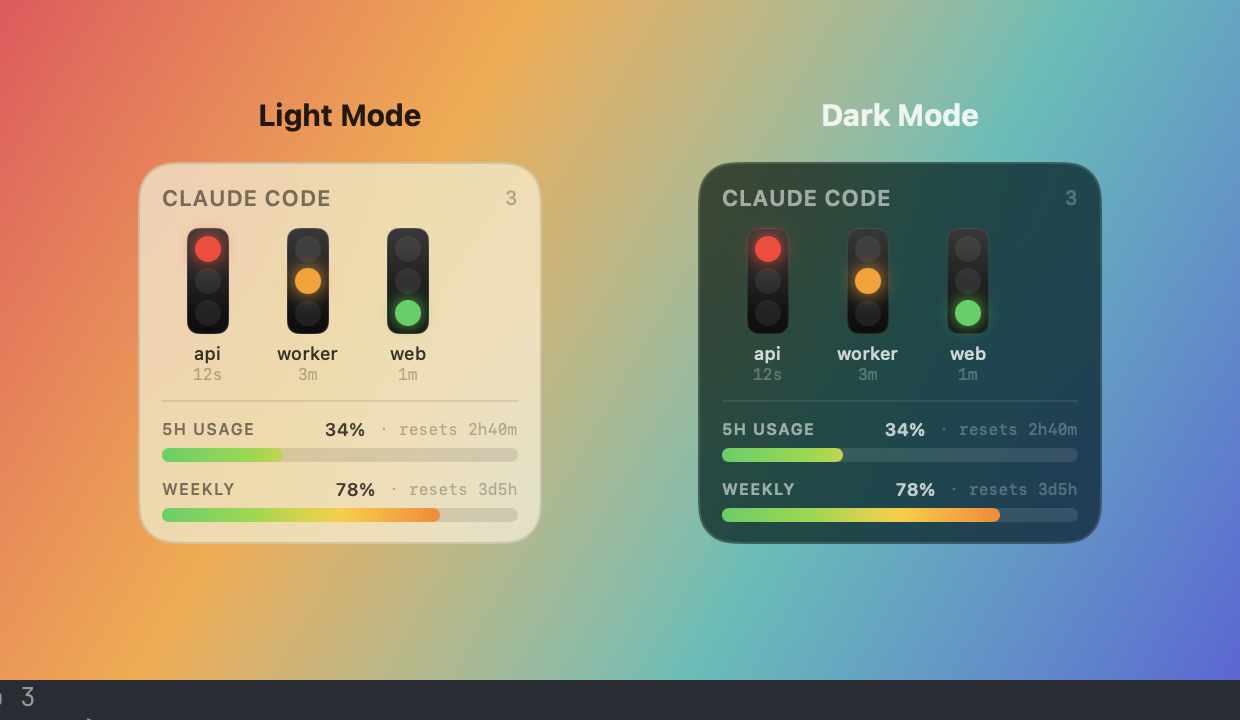
Claude Code only exposes the real rate-limit numbers to a statusline command (never to hooks
or any file — it's a native Claude Code feature, not a plugin), so this is opt-in: point the
statusline at the helper's --usage-snapshot mode. It writes ~/.claude/statusbar/usage.json for
the app to read and prints a compact, colour-coded terminal line
(Opus 4.8 · claude-status-bar · ctx 40% · 5h 8% · wk 32%). No new software — it reuses the helper
you already have; works on Claude subscription plans (Pro/Max), not API/Bedrock/Vertex.
Set it as your statusline (settings.json):
{ "statusLine": { "type": "command",
  "command": "~/.claude/statusbar/bin/claude-statusbar-hook --usage-snapshot" } }
Claude Code allows one statusline. If you already run one (e.g. a HUD) and want to keep it, wrap both — the snapshot writer and your existing line:
#!/bin/bash
input=$(cat)
printf '%s' "$input" | ~/.claude/statusbar/bin/claude-statusbar-hook --usage-snapshot >/dev/null
printf '%s' "$input" | <your existing statusline command>
Until a snapshot exists the bar stays hidden (no fake data). The number matches Claude's own
/usage because it is Claude's number.
| Hook event | State |
|---|---|
Notification (permission_prompt / idle_prompt) | 🔴 waiting for you |
UserPromptSubmit, PreToolUse, PostToolUse | 🟡 running |
Stop | 🟢 done / idle |
SessionStart / SessionEnd | create / remove the session |
Claude Code ──hook (sync)──▶ claude-statusbar-hook ──▶ ~/.claude/statusbar/<id>.json
                                                              │ (polled every 0.5s)
                                              menu-bar app + floating panel
Hooks are synchronous, fail-open (always exit 0), and called by absolute path — they
never block or fail a Claude Code turn. The installed helper lives at a stable path
(~/.claude/statusbar/bin/) so app updates don't break the hooks.
~/.claude/statusbar/bin/claude-statusbar-hook --install     # wire up (idempotent)
~/.claude/statusbar/bin/claude-statusbar-hook --uninstall   # remove ours; leaves others intact
~/.claude/statusbar/bin/claude-statusbar-hook --uninstall
rm -rf ~/Applications/ClaudeStatusBar.app ~/.claude/statusbar
.app (not bare swift run).ls ~/.claude/statusbar/./Applications and ~/Applications share a bundle
id, so the wrong one launches at login and shadows updates. Keep the ~/Applications copy
and delete the other (sudo rm -rf /Applications/ClaudeStatusBar.app), then toggle Start
at login off/on to re-register.swift run ClaudeStatusBarTests # full test suite (dependency-free harness)
swift build # build all targets
./scripts/bundle.sh # build the .app only
Source is a SwiftPM package: StatusCore (state model), StatusStore (hook helper +
state files), StatusApp (view-model, notifications, floating selection),
StatusInstall (settings.json installer), and the ClaudeStatusBarApp SwiftUI shell.
The bundle is ad-hoc signed — fine for your own machine. Sharing it with other Macs requires a Developer ID certificate and notarization (an Apple Developer account).
Hooking implementations and supporting tools for various coding agents (Claude, Cursor, Gemini, etc)
Claude Code hook that writes a forward-only why-block (decisions, trade-offs, assumptions, limitations) into your PR des
Blocks dangerous git and shell commands from being executed by AI coding agents
One command to install 6 essential safety hooks in 10 seconds — zero dependencies