

Are you the author? Sign in to claim
Native macOS menu-bar app to control Razer BlackWidow V3 Pro RGB lighting without Synapse — pure IOKit, plus Claude Code



A native macOS app to control the RGB lighting of a Razer BlackWidow V3 Pro (Wired) keyboard — without Razer Synapse.
Built with Swift + IOKit. The lighting protocol is reimplemented from OpenRGB. No kernel extension, no libusb, no root — pure IOKit HID feature reports.
| Menu-bar popover | Per-key editor with saved presets |
|---|---|
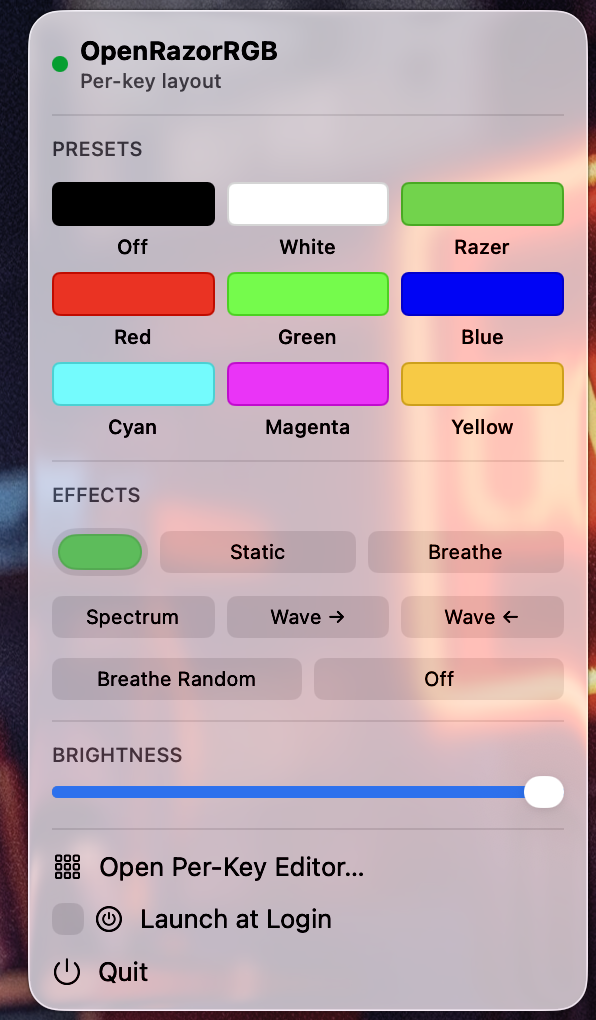 | 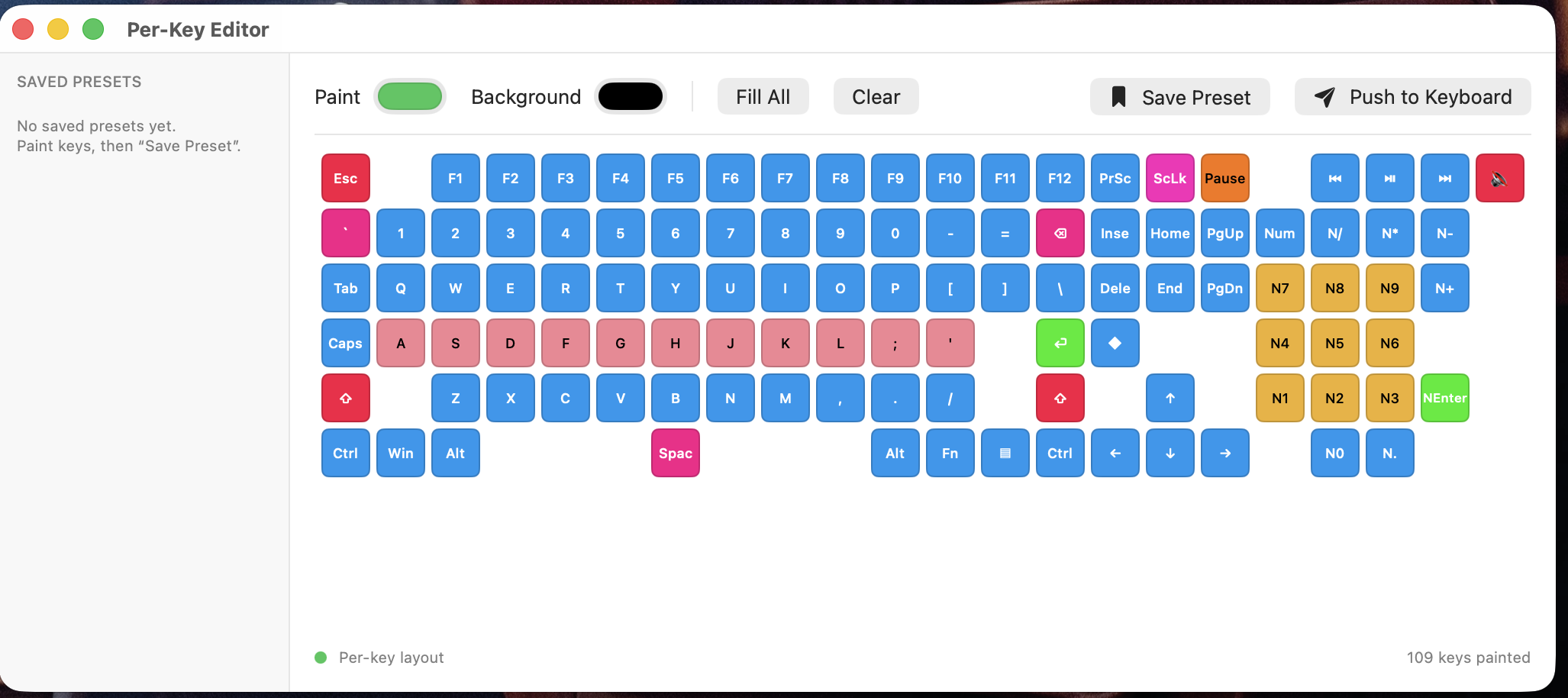 |
| Target | Description |
|---|---|
RazerKit | Reusable core library: HID access, Razer report/protocol, 109-key layout |
razer-poc | CLI tool: enumerate, diagnose, and drive the keyboard |
OpenRazorRGBApp | SwiftUI executable (SwiftPM, for development) |
OpenRazorRGB.xcodeproj | Xcode app target — builds the signed .app bundle for daily use |
The SwiftPM package (Package.swift) and the Xcode project (project.yml →
OpenRazorRGB.xcodeproj) share the same source files in Sources/. Use SwiftPM
for quick CLI iteration; use Xcode to build the distributable .app.
xcode-select --install)xcodegen is required to regenerate the
.xcodeprojif you modifyproject.yml:brew install xcodegen && xcodegen generate
git clone <this-repo>
cd OpenRazorRGB

# Recommended: build + install the signed .app and restart it
make prod

# Or, for quick SwiftPM iteration (bare binary):
swift build
swift build -c release   # optimised, required for the Claude Code hooks (section 3)
See section 2c for the full make command reference.
The keyboard's control interface sits on the Generic Desktop HID usage page, which macOS gates behind Input Monitoring (TCC). You must grant this permission to each binary you want to use.
Grant permission:
System Settings → Privacy & Security → Input Monitoring → click +
The permission is per binary path. You will need to grant it separately for:
swift run razer-poc … during development~/.local/bin/razer-poc — for the installed CLI (section 3)Tip: If a command returns
kIOReturnNotPermitted, toggle the entry off and back on in System Settings, then fully quit and reopen your terminal.
razer-poc)Run directly from the build output during development:
# Safe: enumerate HID collections, no writes
swift run razer-poc --list

# Diagnostics: firmware version + device mode read-back
swift run razer-poc --info

# Set all keys to a solid color (hex RRGGBB)
swift run razer-poc 00ff00        # green
swift run razer-poc ff0000        # red

# Hardware effects
swift run razer-poc --spectrum             # animated rainbow
swift run razer-poc --wave-right           # wave →
swift run razer-poc --wave-left            # wave ←
swift run razer-poc --breathe ff0000       # breathing, one color
swift run razer-poc --breathe-random       # breathing, random colors
swift run razer-poc --off                  # lights off

# Brightness (0–255); --save persists to onboard memory
swift run razer-poc --save --brightness 200 00ff00

# Keymap validation: W/A/S/D red, arrow keys blue
swift run razer-poc --wasd
First run note: If the keyboard is dark after running a color command, its onboard brightness is saved at 0. Fix it with:
swift run razer-poc --save --brightness 255 00ff00After that, colors display without--save.
swift run OpenRazorRGBApp
Grant Input Monitoring to your terminal. Look for the ⌨️ icon in the menu bar.
The app:
SMAppService~/Library/Application Support/OpenRazorRGB/state.jsonBuilding with Xcode produces a signed .app bundle with a stable code
identity. This means the Input Monitoring grant survives every rebuild — you
only grant it once.
+ → Apple IDbrew install xcodegenopen OpenRazorRGB.xcodeproj
In Xcode:
make prodmake prod
This single command:
.xcodeproj with xcodegen (syncs new source files).app with Xcode (signed with your Apple ID)~/Applications/OpenRazorRGB.appAfter the first make prod, grant Input Monitoring (one-time):
System Settings → Privacy & Security → Input Monitoring → + →
select ~/Applications/OpenRazorRGB.app.
This grant is permanent — the bundle ID com.nmartignole.openrazorrgb + your
signing certificate is stable, so future make prod runs don't revoke it.
Click the ⌨️ menu bar icon → check Launch at Login. macOS registers it via
SMAppService and adds it to System Settings → General → Login Items.
| Command | What it does |
|---|---|
make prod | Release build + install to ~/Applications + restart (full workflow) |
make release | Build the signed Release .app with Xcode |
make debug | Build the signed Debug .app with Xcode |
make install | Copy the Release .app to ~/Applications |
make restart | Quit the running app and relaunch from ~/Applications |
make kill | Quit the running OpenRazorRGB app |
make run | Launch the Debug build directly from DerivedData |
make dev | SwiftPM debug build (bare binary, fast CLI iteration) |
make test | Run RazerKit unit tests |
make install-cli | Build + install razer-poc CLI to ~/.local/bin |
make clean | Remove build artifacts |
The .xcodeproj is generated from project.yml using
xcodegen. make prod and make release
run xcodegen generate automatically. If you edit project.yml by hand and
want to regenerate without a full build:
xcodegen generate # rewrites OpenRazorRGB.xcodeproj in place
Wire Claude Code's lifecycle events to keyboard colors so the keyboard becomes a physical status light for Claude's activity — and a context-window progress bar on the F1–F12 row.
There are two complementary pieces:
The trick: status-color commands use --status-color (not --static), which
preserves the F1–F12 context gradient while filling the rest of the keys
with the status color. --static would wipe the context bar.
Hooks fire from Claude Code's process, which needs its own TCC grant:
# Build release binary
swift build -c release

# Install to a user-owned stable path (no sudo needed)
mkdir -p ~/.local/bin
cp .build/release/razer-poc ~/.local/bin/razer-poc
chmod 755 ~/.local/bin/razer-poc

# Install the context-bar helper script (shipped in this repo)
cp hooks/razer-context-bar.sh ~/.local/bin/razer-context-bar.sh
chmod 755 ~/.local/bin/razer-context-bar.sh
Grant Input Monitoring to ~/.local/bin/razer-poc in System Settings.
Verify it works:
~/.local/bin/razer-poc --spectrum              # should animate rainbow
~/.local/bin/razer-poc --status-color ff8800   # rest of keys amber, F-row bar preserved
| Claude state | Hook | Effect | Color |
|---|---|---|---|
| Session opens | SessionStart | Breathe | Blue 0066ff |
| Prompt submitted | UserPromptSubmit | Context bar on F1–F12 | gradient (see below) |
| Running a shell command | PreToolUse(Bash) | Status | Amber ff8800 |
| Writing a file | PreToolUse(Edit/Write) | Status | Purple aa44ff |
| Reading a file | PreToolUse(Read) | Status | Steel blue 0055aa |
| Bash succeeded | PostToolUse(Bash) | Status | Green 00ff66 |
| Tool failed | PostToolUseFailure | Breathe | Red ff0000 |
| Done / idle | Stop | Spectrum | Rainbow |
The F1–F12 context bar lights 1–12 keys (one per ~8% of the context window)
with a green→red gradient; the percentage is read from the transcript JSONL by
razer-context-bar.sh and cached to /tmp/razer-context-percent so subsequent
--status-color hooks can overlay the gradient without re-parsing.
Add the following to your ~/.claude/settings.json (merge into the existing
"hooks" key — do not replace other settings). Replace YOUR_USER with your
macOS username:
{
  "hooks": {
    "SessionStart": [
      { "matcher": "", "hooks": [
        { "type": "command", "command": "/Users/YOUR_USER/.local/bin/razer-poc --breathe 0066ff &" }
      ]}
    ],
    "UserPromptSubmit": [
      { "matcher": "", "hooks": [
        { "type": "command", "command": "/bin/bash /Users/YOUR_USER/.local/bin/razer-context-bar.sh" }
      ]}
    ],
    "PreToolUse": [
      { "matcher": "Bash",  "hooks": [{ "type": "command", "command": "/Users/YOUR_USER/.local/bin/razer-poc --status-color ff8800 &" }] },
      { "matcher": "Edit",  "hooks": [{ "type": "command", "command": "/Users/YOUR_USER/.local/bin/razer-poc --status-color aa44ff &" }] },
      { "matcher": "Write", "hooks": [{ "type": "command", "command": "/Users/YOUR_USER/.local/bin/razer-poc --status-color aa44ff &" }] },
      { "matcher": "Read",  "hooks": [{ "type": "command", "command": "/Users/YOUR_USER/.local/bin/razer-poc --status-color 0055aa &" }] }
    ],
    "PostToolUse": [
      { "matcher": "Bash", "hooks": [
        { "type": "command", "command": "/Users/YOUR_USER/.local/bin/razer-poc --status-color 00ff66 &" }
      ]}
    ],
    "PostToolUseFailure": [
      { "matcher": "", "hooks": [
        { "type": "command", "command": "/Users/YOUR_USER/.local/bin/razer-poc --breathe ff0000 &" }
      ]}
    ],
    "Stop": [
      { "matcher": "", "hooks": [
        { "type": "command", "command": "/Users/YOUR_USER/.local/bin/razer-poc --spectrum &" }
      ]}
    ]
  }
}
Why
&on every command:PreToolUsehooks block the tool call until the command exits. The&forks it to the background so Claude isn't delayed. TheUserPromptSubmitcontext-bar script runs without&because it must finish writing/tmp/razer-context-percentbefore the subsequent--status-colorhooks read it — but it still completes in milliseconds.
Why
--status-colorand not--static:--status-colorreads the cached context percent and keeps the F1–F12 gradient lit while filling every other key with the status color.--staticsets a flat hardware effect and would erase the context bar on each tool call.
hooks/razer-context-bar.sh (installed to ~/.local/bin/) reads the last
assistant message's usage object from the transcript JSONL, sums
input_tokens + cache_read_input_tokens + cache_creation_input_tokens, divides
by the model's context window (200K, or 1M for [1m] sessions), and calls
razer-poc --context-bar <percent>. The PoC lights F1…F12 with a green→red
gradient up to that percentage and persists it to
/tmp/razer-context-percent. Later --status-color calls read that file to
re-light the same F-keys while painting the rest of the keyboard.
If you want Claude Code to configure the hooks automatically for your system, paste this prompt:
I have a Razer BlackWidow V3 Pro keyboard and the OpenRazorRGB project at
~/Dev/OpenRazorRGB. The release CLI binary is at ~/.local/bin/razer-poc and
already has Input Monitoring permission. The context-bar helper is at
~/.local/bin/razer-context-bar.sh.

Please:
1. Build the release binary with `swift build -c release` from ~/Dev/OpenRazorRGB
2. Copy it to ~/.local/bin/razer-poc
3. Copy hooks/razer-context-bar.sh to ~/.local/bin/razer-context-bar.sh
4. Update ~/.claude/settings.json to add keyboard RGB hooks:
   - SessionStart → breathe blue (0066ff)
   - UserPromptSubmit → run ~/.local/bin/razer-context-bar.sh (NO trailing &)
   - PreToolUse Bash   → --status-color amber  (ff8800)
   - PreToolUse Edit   → --status-color purple (aa44ff)
   - PreToolUse Write  → --status-color purple (aa44ff)
   - PreToolUse Read   → --status-color steel  (0055aa)
   - PostToolUse Bash  → --status-color green  (00ff66)
   - PostToolUseFailure → breathe red (ff0000)
   - Stop → spectrum rainbow
   Use --status-color (NOT --static) so the F1-F12 context bar is preserved.
   All commands end with & except the UserPromptSubmit context-bar script.
   Preserve any existing hooks (especially sound hooks on Stop/Notification).
5. Validate the settings.json is valid JSON before finishing.
See CLAUDE.md for the full Razer HID protocol reference, macOS
gotchas (especially the onboard brightness finding), the keymap extraction
method, and project status.
The RazerKit core has unit tests covering the report wire format/CRC, RGB
hex parsing, and the 109-key layout map:
swift test
Tests run without hardware (no HID I/O); they validate the pure protocol and data-model logic.
Released under the BSD 3-Clause License. See LICENSE.
Copyright (c) 2025 Nicolas Martignole.
This project reimplements the Razer HID lighting protocol in pure Swift/IOKit and contains no code from Razer Inc. or OpenRGB. "Razer" and "BlackWidow" are trademarks of their respective owners; this project is not affiliated with or endorsed by them.
Hooking implementations and supporting tools for various coding agents (Claude, Cursor, Gemini, etc)
Claude Code hook that writes a forward-only why-block (decisions, trade-offs, assumptions, limitations) into your PR des
Blocks dangerous git and shell commands from being executed by AI coding agents
One command to install 6 essential safety hooks in 10 seconds — zero dependencies