

Are you the author? Sign in to claim
Generate project-tailored AI assistant rules & skills (CLAUDE.md, .cursorrules, Copilot instructions, AGENTS.md) in unde

Generate project-tailored AI assistant rules & skills in minutes.
Payo interviews you about your stack, then writes the guidance files your AI coding assistant reads — so Claude, Cursor, Copilot, and friends follow your project's conventions instead of guessing.



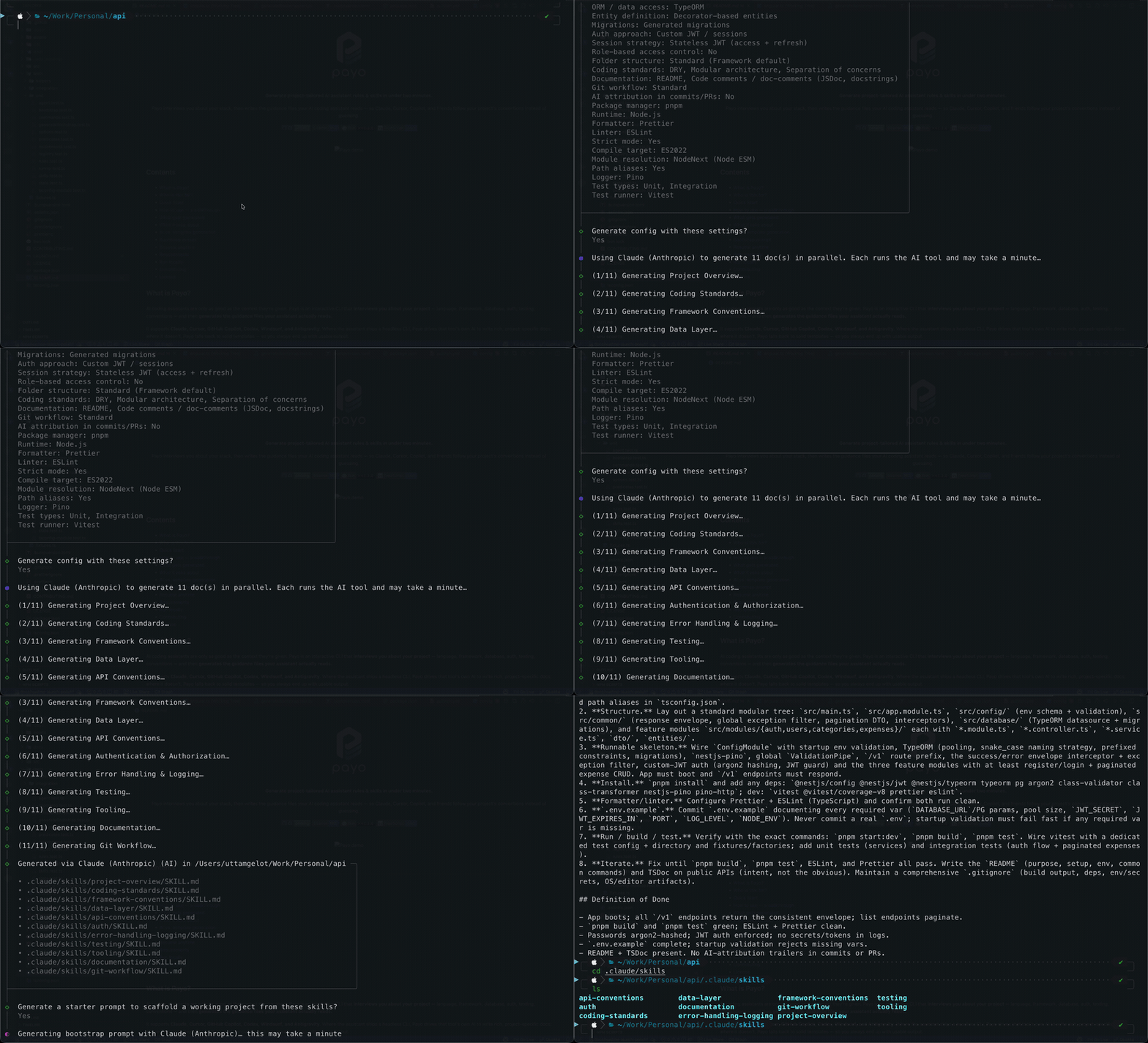
AI coding assistants are only as good as the context they're given. Payo is an interactive CLI that interviews you about your project — language, framework, database, auth, testing, conventions — and then generates the guidance files your assistant actually reads.
It supports Claude, Cursor, GitHub Copilot, Codex, Windsurf, and Antigravity. Where the assistant ships a headless CLI, Payo drives that tool's own AI to write rich, project-specific docs; where it doesn't, Payo falls back to solid templates — so you always end up with usable output.
Every AI coding session starts cold. Your assistant doesn't know you use Drizzle
over Prisma, that handlers live in src/routes, that you write Vitest specs
beside the file, or that commits follow Conventional Commits. So you re-explain
it — in chat after chat — and still get code that ignores half of it.
The fix is the guidance files each tool already reads (CLAUDE.md,
.cursorrules, .github/copilot-instructions.md, AGENTS.md). But writing them
by hand is tedious, easy to get wrong, and different for every tool. Most people
never do it, or do it once and let it rot.
Payo writes them for you in minutes — tailored to your actual stack, in each tool's native format — so your assistant follows your conventions from the first prompt instead of guessing.
Vibe coding is fast and fun — you prompt, the AI improvises, code appears. The problem isn't the speed, it's that the assistant has no rules to improvise within. So it guesses: a different ORM than the rest of the repo, files scattered wherever, its own naming, your tests and commit conventions skipped. Fine for a throwaway demo; on a real codebase it quietly piles up inconsistency you pay for later in reviews, bugs, and refactors — and each new chat starts the guessing over.
Payo gives that improvisation a guardrail. It generates the guidance files your assistant already reads, so the AI reaches for your framework, your folder layout, your testing and git rules every time — without you stopping to explain them. You keep vibe coding at full speed; the output just fits the project instead of fighting it.
If you've ever pasted the same "here's how this project works" preamble into a chat for the third time, Payo is for you.
No install required — run it in any project directory:
npx @uge/payo
# or
bunx @uge/payo
The command you run after install is still
payo. Install globally withnpm i -g @uge/payo(orbun add -g @uge/payo), then just runpayo.
Answer a short questionnaire about your stack, and Payo drops tailored AI guidance files straight into your repo.
npx @uge/payo — it writes into the
current directory, so cd into the repo first.bootstrap-prompt.md you hand to any LLM to scaffold a runnable project that
honors the guidance it just generated..payo/; Payo resumes and
only generates what's missing.Each tool gets files in its own native format and location:
| Tool | Files generated |
|---|---|
| Claude (Anthropic) | CLAUDE.md · .claude/skills/** |
| Cursor | .cursorrules · .cursor/rules/** |
| GitHub Copilot | .github/copilot-instructions.md · .github/instructions/** |
| Codex CLI | AGENTS.md |
| Antigravity (Google) | AGENTS.md · .agents/skills/** |
| Windsurf | .windsurfrules |
| Other / generic | AI_RULES.md |
Rich AI generation needs the selected tool's CLI on your
PATH. Without it, Payo writes well-structured template defaults instead.
Payo understands 25 frameworks, 24 ORMs, and 4 databases across TypeScript/JavaScript, Python, Go, and Rust — and tailors its follow-up questions to whatever you pick. Dimensions covered:
tsconfig strictness, target, module resolution, path aliasesPayo always leaves you with output. When the chosen assistant's headless CLI is installed, it generates each guidance file in parallel from your answers — richer and more specific. When the CLI is missing, or every run fails, it falls back to static templates.
A few environment variables tune AI generation:
| Variable | Default | Purpose |
|---|---|---|
PAYO_CONCURRENCY | 4 | Max parallel agent subprocesses |
PAYO_RETRIES | 1 | Extra attempts after a failed run |
PAYO_AGENT_TIMEOUT_MS | 120000 | Wall-clock cap per file (ms) |
Payo has no backend and no telemetry. Rich generation runs entirely through the
AI CLI you already have installed (claude, cursor-agent, etc.), so your
answers go only to that tool under your own account and credentials — exactly as
if you'd prompted it yourself. Payo itself sends nothing to any server; without a
CLI present it never leaves your machine at all, falling back to local templates.
An empty repo with great guidance is still an empty repo. After generating, Payo
offers to write a bootstrap-prompt.md — a paste-ready prompt that tells any
LLM to scaffold a runnable project using the stack's official tooling (the
framework's own create command / CLI), honor the generated conventions, and
iterate with you until it runs.
Interrupt a run and pick up where you left off. Payo saves your questionnaire
answers and generation progress under .payo/; rerun and it resumes, only
generating what's missing. Finished runs clean the directory up automatically.
Payo works today, but it's still early. Here's where it's headed:
Have a stack you want supported or an idea to make the flow better? Open an issue or see Contributing.
To run Payo: Node.js >= 18. That's it — npx @uge/payo
runs the published, Node-targeted binary, so you do not need Bun to use Payo.
If you prefer Bun, bunx @uge/payo works too.
To develop Payo: Bun >= 1.1.0 (the project builds, tests, and runs from source with Bun — see Run locally).
Hacking on Payo or running it from source:
git clone https://github.com/uttam-gelot/payo.git
cd payo
bun install        # Bun >= 1.1.0
bun run dev        # runs src/index.ts directly
Other useful scripts:
bun test           # run the test suite
bun run typecheck  # tsc --noEmit
bun run lint       # eslint
bun run build      # bundle to dist/ (Node target)
Contributions are welcome — new frameworks, ORMs, AI tools, and fixes. See CONTRIBUTING.md for setup, the project layout, how to add a stack module, and the pre-PR checklist.
Rules/instructions, prompts/commands/workflows, and skills for Copilot, Cursor, Windsurf, and Antigravity AI Dev Tools.
Advanced agent rules and prompt templates for AI coding assistants, focused on planning, security, memory-bank documenta
Rules and guidelines for optimizing AI coding assistant interactions in Windsurf and Cursor IDEs.
AI agent skill for Jest 29/30 — 28 rules: mocks, async, timers, snapshots, CI. Works with Claude Code, Cursor, Codex, Wi
